
Small businesses save the most time with AI when it handles repeatable work while people retain control of decisions. The practical goal is to return hours to sales, delivery, customer service, and product work without creating new review or data-management burdens.
Early proof: one recurring workflow can return several hours each week
- A five-person agency might spend 30-45 minutes preparing meeting notes, 15-20 minutes assigning actions, 20-30 minutes drafting follow-up emails, and 45-60 minutes preparing a weekly status update.
- An approved transcription and drafting workflow might reduce this to 10-20 minutes of human review per activity.
- Depending on call volume and output quality, the agency could recover roughly 1.5-3 hours per week.
This is an illustrative workflow, not a universal benchmark. The business impact appears only when recovered time is reassigned to client delivery, sales, product work, or faster customer response.
How does AI save time for a small business?
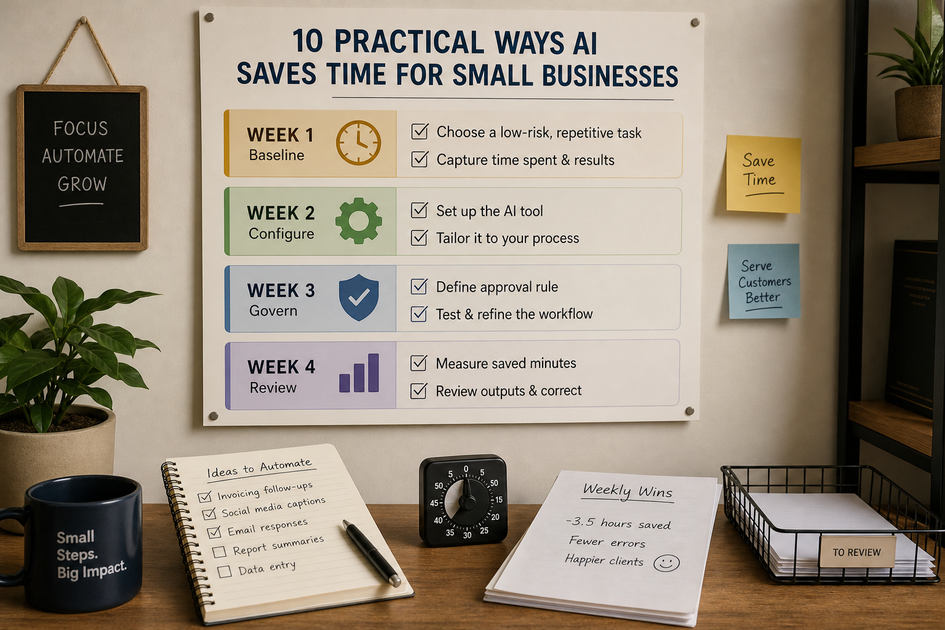
*A mobile-friendly checklist organized by week: choose a low-risk task and capture the baseline in week one; configure the tool and approval rule in weeks two and three; review saved minutes, correction rate, and business impact in week four.*AI is most useful in text-heavy, rules-based workflows where someone currently drafts, sorts, summarizes, or copies information between tools. Results depend on task volume, tool quality, integration reliability, and the time required for human review.
Start with the first draft, sort, or summary
Begin with email drafts, meeting summaries, document extraction, FAQ responses, and spreadsheet cleanup. These tasks usually have clearer inputs and lower review risk than autonomous customer, financial, or operational workflows.
Track three measures:
- Minutes saved per task
- Weekly hours returned to higher-value work
- Human correction rate
A small business can test one workflow with an approved tool such as ChatGPT, Claude, Gemini, Zapier, Make, Google Workspace, or Microsoft 365. Custom development may be unnecessary for a simple pilot, but integration complexity, data controls, and reliability requirements can make technical help worthwhile.
Keep time savings useful
AI should draft or classify high-risk work while a named employee verifies facts, tone, permissions, and the final action.
- Require approval for pricing, contracts, tax records, hiring decisions, regulated claims, and sensitive customer messages.
- Keep a human checkpoint before AI sends, publishes, changes records, or triggers a payment.
- Document which tools may receive customer, financial, or confidential information.
- Stop a workflow if correction time exceeds the time saved.
What AI workflows return the most time for small businesses?
The best starting point is a frequent, low-risk workflow with a clear owner, measurable baseline, and manageable review step.
Draft routine email replies
Provide customer context, the desired outcome, and the tone. Measure first-draft time and editing minutes, and do not enable automatic sending at the start.
Summarize meetings
Use an approved transcription tool to produce decisions, owners, and deadlines. The meeting owner should correct names and commitments before sharing the summary.
Triage shared inboxes
Use Gmail or Microsoft 365 rules with AI classification to label messages as urgent, sales, support, billing, or low priority. Begin with internal labels before adding automatic replies or routing.
Prepare calendar and task follow-ups
Turn approved meeting decisions into task drafts with owners and due dates. Confirm that each task is accurate and connected to the right project.
Create support first responses
Give AI approved FAQs, policies, and product information so it can draft answers for review. Track response time, escalation rate, and correction frequency.
Repurpose one source into content drafts
Turn a webinar, customer interview, or product update into an email, social post, help article, or sales brief. Check factual claims, customer permissions, and brand voice.
Extract data from invoices and forms
Use OCR or document AI to capture vendor, date, amount, and category. Verify totals and account categories before posting anything to accounting records.
Prepare research briefs
Ask AI to organize competitor pages, customer interview notes, or market sources into a cited brief. Verify external claims before using them for pricing, product, or marketing decisions.
Clean spreadsheets and draft reports
Use AI-assisted formulas or workflows to standardize fields, flag missing data, and draft summaries. Review source data before trusting the conclusion.
Create an internal knowledge assistant
Organize approved SOPs, onboarding documents, and policies in a controlled repository. The assistant should point staff to current source documents rather than inventing policy.
A safe pattern connects approved inputs, one human review step, and one destination. AI performs the transformation, but a person confirms the result before it enters a business system.
How should small businesses introduce AI safely?
AI should handle defined steps while people retain approval at meaningful decision points. Poor outputs, exposed data, or unreliable integrations can create more work than they remove.
The main risks to manage
- Accuracy: Require source documents, citations, or second-person review for customer promises, financial figures, legal language, and operational commitments.
- Privacy: Prohibit passwords, payment details, confidential contracts, and sensitive personal data in unapproved tools.
- Adoption: Assign one workflow owner, document the old and new process, and stop automations that create more correction time than they save.
- Integration failure: Test duplicate records, missed fields, access permissions, and failure alerts before connecting CRM, accounting, or support systems.
A practical 30-day rollout
Week 1: choose and measure
Select one high-volume, low-risk task such as meeting summaries, email drafting, or FAQ responses. Record weekly volume and average handling time.
Weeks 2-3: configure and review
Choose an approved tool, create a reusable prompt or rule, and define the human approval step. Allow time for tool approval, data permissions, staff training, and correction.
Week 4: decide based on evidence
Keep the workflow only if it improves a named metric such as response time, delivery hours, backlog size, or first-draft completion rate.
CRM, accounting, and support integrations may require ongoing monitoring, permission changes, rule updates, and troubleshooting. A lightweight technical plan can improve maintainability, but it does not replace operational ownership.
Before connecting AI to a business process, confirm that it has:
- A clear owner and repeatable inputs
- An approved AI platform
- A defined human review point
- A measurable baseline and success metric
- Appropriate permissions for customer, financial, or regulated data


