
Shipping your first app is stressful enough without getting blocked at the finish line. Privacy policies are a common last-minute submission issue for indie founders because app stores often expect a public policy link for most apps, including small utilities and MVPs. This guide shows when it is required, what it needs to say for a simple app, and a fast, realistic way to publish something accurate.
Early proof block (review failure modes you can prevent up front):
| What happens | What triggered it | Practical impact for a solo founder |
|---|---|---|
| Submission blocked | No privacy policy URL in store listing | Launch stalls until you publish and link a policy |
| Review delayed | Policy exists but link is broken or not publicly accessible | You fix the link and wait for another review cycle |
| Rejection for mismatch | Policy claims "no data" but SDKs collect analytics or crash logs | You update policy and disclosures, then resubmit |
How to read this: this is a directional checklist of common reviewer failure modes, not a promise of universal outcomes. Practical interpretation: reviewers mainly check that your public policy, in-app behavior, and store disclosures tell the same story. Reader impact: budgeting a bit of time up front (often a couple hours for a simple app, longer with ads, attribution, multiple SDKs, or legal review) can prevent avoidable back-and-forth.
Writing a Privacy Policy That Actually Passes App Store Review goes deeper on the ideas above and adds concrete next steps.
Why do Apple and Google require a privacy policy?
Category: Risk
Statistic: 12%
Label: Rejected for privacy issues (Q1 2026)
Context: Privacy manifest/policy gaps can stop release at review
Category: Risk
Statistic: 29%
Label: Avoidable rejections
Context: Tied to metadata or policy gaps
Category: Timeline
Statistic: 72 hrs
Label: Typical review delay
Context: When issues need a second pass
The rejection scenario first-time founders run into
You submit your build, fill out most of the store listing, and hit review. Then you get a message like: missing or invalid privacy policy URL, or your disclosures do not match what the app actually does. Your release pauses until you publish a public policy link, update metadata, and sometimes answer privacy questions again.
Plan for this as a normal launch task. It is closer to "screenshots and icons" than "maybe later," especially if you ship third-party SDKs.
Why "we don't collect data" is rarely safe
- Stores care about disclosure and consistency, not intent. Apple expects clear privacy practices, including what data is collected, how it is used, and whether third parties are involved (Apple App Store Review Guidelines - 5.1.1).
- Even without accounts, SDKs can collect diagnostics, usage signals, identifiers, or IP addresses (analytics, crash reporting, ads, attribution, support widgets).
- Google Play often requires a privacy policy URL and expects it to describe data practices, including collection, sharing, and user controls (Google Play privacy policy requirements).
One thing worth noting: you can only describe what you can verify. If an SDK is vague or changes behavior in an update, you may need to revisit both the policy and the store disclosures.
What this guide helps you decide
- Do you need a privacy policy link before submission day? Typically, yes for public store distribution.
- What must a compliant policy cover for a simple indie app?
- What is a fast path you can keep accurate without turning it into a legal project?
When you move from outline to execution, The Privacy Policy URL Trap: What It Must Include to Pass Review helps close common gaps teams hit here.
What do Apple and Google expect from a privacy policy?
Store-review reality check for Apple and Google
| Store | What reviewers expect (practically) | What blocks launch |
|---|---|---|
| Apple App Store | A privacy policy should clearly describe data handling as part of privacy compliance (Apple 5.1.1) | Missing policy link, unclear disclosures, or privacy details that do not match app behavior |
| Google Play | A privacy policy URL is required in many cases and must describe data practices; Play Console also prompts privacy and Data safety disclosures (Privacy policy requirements, Data safety) | Missing policy URL, inconsistent Data safety answers, or policies that do not reflect SDK behavior |
In practice, reviewers are trying to confirm your story quickly. If they cannot, you often get a delay or rejection rather than a "ship now, fix later" outcome.
What reviewers are really checking
| Area | Apple (practically) | Google Play (practically) |
|---|---|---|
| Where you provide the policy link | App Store Connect listing metadata (and sometimes in-app too) | Play Console policy URL and often an in-app link too (Privacy policy requirements) |
| What the policy must match | Permissions, account flows, and third-party SDK behavior | Data safety disclosures and actual app behavior (Data safety) |
| Common mismatch | Policy says "no collection" but analytics or crash SDKs exist | Data safety says "not collected" but SDKs or permissions suggest otherwise |
A realistic caveat: you can do everything right and still get questions, especially on first submissions or in sensitive categories. The goal is to reduce avoidable back-and-forth, not guarantee instant approval.
The payoff of doing it early (and the tradeoffs)
- Pros: fewer review cycles, clearer support answers, easier future updates.
- Tradeoff: removing analytics can reduce review friction, but you lose product insight (funnels, retention, feature usage).
- Constraint: keeping a policy accurate adds ongoing work. Plan a quick check each release (and whenever you add SDKs, permissions, or monetization).
- Risk: third-party SDK updates can change collection or identifiers. Re-audit after dependency bumps, not only after feature work.
A complementary angle worth comparing lives in The Privacy Policy Page That Prevents Rejections.
How do you create a compliant privacy policy for a simple app?
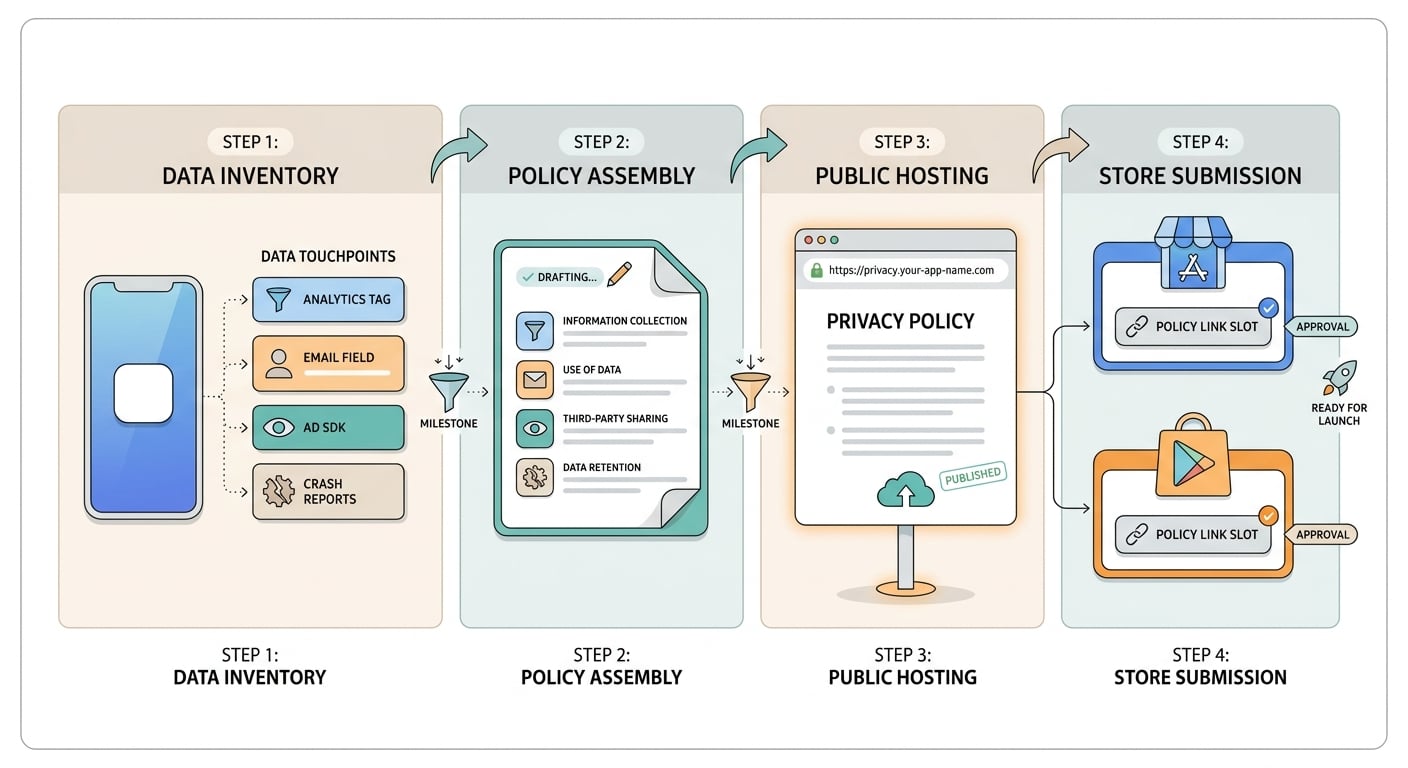
A simple three-to-four step process diagram showing data inventory, policy creation, public hosting, and store-console linking for App Store Connect and Google Play Console. The diagram should make the submission workflow obvious to a first-time founder.
Step 1: List every data touchpoint before you write
This is the part most founders underestimate. For a small app, expect at least an hour if your SDK list is short, and more time if you have ads, attribution, multiple analytics tools, or multiple platforms.
Map your obvious product flows
Sign-in, contact forms, subscriptions, payments, user-generated content, and any place a user types personal info.
Audit your SDKs and platform services
Check analytics, crash reporting, ads, attribution, push notifications, support chat, and web views that may load third-party scripts.
Write down what data is touched and why
Note data types (email, device ID, IP address, diagnostics, location), purpose (functionality, analytics, ads, security), and whether it is shared with third parties.
Dependency caveat: you are relying on third-party SDK documentation and disclosures, which can be incomplete or change over time. If you are in a sensitive category or need legal review, expect additional lead time that can easily spill into days rather than hours.
Step 2: Use an operational artifact so your policy matches reality
A simple way to stay consistent is to maintain a one-page "SDK data map" next to your release checklist.
| Common SDK/service | What it can collect (typical) | Policy line you can adapt (plain language) |
|---|---|---|
| Firebase Crashlytics | Crash diagnostics, device information | "We collect crash and diagnostic data to identify and fix bugs." |
| Firebase Analytics | App interactions, device identifiers, usage events | "We collect usage data to understand app performance and improve features." |
| Push notifications (APNs/FCM) | Device tokens | "We use device tokens to deliver notifications you enable." |
| Support email/form | Contact info and message contents | "If you contact support, we receive the information you include in your message." |
What this means: you are not trying to write a perfect legal thesis. You are creating a maintainable mapping from what ships in your binary to what you disclose publicly.
Real dependency risk to plan for: attribution and ad SDK settings change. For example, you might toggle an ad network, add SKAdNetwork-related configuration, or enable a feature flag that changes what identifiers are used. Practical fix: re-audit after SDK updates or monetization changes, then re-answer Google Play Data safety and re-check your policy language.
Step 3: Pick the fastest path you can maintain
Use a reputable generator or template for a straightforward app
Good for simple flows (for example: basic analytics plus crash logs). Budget time to edit and delete clauses that do not apply, and to confirm it matches your shipped SDKs.
Get professional review for higher risk apps
If you handle sensitive data (health, biometrics, precise location), children’s data, or complex sharing, professional help can be worth it. It costs more and takes longer, but it can reduce avoidable rework and user trust issues.
Choose the option you can keep accurate
A simple policy you update is usually safer than a perfect one that goes stale. Decide who owns updates (often the lead developer) and add it to your release checklist.
Step 4: Publish, link, and verify (quick but important)
Host the policy at a public, stable URL
It must open without login, without region blocks, and without broken redirects. A page on your site or a static hosted page is fine.
Link it in the right store fields (and consider in-app)
Add the URL in App Store Connect and Play Console. If you have a Settings screen, an in-app link helps users and can reduce support churn, but it is another thing to maintain.
Do a consistency check before you submit
Cross-check: (a) policy text, (b) app permissions, (c) shipped SDKs, and (d) store questionnaires like Google Play Data safety (Data safety requirements).
Mini-workflow example (simple, measurable checks):
- If you use Firebase Crashlytics, assume it collects crash diagnostics and device information and reflect that in both your policy and your store disclosures.
- Verify the policy URL returns HTTP 200 on mobile (cellular, not just your home or office Wi-Fi). If your host is flaky, fix that first because intermittent failures can look like a broken policy link.
Common mistakes that still trip up simple apps
Copying generic policy text without editing it
Templates often include clauses about selling data, targeted ads, or categories you do not use. Reviewers notice mismatches when your app ships analytics or crash SDKs but the policy claims "no data collected," or when your Data safety answers disagree with the policy.
If you use a generator, treat it as a draft. Your job is to delete what does not apply and name what you actually do.
Forgetting third-party collection and operational drift
Even "basic" apps can touch data through:
- analytics and crash logs (diagnostics, device info)
- push notifications (device tokens)
- support tools (email content, attachments)
- ads and attribution (tracking and sharing implications)
Also plan for drift: SDK updates, new permissions, or monetization changes can change disclosures. A lightweight habit helps: when you bump dependencies, scan the SDK "Data collected" section (or equivalent) and update your map if needed.
Launch-day checklist and next steps
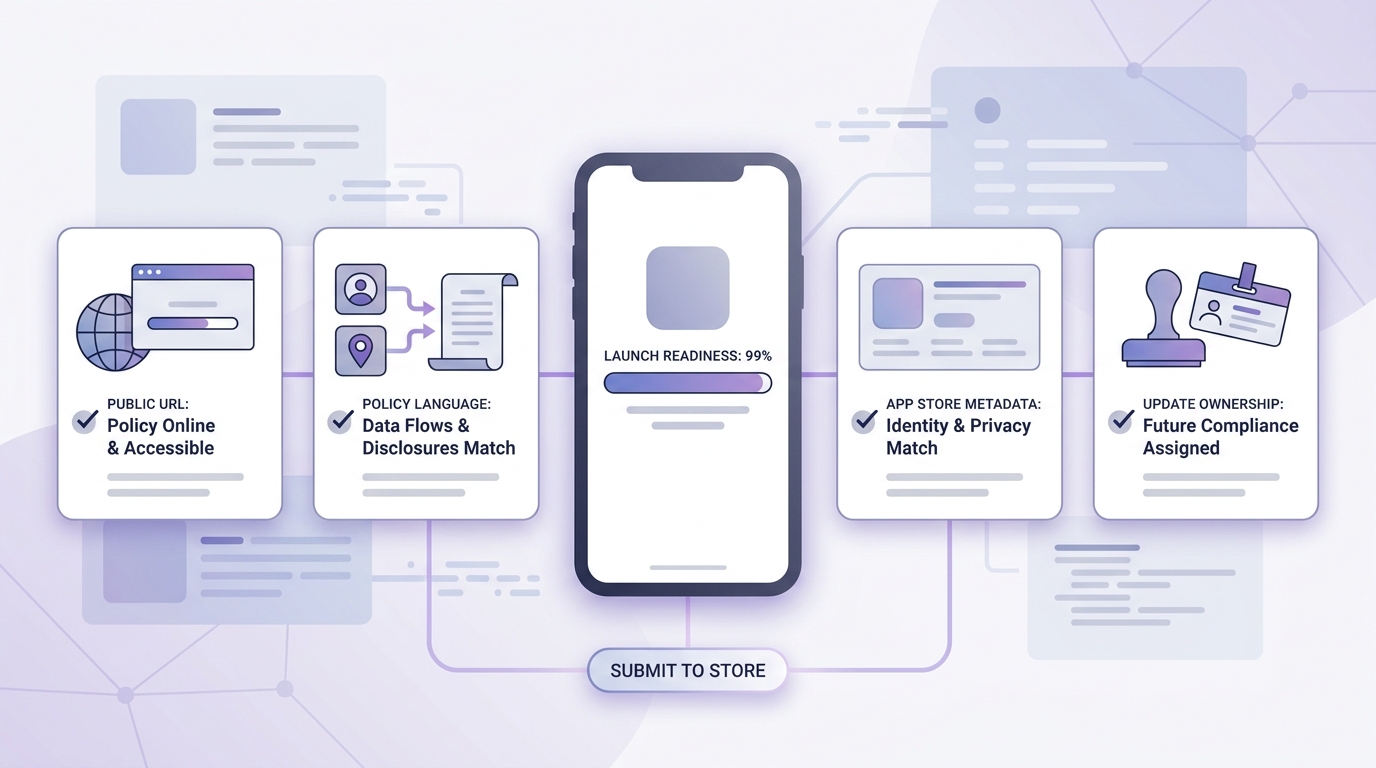
A mobile-friendly checklist block with the final privacy policy checks: public URL works, app data flows match policy language, store metadata matches disclosures, and update ownership is assigned. It should read like a last-minute release gate for indie founders.
- The privacy policy URL loads publicly (no login), on mobile, from a clean browser.
- The policy names your app or developer and matches your store listing identity.
- The policy reflects current data flows (only include what you actually do): analytics, crash logs, login/account data (if any), ads/attribution (if any), support channels, payments/subscriptions (if applicable).
- Store disclosures match the policy, including Google Play Data safety answers where relevant (Data safety).
- Someone is accountable for updates when you ship new features, update SDKs, or change monetization.


