
Building a finance app is hard. Getting it through App Store review can feel harder, especially when rejection notes read like a compliance quiz you did not know you were taking. The outcome you want is straightforward: a submission a reviewer can validate quickly, without quietly blowing up your launch calendar.
| Risk area reviewers probe first | What triggers flags | What it usually costs you (planning ranges) |
|---|---|---|
| Account access (bank linking, login, KYC) | Demo credentials fail, MFA blocks, identity checks are unclear, core flow cannot be reached | Often 1-3 days of calendar time per resubmission cycle, plus a few hours to rebuild a reliable review path and retest it |
| Payment transparency (fees, subscriptions, transfers) | Vague pricing, "free" positioning that conflicts with paid features, unclear fee timing | Often 0.5-2 days to update metadata and in-app copy; sometimes a UI change if disclosures are buried |
| Privacy-policy mismatch | Policy says one thing, permission prompts or data behavior suggest another | Commonly several days of calendar time due to product, legal, and marketing coordination, even when edits are small |
| Unsupported financial claims | "Guaranteed returns," "no risk," "best rates" without context | Marketing rewrite and asset refresh; campaigns tied to claims may need to pause |
Explanation: Finance apps tend to trigger faster scrutiny because they touch money and sensitive data. Reviewers have limited time, so ambiguity becomes the bottleneck, even when the underlying product is fine.
Interpretation: Many rejections are not about "finance is forbidden." They are about proof and clarity: can a reviewer verify what happens to money and data without guessing?
Reader impact: If you plan for at least one review loop and set up a same-day response process, you can often keep schedule slip to days rather than a full week. It is not a guarantee, especially when third-party dependencies, compliance review, or entitlement approvals are involved.
Sources: App Store Review Guidelines - Apple Developer
In-App Purchases and Subscriptions: The Complete Publishing Guide goes deeper on the ideas above and adds concrete next steps.
Why do finance apps fail App Store review?
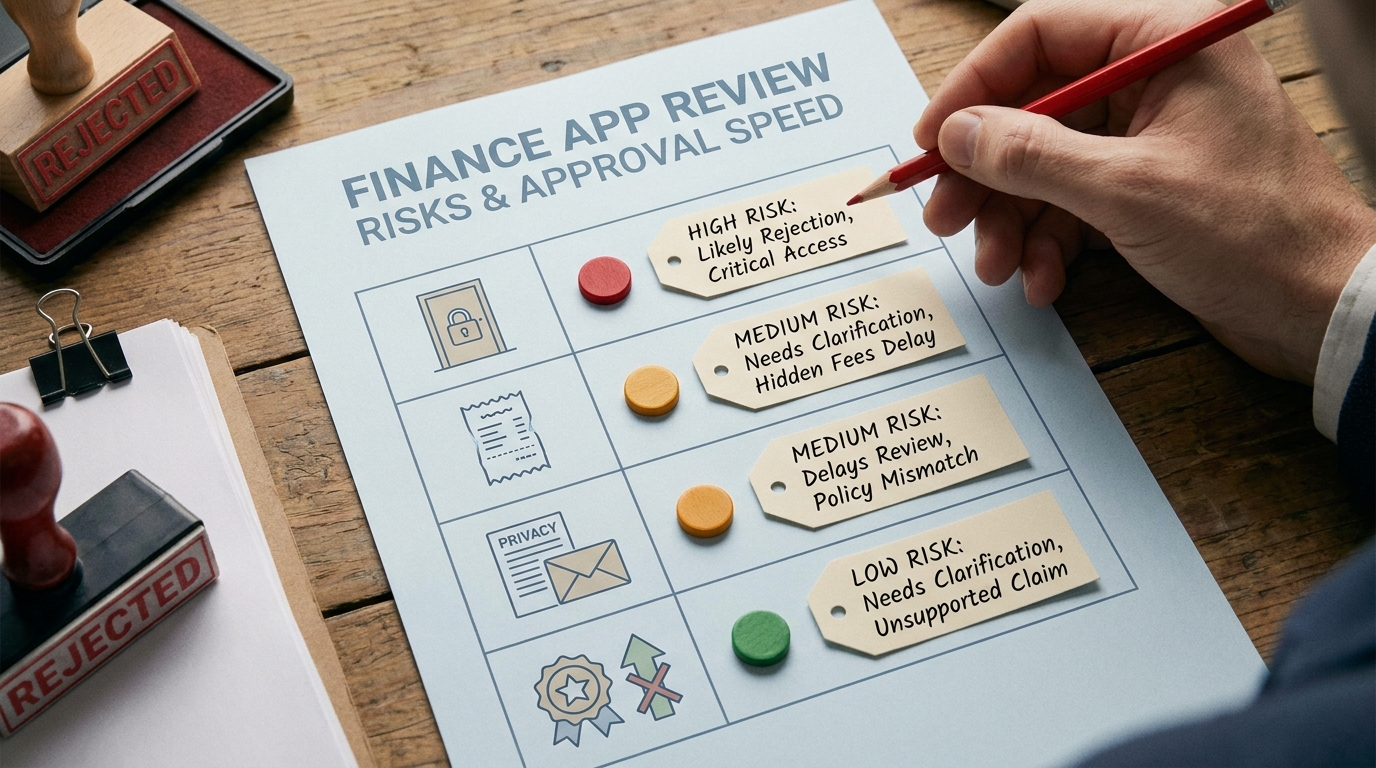
A compact table comparing the most common App Store review risk areas for finance apps - account access, payment transparency, privacy-policy mismatch, and unsupported financial claims - with a simple low/medium/high risk frame and a note on why each one affects approval speed.
Most finance apps do not fail App Store review because the core feature is "too financial." They fail because the submission does not make the money flow, data flow, and responsibility boundaries obvious to a reviewer who has minutes, not hours, to build confidence.
Apple is not just checking whether your feature works. It is checking whether your app looks safe to approve: transparent about fees, precise about what you collect, and clear about what the user is agreeing to under real-world conditions.
One thing worth noting: transparency is not free. Clear disclosures can lower conversion and require design and engineering time, but they often reduce launch volatility, support load, and follow-on compliance cleanups.
When you move from outline to execution, Why Most First App Submissions Fail - and How to Be the Exception helps close common gaps teams hit here.
How should you build the app and submission package for review?
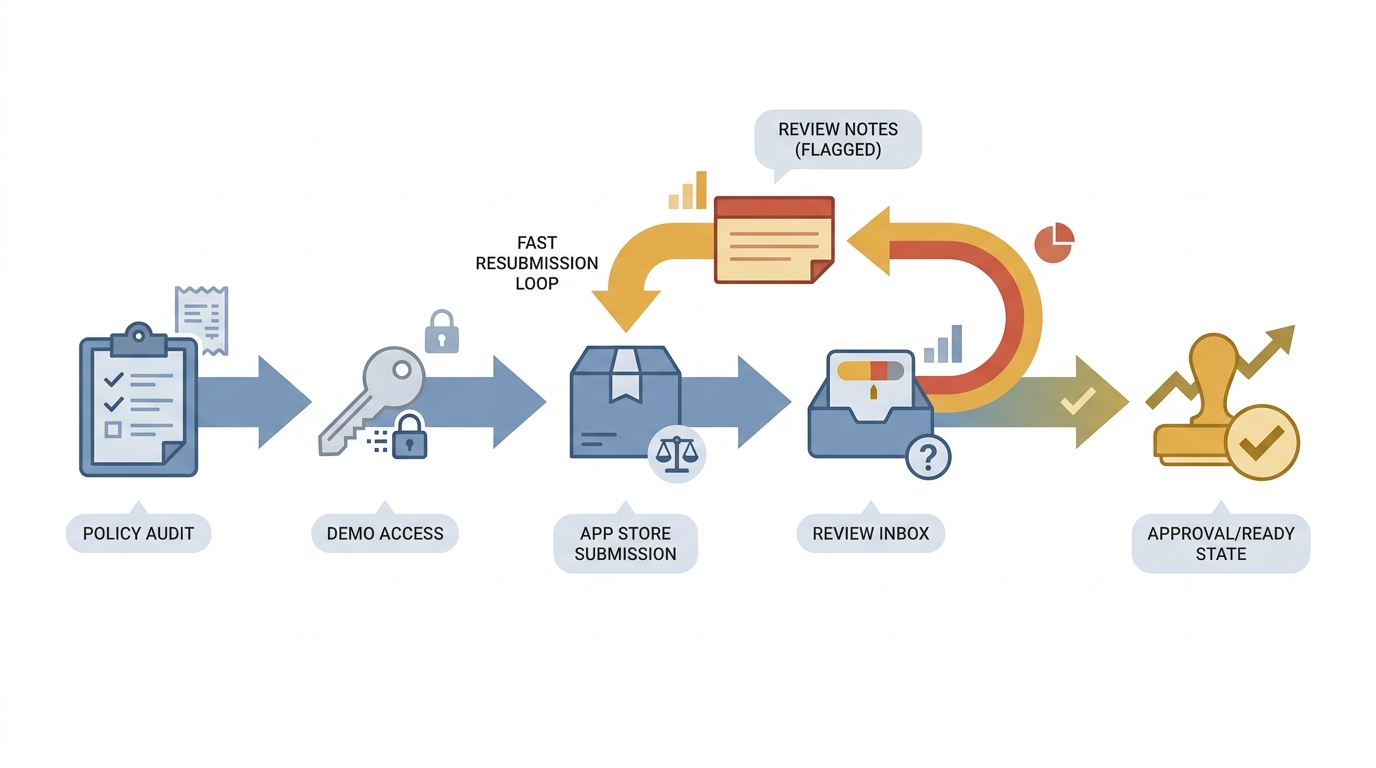
A process diagram showing the finance app review path from policy audit to demo account setup, review notes, App Store submission, reviewer response, and a fast resubmission loop when clarification is needed.
Design the reviewer path inside the product
Make the category obvious in the first screens
A reviewer should quickly understand if this is budgeting, payments, lending, investing, or a hybrid. Ambiguity slows review because each category implies different disclosures and safety expectations.
Tie sensitive permissions to a plain-language purpose
When you request bank linking, location, contacts, notifications, camera, or photo access, explain why at the moment you ask. Budget 1-2 hours per permission for copy and UX placement, plus time for internal review if you operate in regulated contexts.
Provide a fast demo route to the core finance action
Give test credentials or a review mode that reaches the main action in a few taps. If your flow requires approval, funding, or an external step, document the workaround in Review Notes so a reviewer can still validate the experience.
Dependency caveat: if you rely on third-party providers (bank linking, KYC, card issuing, risk scoring), sandbox outages, expiring test users, and webhook delays happen. Retest the demo path before each submission and keep a fallback path if the vendor sandbox is unreliable.
Source: App Store Review Guidelines - Apple Developer
Translate policy into launch-ready assets (what reviewers actually read)
- Ensure your privacy policy, terms, and in-app disclosures match actual behavior (collection, sharing, retention, and account-data usage).
- Remove or soften unsupported marketing claims across screenshots, subtitle, and description. If you cannot substantiate a claim quickly, treat it as a review risk.
- Be explicit about fees, subscription terms, and any real money movement. If Apple in-app purchase is required for a digital service, align implementation and copy.
- Include support contact details that work, plus region availability and eligibility constraints so reviewers do not have to guess why something is blocked.
- If licensing, custodial relationships, or regulated partners matter to trust, describe them plainly, and avoid implying endorsements you cannot document.
Practical constraint: tightening these assets usually needs cross-functional turnaround. Even if writing takes 2 hours, plan 2-5 days of calendar time for reviews, approvals, and screenshot refreshes.
Sources: Submitting - App Store - Apple Developer, App Store Review Guidelines - Apple Developer
Run a 30-minute review-readiness audit
Audit your finance app like a reviewer would: demo access, permission purpose, pricing clarity, and privacy-policy alignment.
Start the audit checklist
A complementary angle worth comparing lives in Top App Store Rejection Reasons and What to Do About Them.
How can you reduce App Store review cycles?
Treat App Store review like an operational process, not a one-off event. The metric you can control is resubmission cycle count (how many times you go back and forth before approval). Also track your time-to-reply, because internal handoffs often add more delay than the reviewer.
Here is a lightweight workflow that fits small teams:
Pre-submit check (60-90 minutes)
Confirm demo credentials, core flow reachability, fee visibility, and privacy-policy alignment on a clean device and a clean account.
Review notes as test script (20-40 minutes)
Write steps a reviewer can follow in 2-3 minutes: login, where to find the core action, where fees appear, and what to do if a dependency blocks progress.
Same-day response owner (ongoing)
Assign one person to monitor App Store Connect and coordinate fixes. A realistic iteration is often 0.5-2 days once you include QA, build, and resubmission.
Fix-log and checklist update (10-15 minutes per rejection)
Log the rejection reason, the underlying reviewer question, and the shipped fix. Promote recurring items into a pre-submit checklist.
Failure modes to plan for: partner sandbox downtime, delayed entitlement approvals, metadata or legal review lag, and MFA or device-trust prompts that break reviewer access. If any are in play, add buffer to your launch plan and avoid tying paid campaigns to a single approval date.
For tradeoffs, checklists, and edge cases, What the App Store Review Team Actually Tests rounds out this section.
The mistakes that trigger rejection, and fixes that actually change outcomes
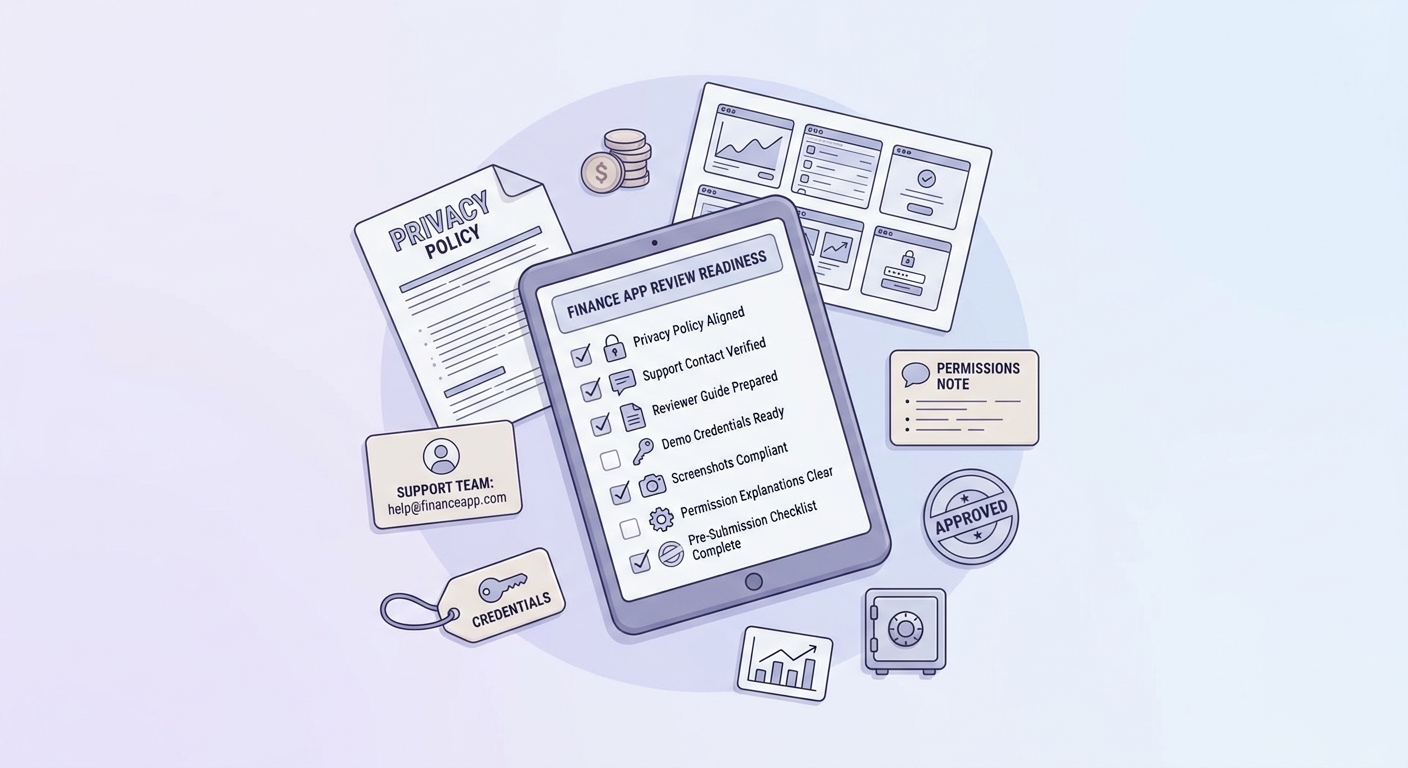
A tight pre-release checklist for finance app App Store readiness covering privacy policy alignment, support contact, reviewer instructions, demo credentials, screenshots, and permission explanations before submission.
The rejection patterns teams repeat
- Store listing and screenshots claim one thing, but onboarding shows another (or asks for permissions without context).
- Demo credentials fail, MFA blocks access, or the reviewer hits a dead end after sign up.
- Bank linking or identity verification appears without explaining who provides it and what data is pulled.
- Fees are technically disclosed, but practically hidden, or "free" positioning conflicts with payment reality.
- Language sounds like financial advice or guaranteed outcomes without framing, disclaimers, or substantiation.
In practice, these are a reviewer reacting to uncertainty in a high-trust category. If you remove uncertainty, outcomes often improve, but first-pass approval is never guaranteed.
Why "we will fix it after launch" is risky in finance
In a money context, rough edges read as safety issues. Post-launch cleanup can also be slow because it often involves product, legal, marketing, and partners, and can create support load or force asset rollbacks.
The practical takeaway: it is frequently cheaper to delay submission 1-2 days than to patch public-facing trust issues while users and reviewers are watching.
What Founders Should Know Before Their First Submission reframes the same problem with a slightly different lens - useful before you finalize.
Final position: treat review readiness as part of the launch strategy
The fastest path to approval is not gaming review. It is making legitimacy obvious in the product, metadata, and Review Notes so the reviewer can verify safety quickly, even if a dependency is flaky.
A practical operating rule: do not submit until your demo path, disclosures, and support details match the live product you want users to experience. If you cannot clearly explain the money flow in a couple minutes, and show it in a short tap path, plan for at least one review loop and watch for dependencies like KYC provider test accounts, Plaid sandbox behavior, or entitlement wait times.
Final pre-submit step: ship the boring clarity
If your finance app is legitimate, your job is to make that legitimacy easy to verify in minutes.
Get the pre-submit checklist