
If your app was rejected by App Review, the quickest path back is usually not guessing. It is identifying whether the reviewer hit a crash, an access problem, a privacy mismatch, a misleading listing, or a product-completeness issue in the first few minutes.
Why Most First App Submissions Fail - and How to Be the Exception goes deeper on the ideas above and adds concrete next steps.
Why Did Apple Reject My App?
Most App Store rejections make more sense when you replay the reviewer’s first session: install, launch, onboarding, permissions, login, first core action, trust check, and metadata check.
Apple’s App Review Guidelines emphasize stable, complete, honest, privacy-respecting apps. Recent rejection roundups from Applander, AppBuilder24, and Forvibe point in the same direction, though patterns vary by app type, review context, and Apple’s current requirements.
| Common signal | What it usually means | Practical fix | Likely owner | Requires |
|---|---|---|---|---|
| Crash, freeze, or launch hang | Reviewer cannot reach value | Reproduce on clean install and fix the blocking path | Engineering | New build |
| App feels unfinished | Product looks incomplete | Remove placeholders and complete the first workflow | Product, design | Usually new build |
| Weak network handling | App assumes ideal conditions | Add timeouts, retries, and readable errors | Engineering | New build |
| Permissions appear too early | Trust is missing | Ask only when the feature needs access | Product, engineering | Usually new build |
| Reviewer cannot log in | Access path failed | Add demo access and verify auth flows | Product, QA | Notes or new build |
| Privacy mismatch | Disclosures and behavior differ | Align labels, policy, SDKs, data use, and AI behavior | Product, legal, engineering | Connect or new build |
| Listing does not match build | Metadata overstates the product | Update screenshots, claims, and links | Marketing, publishing | App Store Connect |
The interpretation is practical: not every rejection needs code. Some are App Store Connect issues, some are reviewer-access problems, and some are real product gaps.
The business impact is time. Sorting the rejection into the right lane can save hours or days, especially when the fix is updated metadata, better reviewer notes, or working credentials rather than a patched binary.
When you move from outline to execution, What Happens When Your App Gets Rejected - and How to Respond helps close common gaps teams hit here.
What Are the Most Common App Store Rejection Reasons?
Start with the blockers that stop the reviewer before they understand your app’s value: launch, onboarding, access, privacy, and the first successful action.
App crashes, freezes, or gets stuck
What it looks like: the app exits, hangs on a spinner, fails after splash, or never reaches a usable screen.
Practical fix: test a fresh install, not only a developer device with cached data. Confirm launch, onboarding, login, and the first core action on the iOS version or device class mentioned in the rejection.
Effort: medium to high. Expect a new build, focused QA, and release-process time before Apple reviews it again.
App feels like a prototype
What it looks like: placeholder copy, blank screens, broken support links, generic templates, or visible features that cannot be used.
Practical fix: remove unfinished surfaces and make one complete workflow obvious. A small complete app is usually safer than a broad unfinished one.
Effort: medium. A Resolution Center explanation rarely fixes a product that still looks incomplete.
App depends on perfect network conditions
What it looks like: the app works on office Wi-Fi but fails under slow, blocked, or intermittent connections.
Practical fix: add timeouts, retry paths, cached safe fallbacks, and readable failure messages. Avoid infinite loaders during onboarding, login, or payment-like flows.
Effort: medium. The dependency may sit outside the app, such as your backend, CDN, auth provider, or third-party API.
Permissions are requested too early
What it looks like: the app asks for location, camera, contacts, tracking, microphone, or notifications before the user understands why.
Practical fix: request access only when the user starts a feature that needs it. Ask for camera access when the user taps "scan," not on the welcome screen.
Effort: low to medium. The tradeoff is a slightly more deliberate flow, but it usually improves user trust.
Authentication blocks review
What it looks like: the reviewer cannot create an account, log in, reset a password, pass verification, or access restricted content.
Practical fix: provide working demo credentials in App Store Connect, verify password reset, and add a guest path if the product allows it. Explain the shortest route to the feature.
Effort: low if notes solve it, high if auth is broken. Watch for fraud checks, SMS limits, invite gates, region locks, and expired test accounts.
Privacy, SDK, or AI disclosures do not match behavior
What it looks like: privacy labels, policy text, permissions, analytics, crash reporting, AI calls, payments, SDKs, or account deletion flows do not match the submitted build.
Practical fix: audit every data path, then align App Store privacy labels, policy text, permission prompts, deletion options, and in-app behavior.
Effort: low to high. A disclosure update may be quick, but changing data collection can require engineering, legal review, and a new build.
A complementary angle worth comparing lives in We Analyzed App Launch Delays: Why Mobile Apps Don’t Go Live on Time.
Can You Fix an App Store Rejection Without a New Build?
A fast resubmission starts with the right lane. Patching code for a metadata issue wastes time, while editing screenshots for a crash can lead to another rejection.
| If Apple flags | Start here | Planning range |
|---|---|---|
| Crash, freeze, broken onboarding | Clean install, logs, device or iOS match, patched build | Often 1 to 3 working days, depending on QA and release process |
| Login or access issue | Demo credentials, reviewer notes, guest path, test account | Same day is possible if auth works |
| Privacy mismatch | Data audit, SDK review, App Store privacy answers | Same day to several days, depending on data complexity |
| Listing mismatch | Screenshots, description, URLs, feature claims | Often same day if no build change is needed |
| Minimum functionality | Complete one useful workflow | Usually needs product, design, QA, and build work |
Timing still depends on new builds, QA depth, Apple review timing, backend stability, and privacy or legal complexity.
For tradeoffs, checklists, and edge cases, How a Founder Fixed an App Store Rejection in 4 Hours rounds out this section.
Resubmission checklist
Before you send the app back, check the path a reviewer will actually take.
- Clean install tested from first launch.
- Demo credentials verified in the right environment.
- Password reset, verification, and paywall access tested.
- Core action completed in minutes.
- Privacy labels match current app behavior, SDKs, and AI services.
- Screenshots and description match the submitted build.
- Support URL, privacy policy URL, and account deletion path work.
- Resolution Center note names the exact fix.
Your reply should be specific, not defensive. Mention the new build number, updated screenshots, corrected privacy disclosures, working demo credentials, changed permission timing, or clearer path to the core feature.
We Analyzed App Store Rejection Patterns: What Most Founders Miss Before Submission reframes the same problem with a slightly different lens - useful before you finalize.
Common pitfalls and edge cases
Some rejections repeat because teams fix the visible symptom instead of the reviewer’s blocker.
- TestFlight passed, but review failed: reviewers may use a different device, account state, region, network, or clean install.
- Backend dependency failed: review can happen outside your working hours, so unstable services can look like app defects.
- Feature is real but hidden: if the reviewer cannot find it quickly, it may as well not exist.
- Privacy answers are stale: adding an SDK, analytics event, or AI provider can change disclosure requirements.
- Metadata overpromises: if the listing says a feature exists, the submitted build needs to prove it.
The practical takeaway: resubmit only after the specific blocker is fixed or clearly clarified. A short, accurate fix beats a long explanation.
Check your submission before sending it back
Use a final pass to verify reviewer access, privacy alignment, screenshots, support links, and the first successful user workflow.
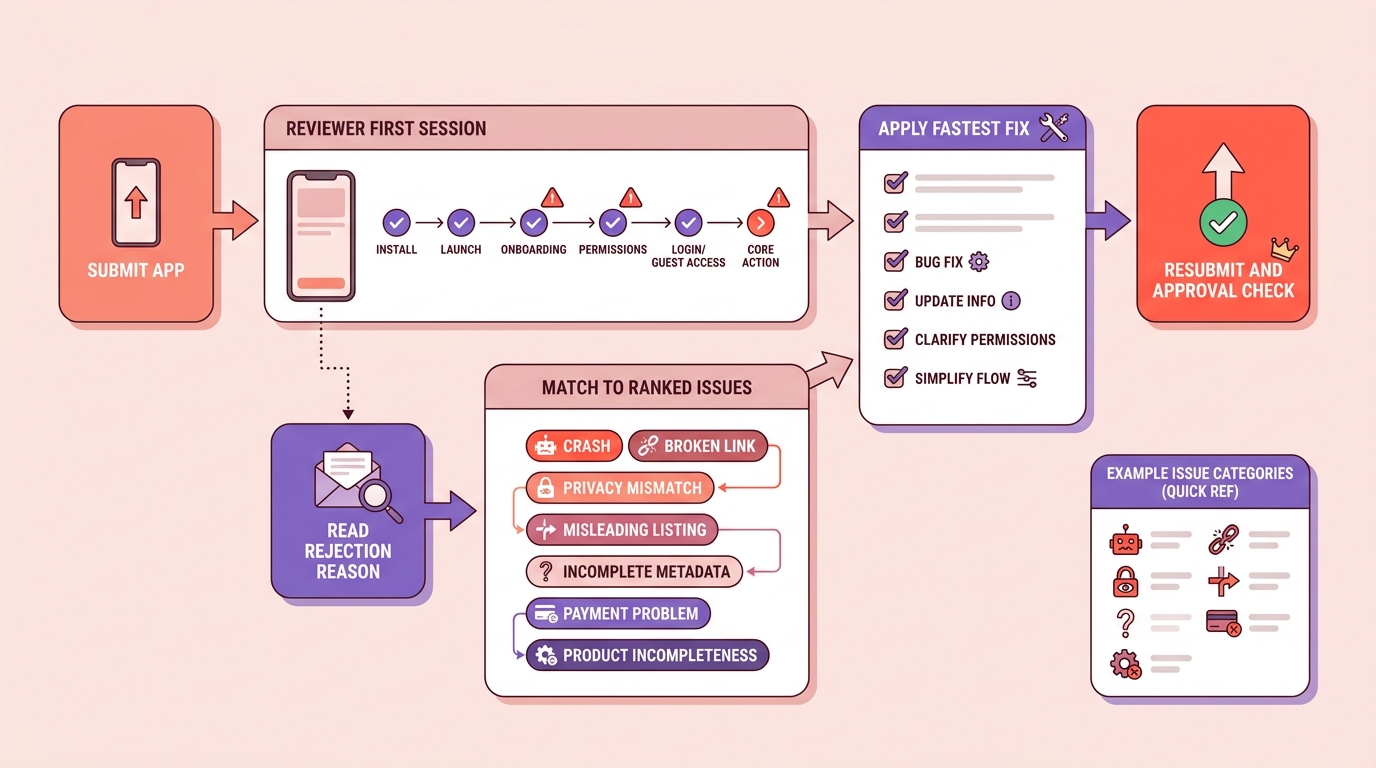
The flow turns an App Store rejection into a quick recovery path: identify the exact reason, map it to the most common ranked issue, apply the fastest fix, and resubmit with fewer review cycles.


