
Setting up iOS in-app purchases (IAP) looks simple until you try to ship: products exist in App Store Connect, your paywall loads, but real devices fail, restores do nothing, or you grant access without a verifiable receipt. This guide covers prerequisites, configuration, testing, validation choices, and the edge cases that tend to show up right before launch.
Top 5 Ways to Monetize Your First iOS App goes deeper on the ideas above and adds concrete next steps.
Why iOS in-app purchases fail so often
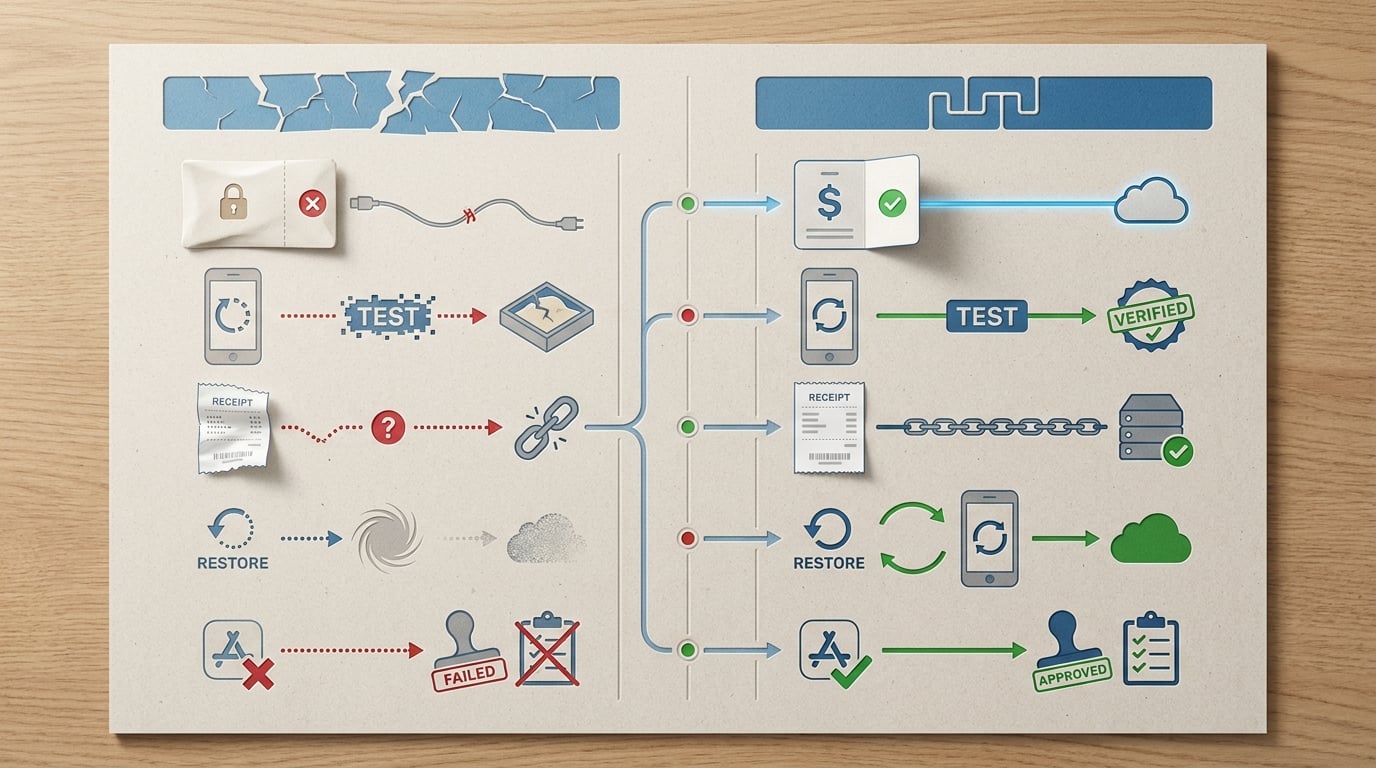
A two-column comparison table contrasting a fragile iOS in-app purchase setup with a production-safe flow. The rows compare App Store Connect product creation only, sandbox testing, receipt validation, restore purchases, and App Review readiness for this specific tutorial.
Apple treats IAP as an end-to-end system: App Store Connect configuration, StoreKit integration, receipts, and testing all matter (In-App Purchase overview, App Store Connect overview).
| Workflow checkpoint | Fragile setup (common) | Production-oriented setup (what holds up) | Practical impact |
|---|---|---|---|
| App Store Connect products created | Yes | Yes | Necessary, not sufficient |
| Sandbox testing end-to-end | No or partial | Yes, on real devices with Sandbox users | Catches ID, state, and metadata issues earlier |
| Receipt-backed entitlement | No | Yes (on-device or server) | Fewer accidental unlocks and entitlement drift |
| Restore purchases tested | Inconsistent | Yes, tested after reinstall or device change | Fewer "I paid but lost access" tickets |
| Basic IAP observability | None | Yes (success, validation result, restore usage) | Faster debugging when something breaks |
Explanation: This table compares "products exist" with "a user can buy, you can verify it, and they can restore later."
Interpretation: Many failures are not code bugs. They come from missing prerequisites (agreements, capability), product status or metadata, or skipping the receipt and restore loops.
Reader impact: In my own launches, adding a restore test pass and a single validation-result log usually cut time-to-diagnose from hours to minutes. That is anecdotal and context-dependent, and it worked best when the app was a single product with centralized logging and a simple entitlement model. One limitation: it does not magically solve App Store Connect propagation delays or Sandbox weirdness, so you still need to budget waiting time.
When you move from outline to execution, The Founder's Complete App Publishing Checklist helps close common gaps teams hit here.
Why iOS in-app purchase setup goes wrong so often
Most first-time IAP issues come from treating App Store Connect setup as the finish line. In practice, you are coordinating identifiers, capabilities, StoreKit, receipt handling, and real-device testing, and a mismatch can look like "StoreKit is broken" (App Store Connect overview).
Here is the thing: you can do everything "right" and still hit Sandbox quirks, App Store Connect propagation delays, or network conditions that make receipt refresh fail. Plan for debugging time, not just implementation time.
What usually breaks first
- Wrong product type for the business model
- Changes restore behavior and user expectations.
- Identifier mismatches
- Product IDs are case-sensitive; signing must match your App Store Connect app record.
- Capability added to the wrong target
- Common in multi-target apps and with extensions.
- Skipping true end-to-end testing
- Purchase works once, but restore, reinstall, and pending states are untested.
- Unlocking without receipt-backed entitlement
- Creates access bugs after refunds, device changes, or account switches.
The outcome this guide is aiming for
By the end, you should have a flow that fetches products, completes transactions, validates receipts before granting entitlement, and restores purchases with minimal manual support. You can validate on-device or via a server depending on your risk tolerance and ops overhead (choosing a validation technique, validating on-device).
Time expectation (typical): product setup can be 30 to 90 minutes if you know the screens. A reliable purchase plus restore plus validation loop is more often 0.5 to 2 days once you include test cycles, propagation delays, and fixes.
Set up your IAP flow checklist
Capture your product setup, validation decision, and pre-submission tests so you can repeat it each release.
Get the checklist
A complementary angle worth comparing lives in In-App Purchases and Subscriptions: The Complete Publishing Guide.
How do you set up iOS in-app purchases in App Store Connect and Xcode?
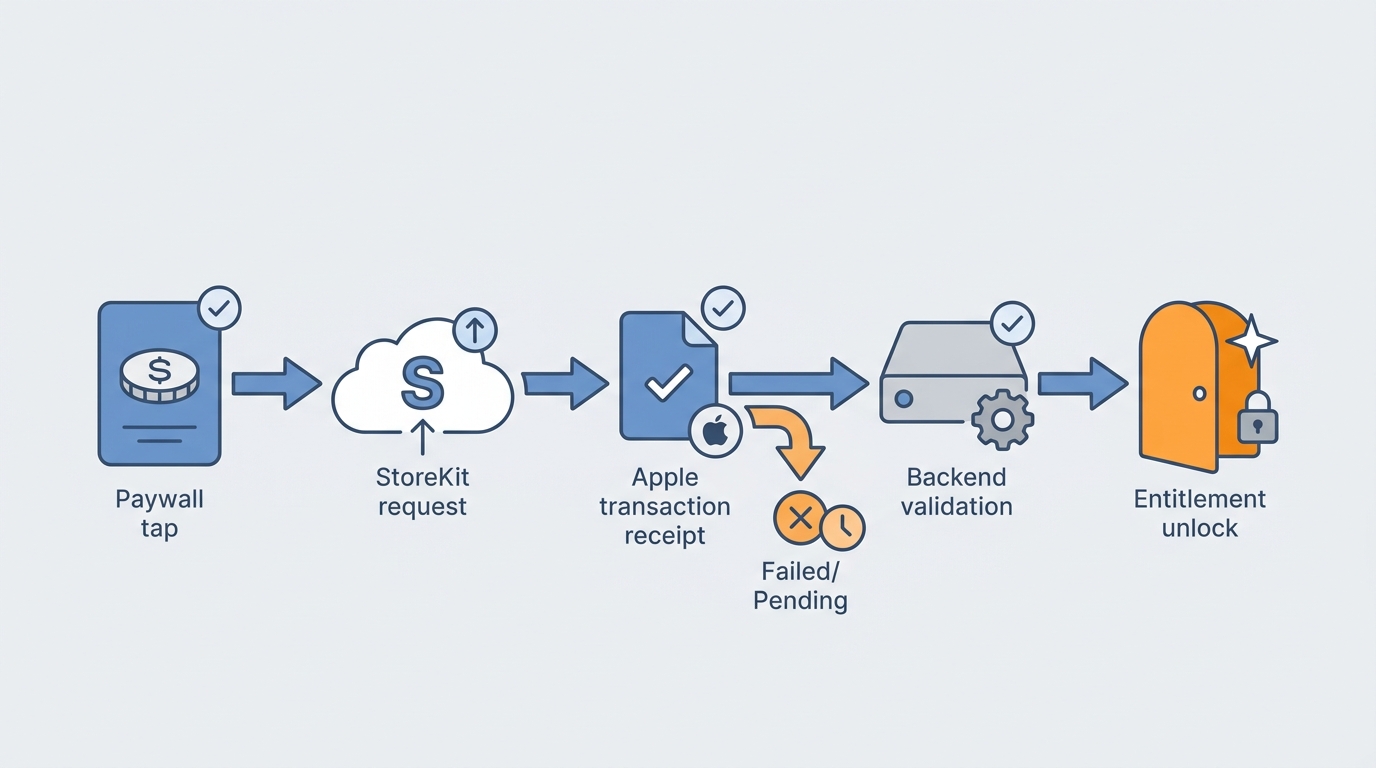
A process diagram showing the iOS purchase path from paywall tap in the app, to StoreKit purchase request, to Apple transaction receipt, to backend receipt validation, and finally to entitlement unlock. The diagram emphasizes the decision point for failed or pending transactions.
Apple’s docs cover the pieces, but sequencing is where teams lose time. This order usually avoids the most common dead ends, with tradeoffs noted where they matter (StoreKit IAP docs).
Confirm App Store Connect agreements and your app record
In App Store Connect, ensure Paid Applications agreements, tax, and banking are complete. If those are incomplete, you can be blocked from creating or testing products even if your code is correct (App Store Connect overview).
Lock bundle ID and enable the IAP capability
Your App Store Connect app record, Xcode bundle ID, and signing must match. Add the In-App Purchase capability to the correct target, and verify team, profiles, and entitlements.
Realism note: multi-target setups (dev/staging/prod) often add 15 to 45 minutes of "why is this target different" work.
Create products with durable identifiers and complete metadata
Use a stable product ID convention (reverse DNS, no renames). Fill in pricing, availability, at least one localization, and review information. If a product is not in a usable state, StoreKit may not fetch it.
Tradeoff: subscriptions fit recurring value, but add ongoing complexity (renewals, expirations, upgrades, more support questions). A non-consumable unlock is often simpler for a first paid release, if it matches your model.
Implement purchase + restore, then gate access on entitlement checks
Your paywall should fetch products, start the purchase, and observe transaction updates for success, failure, and pending states. After a completed transaction, decide entitlement by validating the receipt on-device or validating on a server (choosing a validation technique).
Tradeoff note: on-device validation can be faster to ship and removes server uptime dependency, but it is generally weaker against some fraud and tampering scenarios. Server-side validation improves control and logging, but adds infrastructure, latency, and a failure mode when your backend is down.
Dependency caveat: if you rely on server validation, decide what happens during outages. A common approach is a grace period for previously entitled users, but stricter rules for brand-new unlocks.
Run end-to-end Sandbox tests on real devices
Test the whole loop: fetch products, purchase, receipt update, validate, unlock, persist entitlement, reinstall, and restore. Sandbox and App Store Connect changes can lag, so leave time between edits and tests before assuming your integration is broken.
Effort note: budget 60 to 120 minutes for a full clean-state test pass (fresh install, reinstall, second device) even for a simple app.
For tradeoffs, checklists, and edge cases, Step-by-Step Guide to Publishing Your First Mobile App rounds out this section.
One concrete example (IDs, decision point, and one metric)
Use a boring, consistent pattern so debugging stays simple:
- Product IDs:
com.acme.myapp.pro.monthlycom.acme.myapp.pro.yearly
- Decision point after transaction:
- If receipt validation succeeds and product is active - grant
pro=true - If validation fails due to network - keep previous entitlement and prompt retry
- If validation fails with "no entitlement" - do not unlock, offer restore
- If receipt validation succeeds and product is active - grant
- One metric to log:
iap_validation_resultwith fields:product_id,environment(sandbox/prod),result(ok/network_error/invalid),latency_ms
This is not fancy, but it keeps support and App Review conversations grounded in evidence.
Top 5 Things Every Founder Must Do Before Submitting an App reframes the same problem with a slightly different lens - useful before you finalize.
Pitfalls and edge cases worth testing (so you do not learn them at launch)
| Pitfall | Likely cause | Fast check |
|---|---|---|
| Product not found | ID mismatch, wrong bundle ID/signing, missing IAP capability, product not in a usable state | Compare product ID string in code vs App Store Connect; confirm correct target capability |
| Restore does nothing | Restore not wired to entitlement logic, not tested after reinstall | Reinstall, tap Restore, confirm receipt refresh and entitlement update |
| Pending or interrupted purchase | Purchase awaiting approval or completion | Show pending UI; rely on transaction updates to finish later |
| Receipt refresh fails | Network issues, Sandbox flakiness | Retry with backoff; do not revoke existing entitlements on timeout |
| App Review cannot test | Missing metadata, unclear paywall copy, gated content inaccessible | Provide reviewer notes and a clear path to content without forcing purchase |
Validation breaks in practice too. These are the failure modes I plan for up front:
- Backend outage (server validation): cached entitlement + grace period for existing users, but block brand-new unlocks until validation succeeds.
- Clock skew / bad device time: avoid strict client-side time assumptions; prefer receipt-driven dates.
- Receipt refresh failures: retry with backoff, and surface a "Try again" state instead of silently failing.
- User switches Apple IDs: handle "no entitlement" cleanly, point to Restore, and keep support macros ready.
Final iOS IAP checklist before launch
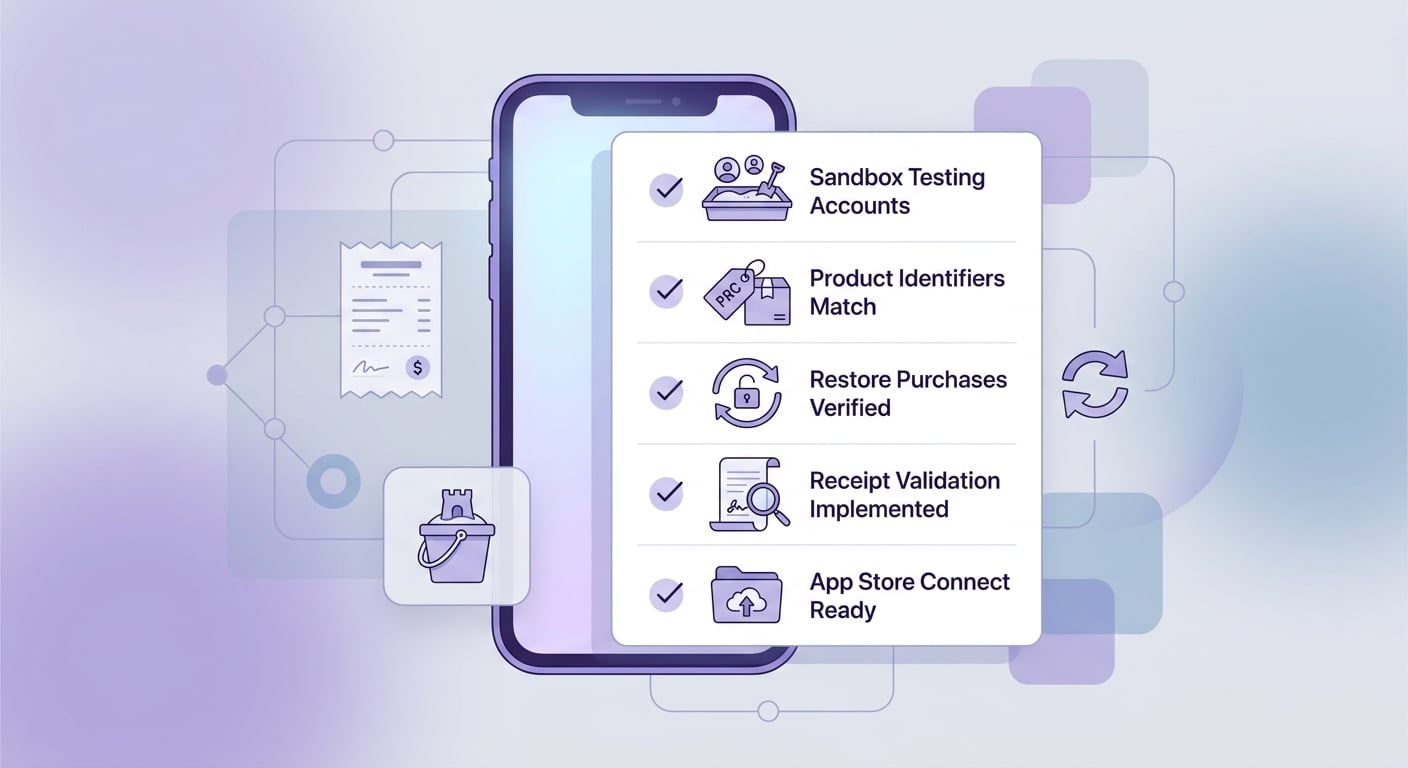
A mobile-friendly checklist block for iOS app teams covering Sandbox account testing, product identifier matching, restore purchases, receipt validation, and App Store Connect readiness before submission.
Treat IAP as a system you operate, not a one-time integration. The code is only half the work; the other half is repeatable testing and basic observability.
| Phase | What to verify | Time you should budget |
|---|---|---|
| Pre-launch | Products in correct state; end-to-end Sandbox test; restore on clean install; entitlement gated by receipt check | 2 to 6 hours for a first release |
| Launch week | Monitor purchase completion, product fetch errors, validation errors, restore usage, and support tickets | 15 to 30 minutes/day |
| Ongoing | Keep IDs stable, re-test after major app changes, watch refund-driven entitlement drift | 1 to 2 hours per release |
One thing worth noting: if you change product structure later (for example, switch from non-consumable to subscription), expect migration work and user communication. That is doable, but it is not free.
Want a preflight review for your IAP release
If you are about to ship, a structured review of product setup, validation approach, and restore flows can reduce launch debugging.
Request a review