
If your app was rejected because it "feels like a demo," the issue is rarely that it is too small. The problem is usually that a reviewer cannot complete one meaningful value loop in the submitted build. This guide gives founders and product teams a practical way to assess minimum functionality before sending a mobile app to App Store review, and to apply similar review-readiness thinking before Google Play submission.
How to Publish Your Rork App: App Store + Google Play Checklist goes deeper on the ideas above and adds concrete next steps.
Early proof: minimum functionality is judged by the first usable outcome
Editorial position: minimum functionality is not a feature-count test. It is a first-session value test.
A reviewer opens the build, tries to understand the promise, takes a core action, and looks for a result. If that path breaks, hides behind login, depends on unstable test data, or ends in a blank state, the app can feel unfinished even when the UI looks polished.
| Review signal | What the reviewer should see | Practical impact |
|---|---|---|
| Clear purpose | The app explains what it does quickly | Less confusion in the first minute |
| Core action | The reviewer can do the main thing | The app feels functional, not conceptual |
| Visible outcome | The action creates, saves, tracks, recommends, or displays something useful | The product promise becomes credible |
| Safe access | Login, permissions, and test data work reliably | Fewer avoidable review blockers |
| Return reason | The result suggests why someone would come back | The app feels like a product, not a screen demo |
This is an illustrative review-readiness check, not a formal scoring model. Apple’s App Review Guidelines emphasize that apps should be complete, usable, and free of placeholder or beta-style content. For Google Play, treat the same points as general operational readiness unless you are mapping them to a specific Play policy requirement.
The business impact is practical. A vague minimum-functionality rejection can delay launch timing, paid acquisition, creator campaigns, and investor updates. The faster fix is often not more features, but making one complete outcome easier to reach.
When you move from outline to execution, How to Publish Your Lovable App: From Export to Approval helps close common gaps teams hit here.
Why does an app feel like a demo during review?
A technically working app can still look unfinished if the first session sends prototype signals. The most common problems are access, empty states, inactive controls, and weak product specificity.
| Feels like a demo | Feels like a product |
|---|---|
| Blank home screen | Guided empty state with a next step |
| Mandatory login before value is visible | Guest path, demo account, or reliable review credentials |
| Placeholder copy or stock labels | Domain-specific examples and language |
| Buttons that do nothing | Working controls or hidden unfinished features |
| Flow ends silently | Confirmation, saved result, or useful output |
| "Coming soon" sections | Future features removed from the review build |
Here is the thing: reviewers do not see your roadmap, Slack discussions, or backend effort. They see the build in front of them. A major infrastructure task may matter less during review than a small empty-state fix if the infrastructure is invisible and the empty state blocks comprehension.
A complementary angle worth comparing lives in The Invisible Rules That Determine Whether Your App Goes Live.
What should you fix before app submission?
Start with the one-outcome test. From a fresh install, ask whether a reviewer can understand the app, take the main action, and see a meaningful result within a few minutes.
Focus on these practical fixes:
- Provide a guest path, demo account, or review credentials if login is required
- Seed realistic sample data so the app does not open to an abandoned dashboard
- Replace placeholder copy with specific examples from the real use case
- Remove visible "coming soon" features from the submitted build
- Make every primary CTA perform a real action or hide it
- Add a clear success state after the main action
- Explain sensitive permission prompts before asking
Plan for real QA effort. As a rough internal estimate, a focused pre-review pass for a small app may take half a day to two days, depending on accounts, backend data, permissions, and third-party APIs. If test credentials expire, seeded data resets, social login fails, or a staging backend goes down during review, the app can still be rejected even if the product itself is viable.
For tradeoffs, checklists, and edge cases, What the App Store Review Team Actually Tests rounds out this section.
How can a small app meet minimum functionality?
A review-ready app does not need a large feature catalog. It needs one coherent product path that matches the promise made by the listing, onboarding, and first screen.
Use this workflow:
Define the first meaningful outcome
Write down the one result the reviewer should reach. Examples include creating a note, generating a workout plan, saving a project, viewing a recommendation, tracking a habit, or submitting a booking request.
Remove blockers before that outcome
Check for login walls, unclear permission prompts, broken email verification, unstable social login, empty databases, and taps that do not visibly change anything.
Confirm the payoff
The final screen should show saved content, a generated result, a completed action, or a clear next step. If the flow ends silently, the app still feels incomplete.
Test it like a reviewer
Install a clean build on a device, use only the credentials and notes provided in submission metadata, and avoid internal shortcuts. This usually reveals gaps the product team has stopped noticing.
The tradeoff is that you may need to hide unfinished features you care about. That can feel uncomfortable when you want the reviewer to see the broader vision. In practice, a narrower build with one complete loop is often safer than a wider build with several dead ends.
How to Publish Your Dreamflow App: Store Submission Done Right reframes the same problem with a slightly different lens - useful before you finalize.
Final pre-review checklist
Before submission, audit the first session through five lenses:
| Check | What to confirm |
|---|---|
| First action | The reviewer knows what to do first |
| Access | Login, credentials, and permissions do not block review |
| Data | Sample or test data is stable and realistic |
| Outcome | The core action produces a visible result |
| Dead ends | No primary screen feels blank, broken, or unfinished |
One thing worth noting: a simple app can pass if it feels complete, while a larger app can fail if the reviewer cannot experience one real outcome. Also plan for resubmission time. Even small fixes may take a day or more once QA, build upload, review notes, and store processing are included.
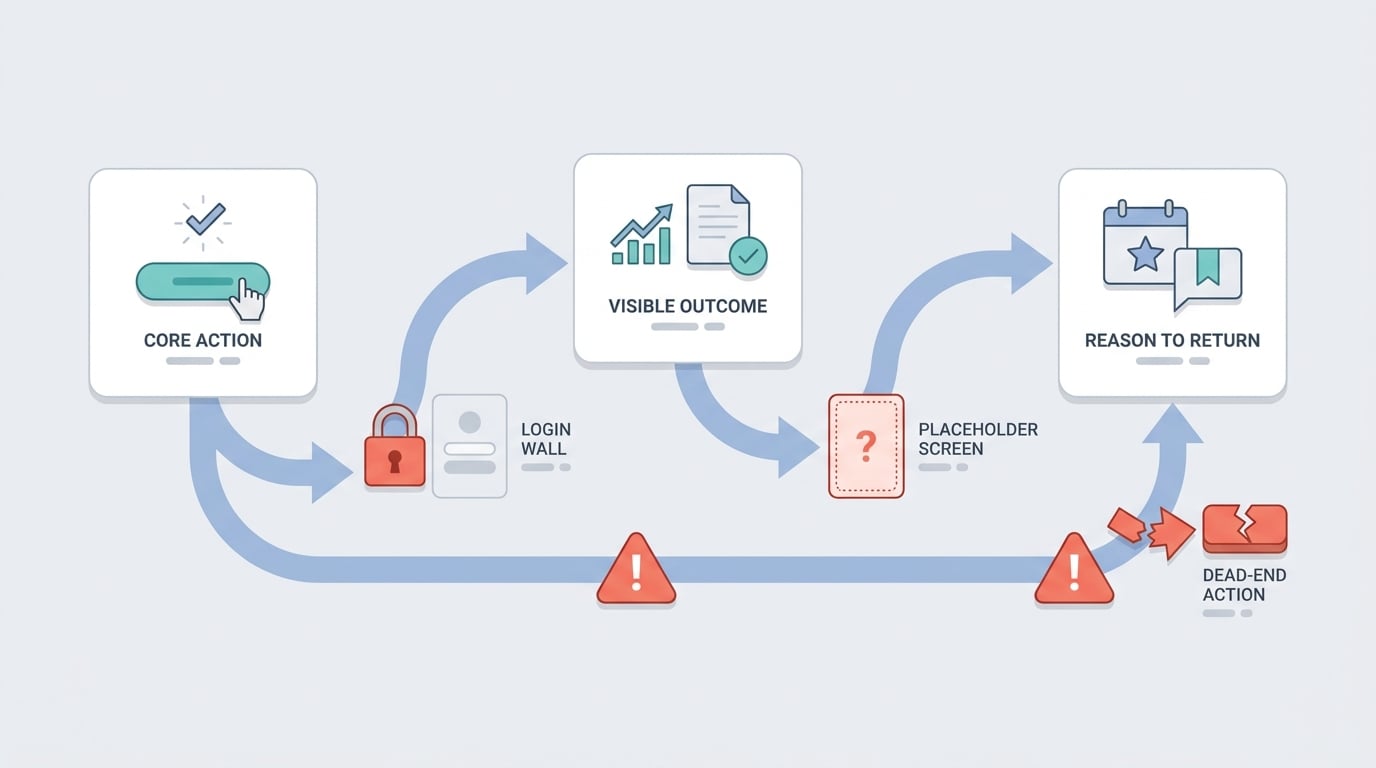
A three-step process diagram showing the reviewer journey from core action to visible outcome to reason to return, with warning markers for login walls, placeholder screens, and dead-end buttons that break the loop.


