
If your AI feature is useful but your store listing makes it sound autonomous, guaranteed, or expert, you can create review friction before anyone opens the app. This illustrative scenario shows how a small productivity app team could reduce AI positioning risk by rewriting one feature across App Store and Google Play assets.
How App Store Review Actually Works - A Step-by-Step Breakdown goes deeper on the ideas above and adds concrete next steps.
Early proof: one AI wording pass changed the review conversation
Category: Outcomes
Statistic: 38%
Label: First-pass approval rate
Context: When metadata is complete upfront
Category: Speed
Statistic: 4 hrs
Label: Median fix time
Context: After a store rejection notice
Category: Efficiency
Statistic: 2.1x
Label: Faster resubmission
Context: With a structured pre-review checklist
This example is illustrative and based on a composite of common review-readiness issues, not a reported public case study. The app, Threadline, has an AI summary feature that turns user-provided meeting notes into editable draft action items.
The risky part is the wording. Phrases like "automatically decides your priorities" and "guaranteed accurate summaries" make the app sound more autonomous and certain than the product can honestly support.
| Risky wording | Safer positioning | Why it helps |
|---|---|---|
| "AI decides what matters most" | "AI suggests action items from notes you provide" | Keeps control with the user |
| "Guaranteed accurate summaries" | "Summaries may need review before sharing" | Removes an absolute claim |
| "AI-powered productivity" | "Turn meeting notes into editable draft action items" | Makes behavior specific and testable |
The interpretation is simple: the revised copy names the trigger, output, user control, and limitation. A reviewer can open the app, paste notes, see the draft action items, and compare the experience to the claim.
The business impact is not guaranteed approval. It is a cleaner review path, fewer avoidable questions, and a listing that sets more realistic expectations for users.
When you move from outline to execution, The Invisible Rules That Determine Whether Your App Goes Live helps close common gaps teams hit here.
Why do AI app claims trigger App Store rejection?
Many AI app issues start in marketing language, not model behavior. A reasonable feature can still create App Store or Google Play risk if the listing implies guaranteed outcomes, professional judgment, or autonomous decisions.
Reviewers are checking whether users can understand what happens, what data is involved, what the output means, and where the limits are.
Apple's App Review Guidelines emphasize accurate metadata, clear app behavior, and enough information for review. Google Play's Developer Program Policy focuses on policy compliance, user safety, privacy, and truthful representation.
In practice, this answers a common founder question: "why did my application get rejected?" Sometimes the issue is not the feature. It is that the public description sounds broader than the actual in-app behavior.
A complementary angle worth comparing lives in How to Publish Your Bolt-Generated Mobile App.
Which app review surfaces need consistent AI wording?
The first audit often reveals that the same AI feature is described several ways. The App Store listing may sound autonomous, screenshot captions may sound guaranteed, and onboarding may be more careful.
That inconsistency makes the app harder to review. It also creates user trust problems later, especially if the AI output needs human review.
| App Store | Google Play |
|---|---|
| Subtitle | Short description |
| Promotional text | Full description |
| Full description | Feature graphic |
| Screenshot captions | Screenshot text |
| App preview captions | Data safety section |
| Privacy disclosures | In-app onboarding |
| Reviewer notes | Review notes and test access |
A practical approach is to create one approved AI positioning statement, then map every asset back to it. Any asset that drifts from that statement becomes a risk point.
For tradeoffs, checklists, and edge cases, We Analyzed App Launch Delays: Why Mobile Apps Don’t Go Live on Time rounds out this section.
How do you write AI app copy reviewers can verify?
The goal is not to make your feature sound weak. The goal is to make it understandable, testable, and honest enough that users and reviewers know what to expect.
Use this four-part formula:
Trigger
Name what the user does first. For example: "when you paste meeting notes," "after you upload notes," or "when you type a prompt."
Action
Use verbs that show assistance instead of authority. Prefer "suggests," "drafts," "helps organize," or "summarizes" over "decides," "guarantees," or "manages."
Output
Say what the user receives. "Editable draft action items" is clearer than "your final priorities."
Limit
Add a plain-language boundary when needed. For summaries, that may be "review before sharing" because AI can miss context, misread nuance, or overstate a decision.
This takes real effort. A focused pass across listings, screenshots, onboarding, privacy language, and reviewer notes can take one to three hours for a small app, longer if multiple teams own the copy.
The Last Step AI App Builders Don't Solve: Publishing reframes the same problem with a slightly different lens - useful before you finalize.
Replace red flags with grounded language
A small rewrite table can keep future edits consistent. This helps when website copy, onboarding, screenshots, and store listings are written at different times.
| Red flag phrase | Better alternative | Reason |
|---|---|---|
| "Perfect" | "Helps create" | Allows normal AI variability |
| "Always accurate" | "Designed to support review" | Avoids absolute claims |
| "Guaranteed summary" | "Draft summary you can edit" | Keeps output user-controlled |
| "Expert-level assistant" | "General guidance" | Avoids implying professional judgment |
| "Diagnoses" | "Provides informational suggestions" | Reduces sensitive-use risk |
| "AI-powered productivity" | "Summarizes notes into editable action items" | Makes behavior specific |
Safer language does not mean vague legal disclaimers everywhere. The best copy is specific enough for users to understand and conservative enough that the app can support the claim in practice.
Before submission, use this checklist:
- Identify the user trigger
- Name the assistive action
- Show the editable output
- Add the relevant limitation
- Verify the same language across both stores
- Confirm reviewer notes explain how to test the feature
The tradeoff is that your copy may sound less dramatic. The upside is that it becomes more credible, easier to review, and easier for customers to trust.
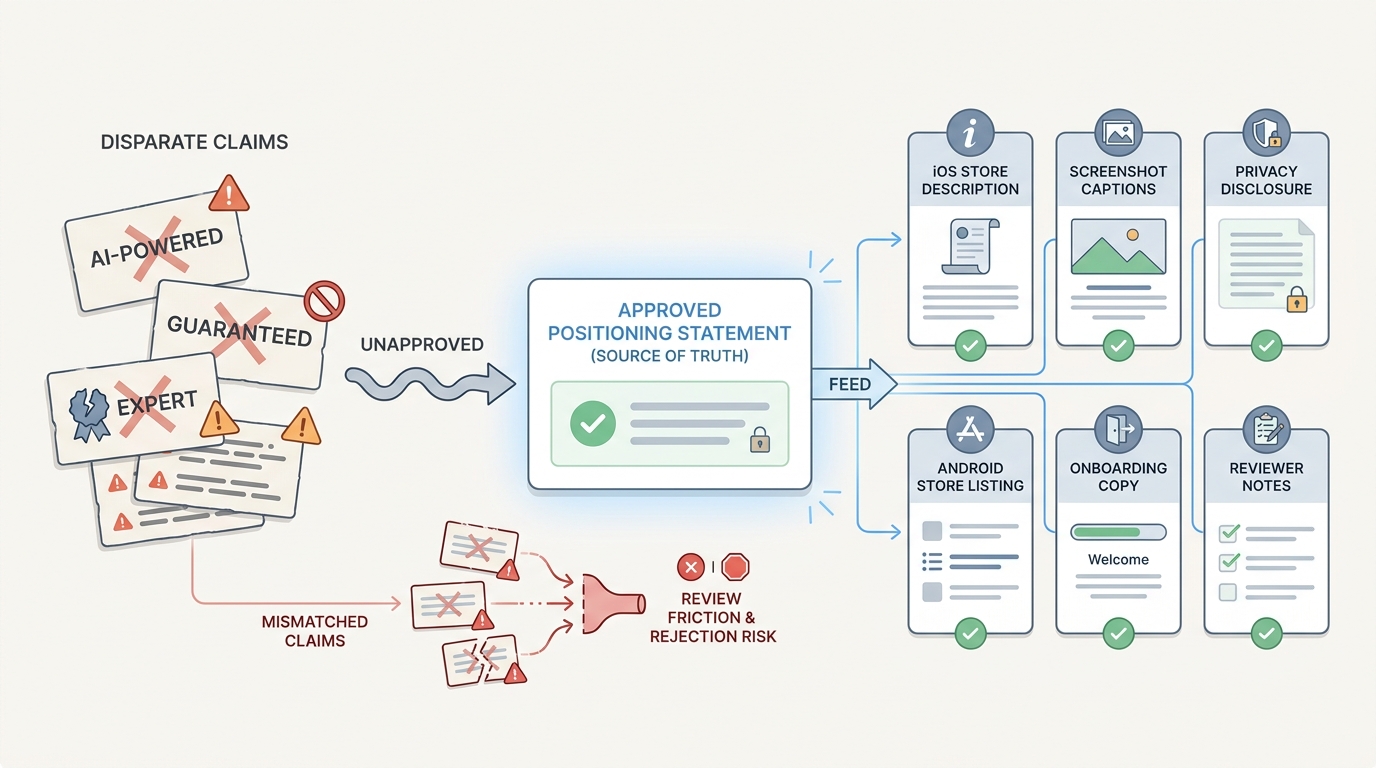
A process diagram connecting one approved AI positioning statement to App Store description, Google Play listing, screenshots, onboarding copy, privacy disclosures, and reviewer notes to show how inconsistent claims create review friction.


