
Pick the console that matches your release cadence, revenue model, and team bandwidth - it will set your release calendar, QA effort, and where you spend billing and reconciliation engineering time. Read on for a concise, actionable checklist you can start this quarter to reduce launch risk and parity debt.
Which console has faster review and iteration?
Category: Risk
Statistic: 29%
Label: Avoidable rejections
Context: Tied to metadata or policy gaps
Category: Timeline
Statistic: 72 hrs
Label: Typical review delay
Context: When issues need a second pass
Category: Fit
Statistic: 5 decision factors
Label: Review, controls, roles, billing, tests
Context: Use these five rows to pick the best-fit workflow for your team
Expect iOS to need larger calendar buffers while Play supports faster iteration.
| Criteria | App Store Connect (iOS) | Google Play Console (Android) |
|---|---|---|
| Typical review window (directional) | Stricter and more variable; plan 24 - 168 hours for major updates | Generally faster for many updates; commonly 24 - 72 hours for minor changes |
| Release control | Metadata edits can trigger review; phased releases available but still reviewed | Staged rollouts, internal app sharing, and quicker metadata changes |
| Team & roles | Granular roles, App Store Server APIs, more manual policy checks | Flexible roles, Play Console API, easier internal distribution for QA |
| Billing & APIs | Strong first-party subscription tooling and server notifications, more lifecycle rules | PurchaseToken verification via API, more flexible refunds and promotions |
| Experiments | Product page A/B exists but reviews can slow iteration | Faster internal testing and staged rollouts reduce iteration cost |
Explanation: this table is directional; actual behavior depends on region, account history, app category, and recent policy changes.
Interpretation: expect iOS to need more policy preflight and longer buffers; expect Android to let you iterate internal builds faster.
Reader impact: use these signals to assign owners, pad marketing dates, and prioritize reconciliation effort before your next launch.
Run this 1-week audit Cross-functional week to verify SKUs, calendarize review buffers, and assign owners. Start the audit checklist
When you move from outline to execution, How to Publish a Game on App Store - What's Different helps close common gaps teams hit here.
Which console should you prioritize and why?
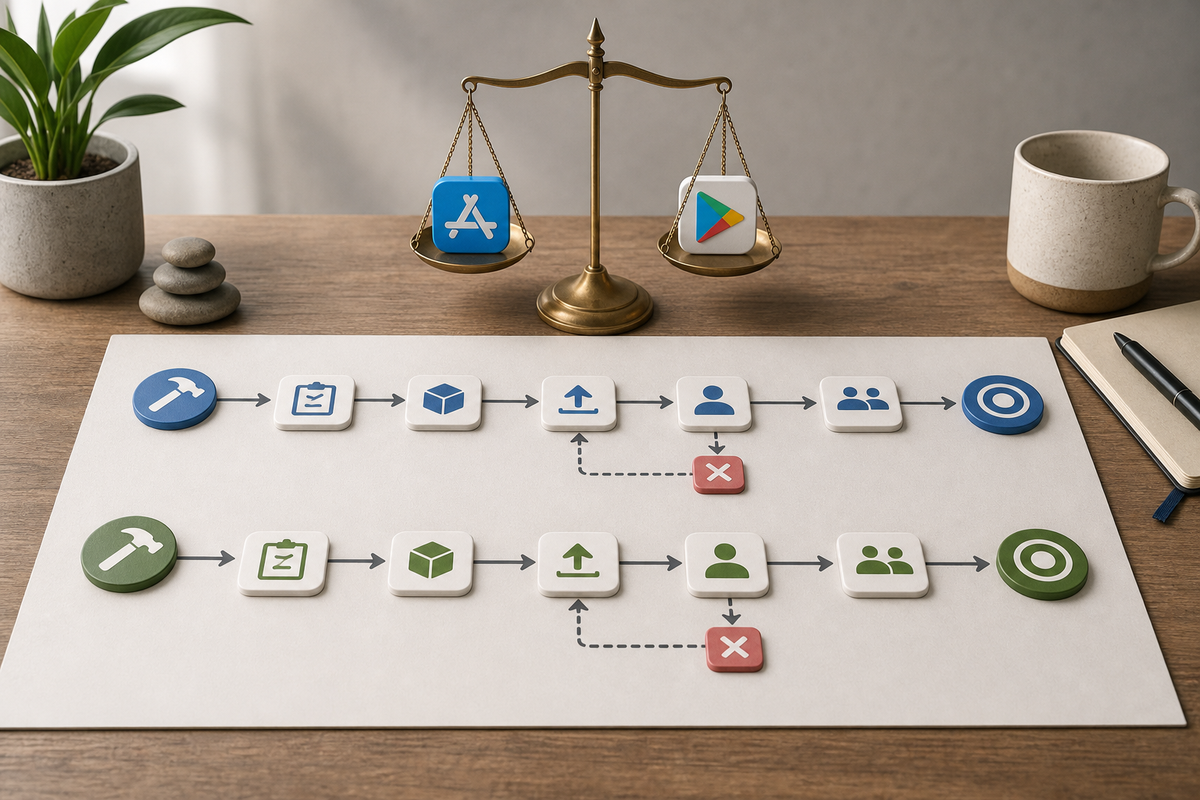
A process diagram showing parallel CI/CD flows for App Store Connect and Google Play Console: build → test → artifact → upload → review → staged rollout; includes decision points for 'policy rejection' and 'billing verification' and highlights time buffer nodes for each platform.
Pick the console that aligns with the most predictable long-term value and your team capacity. If subscriptions and predictable lifecycle revenue are core, favor App Store Connect; if fast experiments and quick hotfixes matter more, favor Google Play.
Why this matters: release speed affects campaign timing and spend, and billing differences create different reconciliation and support burdens. Tradeoff note - choosing one platform first speeds early work but usually creates 2-6 sprints of parity work later and an ongoing 10-20% release maintenance cost if you support both.
What operational changes should you make this quarter?

A 6-item checklist block founders can follow this week: calendarize launch buffers, assign release owner, map SKUs, integrate server receipt APIs, set up Play staged rollouts, create App Store submission templates - formatted as stat cards with a short line of impact for each item.
Do these practical items this quarter to reduce release risk and console-parity debt. Each item includes realistic effort and common risks.
Lock release windows
Map calendar entries and pad them. Expect to add 1-2 days buffer for Play minor fixes and 5 business days for iOS major launches. Risk - last-minute rejections still happen, so enforce code freezes tied to those buffers and align marketing and support.
Set up CI/CD pipelines per console
Create pipeline stages: build, lint, tests, upload to TestFlight or internal app sharing, then staged rollout triggers. Expect 3-8 engineer-days for scripted uploads and basic status checks; more if you need robust retries or token refresh handling. Dependency - console APIs and rate limits vary and can surface edge cases.
Assign owners and a rejection runbook
Designate a Release Manager to monitor reviews and run a rejection playbook. Building templates and a communications path typically takes 1-2 person-days but saves hours during an incident. This only works if on-call responsibilities and escalation paths are clearly defined.
Monetization mapping and server reconciliation
Centralize SKU mapping and entitlement logic, and implement server-side receipt verification. Expect one engineer to spend 1-3 sprints depending on existing infra; allocate extra sprint time for robust error handling, retries, and monitoring. Common failures: mismatched SKUs, parsing quirks, expired tokens.
Policy preflight and QA
Run metadata and payment-flow checklists before each major submission. Formalizing a preflight takes 1-3 person-days initially, then less per release. This reduces common App Store rejections but does not guarantee subjective policy decisions will be avoided.
Operational tradeoff: spending engineering time on App Store precision reduces subscription and policy errors at the cost of slower iterations. Focusing on Play automation speeds experiments but increases reconciliation and long-term support work.
For tradeoffs, checklists, and edge cases, App Store vs Google Play: Where Should You Launch First rounds out this section.
Implementation checklist - quick actions with estimated effort
Do these prioritized actions this quarter to lower launch risk and reduce parity debt.
- Reconcile SKUs across platforms (1-3 engineer-days; ongoing sync).
- Build or extend a server verification service (1-3 sprints, typically 2-6 weeks depending on complexity).
- Add automated uploads and status checks to CI (3-8 engineer-days).
- Create a release runbook and rejection appeal templates (1-2 person-days).
- Track console-parity debt as a single backlog item and allocate 10-20% of release effort to parity until gaps close.
What to expect: parity work is not instantaneous. Typical teams spend 2-6 sprints to close major gaps, then budget ongoing 10-20% of release work to maintain both platforms. If headcount is constrained, prioritize server-side verification and release ownership first; those give the most immediate reduction in customer-facing errors.
CTO: kick off receipt verification sprint Create a sprint to instrument server-side receipt verification, map critical SKUs, and calendarize launches. Book the sprint kickoff
Why Code Signing Is the Most Confusing Part of iOS Publishing reframes the same problem with a slightly different lens - useful before you finalize.


