
Manual publishing your app to the App Store and Google Play is absolutely doable. The catch is that the hidden time cost and uncertainty are usually higher than most founders budget for, especially on a first submission. If you are coordinating a launch, that uncertainty becomes a real execution risk, not just "admin work."
For a first-time end-to-end publish, a realistic effort range is often half a day to several days of focused work, plus review time. Your timeline also depends on app stability, your SDK inventory (analytics, ads, payments), privacy policy and legal copy readiness, and occasional account verification holds that are hard to predict.
Early proof: first-time publishing often burns time before review even starts
Below is a practical benchmark for the work that tends to happen before you even get a yes or no from Apple or Google. Caveat: the pre-review time ranges are practitioner estimates (they vary by app type and readiness). Review-queue timing is sourced.
| Manual publishing step (first launch) | Typical time cost | Why it becomes a delay multiplier |
|---|---|---|
| Interpret key policy and listing requirements | 1 to 3 hours (practitioner estimate) | You often discover what matters after you already filled the wrong fields |
| Developer account setup and portal configuration | 1 to 24 hours (practitioner estimate) | Verification, roles, and banking or tax fields can stall everything else |
| iOS signing setup (certificates, profiles, bundle IDs) | 1 to 4 hours (practitioner estimate) | One wrong choice can block upload entirely |
| Store listing assets (screenshots, icons, descriptions) | 2 to 6 hours (practitioner estimate) | Revisions are common once you hit device and localization requirements |
| Privacy and disclosure forms (App Privacy, Data Safety) | 1 to 3 hours (practitioner estimate) | Ambiguity can lead to re-review, not just a warning |
| Apple review queue wait time | 1 to 3+ days (sourced) | Queue times often land in a 24 to 72 hour window, but can extend when queues back up (source; source) |
| Google Play review timing (new apps and some updates) | Can take days (sourced) | Longer or variable reviews can push launches, especially after policy changes (source) |
| Rejection recovery (fix, rebuild, resubmit, wait again) | +1 to 3 days (practitioner estimate) | Rejections restart the submission clock and disrupt launch coordination |
Interpretation: the time complexity of a first release is not the same as the time it takes to click through forms. It is the compounding cycle time when one mismatch triggers a rejection and you re-enter the queue.
Reader impact: if your date matters, the goal is not "do it fast once." It is "avoid resets" so the biggest variable left is the review queue you cannot control.
| Risk | Likely impact | Practical mitigation |
|---|---|---|
| Incorrect disclosures (privacy/data safety) | Rejection or re-review loop | Inventory SDKs and data flows first; match forms to actual behavior |
| Missing or broken policy links | Preventable rejection | Test privacy policy and support URLs on mobile, without login |
| iOS signing mistakes | Blocked upload | Use a repeatable signing checklist and store access in a shared vault |
| Android keystore loss | You cannot update the app | Back up keystore securely; document ownership and recovery steps |
The Future of App Publishing: Where AI Agents Are Taking It goes deeper on the ideas above and adds concrete next steps.
Why does manual app publishing feel more complex than it looks?
Category: Speed
Statistic: 24 - 72 hrs
Label: Typical Apple review time
Context: Even a clean first submission can take days to get a result
Category: Speed
Statistic: 3 - 14 days
Label: Google Play new app launch
Context: New accounts or sensitive categories can extend the wait
Category: Risk
Statistic: Days - weeks
Label: “Waiting for Review” queue delays
Context: Any rejection/resubmission can restart the review clock
The consoles are learnable, and you can get through them with patience. The issue is that "learnable" still costs time when you are doing it under launch pressure.
Uncertainty comes from policy interpretation, one-time account setup, and the re-review loop when something small is off. Even good checklists can miss edge cases because policies are sometimes subjective, and different reviewers can focus on different details.
When you move from outline to execution, Froxi AI vs Fastlane: Which Is Better for Founders? helps close common gaps teams hit here.
What usually slows down App Store Connect and Play Console?
Most first-time failures are not deep engineering problems. They are operational mismatches between what the platforms expect and what a stressed team submits.
Common failure modes that create rework:
- iOS signing confusion (wrong certificate, profile, or bundle ID), which blocks upload
- Screenshots that are the wrong dimensions, outdated, or show features not in the binary
- Missing or inaccessible privacy policy link, especially if you collect any user data
- Inaccurate App Privacy or Google Play Data Safety disclosures that trigger rejection or escalation
- Metadata mismatches (misclassified category, misleading description, missing required fields)
- High impact risk: losing the Android keystore, which can prevent future updates and force a new listing
One thing worth noting: the consoles treat submissions like compliance statements. Some parts still require human judgment, like content ratings, privacy disclosures, and whether a permission is truly required.
A complementary angle worth comparing lives in Why Publishing Certainty Is More Valuable Than Faster Builds.
How does Froxi AI help without changing Apple or Google rules?
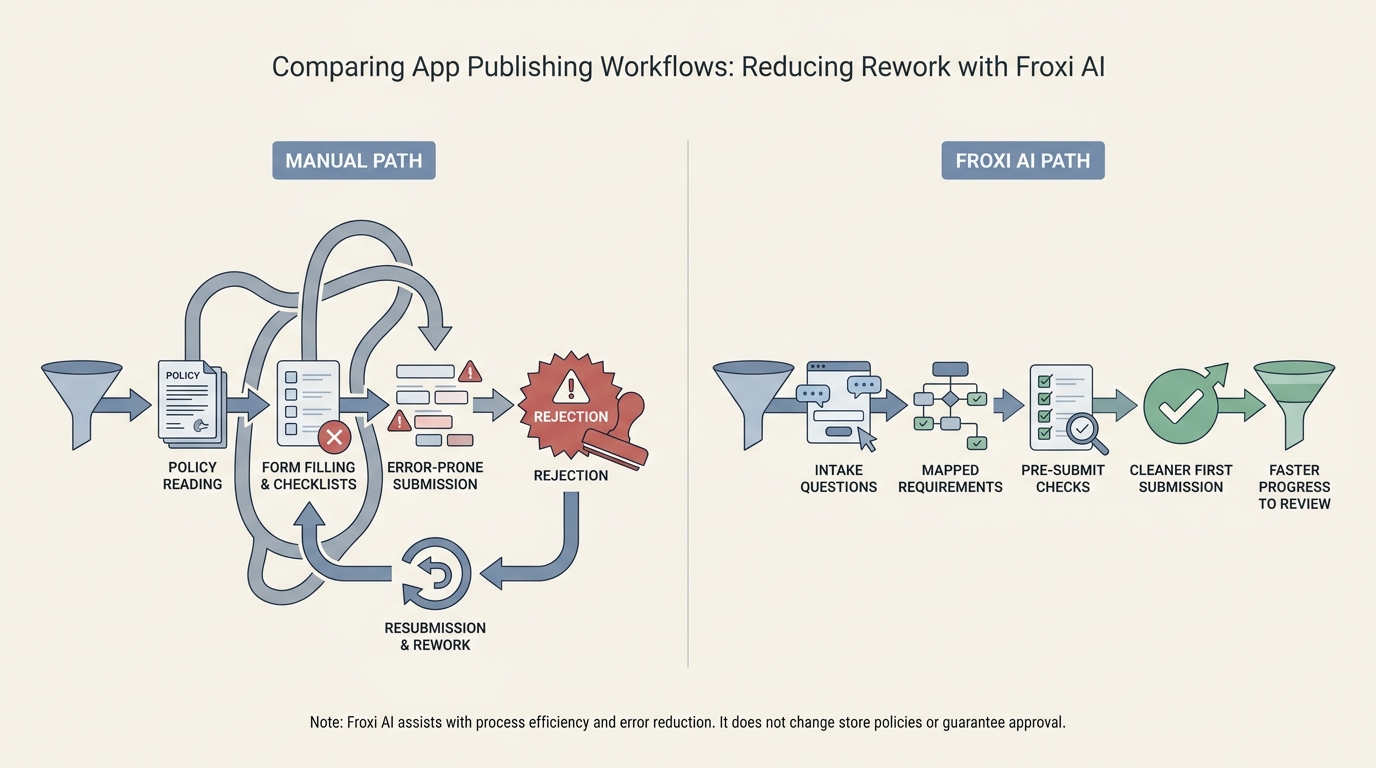
A process diagram comparing the manual path of reading policy pages, filling forms, getting rejected, and resubmitting against the Froxi AI path of intake questions, mapped requirements, pre-submit checks, and a cleaner first submission. The diagram should make the workflow difference obvious at a glance.
Froxi AI does not control Apple or Google review times, and it cannot prevent every rejection. It helps you sequence the work and reduce preventable mistakes, especially if you do not have a dedicated release manager.
A concrete guided workflow you can actually run:
Guided intake (20 to 40 minutes for most apps)
You describe app type, permissions, data flows, monetization, and required links. Expect longer if you use ads, analytics, login, kids content, health claims, or user-generated content.
Mapped requirements for iOS and Android (15 to 30 minutes to review)
It turns inputs into a platform-specific checklist that points to the relevant sections in App Store Connect and Play Console. This is where you catch missing disclosures before you touch the final submission.
Pre-submit checks (30 to 90 minutes)
You validate assets and metadata, and sanity-check disclosure completeness. It is not legal advice, but it helps you avoid obvious errors like broken links, wrong screenshot sizes, or mismatched data categories.
Submission through official tools (time varies)
You still submit through Apple and Google. In practice, many teams also do an Android internal test track first to catch install, permission, and listing surprises before Production.
Operational target (not a guarantee): aim for "mostly complete" before submission so you are not fixing basics during review. That usually means assets validated, disclosures filled to match real SDK behavior, links reachable, and metadata aligned with what the app does.
What it cannot do (and what you still own):
- It cannot guarantee approval or a specific review timeline.
- It cannot override policy changes, reviewer discretion, or account holds.
- It does not replace safe credential handling (Apple access, certificates, provisioning, Android keystore).
- It cannot invent missing artifacts (a real privacy policy, legal disclosures, entitlement justification). If you do not have them, plan time to create and review them.
For tradeoffs, checklists, and edge cases, How Solo Founders Can Navigate App Publishing Without Losing Weeks rounds out this section.
When should you publish manually or use Froxi AI?
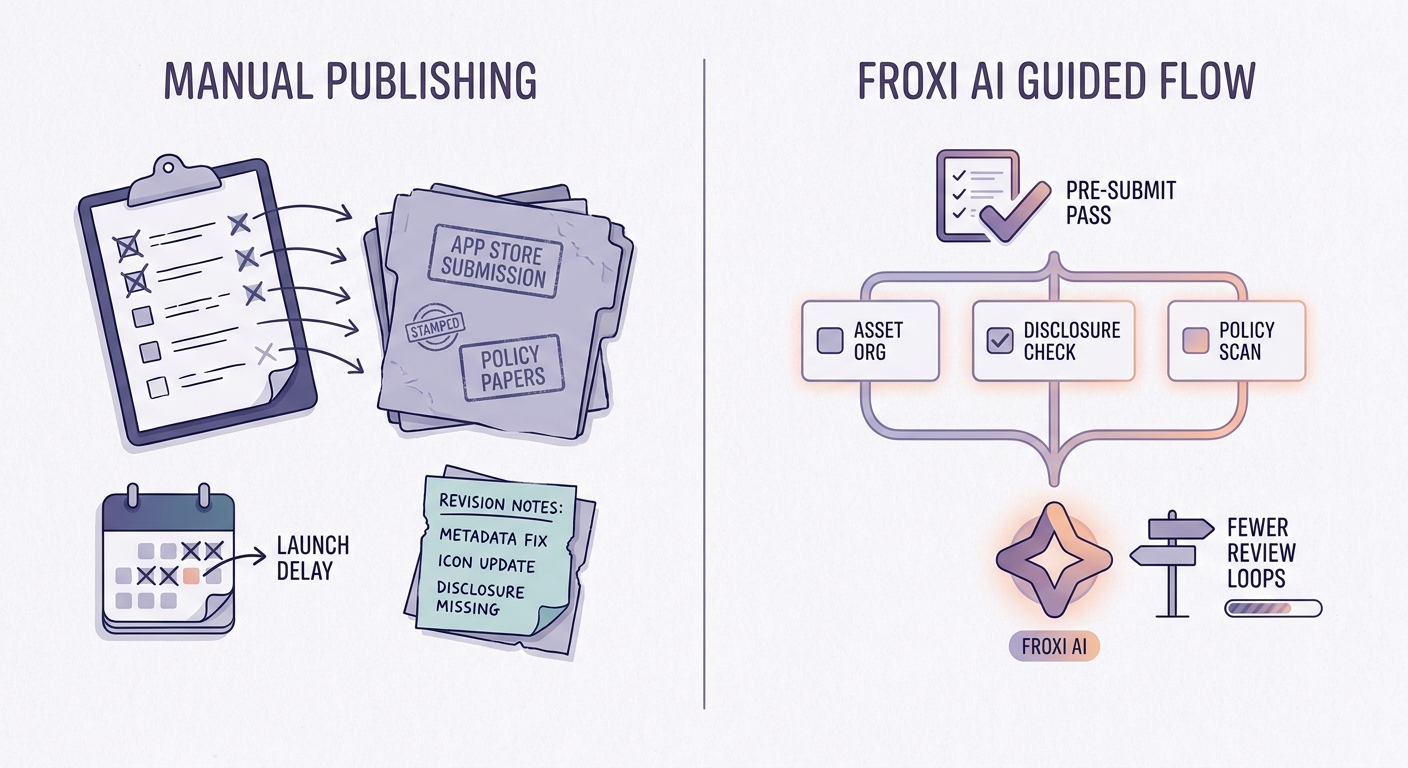
A concise decision checklist showing which teams should stay manual and which should use Froxi AI, based on factors like first-time publishing, launch pressure, technical familiarity, and tolerance for rejection delays. The block should read as a practical decision aid, not a sales pitch.
Here is a tighter way to decide.
| Criteria | Manual | Guided tool (like Froxi AI) |
|---|---|---|
| Your experience level | You have shipped before on both platforms | First-time submitter or new to one platform |
| Timeline flexibility | You can absorb slips | A delay burns spend, credibility, or milestone timing |
| Process maturity | You already have release checklists and asset pipelines | You are building the process while shipping |
| Main risk | Learning curve and rework | Still subject to reviewer discretion and policy fuzziness |
| Best use case | Building platform muscle memory | Reducing preventable resets and missed fields |
Tradeoff: a guided tool adds upfront effort (intake, organizing assets, confirming disclosures). It also will not help much if your main blocker is engineering work (crashes, broken login) or if you are in a category where policy interpretation is genuinely fuzzy. In those cases, plan a longer buffer and consider a human review.
Should You Publish Your App Yourself or Hire Someone? reframes the same problem with a slightly different lens - useful before you finalize.


