
If your App Store keywords are not moving rankings, it is often not because you picked the wrong terms. More commonly, the terms are in the wrong fields, the listing does not match what people expect after tapping, or the app is not yet earning the conversion and retention signals that help rankings hold. This guide covers what the stores are most likely to index in 2026, how to research and score keywords without guessing, and how to ship changes you can measure without breaking your release cadence.
App Store Optimization in 2026: What Actually Moves the Needle goes deeper on the ideas above and adds concrete next steps.
Early proof: which metadata fields still matter most
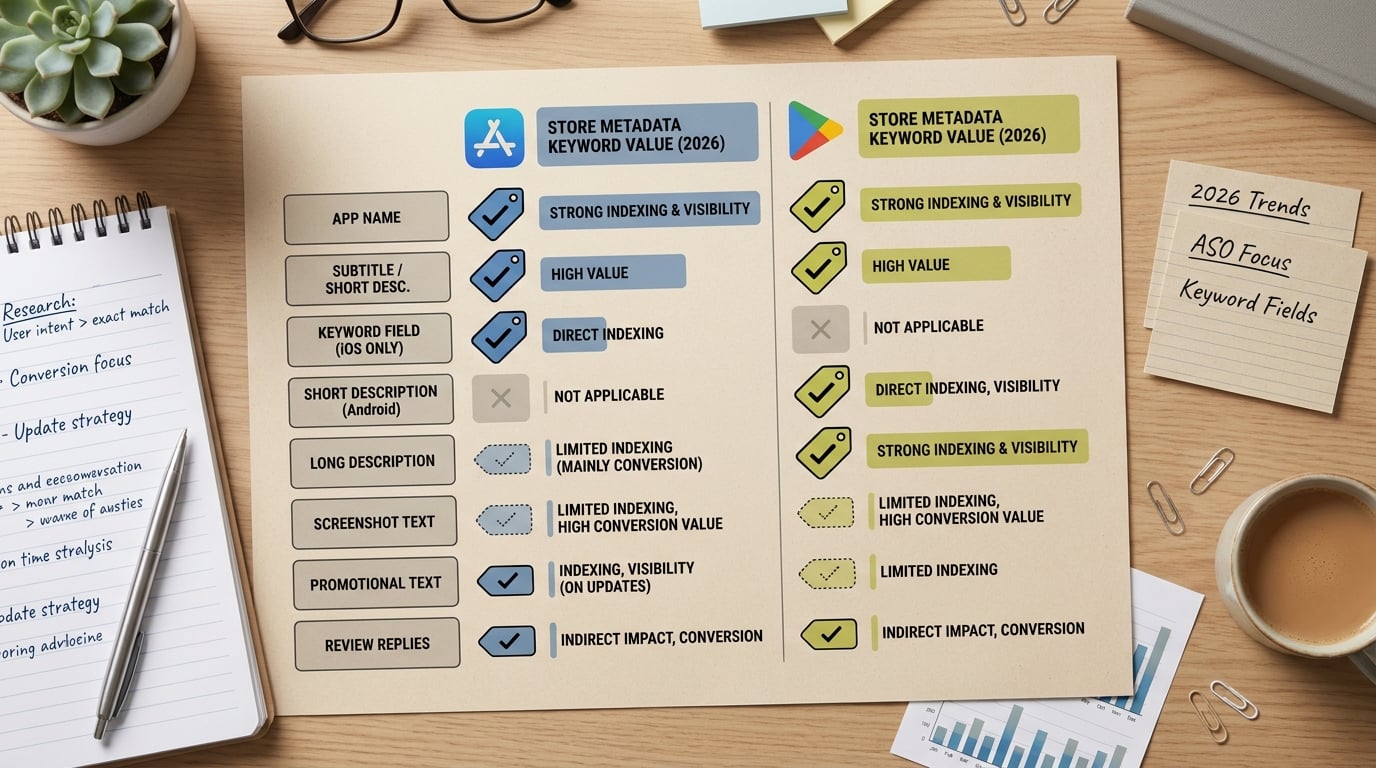
A compact comparison table showing how App Store and Google Play treat app name, subtitle, keyword field, short description, long description, screenshot text, promotional text, and review replies in 2026 keyword strategy.
The table below reflects what many teams see in practice: a few fields tend to drive most search coverage, while the rest mostly supports conversion and trust. On iOS, Apple is relatively explicit about the role of metadata and user behavior signals in App Store Search (Apple Developer). On Google Play, weighting is less transparent, so treat this as a starting point and validate in your own data.
Caveat: this is directional, not a guarantee. Category dynamics, locale language patterns, store tests, and competitor moves can change what matters for your app, so validate per locale and per release.
| Metadata field | iOS App Store: likely search indexing value | Google Play: likely search indexing value | What to do first |
|---|---|---|---|
| App name (title) | Primary signal for exact and close-match queries | Primary signal | Put your highest-intent head term here, keep it readable. |
| Subtitle (iOS) / Short description (GP) | High impact secondary field | High impact secondary field | Use for intent qualifiers and category language users actually type. |
| 100-character keyword field (iOS) | Direct indexing input (not shown to users) | N/A | Pack distinct terms, avoid repeats, prioritize coverage. |
| Long description | Weak for iOS search; mostly conversion context | Often supports relevance plus conversion | Write for clarity and benefits, not as a keyword dump. |
| Screenshot text | Conversion and clarity; may influence discoverability indirectly but is not a reliable ranking lever | Conversion and clarity; may influence discoverability indirectly but is not a reliable ranking lever | Use to support the promise and reduce bounce, not to replace title work. |
| Review replies | Reputation and support loop | Reputation and support loop | Use for trust and retention; expect indirect effects. |
How to interpret this: if you are spending most of your time rewriting the long description while your title, subtitle, or iOS keyword field is underused, you are likely leaving search coverage on the table.
Impact for readers: you can usually get a cleaner, faster first test by editing the highest-impact fields and holding everything else steady, instead of doing a full listing rewrite that is hard to attribute.
The baseline metrics to capture before touching keywords
- App Store Connect: Search impressions, product page views, installs, and impression-to-install conversion rate (ideally 14-28 days).
- Rank tracking for 10-20 target terms in one locale: same device type, same language, consistent check times, or a rank tracker.
- A change log: copy the exact old vs new strings so you can revert quickly if conversion drops.
- Confounders to note: feature launches, influencer posts, paid UA changes, seasonal demand, and store featuring.
One thing worth noting: ranking volatility is normal. Even good changes can look flat in week 1, especially in competitive categories or during seasonal swings.
When you move from outline to execution, How the App Store Algorithm Works in 2026 helps close common gaps teams hit here.
What do App Store keywords need to do in 2026?
The goal here is operational: use the metadata fields the stores are most likely to index, align them to real user intent, then measure whether you gained qualified installs. That means fewer speculative tactics and more field placement, relevance, and timelines you can run inside a normal release cycle.
A key constraint is that iOS and Google Play do not treat metadata the same way. Apple frames App Store Search as relying on metadata plus user behavior signals like downloads and ratings, which makes field choice and relevance important (Apple Developer). Google Play is more text-rich and less explicit, so Android advice is best treated as conventions you test, not a deterministic formula.
Here is the thing: in 2026, keyword work is often limited by proof of relevance. If your listing promises one thing and the product experience delivers another, you can see short-term ranking movement followed by conversion drops, refunds, or weaker retention that cancels it out. Directional industry writeups make the same point, but outcomes vary by category and competition (AppsTemple, AppDrift).
A complementary angle worth comparing lives in ASO Without Guessing: A Practical Keyword Workflow for Indie Founders.
How do you research and score App Store keywords without guessing?
Build the term list from user jobs, not dashboard volume
Start with the job in plain language
Write the phrase a user would say out loud: "track daily habits", "scan receipts", "plan workouts", or "calm anxiety before sleep". This anchors relevance, which matters because metadata and user behavior signals tend to interact over time.
Add adjacent workflows users expect
Pull from reviews, support tickets, onboarding drop-off points, and competitor promises: reminders, mood tracking, journaling, budgeting, exports, tax categories. Keep the list tight so you can actually test it.
Layer audience and context modifiers
Add who and when: student, ADHD, couple, freelancer, beginner, travel, team. Long-tail phrases often have lower demand, but they can convert better because the promise is specific.
Search the store like a user before trusting ASO software
- Search your core phrase on a real device and note the top results: app name, subtitle or short description, rating band, and what the first 2 screenshots promise.
- Repeat for 5-10 secondary terms and a few 2-4 word long-tails.
- Flag pages dominated by category leaders with stronger social proof; those terms may require a narrower entry point first.
This typically takes 30-60 minutes per locale plus time to document competitors. It saves guesswork, but it is still work you need to schedule (and it is easy to cut corners and miss obvious intent signals).
Score each keyword by intent, competition, and product fit
Use a simple rubric so you can compare terms quickly and avoid debates that go nowhere.
| Score factor | What to ask | Practical red flag |
|---|---|---|
| Intent | Does the query imply a goal your app clearly solves in the first session? | Users need 3-4 steps before value is obvious. |
| Competition | Are your rating, screenshots, and positioning credible vs the top results? | SERP is dominated by brand-name incumbents. |
| Product fit | Can you support the term without stretching the truth? | The term implies features you cannot demo. |
How do you place keywords in the fields that move App Store search?
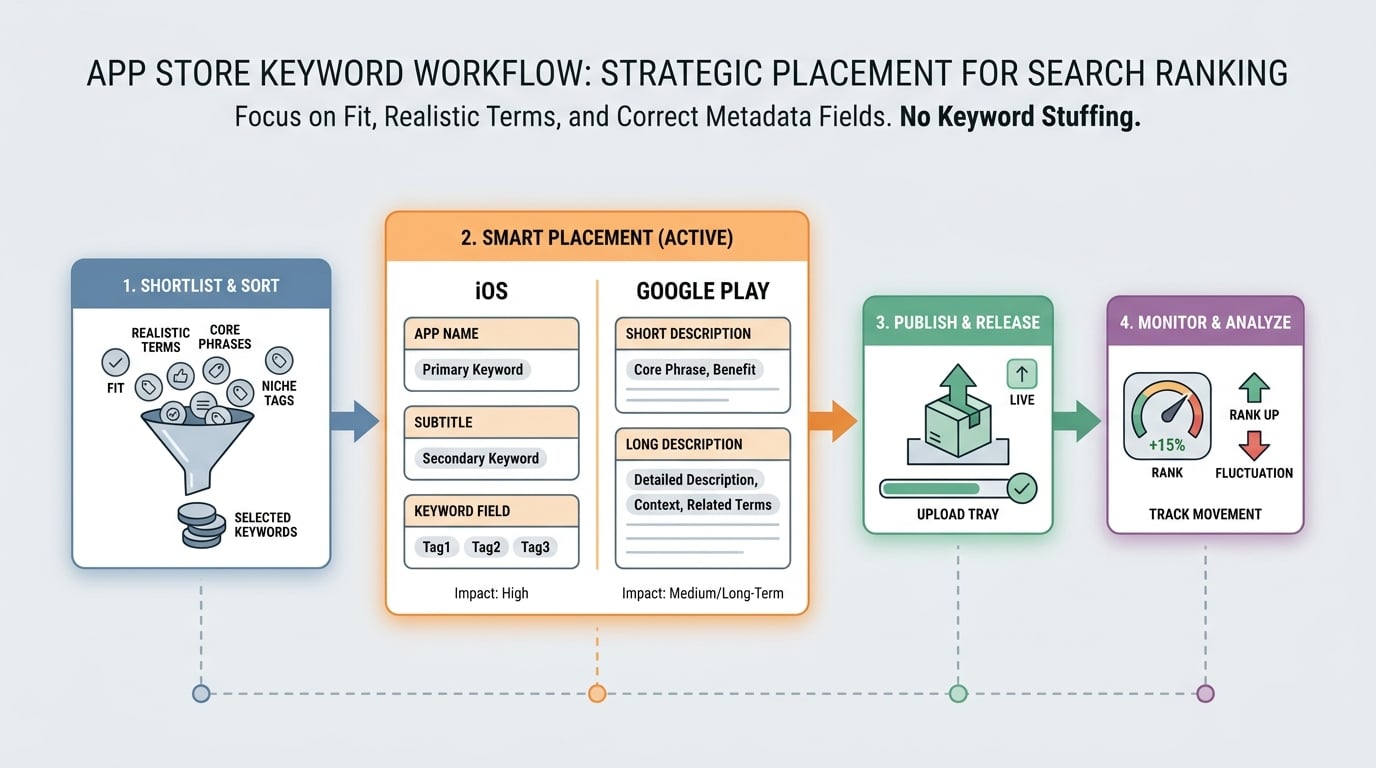
A step-by-step process diagram showing the keyword workflow from shortlist to placement: choose a realistic term, map it to app name/subtitle/keyword field on iOS or short description/long description on Google Play, then publish and monitor rank movement.
Use the Apple metadata trio before anything else
App name (title)
Put your clearest primary keyword here only if it still reads like a product name, not a keyword list. One strong term often beats two awkward ones, especially if brand constraints limit how far you can push it (Apple Developer).
Subtitle (30 characters)
Use this space for a benefit-led supporting phrase that narrows intent. The practical goal is better conversion on the search results page, which can help stabilize rankings if retention and reviews do not deteriorate.
Keyword field (100 characters, hidden)
Fill gaps with modifiers, audiences, and adjacent jobs that do not fit cleanly in visible copy. Treat it like coverage, not repetition: avoid duplicates and filler, and prioritize terms you are willing to stand behind (common field-level guidance matches this approach, for example LaunchShots).
Treat Google Play as visible SEO, not hidden keyword stuffing
- Put your strongest terms in the short description because it is prominent and conversion-sensitive.
- Use the long description to explain workflows and objections in plain language, using natural variations instead of forced repetition.
- Expect iteration: you may see impressions move without installs if the listing promise is unclear or the price and reviews do not hold up.
Localize with a budget and a reason
Localization can be a real lever, but it is rarely free.
- Start with 1-2 additional locales where you already see meaningful traffic or revenue.
- Budget time for translation, native review, and store review cycles (often a few days to a couple of weeks depending on your process).
- Be careful with literal translations of "keywords" that users do not actually type. Store search language can be more colloquial than your marketing copy.
CTA: Audit what is actually indexed
If you want a quick sanity check on whether your highest-impact fields are doing their job, I can review your title, subtitle or short description, and (iOS) keyword field for one locale and flag what is worth testing first.
audit your indexed fields
How to ship changes without losing attribution
A lot of ASO work fails because teams change too many variables at once, then argue about what caused what.
Pick one hypothesis per release
Example: "Add head term to title, move modifiers to keyword field, keep screenshots stable." This makes the readout less ambiguous.
Hold conversion-sensitive assets steady when you can
Screenshots, pricing, paywalls, and onboarding can dwarf metadata effects. Sometimes you cannot freeze them because product and growth need to ship, but write down the tradeoff so you do not over-interpret the results.
Plan for operational constraints
Title changes may require brand approval, legal review, or trademark checks. If your org has review gates, expect at least 3-10 business days of coordination before the change is live, plus store review time.
Expect failure modes and external volatility
Rankings can move because competitors update, a category gets featured, or the algorithm shifts. Also, some categories are saturated enough that metadata changes mostly reshuffle impressions rather than create meaningful new installs.
What to measure, what to avoid, and the update checklist
Track the right signals for 3 to 4 weeks after the release
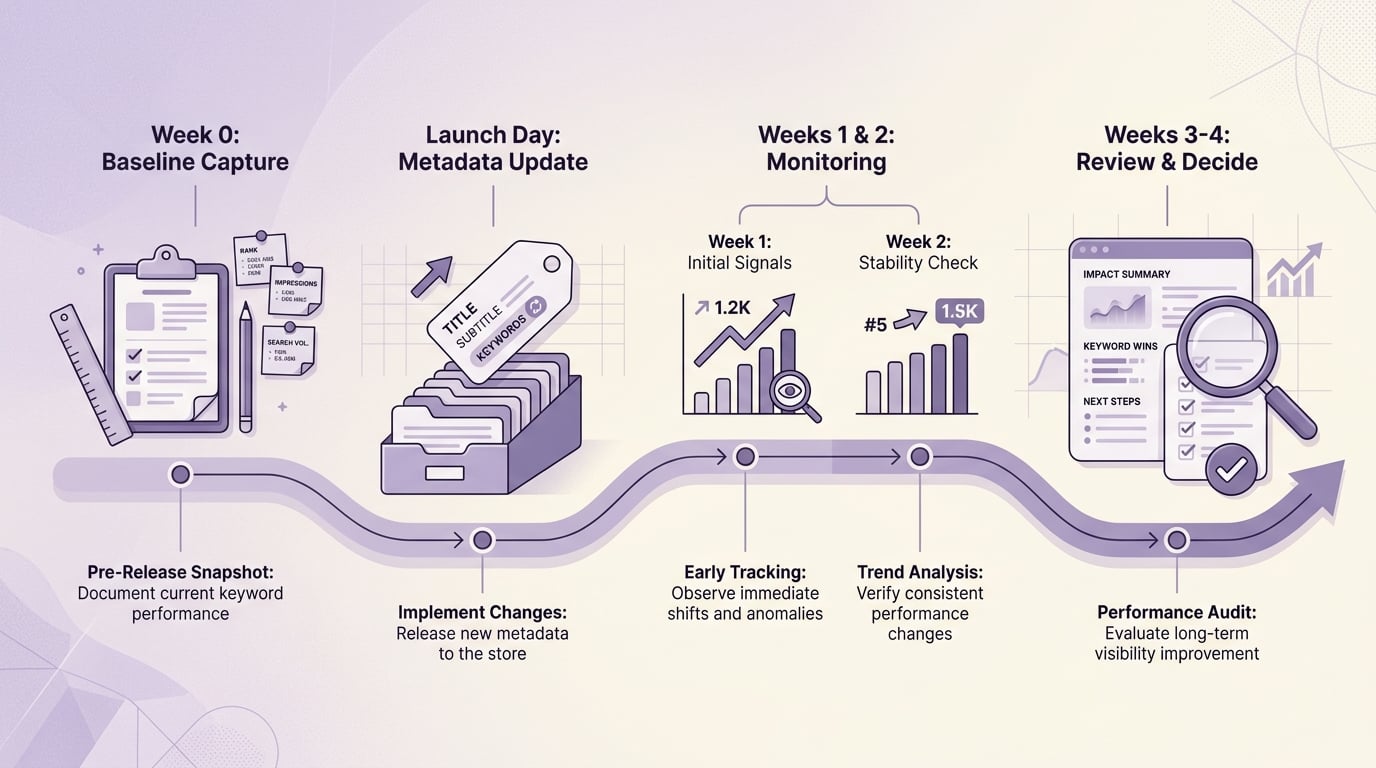
A simple 4-week timeline showing baseline capture before release, launch-day metadata update, week-1 and week-2 monitoring of impressions and ranks, and a week-3 to week-4 review window for judging whether App Store search visibility improved.
Monitor the store funnel in App Store Connect
Track search impressions, product page views, installs, and impression-to-install conversion after the update lands. Expect noise: rankings can swing daily, and impressions can move before installs do.
Compare rank movement for your 10 to 20 target terms
Log pre-change ranks, then recheck on a consistent cadence. Treat week 1 as mostly volatility, week 2 as directional, and weeks 3 to 4 as your first reasonable read on whether the change is helping.
4-week measurement timeline (simple checklist)
| Phase | What to do |
|---|---|
| Pre-release | Capture baseline ranks and funnel metrics (14-28 days if possible). |
| Launch day | Ship metadata change only if you want cleaner attribution. |
| Weeks 1 to 2 | Monitor impressions, conversion, and rank swings; avoid overreacting. |
| Weeks 3 to 4 | Judge movement vs baseline; keep, revert, or iterate with one new hypothesis. |
Avoid the common mistakes that make keyword work look useless
- Chasing broad terms your product cannot credibly support can increase low-quality taps and reduce conversion.
- Changing screenshots, pricing, paywalls, onboarding, and metadata in one release speeds up shipping but slows down learning.
- Assuming screenshot text or long description keywords will reliably substitute for primary metadata is a risky bet; treat those areas primarily as conversion levers and verify any discovery impact in your own data.
- Ignoring localization costs: each locale adds research, copywriting, and review cycles, and results vary by market.
- Overfitting to one competitor: the results page can shift quickly if a larger app updates creatives, gets featured, or runs heavy paid acquisition.
The update checklist (what to do in one release)
- Pick 1 hypothesis (for example: "add head term to title, move modifiers to keyword field").
- Change only the relevant fields for that hypothesis.
- Keep screenshots and pricing stable if you need cleaner attribution (or note the tradeoff if you cannot).
- Document exact before and after strings and the release date by locale.
- Set stop conditions: for example, revert if conversion drops materially for 7-10 days without an impressions lift.
CTA: Run a clean keyword test
I can help you set up a 3-4 week ASO experiment plan (fields to change, terms to track, and stop conditions) using App Store Connect plus one rank tracker, so you can iterate without guessing.
run a clean release test


