
Mobile founders rarely need more analytics. They need faster answers to a few expensive questions: which channels bring valuable users, where onboarding breaks, what predicts retention, and whether subscription revenue is improving or leaking. This shortlist reviews five commonly compared tools by practical fit, setup burden, and the conditions where each one tends to work well or fall short.
How a Solo Founder Prepared Their App for Launch Without Hiring an Agency goes deeper on the ideas above and adds concrete next steps.
What are mobile app analytics tools, and why do founders compare these 5?
These five tools appear in buying conversations because they cover different parts of the same mobile growth workflow. Product analytics explains in-app behavior, attribution explains where installs and post-install conversions came from, and baseline mobile analytics helps teams get started quickly. Most founders only need one layer first, then add another when a reporting gap starts affecting real decisions.
| Tool | Primary job | What founders usually use it to answer | Why it belongs in this shortlist |
|---|---|---|---|
| Mixpanel | Product analytics | Where do users drop during onboarding? Which actions correlate with retention? | Commonly compared with Amplitude for event-based product analysis in source-backed market discussions. |
| Amplitude | Product analytics | Which user paths lead to activation or repeat use? How should a larger team govern analysis? | Often evaluated against Mixpanel when teams want deeper pathing and more structured analytics workflows. |
| Firebase Analytics | Baseline mobile analytics | What are our core usage trends, events, and audience patterns? | Included here as an editorial pick because many mobile teams use it as a practical starting point, especially in the Google ecosystem. |
| AppsFlyer | Mobile attribution | Which campaigns drive installs and valuable downstream events? | Source-backed attribution comparisons commonly place it alongside Adjust for campaign and post-install measurement. |
| Adjust | Mobile attribution | How should we measure channel quality with a privacy-aware attribution setup? | Commonly considered with AppsFlyer in attribution evaluations where partner coverage and privacy constraints matter. |
Explanation: this is an editorial shortlist, not a universal top-5 ranking. The source-backed comparison clusters are Mixpanel vs Amplitude for product analytics and AppsFlyer vs Adjust for attribution. Firebase is included as a practical baseline option based on common startup usage, not a cited market ranking.
Interpretation: if you compare all app analytics tools as one category, you can buy the wrong layer. Teams sometimes buy attribution when the real blocker is weak onboarding visibility, or buy product analytics when the urgent issue is paid channel accountability.
Business impact: choosing the right first layer can reduce rework and misleading dashboards. In practice, implementation usually takes several days at minimum, and often 1-3 weeks once event planning, SDK setup, QA, identity mapping, consent handling, and dashboard validation are included.
Here is the practical flow. Install sources feed attribution, attribution can connect to in-app events, event analysis reveals onboarding and activation bottlenecks, and retention plus subscription outcomes show whether growth is compounding across App Store and Google Play.
Practical interpretation: the first tool you buy should match the first question you cannot answer today. If you do not know why users churn after install, product analytics often comes first. If you cannot trust campaign quality or downstream ROI, attribution often comes first.
Which app analytics tools are best for startups and subscription apps?
This list is ranked by founder fit and decision usefulness, not by a source-backed global market score. The goal is to help startup teams choose the right first tool or a realistic initial stack.
| Rank | Tool | Best for | Core strength | Setup effort | First founder question it answers best |
|---|---|---|---|---|---|
| 1 | Mixpanel | Early-stage mobile product teams | Fast funnels, retention, self-serve analysis | Moderate | Why are users dropping off after install or during onboarding? |
| 2 | Amplitude | Scaling product teams | Deeper pathing, behavioral analysis, governance | Moderate to high | Which behaviors appear to predict activation and repeat use? |
| 3 | Firebase Analytics | Cost-conscious startups | Fast baseline mobile tracking | Low to moderate | What are our core usage trends and event volumes right now? |
| 4 | AppsFlyer | Paid acquisition teams | Attribution clarity and campaign measurement | Moderate | Which campaigns drive installs and valuable downstream events? |
| 5 | Adjust | Teams needing an attribution alternative | Privacy-aware attribution and channel measurement | Moderate | Which acquisition sources are performing best under our measurement model? |
A few practical notes:
- Mixpanel and Amplitude are often better fits than attribution tools for diagnosing onboarding drop-off.
- Firebase is a useful baseline, but many teams later want deeper retention and journey analysis.
- AppsFlyer and Adjust are attribution tools first, not replacements for product analytics.
- "Moderate setup" usually means more than adding an SDK. Expect event planning, purchase event validation, identity rules, consent checks, and at least one QA cycle.
Ranked recommendations: the best 5 app analytics tools for mobile founders
Mixpanel
Best for founders who need answers quickly on onboarding funnels, churn after install, and retention patterns. It is often a strong first product analytics choice when a lean team wants usable dashboards without building a full analytics function first.
Strengths: quick funnel setup, accessible retention views, and relatively fast self-serve analysis. Tradeoffs: governance can get messy if event taxonomy is inconsistent, and more advanced use cases still require thoughtful instrumentation. Realistic effort: often a few days for a basic setup, or 1-2 weeks if you need a clean event plan, identity stitching, and subscription events.
Amplitude
Best for teams that already know analytics discipline matters and want richer behavioral analysis. It tends to fit better when the company can invest in cleaner instrumentation and a more governed event model.
Strengths: deeper journey analysis, stronger support for mature event structures, and better fit for teams that want analytics operations to scale. Tradeoffs: more complexity, more implementation discipline, and often a slower path to the first useful dashboard. Realistic effort: SDK setup may be similar to peers, but meaningful value often takes longer because event design, naming standards, and QA matter more.
Firebase Analytics
Best for startups that need baseline visibility quickly and want to keep initial tooling costs and complexity relatively low. It is often the practical default if the team already uses other Google tools.
Strengths: familiar mobile setup patterns, broad baseline tracking, and a lower barrier to getting started. Tradeoffs: it may feel limiting once you need sharper funnel, retention, or path analysis. Dependency caveat: fit is stronger if your team is already comfortable with the broader Google stack and can accept a more baseline-oriented reporting layer at first. Failure mode: teams sometimes assume SDK installation alone creates decision-ready reporting, but event structure, conversion definitions, and app-specific QA still matter.
AppsFlyer
Best for teams spending meaningfully on acquisition and needing clearer attribution across campaigns and downstream events. Source-backed comparisons commonly place it in attribution evaluations with Adjust, especially when paid media decisions have material budget impact.
Strengths: focused attribution workflows and campaign measurement depth. Tradeoffs: attribution quality still depends on privacy constraints, media partner integrations, consent handling, and clean event handoff to product or subscription tools. Failure mode: teams sometimes expect attribution software to fix poor in-app event design, which it will not. Realistic effort: budget a few days for a basic setup, but 1-2 weeks is more realistic if post-install events, SKAdNetwork-related configuration, partner mapping, and QA are in scope.
Adjust
Best for teams that need a serious attribution option with attention to privacy-related measurement considerations. It is often considered alongside AppsFlyer rather than against product analytics tools in source-backed attribution comparisons.
Strengths: credible attribution coverage and fit for teams evaluating measurement posture carefully. Tradeoffs: like other attribution platforms, value depends heavily on implementation quality, partner setup, and realistic expectations under modern privacy conditions. Failure mode: attribution can appear to "break" when the real issues are consent gaps, mismatched event names, delayed postback setup, or unrealistic expectations about deterministic visibility. Decision note: if your paid acquisition budget is still small, this may be more platform than you need right now.
What the comparisons actually mean in practice
The Mixpanel vs Amplitude decision is usually about operating style, not just features. Source-backed comparisons commonly frame them as close product analytics alternatives, but the better choice depends on how disciplined your team can be with event design.
Choose Mixpanel if speed to first insight matters most. Choose Amplitude if you can support a more rigorous event model and want deeper behavioral analysis over time. In both cases, weak taxonomy can make a good tool look worse than it is.
For AppsFlyer vs Adjust, the decision is similar. Source-backed attribution comparisons place them in the same buying set, but neither tool removes the practical limits created by privacy rules, consent requirements, media partner coverage, or post-install event quality.
What this means for subscription apps is simple: event mapping matters more than logo choice. If purchase events, lifecycle states, and in-app behavior are not connected cleanly, even a strong dashboard can point you in the wrong direction.
How do you choose app analytics tools without overbuying?
Choose based on the first metric you must trust in the next 30 days. That keeps the decision grounded in an operating need rather than a broad platform pitch.
Onboarding or feature adoption is the urgent problem
Start with Mixpanel or Amplitude. Define activation, retention, and key funnel events first so you can see where users drop and which actions appear to correlate with repeat use.
Install source quality or paid ROI is the urgent problem
Start with AppsFlyer or Adjust. If you cannot trust campaign attribution, adding more in-app dashboards usually will not fix the decision bottleneck.
You need broad visibility with minimal budget and engineering lift
Start with Firebase Analytics. It gives many startups a useful baseline, with the understanding that you may later add or migrate to a deeper product analytics tool.
The implication is that the best analytics stack for subscription apps often starts narrow. Buy the layer that answers the most expensive unanswered question first, then expand only when the next decision clearly justifies the extra implementation load.
Implementation checklist for App Store and Google Play subscription apps
A clean setup usually matters more than a premium plan. Before judging any tool, make sure these basics are in place:
- Define a shared event taxonomy for onboarding, paywall views, trial starts, paid conversions, renewals, churn, and reactivation.
- Keep iOS and Android purchase events consistent enough to compare lifecycle performance across both platforms.
- Verify identity stitching from anonymous user to known account where relevant.
- Confirm attribution handoff so campaign source data can connect to downstream in-app events and subscription states.
- Review day-1 and day-7 retention, activation rate, trial-to-paid conversion, and campaign-level downstream quality, not just installs.
- Budget time for QA. Even a simple setup often needs at least one full release cycle to validate events in production.
One thing worth noting: poor taxonomy can make Mixpanel look weak, poor attribution handoff can make AppsFlyer or Adjust look inaccurate, and inconsistent subscription events can make any revenue analysis unreliable. Tool selection matters, but operational discipline usually matters more.
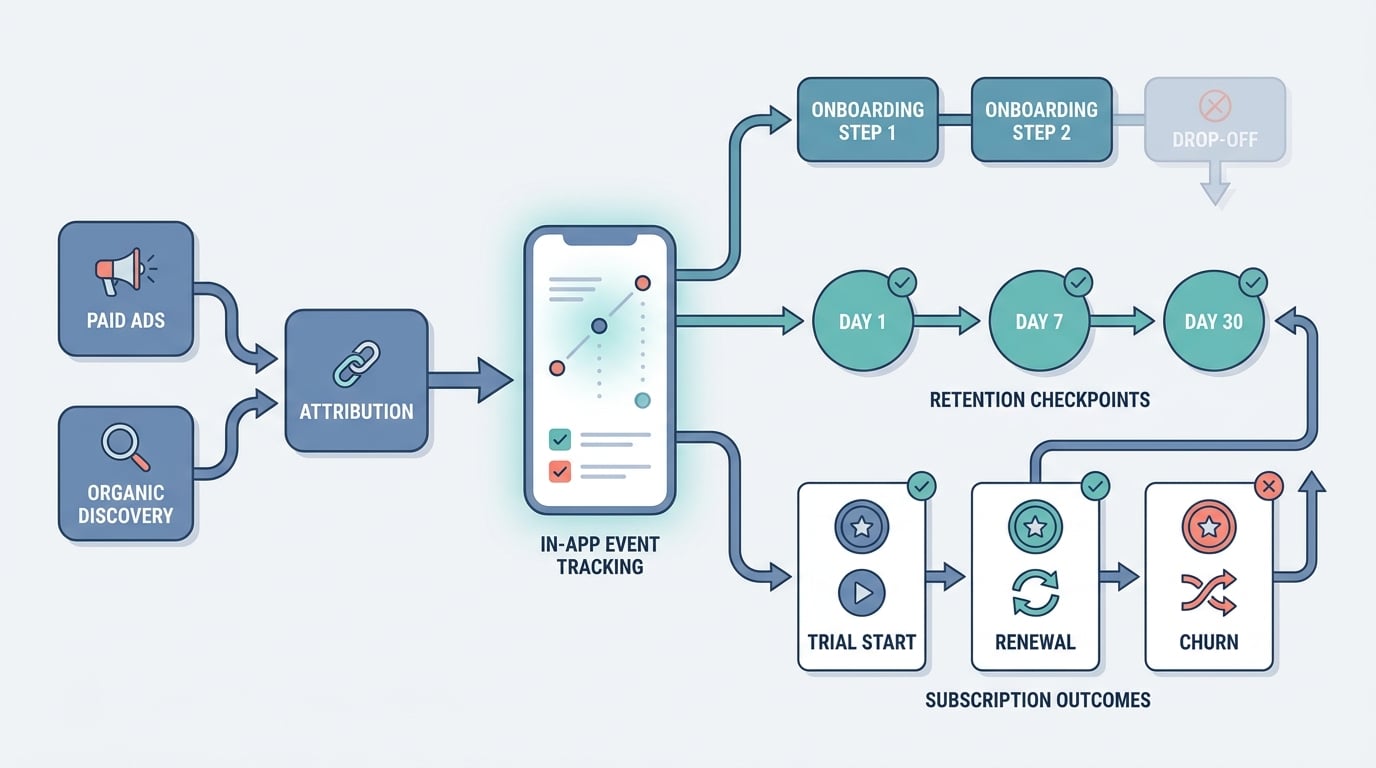
A process diagram showing a mobile founder workflow: paid and organic install sources feed into attribution, which connects to in-app events, onboarding funnel drop-off, retention checkpoints, and subscription outcomes such as trial start, renewal, and churn across App Store and Google Play.


