
If you have ever finished building a mobile app and assumed launch week would mostly mean pressing Submit, this story will feel familiar. The product works, testers are happy, and then App Store Connect and Google Play Console open up a second project full of metadata, screenshots, policy answers, and reviewer details. This case study shows how a solo founder used Froxi as an AI app publishing assistant to turn a vague, stressful publishing process into a more review-ready checklist and a more realistic launch plan.
| Proof area | Before using a structured checklist | After using Froxi for launch prep |
|---|---|---|
| Launch prep | Notes across docs, screenshot folders, and browser tabs | One working checklist covering both stores |
| Missing fields | Discovered late, often while filling forms | Surfaced earlier, before final submission |
| Apple vs Google tasks | Blended together | Split into platform-specific tasks |
| Privacy and compliance | Unclear what was required vs optional | Required items flagged for follow-up |
| Reviewer notes | Drafted late or skipped | Prepared alongside assets and links |
| Founder workload | Constant context switching and uncertainty | More visible task sequence, but still required manual review |
This proof is directional, not a claim of guaranteed approval or faster growth. What changed most was operational clarity: Maya could see what was missing, estimate the work, and avoid some common last-minute surprises. In this case, the founder spent several focused evening sessions pulling assets together, revising screenshots, and checking policy details before submission.
Froxi AI vs Agencies: Which Gives Founders More Control? goes deeper on the ideas above and adds concrete next steps.
From finished build to stuck at the submission screen
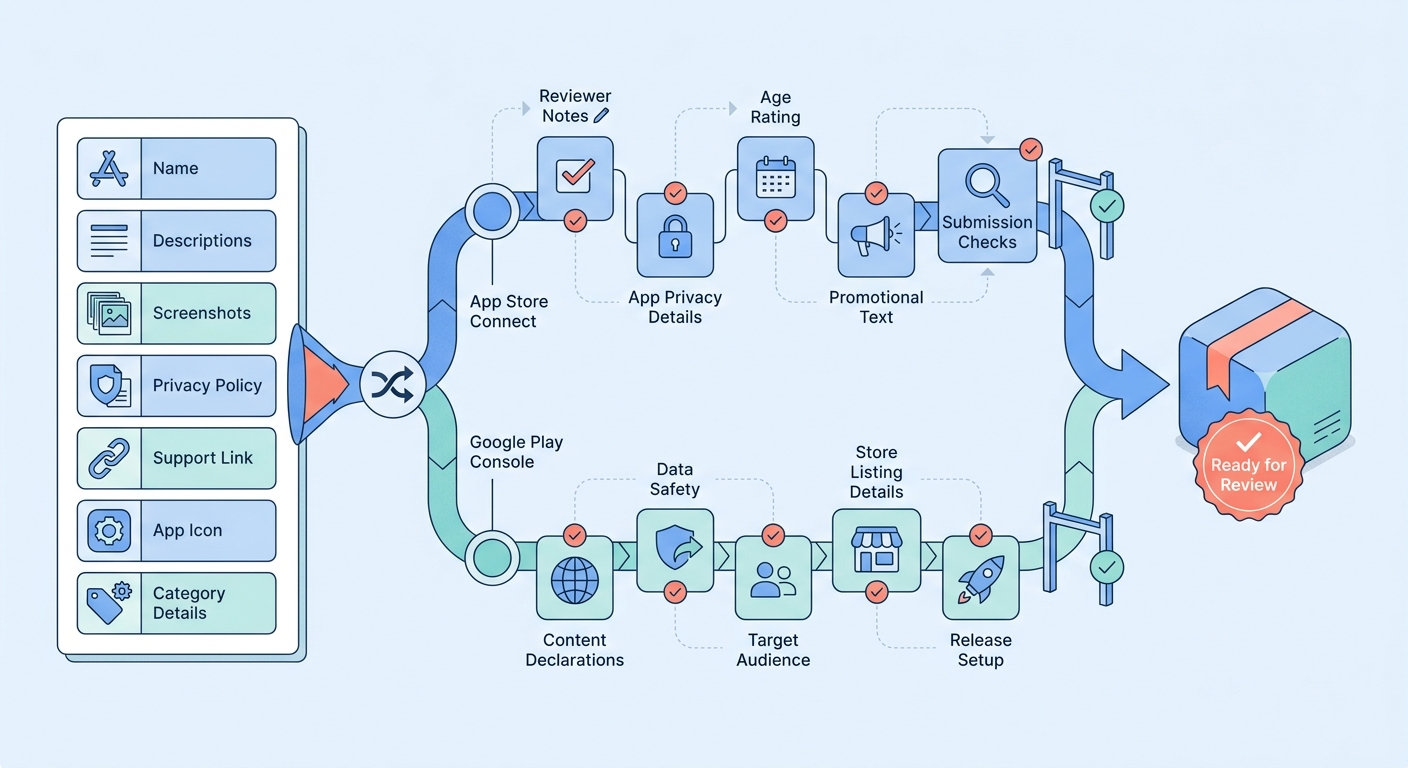
A process diagram that splits one app launch into shared tasks and platform-specific branches: shared inputs like app name, descriptions, screenshots, privacy policy, and support links flow into separate App Store Connect tasks such as reviewer notes and separate Google Play Console tasks such as content declarations, then reconverge into a review-ready submission package.
Category: Outcomes
Statistic: 38%
Label: First-pass approval rate
Context: When metadata is complete upfront
Category: Speed
Statistic: 4 hrs
Label: Median fix time
Context: After a store rejection notice
Category: Efficiency
Statistic: 2.1x
Label: Faster resubmission
Context: With a structured pre-review checklist
Maya is a solo founder who spent four months building a habit-tracking app after work. By Monday of launch week, the app was stable, the main onboarding bugs were closed, and a small beta group was already using it daily.
She expected the last mile to be simple. Instead, App Store Connect wanted metadata, screenshots, support links, categories, and reviewer context. Google Play Console wanted different listing fields, declarations, and release details.
The hard part was no longer the build. It was packaging the build for two stores with different expectations.
When you move from outline to execution, How Solo Founders Can Navigate App Publishing Without Losing Weeks helps close common gaps teams hit here.
Why do solo founders get stuck on app publishing?
The blocker was operational, not technical. Maya's uncertainty came from submission components like:
- App Store listing preparation
- subtitle
- keywords
- promotional text
- category choices
- screenshots
- support URL
- Google Play listing preparation
- short description
- full description
- feature graphic
- content declarations
- release details
- Compliance stack
- privacy policy URL
- data handling answers
- permissions rationale
- age and content declarations
- reviewer notes for sign-in or gated features
Here is the thing: none of these items are individually hard, but together they create coordination work. In Maya's case, launch prep took a few evenings once she treated it like a separate mini-project. If screenshots need rework or policy pages are incomplete, the effort can easily stretch into several days.
Maya looked at agencies, but the fit was off. The budget was one issue, and the bigger one was scope. She did not need a full launch campaign or outsourced ASO. She needed structure, requirement checks, and a way to keep control over sensitive facts like privacy disclosures and reviewer access.
A complementary angle worth comparing lives in Should You Publish Your App Yourself or Hire Someone?.
How can a solo founder prepare an app for launch without an agency?
Expected outcome: a review-ready submission package with fewer hidden dependencies, clearer task order, and less last-minute scrambling.
Prerequisites:
- a stable enough build for screenshots and reviewer testing
- working support and privacy policy URLs
- access to App Store Connect and Google Play Console
- a clear view of sign-in, subscriptions, and data handling
- time set aside for at least two review passes
Realistic effort note: for a solo founder, this usually means multiple sessions across 2 to 5 days, not one quick admin block. The exact time depends on how complete your assets, policies, and onboarding flows already are.
Step 1: map the submission scope across Apple and Google
List the shared inputs first
Maya used Froxi to map the items both platforms needed: app name, descriptions, screenshots, privacy policy, support links, and release notes. That changed the work from "figure out publishing" to "complete this shared input set."
Split out platform-specific requirements
Froxi then separated the Apple-only and Google-only tasks. Reviewer notes in App Store Connect and declarations in Google Play Console stopped getting blended together, which reduced the risk of assuming one answer covered both systems.
Turn scope into a launch timeline
Once the scope was visible, Maya stopped saying "I should submit this week" and started estimating actual tasks. In practice, she needed one pass to gather inputs, another to revise assets, and a final pass inside each console.
Decision points at this stage:
- Is the current build stable enough for final screenshots?
- Do you already have a live privacy policy and support page?
- Will the app need reviewer credentials, test accounts, or special instructions?
- Are there permissions or subscription flows that need extra explanation?
Step 2: organize store assets before writing copy
Gather screenshots by user flow
Instead of exporting random screens at the end, Maya grouped screenshots by onboarding, habit creation, reminders, and progress tracking. That made the listing more consistent, but it also took time because screenshots often need crops, captions, and last-minute updates after UI changes.
Confirm operational links and review access
She checked that the privacy policy URL was live, the support page worked, and reviewer login details were documented. This mattered because listing copy, reviewer notes, and compliance answers all depended on the same facts.
Use missing dependencies to guide the work
Froxi helped surface what was incomplete before she polished copy. That reduced some rework later, though it did not remove the need for manual checking.
| Submission area | Apple App Store | Google Play |
|---|---|---|
| Reviewer guidance | Often important when sign-in or gated flows exist | Less central, but release notes and declarations still matter |
| Listing assets | Screenshots, metadata, support details | Screenshots, feature graphic, descriptions |
| Compliance focus | Privacy details, account access, review context | Data safety, content declarations, release setup |
| Common founder mistake | Assuming the reviewer will figure out hidden flows | Assuming one set of declarations covers all cases |
| Practical takeaway | Write explicit reviewer notes | Double-check declarations against actual app behavior |
What this means in practice is simple: Apple and Google overlap, but they are not interchangeable workflows. Treating them as one combined form usually creates cleanup work later.
Step 3: prepare a review-ready submission package
Draft listing copy for users and reviewers
Maya wrote concise store copy that explained the product clearly without overselling it. The goal was accurate positioning that matched the in-app experience, not just keyword stuffing.
Write reviewer notes like instructions, not marketing
She documented sign-in flow, test credentials, subscription limitations, and features hidden behind onboarding steps. This is easy to postpone, but weak reviewer notes can create delays if the app has gated access.
Run a final compliance pass
Before upload day, she reviewed privacy disclosures, permissions, and declarations one more time. That final pass does not remove rejection risk, but it can catch obvious mismatches before a reviewer does.
Pitfalls to watch for:
- screenshots that no longer match the shipped UI
- privacy answers copied from old docs without verification
- support or policy links that break on mobile
- reviewer accounts missing access to core features
- listing copy that promises features not fully live yet
For tradeoffs, checklists, and edge cases, The True Cost of Slow App Releases for Startups rounds out this section.
What actually improved before submission
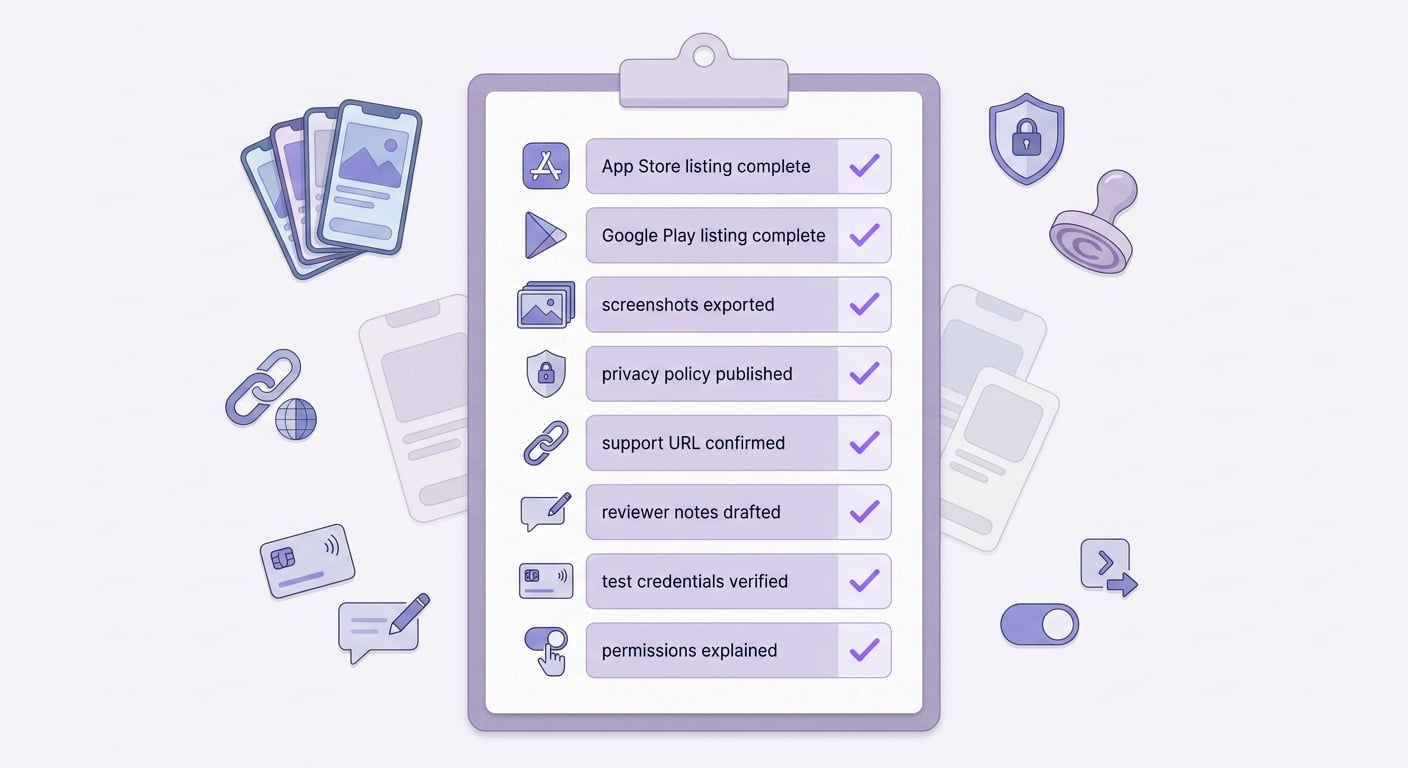
A clean checklist block summarizing the founder's final pre-submission items: app store listing fields complete, google play listing fields complete, screenshots exported, privacy policy published, support URL confirmed, reviewer notes drafted, test credentials verified, permissions explained, and compliance declarations reviewed.
The practical gains were confidence, completeness, and fewer avoidable gaps.
- Maya moved from scattered prep work to one launch checklist tied to App Store and Google Play requirements.
- Missing items surfaced earlier, including policy links, reviewer notes, and screenshot inconsistencies.
- The final week became easier to schedule because launch prep was a bounded task, not a foggy background problem.
- She kept ownership of the facts being submitted instead of delegating sensitive policy answers to a third party.
One useful way to frame the outcome is this: Froxi did not do the submission for her. It made the hidden work visible sooner, which is often enough to lower stress and improve execution.
The Future of App Publishing: Where AI Agents Are Taking It reframes the same problem with a slightly different lens - useful before you finalize.
Risks, failure modes, and tradeoffs founders should plan for
This is the part many launch stories skip. A checklist helps, but it does not remove the messy parts of publishing.
| Failure mode | Why it happens | Mitigation |
|---|---|---|
| Inaccurate privacy disclosures | Founders answer based on assumptions, not actual data flows | Verify against analytics, auth, payments, and SDK behavior |
| Broken support or policy links | Links were drafted quickly or changed late | Test all public URLs on desktop and mobile before submission |
| Screenshots out of date | UI changed after asset export | Lock screenshots late in the release cycle and recheck before upload |
| Bad reviewer credentials | Test account setup was incomplete or undocumented | Create and test reviewer access separately from your own account |
| Overstated store copy | Marketing language gets ahead of shipped functionality | Match claims to features live in the submitted build |
| Platform-specific rejection surprises | Apple and Google interpret issues differently | Review each platform's requirements separately |
There is also a coordination cost. If your privacy policy is still being edited, your support page is unfinished, or onboarding changes at the last minute, your submission assets may need another revision loop. For solo founders, that often means a few extra hours or pushing submission by a day or two.
One thing worth noting: AI assistance is useful for structure and gap detection, but it should not be the final source of truth for compliance. Founders still need to verify data collection claims, account deletion flows, subscription behavior, and any regulated content or permissions.
Lessons for indie developers publishing without an agency
A few lessons from Maya's launch are transferable:
Start launch prep before the build feels fully done
Privacy answers, permissions, and account flows often affect screenshots, listing copy, and reviewer instructions. Waiting until the end increases revision work.
Treat App Store Connect and Google Play Console as separate systems
They overlap on basics, but they do not ask the same questions in the same way. Assuming they are interchangeable creates avoidable errors.
Use AI for structure, not authority
It can help organize requirements and spot missing items, but founders should keep ownership of facts like data collection, deletion flows, subscription access, and reviewer credentials.
Budget real time for the non-code work
Even a simple app can require multiple sessions to gather assets, verify links, write copy, and run final checks. If you are working solo, that work competes directly with bug fixes and release prep.
The practical takeaway is that launch prep is operations work. If you plan for that early, the submission process usually becomes more manageable, even if it is never completely frictionless.
FAQ
Can a solo founder publish to the App Store and Google Play without an agency?
What usually delays app store submission the most?
Is App Store Connect the same as Google Play Console?
What should be in an app launch checklist?
Can AI guarantee app approval?
FAQ
### What problem did the solo founder face after finishing the app build? The founder was no longer blocked by development, but by app publishing tasks like store metadata, screenshots, privacy policy links, reviewer notes, and compliance questions in App Store Connect and Google Play Console.How did Froxi help with mobile app launch preparation?
Froxi acted as an AI app publishing assistant by turning scattered notes and assets into a structured app launch checklist, surfacing missing information early, and separating shared tasks from Apple-specific and Google-specific submission steps.
Can a solo founder publish an app without hiring an agency?
Yes. The article shows that a solo founder can prepare an app store submission without an agency if they have a stable build, required links, store access, and a clear checklist to manage listing assets, compliance details, and reviewer information.
What items usually need to be prepared for App Store and Google Play submission?
Common items include the app name, descriptions, screenshots, privacy policy URL, support URL, categories, release notes, reviewer notes, content declarations, and answers about data handling, permissions, and age suitability.
How long does app submission preparation usually take for a solo founder?
The article suggests it often takes multiple focused sessions across 2 to 5 days, depending on how complete the screenshots, policy pages, onboarding flow, and compliance details already are.
Does Froxi guarantee App Store or Google Play approval?
No. The article states that Froxi supports submission preparation, requirement checks, and gap detection, but it does not guarantee approval, faster growth, or automatic compliance.


