
A two-week mobile app release delay rarely costs only two weeks. For a startup, it can delay beta feedback, distort acquisition tests, slow product decisions, and keep the team spending runway before the market has seen the build. This guide gives you a practical way to estimate that cost and tighten the next App Store or Google Play release path without pretending release work is frictionless.
Should You Publish Your App Yourself or Hire Someone? goes deeper on the ideas above and adds concrete next steps.
Why Can a Two-Week App Release Delay Cost More Than Two Weeks?
A release delay compounds because several startup workflows depend on the same live build. The table below is illustrative, not a universal benchmark. Use it to spot where delay spreads, then replace the assumptions with your own numbers.
| Release-dependent workflow | If the build ships on time | If the build is delayed two weeks | Practical impact |
|---|---|---|---|
| Beta feedback | Testers react to the intended release candidate | Feedback arrives later or applies to an older build | Product decisions may rely on stale evidence |
| Store review preparation | Metadata, review notes, screenshots, and privacy labels are finalized together | Assets drift as the product changes | More coordination and QA work before approval |
| Staged rollout | A small user group sees the build before broad rollout | Rollout shifts into the next sprint or campaign window | Bugs and activation issues surface later |
| Paid acquisition tests | Campaigns point to the current onboarding and paywall | Campaigns may hit the wrong flow or be paused | CAC, conversion, and activation data become harder to trust |
| Runway burn | Team spend supports active market learning | Payroll continues while learning is deferred | The startup pays before getting the feedback loop it expected |
What this means: the cost is not only the calendar slip. The bigger issue is that release timing changes the quality of the data you collect. CAC, activation, crash rate, conversion, and retention signals are less useful when the campaign or test lands on the wrong build.
The business impact depends on team size, burn rate, QA maturity, and launch plan. A two-person founder team may feel the pain as lost focus and delayed learning. A larger team may see measurable rework across product, engineering, QA, support, and growth.
When you move from outline to execution, We Analyzed App Launch Delays: Why Mobile Apps Don’t Go Live on Time helps close common gaps teams hit here.
How Much Does a Slow App Release Really Cost?
Think of slow releases as a cost model, not just a project management annoyance. The goal is to estimate what the delay consumed and what decision it postponed.
You do not need a perfect finance model. You need a useful operating estimate that helps you decide whether publishing, QA, or release management deserves more attention.
Start with these inputs:
- Missed App Store or Google Play availability date
- Actual availability date
- Average daily cost of people involved in the release
- Planned acquisition or beta testing spend
- Product decision the release was meant to inform
- Rework caused by the delay
Use this model:
| Cost category | How to estimate it | Example input |
|---|---|---|
| Direct burn during delay | Daily release-related team cost x delayed days | Product, engineering, QA, design, support |
| Deferred learning | Value of the decision that could not be made | Onboarding, paywall, pricing, retention fix |
| Missed acquisition value | Paused spend or unreliable campaign data | Paid tests, influencer launch, email push |
| Rework | Extra QA, screenshot updates, branch fixes, release notes | Hours x blended hourly cost |
| Opportunity window | Time-sensitive launch or investor milestone impact | Demo day, board update, seasonal campaign |
A practical formula:
Estimated delay cost = direct burn + deferred learning cost + missed acquisition value + rework cost + opportunity window cost
Keep the inputs conservative. If you are not sure how to price deferred learning, ask what the team would have done differently with the data. A release that informs next sprint priorities has a clearer cost than a release with no decision attached.
Reports on mobile release inefficiency, such as QAI's analysis of inefficient mobile releases, point to the same pattern: release friction creates waste beyond the engineering ticket itself. It affects QA loops, coordination, maintenance, and the speed at which teams can react.
Before you accept the estimate, sanity-check it against the next product decision. Was the delayed build supposed to test onboarding copy, account creation, paywall placement, notification timing, pricing, crash fixes, or early retention? If the delayed build did not connect to a real decision, the issue may be prioritization as much as publishing.
A complementary angle worth comparing lives in How Automated Publishing Tools Cut Time to Launch.
A Step-by-Step Method for Measuring One Delayed Release
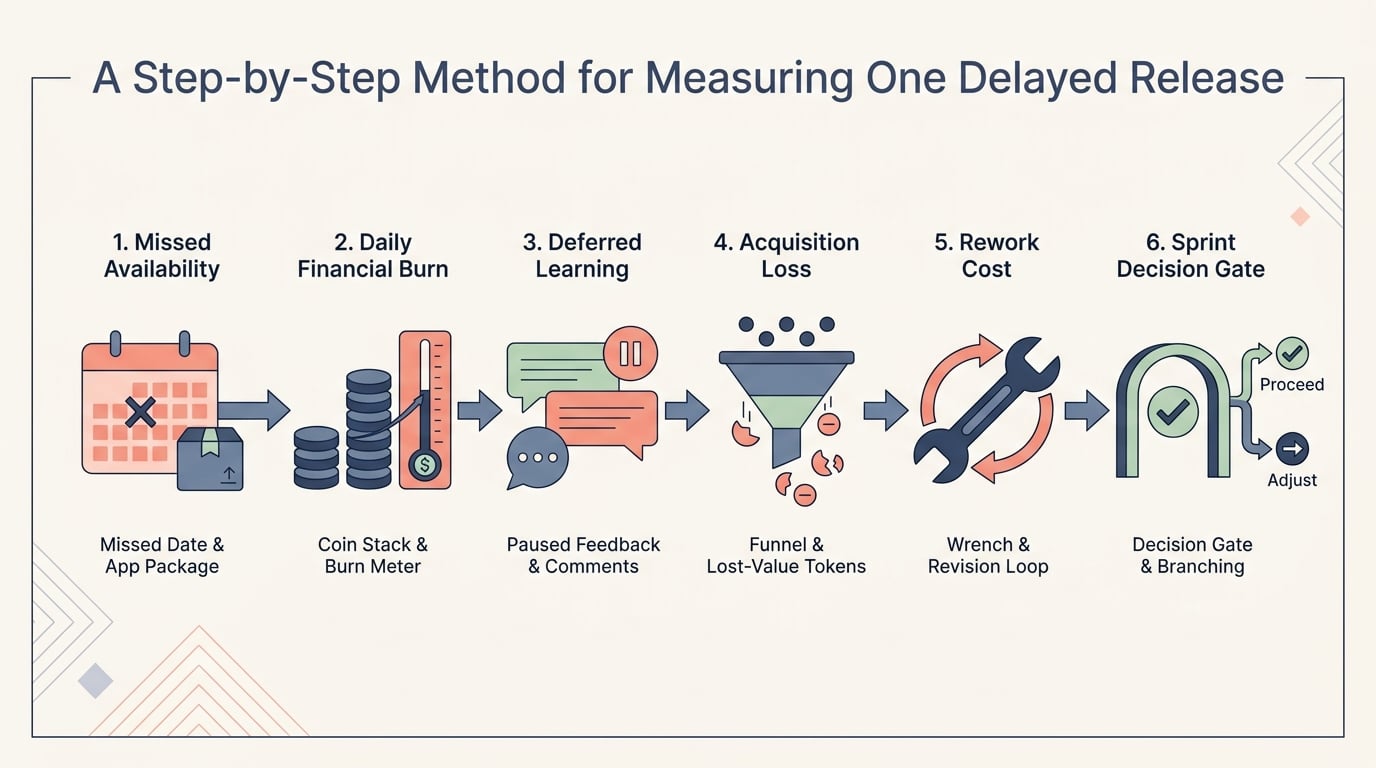
A left-to-right process diagram for calculating a delayed mobile app release: mark the missed App Store or Google Play availability date, add daily burn, add deferred learning, add missed acquisition value, add rework, then validate against the next sprint decision.
Use one real release as your starting point. Do not try to average every launch yet. A single delayed App Store or Google Play submission can show where the release system is leaking time.
Process snapshot:
Missed availability date -> daily burn -> deferred learning -> missed acquisition value -> rework -> next sprint decision
Mark the intended release date
Write down the date the build was supposed to be available to users, not only the date it was submitted. Founders often count submission as "done", while users and campaigns depend on actual availability.
Record the actual availability date
Count the calendar days between intended availability and real availability. If review rejection, metadata fixes, privacy labels, screenshots, or delayed rollout caused separate slips, note each one.
Add daily release-related burn
Include the people still involved because the release is unresolved. This may include engineering, product, QA, design, support, growth, and the founder. A blended daily estimate is usually enough for a decision.
Add deferred learning
Identify the experiment or product question that could not start. If the release contained a new signup flow, the cost is not only engineering time. It is also the delay in knowing whether activation improved.
Add missed or distorted acquisition value
If campaigns were paused, count the planned spend that could not run. If campaigns ran against an old build, mark the results as less reliable. This prevents the team from treating noisy data as product truth.
Add rework caused by waiting
Count the extra QA passes, release note updates, screenshot changes, branch merges, store metadata edits, and support prep. These are common app startup costs that are easy to ignore because they feel like normal launch work.
Validate the estimate against a decision
Ask whether the calculated cost is high enough to justify process changes. If a two-week delay costs more than a month of better release tooling, publishing support, or release management, the investment is easier to defend.
The practical takeaway is simple: the estimate only matters if it changes how you operate. If the same blocker appears twice, make it part of your release checklist and assign an owner.
For tradeoffs, checklists, and edge cases, Web App or Mobile App? The Real Tradeoffs Founders Face in 2026 rounds out this section.
Common Mistakes That Make Startup Release Delays More Expensive
Release delays become more expensive when teams keep acting as if the original timeline still exists. The damage is usually hidden inside messy data, extra QA, and confused ownership.
Common patterns include:
- Launching paid campaigns before the correct build is live
- Treating beta feedback from an old build as current product evidence
- Submitting with incomplete privacy labels, content ratings, or demo access
- Allowing every stakeholder to change store assets until submission day
- Skipping staged rollout because the team feels behind
- Adding new features to a release branch that should already be frozen
One thing worth noting: low startup costs do not protect you from release waste. Even a lean team can burn meaningful runway if a critical mobile release blocks learning for two weeks.
Late engineering changes are especially expensive. Merge conflicts become more likely, QA has to retest approved flows, and store metadata can drift away from the submitted build. The team may feel productive, but release velocity slows because the "almost done" build keeps expanding.
The prevention step is straightforward but not effortless: freeze the release branch, define a hotfix policy, and move unrelated changes into the next release train. Late changes should need a clear reason, such as a blocking crash, compliance issue, payment failure, or severe user experience problem.
This tradeoff matters. A hotfix policy can feel rigid in a small team, especially when founders want to squeeze in one more improvement. But without a threshold, every delayed release becomes a magnet for extra work.
What Should Be on a Startup App Release Checklist?
Release velocity is not about rushing every build into production. It is about reducing avoidable waiting so the team can learn from real users sooner.
Mobile app timelines are already long enough. Development guides from firms such as Netguru and runIT show that planning, development, QA, and launch preparation all carry meaningful effort. The last mile should not become a recurring surprise.
Use this checklist before submission day, not during review:
- Confirm the exact release candidate version.
- Verify build stability through TestFlight or Google Play internal testing.
- Review crash-free status and fix known blocking issues.
- Confirm screenshots match the submitted build.
- Finalize app name, subtitle, description, keywords, and release notes.
- Verify privacy labels, data safety information, content ratings, and platform declarations.
- Add review notes, demo account credentials, test instructions, and required access details.
- Schedule staged rollout timing and define rollback or pause criteria.
- Align campaign launch timing with real store availability.
- Prepare support coverage for the first user wave.
- Set up analytics dashboards for activation, conversion, crashes, retention, and revenue.
A useful release readiness block should answer four questions:
| Question | What good looks like | Ongoing effort |
|---|---|---|
| Can the store review team test the app? | Demo account, clear notes, required permissions, stable build | Update credentials and notes every release |
| Can users understand the update? | Accurate screenshots, metadata, release notes, onboarding | Recheck assets after product changes |
| Can the startup learn after launch? | Analytics, crash monitoring, campaign timing, staged rollout plan | Maintain dashboards and review them daily after launch |
| Can the team react safely? | Rollback, pause criteria, support owner, escalation path | Assign ownership before release week |
The operational burden is real. Checklists only work if someone maintains them, staged rollout criteria are agreed before launch pressure hits, and analytics dashboards are trusted enough to guide decisions. Expect this to take a few focused hours per release for a small team, and more when privacy labels, subscriptions, payments, or regulated data are involved.
If you use over-the-air updates for parts of your mobile app, be clear about what can and cannot bypass store review. Research and tool comparisons such as Appycodes on OTA update options can help teams understand latency tradeoffs for compatible JavaScript or asset changes. Native changes, permissions, store metadata, payments, and policy-sensitive updates still require careful release planning and may need normal store review.
The practical takeaway: a checklist is not bureaucracy if it protects the learning cycle. It is a small operating system for faster evidence, but it needs ownership and upkeep.
When to Get Publishing Help
Manual publishing can work well when the team has clear ownership, enough store experience, and time to prepare assets carefully. It becomes risky when every submission depends on last-minute screenshots, unclear privacy declarations, missing demo accounts, or review notes written under pressure.
If you are deciding whether to publish the app yourself or hire support, treat it as an operational question rather than a prestige question. Outside help can reduce avoidable coordination, but only when the build is stable, QA standards are clear, store accounts are ready, and the team responds quickly to open questions.
Froxi can help organize the publishing details that often slow App Store and Google Play launches. That does not replace product validation, QA discipline, or a clear launch plan. It can, however, reduce the coordination burden when the release inputs are ready and ownership is clear.


