
Choosing between a web app and a mobile app is rarely about what is easier to build. In 2026, the better question is which surface helps you learn faster, retain users better, and monetize without creating operational drag you cannot afford yet. This guide ranks common launch paths by fit, then gives you a practical method to choose based on distribution, product loop, and realistic iteration speed.
Top 10 Mobile App Development Tools You Need in 2026 goes deeper on the ideas above and adds concrete next steps.
What should founders compare first when choosing web vs mobile?

A compact comparison table showing web-first, native mobile-first, web MVP then mobile, and mobile plus web companion across acquisition friction, activation speed, retention loops, publishing certainty, and monetization fit for founders deciding in 2026.
The fastest way to stop debating opinions is to evaluate web vs mobile through five lenses that actually change outcomes: acquisition friction, activation speed, retention loops, publishing certainty, and monetization fit. Both Fora Soft and GitNexa make the same core point: the right choice is strategic, not based on developer comfort or trends.
The table below is a planning grid, not a universal truth. It reflects common founder tradeoffs in 2026, especially around app store gatekeeping, web linkability, PWA gaps, and the practical differences in retention and monetization.
| Launch path (ranked by fit later) | Acquisition friction | Activation speed | Retention loops | Publishing certainty | Monetization fit |
|---|---|---|---|---|---|
| Web-first (responsive web app) | Low (links, SEO, sharing) | High (instant open) | Medium (email, content, in-app hooks) | High (deploy anytime) | High for direct billing; avoids store fee overhead |
| Native mobile-first | Higher (store visit, install) | Medium (install and permissions) | High (push, widgets, device hooks) | Medium (review, release coordination) | Medium (store fees and rules can shape pricing) |
| Web MVP then mobile | Low early, higher later | High early | Medium early, higher later | High early, medium later | High early, medium later depending on store path |
| Mobile plus web companion | Medium (two surfaces to market) | Medium | High (mobile habits plus web re-engagement) | Medium (app review plus web deploys) | High if you split: web for purchase, mobile for engagement |
Explanation: each column names where teams commonly lose time or momentum: getting discovered, reaching first value, bringing users back, shipping changes reliably, and charging money sustainably.
Interpretation: web usually reduces first-touch friction and makes iteration cheaper. Mobile can reduce re-engagement friction after install, but only if users opt in and your notification or habit loop is actually good.
Reader impact: a mismatched surface can stall learning. In my experience, teams often lose somewhere between a few days and a few weeks (often 1-6 weeks) to rework onboarding, retool analytics, adjust release processes, and re-message the product. The exact cost varies with team size, device matrix, app review variability, and how many experiments you need to run.
When you move from outline to execution, Froxi AI vs Agencies: Which Gives Founders More Control? helps close common gaps teams hit here.
Rank the launch paths by fit, not by build speed
This is an editorial ranking by fit for common founder situations, not a universal scoring system. The goal is to choose a launch path that matches distribution reality and the product loop, instead of picking what ships fastest in week one.
Here are the four launch paths founders debate most, ranked by how reliably they produce learning and momentum in 2026:
Web-first (responsive web app)
Best when acquisition is link-driven (SEO, community, partnerships, email) and you need to iterate onboarding, positioning, and pricing quickly.
Web MVP then mobile
Best when you expect mobile to win long-term retention, but you are still validating the core job-to-be-done and want to delay app store operations until the loop is proven.
Native mobile-first
Best when product value is tightly coupled to device capabilities (push, camera, sensors, offline, background tasks) and the primary use case is inherently mobile.
Mobile plus web companion
Best when you need mobile for habit formation and a web surface for administration, collaboration, content, or purchase flows. Highest coordination cost, but often a strong end state for products that last.
The practical backdrop: distribution and update cadence are still meaningfully different. Web and many PWA setups can ship changes quickly, while native apps add store review timing, release coordination, and more QA overhead.
On the flip side, mobile can unlock stronger re-engagement mechanics like push notifications and deeper device integration. That advantage is real in many categories, but it is not automatic: opt-in rates, permission prompts, and notification quality are common failure points.
Practical takeaway
Rank your options by the risk you are trying to retire first: acquisition risk, activation risk, retention risk, or monetization risk. Once you name the biggest risk, the default surface often becomes obvious, and the rest becomes sequencing and timing.
A complementary angle worth comparing lives in The True Cost of Slow App Releases for Startups.
How do founders decide between web app and mobile app?
Category: Collaboration
Statistic: 44%
Label: Fewer back-and-forth cycles
Context: With shared ownership
Category: Cadence
Statistic: <1 day
Label: Ship updates without review
Context: If weekly learning speed matters, web-first usually wins; mobile-first fits when native capabilities justify release gat
Category: Process
Statistic: 11
Label: Critical prep steps
Context: Before store submission
A good decision method is one you can explain to your team in two minutes and defend six months later. In practice, you are choosing where you will accept friction: before first value (web often wins) or after first value (mobile often wins).
Use this timeline to choose a default, then justify exceptions:
Start at the first touchpoint
If the first touchpoint is a link (search result, shared URL, newsletter, community post), default to web-first. If the first touchpoint is "search in the App Store" or "scan a QR in a physical environment," mobile-first becomes more plausible.
Map the activation path to first value
Count the steps from click to value. If you can deliver value before login, web is a strong fit. If value requires permissions (camera, location, Bluetooth) or background behavior, mobile has an advantage, but only if permission acceptance rates are healthy.
Name the retention mechanism (and measure it)
If retention depends on reminders, push, widgets, or tight system integration, mobile-first can be worth the cost. If retention depends on content, collaboration, or recurring tasks that happen at a desk, web can outperform.
Operational detail that makes this real: define 3-5 activation events in GA4 or Mixpanel (for example
sign_up,complete_onboarding,create_first_item,invite_teammate,subscribe) and track:- Activation rate (for example,
% who hit create_first_item within 24 hours) - D7 retention (or D30 for slower B2B cycles)
- Push opt-in rate if you go mobile (treat opt-in as a constraint, set a target range, and test permission timing and copy)
- Activation rate (for example,
Decide your release cadence tolerance
If you expect frequent onboarding and pricing experiments, web or PWA reduces iteration cost. If you can ship in planned batches and your value is device-native, mobile becomes more realistic.
Time expectation: a web change can go live same-day if you already have clean CI/CD, feature flags, and analytics wired. A mobile change can also move quickly, but many teams see a multi-day loop once you include QA across devices and OS versions, app review variability, staged rollouts, and time to verify telemetry after release. For small teams, 3-10 calendar days per meaningful release is a common observed range, not a promise.
Choose monetization constraints early
If you want maximum pricing flexibility and direct billing, web-first is simpler. If you monetize through in-app purchases, subscriptions, or app ecosystem norms, mobile can be a better match, but you are accepting store rules, fees, and occasional policy ambiguity as constraints.
One thing worth noting: web-first and PWAs have real downsides. Heavy interactions can hit a performance ceiling, some APIs behave inconsistently across browsers, background execution is limited, and iOS support for web notifications and install behavior still has caveats depending on OS and user settings. You also still pay operationally for instrumentation and experimentation on web (analytics QA, cookie consent, attribution, A/B test integrity), which is work many teams underestimate.
Practical takeaway
Write a one-page surface decision memo with your default surface, your retention loop, and your expected release cadence for the first 90 days. Add what would change your mind (for example, "if D7 retention is below X without reminders, we invest in mobile re-engagement").
For tradeoffs, checklists, and edge cases, Publishing Apps Built With Flutter, React Native, or Native rounds out this section.
What mistakes do founders make when choosing web or mobile?
Most platform mistakes are not fatal, but they create drag at the exact moment you need speed and clarity. The goal is to spot hidden costs early, especially operational costs that do not show up in a sprint estimate.
| Mistake | Likely consequence | Practical mitigation |
|---|---|---|
| Picking based on build speed instead of learning speed | You ship fast but cannot iterate (review delays, QA bottlenecks, slow experiments) | Choose the surface that lets you run the next 5 experiments with the least coordination |
| Ignoring distribution reality | Your best channel cannot reliably drive installs or opens | Start where the click happens (link vs store) and prove acquisition before expanding surfaces |
| Assuming push or notifications will "fix retention" | Low opt-in rates, user fatigue, churn from noisy messaging | Treat opt-in as a constraint; test permission timing and send only high intent triggers |
| Underestimating store rules and review risk | Rejections or policy changes block a release at a bad time | Build schedule slack, read guidelines early, and keep a rollback plan and staged rollout |
| Underestimating QA and device matrix | Bugs on specific devices or OS versions, slower release cadence | Define a minimum supported set and budget time for regression testing every release |
Mistaking build speed for launch risk
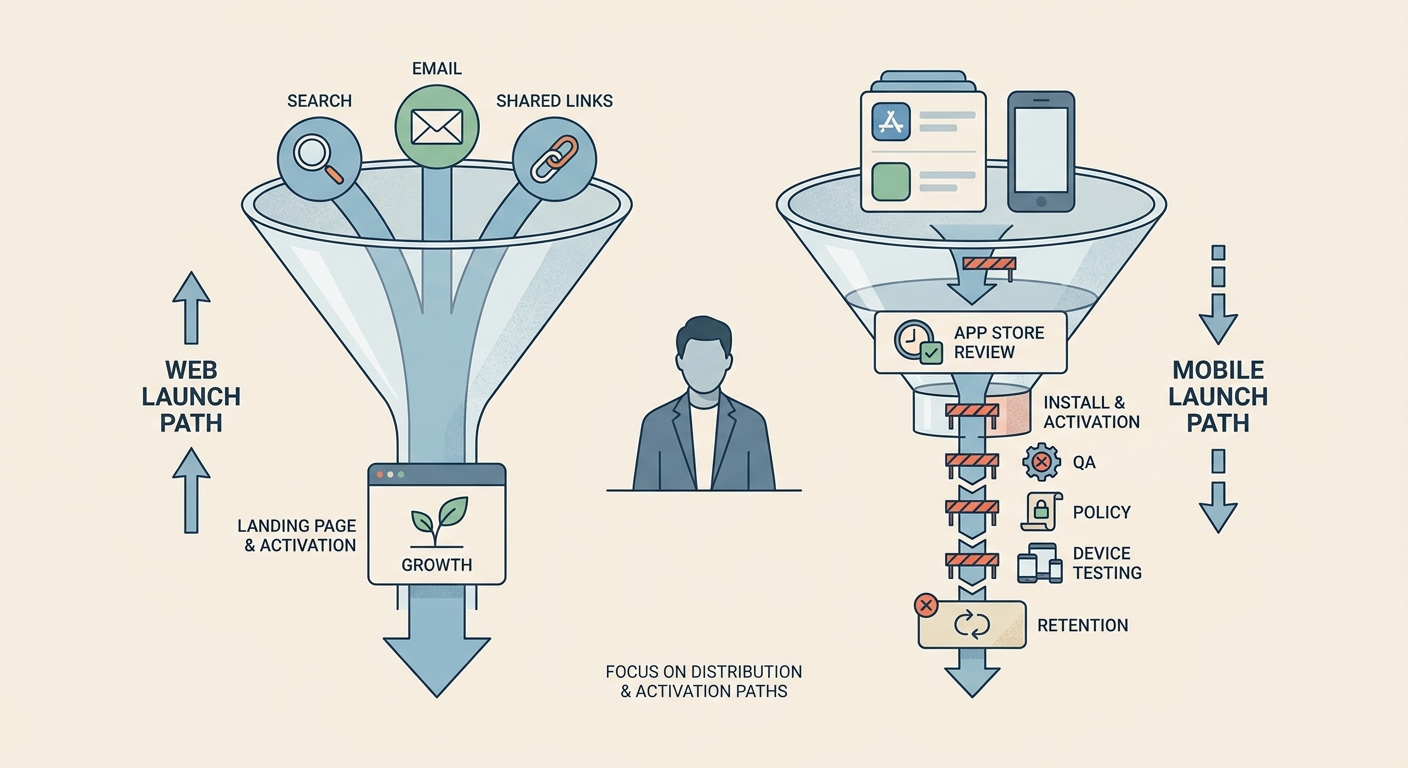
An editorial illustration of a founder reviewing a launch funnel where web traffic arrives from search, email, and shared links, contrasted with a mobile path that starts at the App Store and Google Play before activation.
A faster first build is not the same as a safer launch. Mobile can feel straightforward in week one, then slow down when iteration depends on app review, coordinated releases, and device-specific testing. Web often lets you change messaging, onboarding, pricing, and checkout in hours, which matters when you are still validating the funnel.
Pressure-test this with a real scenario: if you need to tweak onboarding copy, pricing, and a key permission prompt after 10 user interviews, web-first often supports a 2-5 day iteration rhythm. Mobile-first can too, but it depends heavily on your QA capacity, release coordination, and review timing.
Overlooking store rules, QA, and ongoing operational burden
App review outcomes can vary, especially if your category is sensitive (payments, user-generated content, regulated spaces). Plan schedule slack for rejection and resubmission, not just the happy path.
Device QA is real work. If you rely on camera, location, offline mode, Bluetooth, background tasks, or notifications, assume a test matrix across multiple devices and OS versions, plus time for inconsistent behavior.
Notifications are not a one-time feature. Plan ongoing time for copy, segmentation, timing, and measurement, and accept that the upside depends on opt-in and relevance.
A simple default that holds up in real teams
If you are uncertain, a reliable default is: start web-first when distribution is link-driven and the product loop is still forming, then add mobile once you can name the retention mechanism that needs device-native hooks.
The implication: sequencing is often the real decision. You can aim for mobile long-term without taking on store operations and mobile QA before you have a stable onboarding funnel and a clear reason push or device integration will materially change retention.


