
If your first launch is not getting discovered, it is often not the product. It is your app name, subtitle, and keywords failing to match how people search and how the stores interpret metadata. You are also working with tight limits, so every word has to earn its place. The goal is day-one metadata you can ship without creating avoidable rework when stakeholders, legal, or localization constraints show up.
App Store Optimization in 2026: What Actually Moves the Needle goes deeper on the ideas above and adds concrete next steps.
How do app name, subtitle, and keywords affect first launch?
Category: Outcomes
Statistic: 38%
Label: First-pass approval rate
Context: When metadata is complete upfront
Category: App Store
Statistic: 30 + 30 + 100 chars
Label: iOS metadata indexing stack
Context: Title + subtitle + keyword field shape early search discovery
Category: Google Play
Statistic: 30 + 80 chars
Label: Google Play emphasis fields
Context: Title + short description carry the first-launch message and keywords
Here is the proof artifact: a field map showing where each store gives you leverage at launch. It is not a promise of ranking. It is a practical way to reduce unforced errors by giving each field a specific job.
How to read it: Apple gives you more separated slots (including a dedicated keyword field), while Google Play relies more on user-facing copy. The implication is that copying one draft across stores often leaves performance on the table.
What to do next: treat this as a launch checklist and assign ownership per field, then run small edits after you have baseline data. Impact to target: improve conversion through the funnel (Impressions - Product Page Views - Installs) and attribute changes by editing one field at a time with a 3-7 day measurement window (longer if volume is low).
Realistic timing: 2-4 hours for a first draft, 1-2 days for internal review (brand, legal, exec), then 3-7 days for stores to re-index and for enough traffic to see directional signals.
| Store | Highest leverage fields at launch | Practical implication |
|---|---|---|
| App Store | Name + Subtitle + Keyword field | Assign each slot a job: brand, outcome, then intent coverage |
| Google Play | Title + Short description | Write for humans first, then fold in 1-2 high-intent phrases |
How to use this field map in practice:
- Draft per store, then do a final consistency pass (promise and pricing language should align even if wording differs).
- Change one field at a time when iterating so you can attribute lifts or drops.
- Expect ambiguity at low volume; if you only have a few dozen impressions a day, treat early shifts as signals, not conclusions.
When you move from outline to execution, ASO Without Guessing: A Practical Keyword Workflow for Indie Founders helps close common gaps teams hit here.
Why app name, subtitle, and keywords matter before first launch
A launch name that is generic, hard to spell, or overloaded with jargon is harder to search and harder to remember. If users cannot re-type it after hearing it once, organic discovery leaks and paid traffic can get more expensive due to weaker brand recall. How much this matters depends on your channel mix and baseline brand demand.
Your subtitle or short description is the first readable proof of value. If the promise is vague, you can still earn impressions, but installs may lag because the listing does not match the intent that triggered the search.
One thing worth noting: first-launch metadata is slower to fix than in-app copy. Renames can disrupt attribution and search history, confuse existing users, and create messy review narratives. A common failure mode is changing the name or primary keywords too often and taking a short-term ranking hit while the store re-learns relevance, especially in competitive categories.
A complementary angle worth comparing lives in Best App Store Optimization Tools Ranked.
What should you prepare before launch?
- 3-5 app name candidates with internal approval (and ideally a legal or trademark screen)
- A one-line positioning statement you can compress into store language
- A shortlist of 5-10 competitors and category leaders to sanity-check language
- Access to App Store Connect and Google Play Console (optional ASO tooling helps, but it is not required)
How to choose app name, subtitle, and keywords for first launch
1) Lock the app name before you optimize around it
Stress test the name in real usage
Say it out loud, text it to 5-10 people, and ask them to search it cold. Budget 30-60 minutes. If they misspell it or cannot guess what it does, discovery and word of mouth may suffer.
Check uniqueness and avoidable risk
Search both stores for close matches, especially category leaders, and scan for obvious trademark conflicts. This is not legal advice, but it can help you avoid collisions that force a rename after you have already built momentum.
Decide how much meaning the name must carry
A descriptive name reduces the burden on your subtitle, but can be harder to protect as a brand. A pure brand name is easier to own, but your subtitle must do more work to signal category and outcome.
2) Write the subtitle or short description as a plain-language promise
On iOS, the subtitle is short and often truncated in some placements, so prioritize clarity. On Google Play, the short description is user-facing and should read naturally; keyword stuffing can reduce trust and conversion.
Aim for one job to be done, not a feature list. Mini example for a habit-tracker: before "Build Better You", after "Habit tracker with reminders". The second version tends to match searches like "habit tracker" and sets expectation faster, but it is less brand-expressive.
3) Build the keyword set from intent, then map it to fields
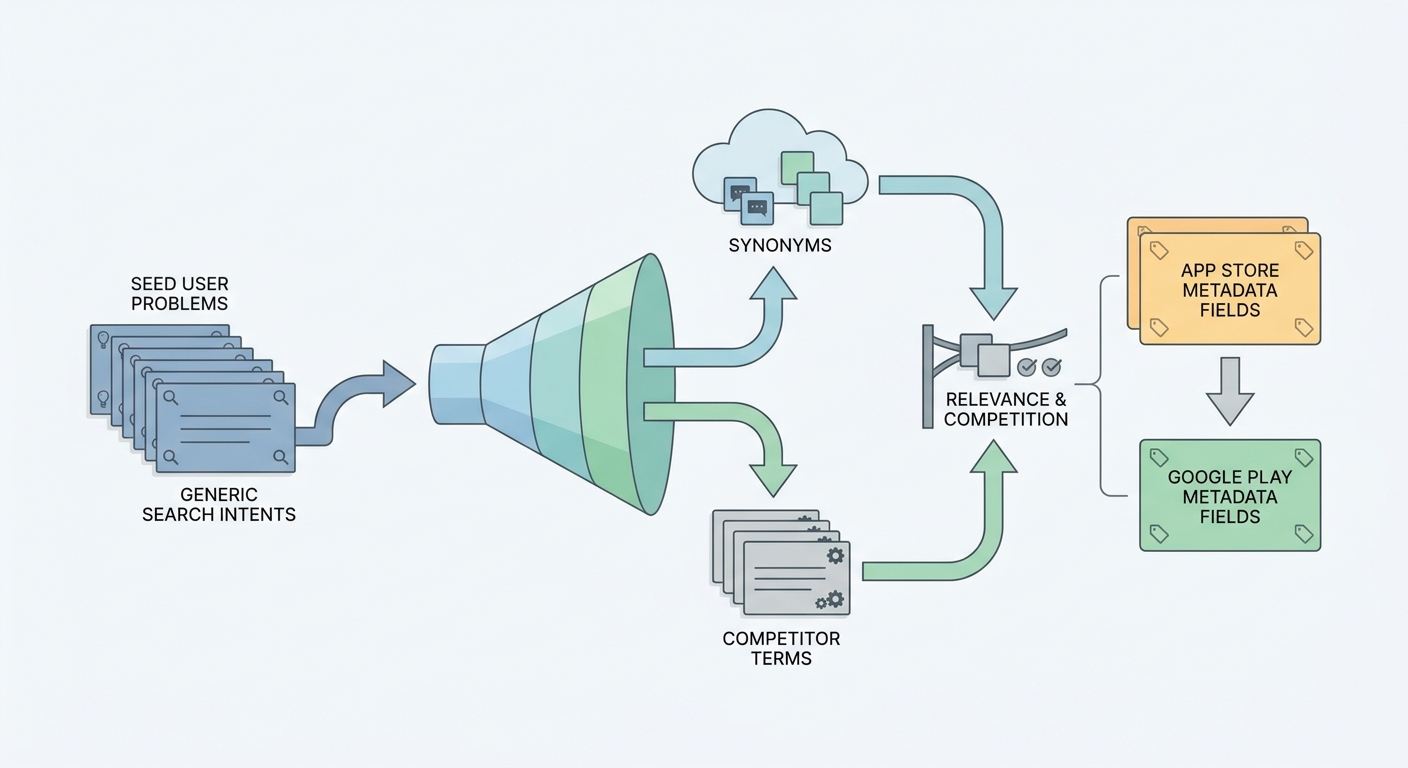
A simple workflow diagram showing the launch keyword process for a new app: start with seed user problems, expand to synonyms and competitor terms, filter for relevance and competition, then map the final set to App Store and Google Play metadata fields.
Start from user intent, not brainstorming. Collect a small set of seed terms, expand with synonyms, and then filter hard for relevance.
Practical workflow (plan 60-120 minutes the first time, longer if approvals are slow):
Seed
List 10-20 phrases users would type when they do not know your brand (for example: habit tracker, habit reminders, routine planner).
Expand
Use competitor listings, search suggestions, and an ASO tool (if you have one) to find variants and long-tail terms. Suggestions are not always high-converting intent, so treat them as inputs, not answers.
Filter and map
Remove terms that are too broad, off-category, misleading, or risky (for example, "free" if you are paywalled). Then assign each term to a specific store slot to avoid wasting characters on repetition.
Dependencies to plan for: localization adds real overhead (translation quality, keyword research per language, and review cycles). If you cannot localize well, it is often better to do one language properly than ship five that are inaccurate or culturally off.
What are the most common first-launch ASO mistakes?
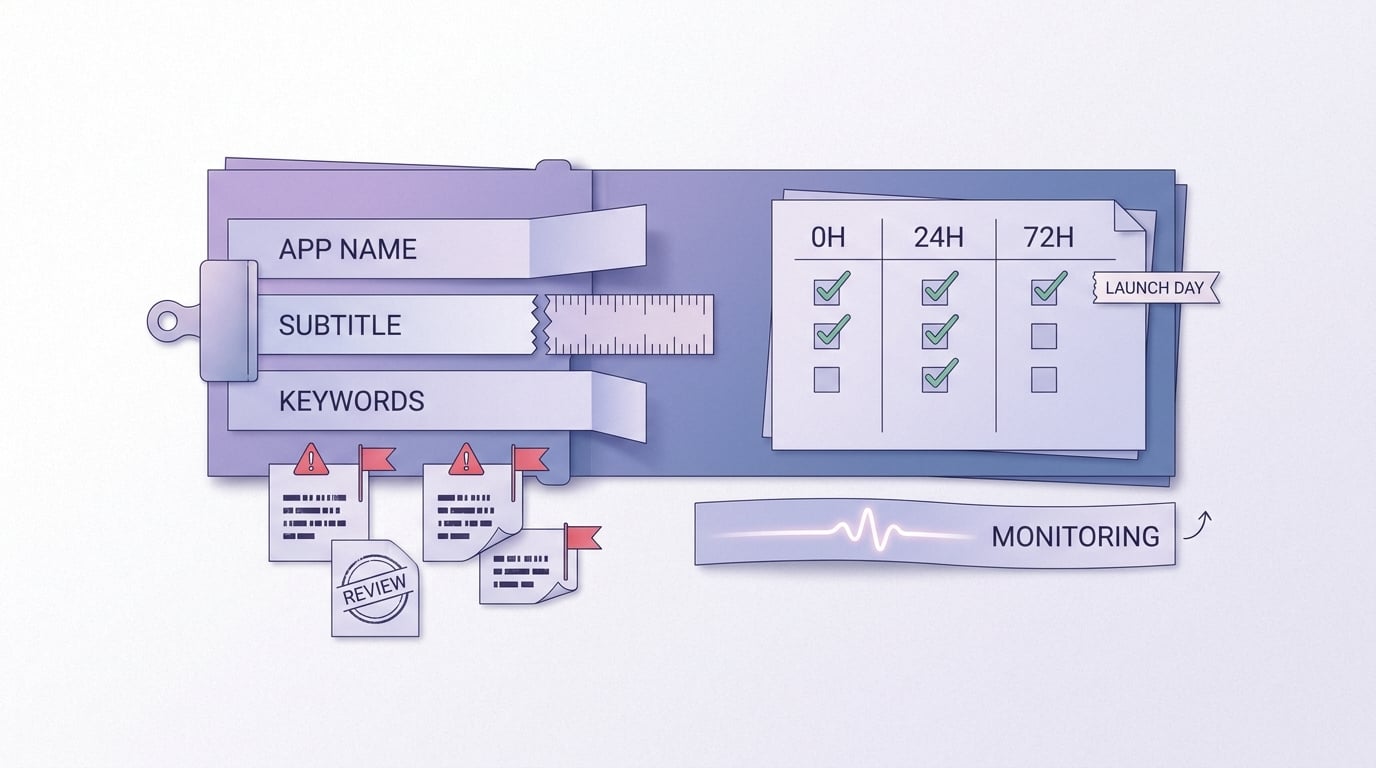
A mobile-friendly checklist block for launch day and the first 72 hours, including metadata preview checks, subtitle truncation checks, keyword repetition review, and early performance monitoring after the app goes live.
Mistake patterns that cost early visibility
- Clever brand name with no search context: If the title is purely brandable, the subtitle must carry meaning, and truncation makes this fragile.
- Repeating the same keyword everywhere: Duplicating "habit tracker" across title, subtitle, and iOS keywords wastes limited space and reduces query coverage.
- Cloning metadata across stores: iOS and Google Play index and display fields differently, so reuse needs adaptation, not copy-paste.
- Mismatched intent (especially "free"): "Free" can lift taps but hurt install CVR and reviews if users hit a paywall.
What to measure in the first 72 hours (and what to change)
Use App Store Connect and Play Console to watch the same basic funnel. Early data can be noisy, especially with low traffic, seasonality, or paid spikes, so treat this as directional unless you have meaningful volume.
| Signal (first 3-7 days) | What it might mean | Next edit to consider |
|---|---|---|
| Impressions up, product page views flat | Weak listing preview or unclear promise | Tighten title/subtitle to be more concrete; reduce jargon |
| Page views up, installs down | Mismatched expectation or pricing shock | Remove misleading terms (like "free"); align screenshots and first lines of description |
| Search terms irrelevant | Keyword coverage too broad | Remove broad terms; add narrower use-case phrases |
| Rankings do not move after an update | Re-indexing lag, high competition, or weak conversion | Wait 3-7 days; avoid frequent churn; adjust one field at a time |
Operational detail that keeps iterations honest (a simple test log you can keep in a spreadsheet):
- Date
- Store
- Field changed (Title, Subtitle/Short description, iOS Keywords)
- Hypothesis
- Baseline window + post window (for example, 7 days before vs 7 days after)
- Metrics: Impressions, Product Page Views, Installs, Install CVR
Launch checklist (fast, practical)
- Preview how title and subtitle render on real devices (check truncation)
- Run a repetition audit across fields (avoid wasting character budget)
- Confirm pricing language is not misleading (especially "free" and trial terms)
- Log your baseline: what changed, when, and why (so later tests are attributable)


