
If your app metrics look healthy but growth still feels stuck, analytics is a common bottleneck. It is not always the root cause - positioning, channel mix, and UX can be just as limiting - but messy instrumentation and the wrong tool can hide churn drivers and turn simple questions into weeks of manual work. This ranked roundup compares 7 mobile app analytics tools for 2026 based on practical fit, setup effort, constraints, and what usually breaks in real teams.
Best 5 App Analytics Tools for Mobile Founders goes deeper on the ideas above and adds concrete next steps.
How we ranked the top 7 mobile app analytics tools in 2026
What we weighed in the 2026 ranking
Category: Reliability
Statistic: 31%
Label: Less launch slip risk
Context: When release prep is standardized
Category: Prevention
Statistic: 5.2x
Label: More issues caught early
Context: Before formal store review
Category: Overview
Statistic: 7 tools
Label: Ranked mobile analytics picks
Context: Single-view comparison of the top shortlist
This list is ranked by day-to-day usefulness for mobile publishing and growth work in 2026, not generic popularity.
- Event tracking depth for installs, signups, purchases, subscriptions, trials, renewals, and refunds
- Cohort retention, funnels, and segmentation that make drop-off diagnosable (not just visible)
- Store and platform coverage that can be reconciled with App Store and Google Play realities
- Operational overhead (instrumentation, QA, governance, taxonomy hygiene)
- Privacy and platform constraints (SKAN limits, consent, identity resolution edge cases)
Why fit matters more than feature count
A solo publisher doing ASO needs different answers than a growth team running paid UA or a product org optimizing onboarding. In practice, the best tools reduce recurring manual reporting across product and marketing, even if they do fewer things overall.
Tradeoffs are real. Deeper tooling often means more setup time, stricter event discipline, and higher cost at scale. Simpler options go live faster, but you can hit ceilings when questions get nuanced (subscription edge cases, cross-device identity, experimentation, exports).
What readers should expect from this list
This roundup is editorially ranked by practical fit for 2026 mobile workflows, not by claiming objective market dominance. Each entry includes best for, strengths, limitations, and the ideal team so you can shortlist quickly with fewer surprises.
When you move from outline to execution, Top 5 App Security Tools for Mobile Developers Ranked helps close common gaps teams hit here.
Early Proof

A compact criteria table comparing the ranking factors for mobile app analytics tools in 2026: event tracking depth, cohort retention, segmentation, App Store and Google Play visibility, setup effort, and team-sharing usefulness.
Benchmark snapshot (what breaks in many audits)
In many audits, teams have plenty of data but low trust and low speed because events, identities, and definitions drift. A quick proof check I use is a schema review plus a 30-minute QA pass on iOS, Android, and one campaign-to-purchase path.
| Common failure mode (often seen) | What you measure to confirm (targets are heuristics) | Business impact if unresolved |
|---|---|---|
| Event names/params inconsistent across platforms | iOS vs Android parity count for top 20 events (aim for 20 of 20 aligned) | Funnels disagree, teams argue, experiments stall |
| Identity is fragile (device vs user vs account) | Duplicate user rate after login merge (watch if consistently above ~5-10%) | Retention and LTV get distorted, especially for subscriptions |
| Dashboards answer vanity metrics | Time-to-answer for 3 questions (aim for under 30 minutes without exports) | Decisions slow down, analytics becomes reporting theater |
| SKAN and privacy constraints misunderstood | Share of paid spend covered by a working SKAN mapping plus cost ingestion | UA looks better or worse than reality, budget gets misallocated |
Explanation: This is not universal, but it is common enough that tool choice should be judged on whether it supports instrumentation discipline and governance, not just dashboards.
Interpretation: The practical goal is consistent events, clear identities, and answers that a second person can reproduce without custom spreadsheets.
Reader impact: Budget real time: 0.5-2 days to write an event spec, then 3-10 working days to implement and QA across iOS and Android (longer with subscriptions, deep links, or multiple paywalls). Results also depend on ownership (who maintains the taxonomy), release cadence, and consent rates, not just the tool.
A complementary angle worth comparing lives in Best App Store Optimization Tools Ranked.
Which mobile app analytics tools are best at a glance?
Quick comparison by best fit
| Rank | Tool | Best for | Lean | Buying signal |
|---|---|---|---|---|
| 1 | Amplitude | product and growth analytics | Product | deep cohorts and segmentation |
| 2 | Mixpanel | funnels and retention clarity | Product | fast, opinionated reporting |
| 3 | Firebase | startup simplicity | All-in-one | lowest setup friction |
| 4 | AppsFlyer | acquisition and ROI reporting | Marketing | attribution-first ops and partner support |
| 5 | Adjust | performance marketing ops | Marketing | campaign hygiene and control |
| 6 | UXCam | UX plus analytics context | Product | session replay tied to events |
| 7 | Flurry | lightweight trend tracking | Reporting | quick dashboards, lighter depth |
How to read the shortlist in under a minute
- Need product events, funnels, and retention? Start with Amplitude or Mixpanel.
- Doing paid UA? You likely need an attribution layer like AppsFlyer or Adjust, but expect SKAN uncertainty and ongoing ops work.
- Small team with limited bandwidth? Choose the lowest-friction option that supports your next 6-12 months of questions so you are not forced into a mid-growth replatform.
Trial 2-3 candidates against one retention question and one monetization question. Expect upfront work (event plan, SDK integration, QA) and some ongoing upkeep, but it can cut down recurring reporting churn and help you avoid overbuying. Sources like App369 and UXCam echo this fit-first approach.
Get the shortlist template
Ranked recommendations: the 7 mobile app analytics tools to consider in 2026
1) Amplitude
- Best for: Teams that need event analytics, funnels, and retention without going fully warehouse-first.
- Strengths: Behavioral segmentation and lifecycle reporting that product and growth can share. Strong once your taxonomy is stable (also reflected in roundups like Amplitude).
- Limitations: Setup discipline matters. Plan 1-2 weeks for event planning, implementation, and QA on a typical app, plus ongoing governance. Costs can rise with event volume and seats.
- Ideal team: Mobile product team shipping weekly, with a clear owner for instrumentation hygiene.
2) Mixpanel
- Best for: Subscription apps and habit apps where retention and churn explain revenue.
- Strengths: Cohorts and funnels are fast to use, which makes lifecycle work repeatable in weekly reviews.
- Limitations: Less marketing and attribution-native than dedicated stacks. Governance is ongoing work as teams add events and rename things.
- Ideal team: Growth or lifecycle team optimizing onboarding, paywalls, and reactivation loops.
3) Firebase Analytics
- Best for: Early-stage apps that need dependable baseline visibility with minimal friction.
- Strengths: Fast instrumentation and strong integration with the broader Firebase ecosystem. Good for event counts and basic funneling (often positioned as a baseline in guides like App369).
- Limitations: Not an attribution replacement. Deeper product analytics can feel constrained without an added layer or exports, which adds analyst time.
- Ideal team: Lean mobile team that needs reliable event capture before investing in a heavier stack.
4) AppsFlyer
- Best for: Teams running meaningful paid UA that need campaign measurement, partner integrations, and attribution operations.
- Strengths: Built for marketing workflows: partner ecosystem, attribution plumbing, deep link support, and reporting that maps to spend decisions.
- Limitations: SKAN and privacy constraints limit certainty, so treat some cuts as directional and reconcile against store-side outcomes. Implementation is usually 3-10 working days including link QA, cost ingestion, and network-specific setup (longer if you have multiple apps, agencies, or messy campaign naming).
- Ideal team: Growth marketing function that manages networks, creatives, and measurement hygiene.
5) Adjust
- Best for: UA teams that need operational control over campaign structure, links, and consistent reporting.
- Strengths: Strong for keeping attribution operations from becoming chaos as spend scales, especially with multiple networks and agencies.
- Limitations: You inherit platform constraints and ongoing maintenance: link QA, network changes, consent requirements, and periodic re-audits when performance shifts. Expect recurring weekly ops time, not a one-time setup.
- Ideal team: Performance marketing team with steady spend, clear campaign governance, and someone accountable for link and naming hygiene.
6) UXCam
- Best for: Teams that need qualitative context (session replay, frustration signals) tied to analytics questions.
- Strengths: Helps explain the why behind drops by showing what users actually did, which is useful for onboarding, forms, and paywalls.
- Limitations: Replay and privacy require careful review (masking, consent, retention). There is added QA overhead to avoid capturing sensitive inputs, and some orgs will require legal review before rollout.
- Ideal team: Product and UX team debugging UX regressions and reducing friction quickly.
7) Flurry
- Best for: Simple dashboards and high-level usage trends when you cannot justify heavier tooling.
- Strengths: Quick to stand up for basic tracking and directional monitoring.
- Limitations: Limited depth for segmentation, governance, and advanced retention work compared to modern product analytics stacks. You may outgrow it once you need cohort nuance or cross-platform consistency.
- Ideal team: Small app that wants baseline reporting and is not yet doing deep lifecycle optimization.
How do you choose the right mobile app analytics tool?
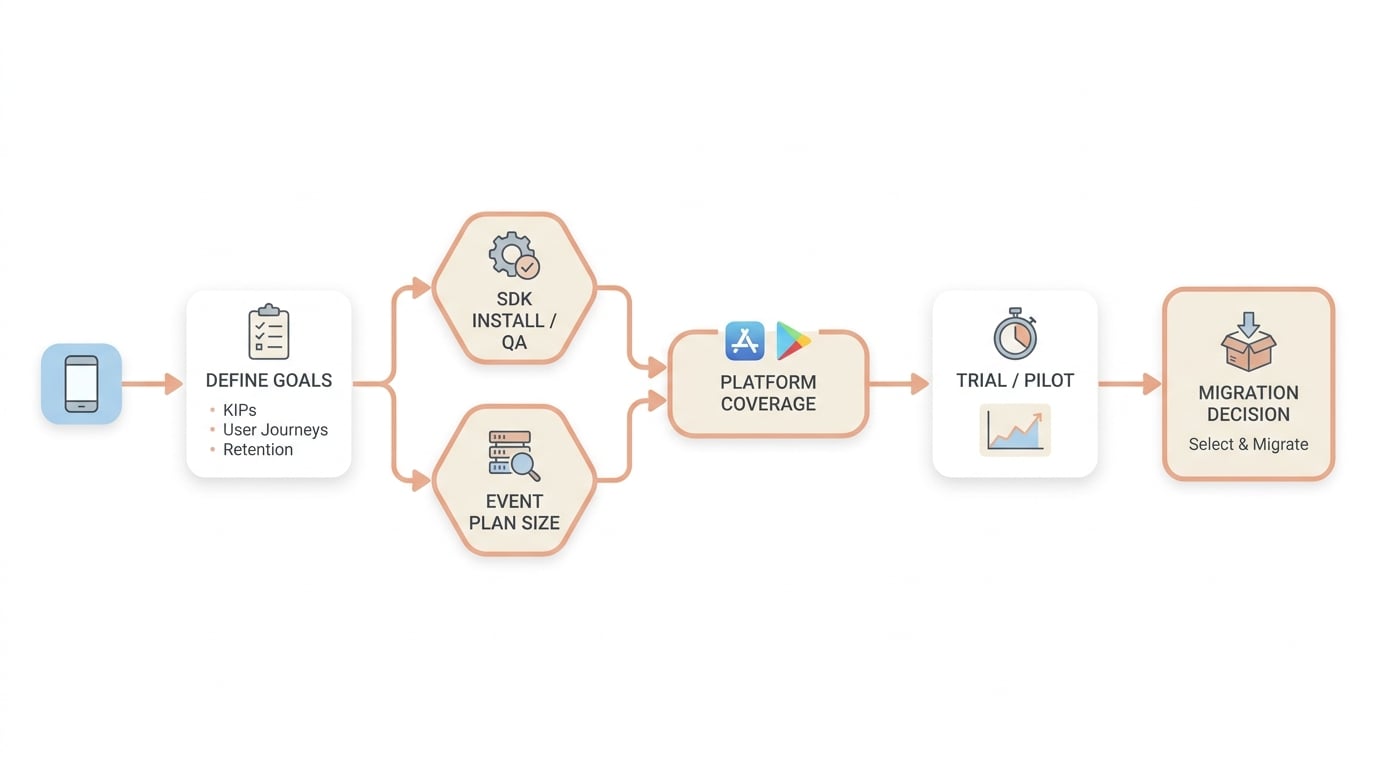
A simple decision flow showing how an app team moves from defining analytics goals to checking SDK setup, platform coverage for App Store and Google Play, and trialing the shortlisted tool before migration.
Match the tool to your app stage
- Early stage: prioritize SDK setup speed and a small event plan (10-20 events). Budget 1-2 weeks to instrument and QA if you want data you can trust.
- Growth stage: look for segmentation, cohorts, and shared dashboards that support weekly experiments. Expect ongoing work to keep event definitions stable as the product changes.
- Established publishers: verify governance (roles, auditability), reliable exports, and consistency across iOS, Android, and both stores. Plan for migration risk and a short dual-run to catch drift.
A minimal event spec and QA checklist (operator version)
| Stage | Event | Must-have parameters (example) |
|---|---|---|
| Paywall shown | paywall_view | paywall_id, variant, source |
| Trial started | trial_start | product_id, price_local, currency, intro_offer |
| Purchase | purchase | product_id, revenue_usd (or local + fx), transaction_id |
| Refund or cancel | refund or cancel | transaction_id, reason (if available) |
Then do one end-to-end QA path per platform: install - attribution/deep link - onboarding - paywall - purchase - open next day. Verify the campaign parameters (where applicable) and that iOS and Android use the same event names and core params.
Check the analytics workflow before you buy
Validate integration and taxonomy
Confirm SDK effort, privacy review needs, and QA time. Make sure product and growth can share one taxonomy without duplicate definitions.
Confirm store and platform coverage
Map App Store and Google Play needs to reality, including subscriptions, refunds, grace periods, and identity edge cases.
Dry run your operating cadence
In a trial, answer two questions end-to-end: retention by cohort and paywall funnel drop-off. If it requires exports and spreadsheets, assume it will stay that way unless you staff for it.
Pilot the simplest tool that answers today’s retention and monetization questions with acceptable ongoing effort, then upgrade only when cohort depth, segmentation, or collaboration becomes the bottleneck. Plan a short dual-run before any full migration, because metric drift and identity changes are common failure points.
Shortlist the right fit


