
Most mobile teams still treat app security like a final gate. In practice, store scrutiny, SDK supply chain issues, and runtime abuse show up as release delays, hotfixes, or support load. The goal is not more alerts - it is the right layers in CI/CD so issues surface early without turning shipping into a weekly fire drill.
| Early proof (what this is) | Interpretation (what it means) | Reader impact (what you should do) |
|---|---|---|
| A rollout benchmark I use with teams: map the main mobile security layers to typical setup time and where they fit in the build-sign-submit flow. | Teams often do better with a small mixed stack than one oversized platform, because each tool tends to be strong in one layer and weaker in others. | Plan effort realistically: get 2-3 layers working in 1-2 weeks, then add hardening or runtime protections only after the CI signal is trusted and owned. These are directional operator estimates, not guarantees, and they vary with team size, app complexity, compliance needs, and CI capacity. |
Here is the same benchmark in a more scannable format (directional estimates based on operator experience; your CI speed, codebase size, and compliance needs will move these numbers):
| Layer | Typical effort to first value | Where it fits | Likely impact (if maintained) |
|---|---|---|---|
| SAST and mobile config scanning | 0.5-2 days setup, then 1-3 hrs/week tuning early on | Pre-merge and PR checks | Catches risky patterns before they ship, but only if noise stays low |
| Dependency and SDK scan | Same-day setup, then ongoing upgrade work | PR and scheduled scans | Reduces third-party risk, but creates backlog and product tradeoffs |
| Secrets detection | Same-day setup, then 0.5-2 days initial cleanup | Pre-commit, PR, and CI | Prevents self-inflicted incidents, forces key rotation discipline |
| Obfuscation and hardening | 1-2 sprints including QA | Release build pipeline | Raises reverse engineering cost, may affect debugging and app size |
| Runtime protection | 1-2 sprints, plus staged rollout | In-app at runtime | Helps with tampering and abuse, but can create false positives and support load |
Top 7 API Tools That Make Mobile Development Faster goes deeper on the ideas above and adds concrete next steps.
Why app security tools matter for mobile releases
Category: Setup
Statistic: Minutes - 1 day
Label: Typical CI setup effort
Context: Fastest to adopt: dependency scanning + secrets detection; SAST often needs more tuning
Category: Implementation
Statistic: Weeks
Label: Runtime protection rollout time
Context: RASP/anti-tamper usually requires SDK integration, testing, and release validation
Category: Workflow
Statistic: 5 layers
Label: Coverage across release workflow
Context: SAST, dependencies, secrets, obfuscation, runtime - each fits a different stage
The core argument: safety has to fit the build-sign-submit flow
Mobile security is now a release discipline, not a pre-launch checkbox. The tools that help are the ones that fit into CI, signing, and release prep without creating bypass culture when deadlines hit.
I rank tools against issues that derail shipping: leaked API keys, risky third-party SDKs, weak client-side storage, insecure platform configs, and tampering on real devices. These rankings are based on operator judgment and pipeline fit, not third-party validation.
What this ranking is optimizing for
- Catch issues before store review, when fixes are still cheap
- Low false positives so developers trust the signal (after initial tuning)
- Predictable CI time (often +1 to +5 minutes per PR; heavy scans usually run nightly)
- Acceptable app size and performance impact (especially for hardening and runtime controls)
- Clear ownership so findings become fixes, not ignored dashboards
When you move from outline to execution, Top 10 Mobile App Development Tools You Need in 2026 helps close common gaps teams hit here.
How did we judge and rank the tools?
Category: Risk
Statistic: 62%
Label: Reported breaches last year
Context: Reinforces why ranking prioritized rollout risk and detection quality
Category: Selection
Statistic: 5 tools
Label: Made the final shortlist
Context: Only tools meeting mobile-first requirements were scored
Category: Method
Statistic: 6 criteria
Label: Mobile-specific scoring rubric
Context: iOS/Android coverage, CI/CD fit, false positives, change velocity, rollout risk, total effort
The decision criteria that matter in mobile environments
| Criterion | What to look for | Tradeoff to plan for |
|---|---|---|
| iOS plus Android coverage | First class support for both | Some tools are great on one platform and weaker on the other |
| Pipeline fit | PR comments, CI exit codes, artifact support | Blocking builds too early can cause bypassing |
| Signal quality | Clear repro steps, manageable noise | Expect tuning time, especially for SAST |
| Change velocity | Updates and feeds you can stage | Updates can break builds if not pinned or tested |
| Rollout risk | Incremental enforcement, good defaults | Big bang rollouts often fail socially, not technically |
| Total effort | Setup plus ongoing triage | Ownership and SLAs matter more than feature lists |
A practical requirement: the tool has to survive real CI/CD constraints. Signing compatibility, build stability, and triage clarity usually beat flashy features because they determine whether the tool stays turned on.
Quick comparison: the five tools and where they fit
| Tool | Primary layer | Best stage in pipeline | Typical setup time to first useful signal | Main tradeoff |
|---|---|---|---|---|
| Semgrep | SAST and config scanning | PR and pre-merge | 0.5-2 days | Needs rule scoping and tuning to avoid noise |
| Snyk Open Source | Dependency and SDK scan | PR plus scheduled scans | 0.5-1 day | Creates upgrade work and product dependencies |
| GitGuardian | Secrets detection | PR and CI (plus history scan) | Same-day, plus cleanup time | First run can be noisy; rotations take coordination |
| MobSF | Binary and config scan | Nightly or release candidate | 0.5-2 days | Findings need human judgment; not all issues are exploitable |
| GitHub CodeQL | Deeper static analysis | Nightly, targeted PR checks | 1-5 days for a solid setup | Heavier to maintain; avoid running everything on every PR |
The five ranked tools (real tools, real jobs)
Semgrep - SAST and mobile-aware code scanning (pre-merge)
Semgrep is a strong fit for PR-time feedback because it is fast, configurable, and easy to scope to the rules you actually care about. It helps catch risky patterns (hardcoded secrets, insecure crypto usage, unsafe WebView patterns) before they become release blockers.
Tradeoffs: you will spend time tuning rules to your codebase, especially in week 1. If you run a giant ruleset on every PR, CI time can creep up and engineers will start ignoring it, so start with a small blocker set.
Snyk Open Source - dependency and SDK vulnerability scanning (supply chain)
Snyk is a practical default for tracking known vulnerabilities across third-party libraries and surfacing upgrade paths. It is valuable for mobile teams because you do not control what SDKs do internally, but you still own the outcome.
Tradeoffs: it creates work you cannot avoid: upgrades, version conflicts, and occasionally replacing an SDK that product depends on. Define what blocks a build versus what becomes a ticket, or your team will end up in permanent "scan debt."
GitGuardian - secrets detection (repo and CI)
GitGuardian is purpose-built for catching leaked keys and tokens in commits and PRs, and it is one of the fastest wins for reducing self-inflicted incidents. It also helps enforce hygiene across multiple repos, which is where mobile teams often leak credentials.
Tradeoffs: the first run can be noisy, especially if git history is messy. Budget time for remediation and rotations, and align with backend or infra owners if mobile secrets touch shared systems.
MobSF (Mobile Security Framework) - mobile app binary scanning (pre-release)
MobSF is useful when you want a second look at what the built app contains: permissions, exported components, insecure configs, embedded URLs, and other issues that can slip past code review. It fits well as a nightly job or a release candidate check.
Tradeoffs: it is another artifact step and results still need human judgment. Treat it as release hygiene, not proof that the app is secure.
GitHub CodeQL - deeper static analysis (targeted queries for critical paths)
CodeQL is great when you want deeper static analysis on specific classes of problems, especially in shared code, critical auth flows, or recurring bug patterns. It complements Semgrep when you need more precision.
Tradeoffs: setup and query maintenance take longer than simpler scanners, and it can be heavy if you analyze everything all the time. Use it selectively, and pin what runs on PRs versus nightly to control CI time.
A concrete workflow example (how a finding becomes a fix in one sprint)
Inputs: a PR changes a login WebView and CI runs Semgrep
Semgrep comments on the PR: an Android
WebViewenables JavaScript and uses a permissive URL load path. Only a small set of high-confidence "blocker" rules fail the build. CI time added is measured at +2 minutes on this repo, which is acceptable because it runs in parallel with tests.Tool output: the alert is turned into a reproducible report
The triage owner (mobile lead or rotating security champion) spends 15-45 minutes confirming it is real: which screen, which URLs, and whether there is an allowlist or
shouldOverrideUrlLoadinghandling. If it is a false positive, they capture a one-line justification and a plan to narrow the rule.Triage decision: fix now vs suppress vs ticket
In practice, teams usually choose:
- Fix now if it touches auth, payments, or deep linking
- Ticket if it is isolated and release risk is low, with a due date
- Suppress only with a reason and a link to the safe alternative pattern
The dependency here is ownership: without someone accountable for suppression review, suppressions quietly become permanent.
Fix: implement a safer pattern and tighten the rule
The engineer adds a domain allowlist and disables JavaScript where not required, plus a small unit or integration test around allowed URLs. If the Semgrep rule was broad, the owner tightens it once so future PRs are cleaner (less noise, fewer "alert fatigue" debates).
Verification: MobSF runs on the nightly or release candidate
MobSF scans the built artifact and flags an exported component introduced by the same PR. The team either fixes it before submission or documents why it is intended. Over time, you can track one simple metric: false-positive rate for "blocker" rules (target under ~10-20% after the first couple weeks) so CI remains trusted.
A complementary angle worth comparing lives in Top 7 Tools to Build Your App Backend Without Code.
How should mobile teams choose the right mix?
Pick a lean stack that your team will keep turned on
Start with one CI anchor (Semgrep or Snyk) plus secrets detection, then add a pre-release artifact scan. Add hardening or runtime protections only after you trust your signal and have an owner for triage.
see the ranked tools
For tradeoffs, checklists, and edge cases, 10 Best No-Code Mobile App Builders This Year rounds out this section.
What goes wrong when teams add app security tools?
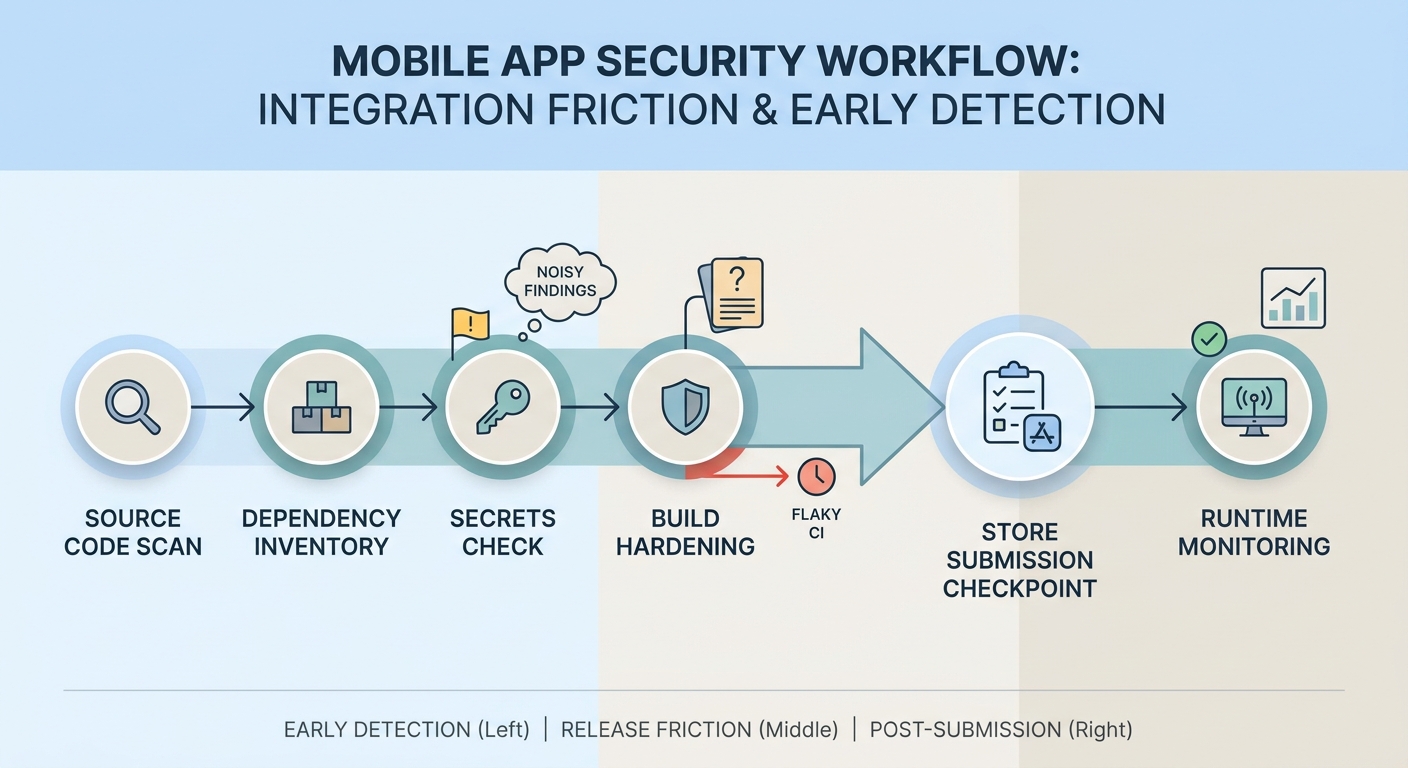
A process diagram showing how a mobile app moves through code scanning, dependency checks, secrets detection, hardening, and runtime monitoring before and after App Store or Google Play submission.
The friction points that cause bypassing
Tools get bypassed for boring reasons: flaky CI, unclear triage ownership, and noisy findings. If your CI is already near capacity, even +3 minutes per PR can be the difference between "we use this" and "we skip it under pressure," so measure before and after.
Hotfix reality is another constraint. If a gate blocks a production fix, you need an explicit escape hatch (time-boxed override with a follow-up ticket), or people will invent their own bypass scripts.
One failure mode (and how to mitigate it)
Runtime protections can backfire when policies are too strict. Example: jailbreak or hooking checks trigger false positives on edge devices, leading to crashes, login loops, or a spike in support tickets.
Mitigation: stage rollout behind a remote flag, monitor crash rate and support volume, and start in report-only mode for 5-10 business days before enforcing blocks. Keep a rollback plan that does not require an app update.
A practical 30-day rollout sequence
Week 1: stabilize one gate
Add Semgrep or Snyk to CI with a small rule set and clear "block vs warn" thresholds. Plan 2-4 hours for setup and another 2-4 hours of tuning once the first wave of findings lands.
Week 2: stop credential leaks
Add GitGuardian across repos and CI. Budget 0.5-2 days for cleanup and rotations, because the real work starts when the first leaks are found (and it may require infra or backend coordination).
Weeks 3-4: add release checks
Add MobSF for release candidates or nightly builds. Plan time to triage findings and decide what becomes policy versus what becomes documentation.
After baseline: deepen coverage
Add CodeQL selectively for critical paths or recurring bug classes. Run heavy analysis nightly unless you have CI capacity and a plan to handle the extra findings.
Make security feel like part of shipping, not a separate project
A realistic target is reducing late-cycle security surprises, not eliminating all risk. Start small, measure noise and CI impact, and expand only when the workflow is stable.
see the ranked tools
Top AI Coding Assistants for Mobile Developers in 2026 reframes the same problem with a slightly different lens - useful before you finalize.


