
AI coding assistants are no longer a nice-to-have for mobile teams in 2026, but the wrong one can add noise: broken builds, shaky SwiftUI state, or React Native changes that only work on one machine. This guide ranks three assistants based on how they behave in real mobile workflows so you can pick a best-fit starting point and spend less time wrangling tools.
Early proof - quick-fit snapshot (internal, directional)
We ran each tool through the same two-hour mini-sprint on a medium-size mobile repo (about 60-120k LOC) with UI, networking, and tests. We tracked prompt retries, manual edit passes to reach reviewable code, and whether changes held up in a local build plus a basic CI run. This is not a lab benchmark, and your repo (CI coverage, code consistency, and dependency drift) can swing results.
| Rank | Assistant | Best for | What worked in practice | Watch-outs |
|---|---|---|---|---|
| #1 | Cursor | End-to-end workflow speed across mixed stacks | Multi-file edits and iterative fixes with repo context | Outcome varies by model choice and repo hygiene; IDE switch cost |
| #2 | Claude Code | SwiftUI-first and native iOS correctness | Reasoning about state, safer patterns, readable Swift | Can guess APIs if targets/deps are unclear; needs good inputs |
| #3 | GitHub Copilot | React Native teams in VS Code | TypeScript flow and fast inline suggestions | Weaker for coordinated repo-wide refactors; less "big picture" |
- Explanation: Same tasks, same repo, same timebox. We optimized for "can we merge this after we build and run tests?" not for clever one-off code.
- Interpretation: The "best" assistant depends on where your time goes. Multi-file changes reward context and tooling; iOS-heavy work rewards SwiftUI reasoning; RN-heavy work rewards TypeScript flow and VS Code ergonomics.
- Impact: You can usually get reliable signal with a short, real trial, but budget more time if your CI is slow, tests are thin, or your app has tricky native build steps. The goal is fewer re-prompts, fewer broken builds, and less cleanup before review.
Top 10 Mobile App Development Tools You Need in 2026 goes deeper on the ideas above and adds concrete next steps.
What changed for mobile developers in 2026?
Category: Outcomes
Statistic: 38%
Label: First-pass approval rate
Context: When metadata is complete upfront
Category: Framework fit
Statistic: 5 lenses
Label: Mobile assistant evaluation scorecard
Context: Code quality, SwiftUI, React Native, context, pricing
Category: Tooling
Statistic: 4 top tools
Label: Shortlist to compare first
Context: Cursor, Claude Code, GitHub Copilot, OpenAI Codex
Assistants are now "always on" across the dev loop, but mobile still exposes weaknesses fast: UI state bugs, build setting drift, native module edge cases, and refactors that silently break tests. You cannot judge these tools on isolated snippets and expect the results to hold up in a real app.
A lot of "assistant performance" is dependency-driven. Model choice, repo consistency, and CI coverage can matter as much as the tool name. Faster coding can also come with stability risk if teams reduce verification and review rigor (see TechRadar Pro and arXiv May 2026).
When you move from outline to execution, Top 7 Vibe Coding Tools for Building iOS Apps Fast helps close common gaps teams hit here.
How we ranked the assistants (and what this does not cover)
We ranked by practical fit for mobile work: can it make changes you can actually merge after you run the app and tests? This is an editorial ranking based on internal testing plus operator judgment, not a universal scoreboard.
| Criterion | What we looked for | Signal it is working |
|---|---|---|
| Mergeable output | Idiomatic Swift/Kotlin/TypeScript with safer defaults | Fewer manual edits and fewer review comments |
| Mobile awareness | SwiftUI/UIKit patterns, RN navigation and native module edges | Fewer lifecycle/state mistakes |
| Context handling | Multi-file edits across screens, tests, and config | Fewer prompt retries and less "forgot the repo" |
| Team cost | Pricing plus workflow disruption | Savings show up weekly, not just in demos |
Constraints worth knowing (so you can judge transferability):
- Repo + tasks: medium-size product repo; one bug fix (state/navigation) + one feature scaffold (new screen, data fetch, tests) + small refactor.
- What we did not measure: long-horizon maintainability, security posture, or performance on your most complex native build setups.
- Time you should actually budget: 2-4 hours to set prompt conventions, review expectations, and a couple CI gates (lint/tests). Without that, teams often "go faster" and then pay it back in regressions.
A complementary angle worth comparing lives in The Future of App Publishing: Where AI Agents Are Taking It.
Ranked recommendations: the best AI coding assistants for mobile developers
Use this as a starting point, then confirm with a short trial on your own codebase. The right pick is the one that reduces your highest-frequency friction, not the one that writes the flashiest snippet.
Cursor (best overall for workflow speed)
| Strengths | Watch-outs | Best-fit signals |
|---|---|---|
| Strong repo-aware edits across UI, state, tests, and utilities | Results vary by model choice and repo cleanliness (naming, boundaries, test coverage) | You do multi-file refactors weekly and want fewer context resets |
| Good at iterative debug loops when you provide logs and ask for minimal diffs | Easy to ship subtle breakage if verification gets skipped | You can tolerate an IDE change and want one tool across Swift and RN |
| Helpful for sweeping changes that touch multiple layers | Expect setup time: 2-4 hours to align on prompting and diff review norms | Your team wants repeatable workflows more than one-off cleverness |
Concrete failure modes we saw:
- Confident edits to build/config files that worked locally but failed in CI.
- Over-eager "cleanup" refactors that changed behavior across files.
- Test updates that compiled but did not match existing conventions.
Claude Code (best for SwiftUI and native iOS builds)
| Strengths | Watch-outs | Best-fit signals |
|---|---|---|
| Strong SwiftUI state reasoning (bindings, ownership, updates) and explaining tradeoffs | Can propose plausible-but-wrong API usage if deployment target and deps are unclear | Your bugs are state and lifecycle related, not just syntax |
| Often produces readable, idiomatic Swift when constraints are explicit | Needs good inputs on larger repos: relevant files, logs, reproduction steps | You value explanations that speed up review and onboarding |
| Good for review prep: concurrency, error handling, and view model clarity | Prompt templates take time to dial in (often 30-60 minutes) | You are migrating UIKit to SwiftUI or tightening architecture |
Concrete failure modes we saw:
- Patterns that compiled but were brittle with navigation, async tasks, or observation lifecycles.
- Suggestions that assumed newer OS APIs than the target.
- "Helpful" abstractions that did not match the team's architecture.
GitHub Copilot (best for React Native teams in VS Code)
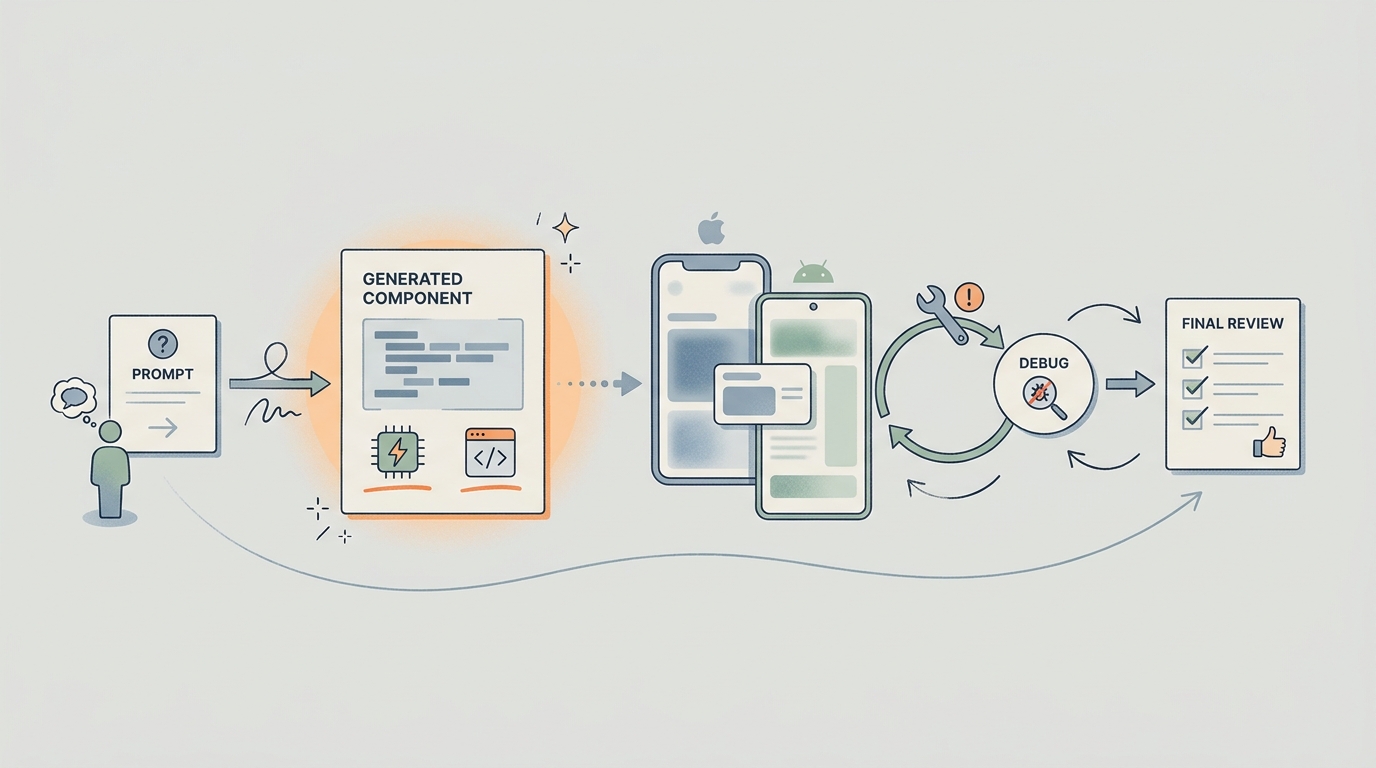
A simple process diagram showing a React Native developer moving from prompt to generated component, then to device test, then to debug pass, then to final review. The diagram should emphasize where a strong assistant reduces friction in shared iOS and Android code.
| Strengths | Watch-outs | Best-fit signals |
|---|---|---|
| Fast component scaffolding with solid TypeScript continuity | Repo-wide refactors and coordinated changes need more manual steering | Your team lives in VS Code and wants minimal workflow change |
| Helpful for day-to-day hooks, props, state, and utilities | Native module and build edge cases still require hands-on debugging | You mostly need steady autocomplete and small refactors |
| Predictable per-seat pricing and low adoption friction | Inline help can miss cross-file implications (navigation, build variants) | You already have strong RN patterns and review discipline |
Concrete failure modes we saw:
- RN changes that looked fine but broke Android builds due to Gradle config, autolinking, or version skew.
- Incomplete updates when a change needed coordinated edits across navigation, tests, and types.
- "Works on iOS simulator" fixes that missed device-only behavior.
For tradeoffs, checklists, and edge cases, The Last Step AI App Builders Don't Solve: Publishing rounds out this section.
How do you choose the right AI coding assistant for your mobile stack?
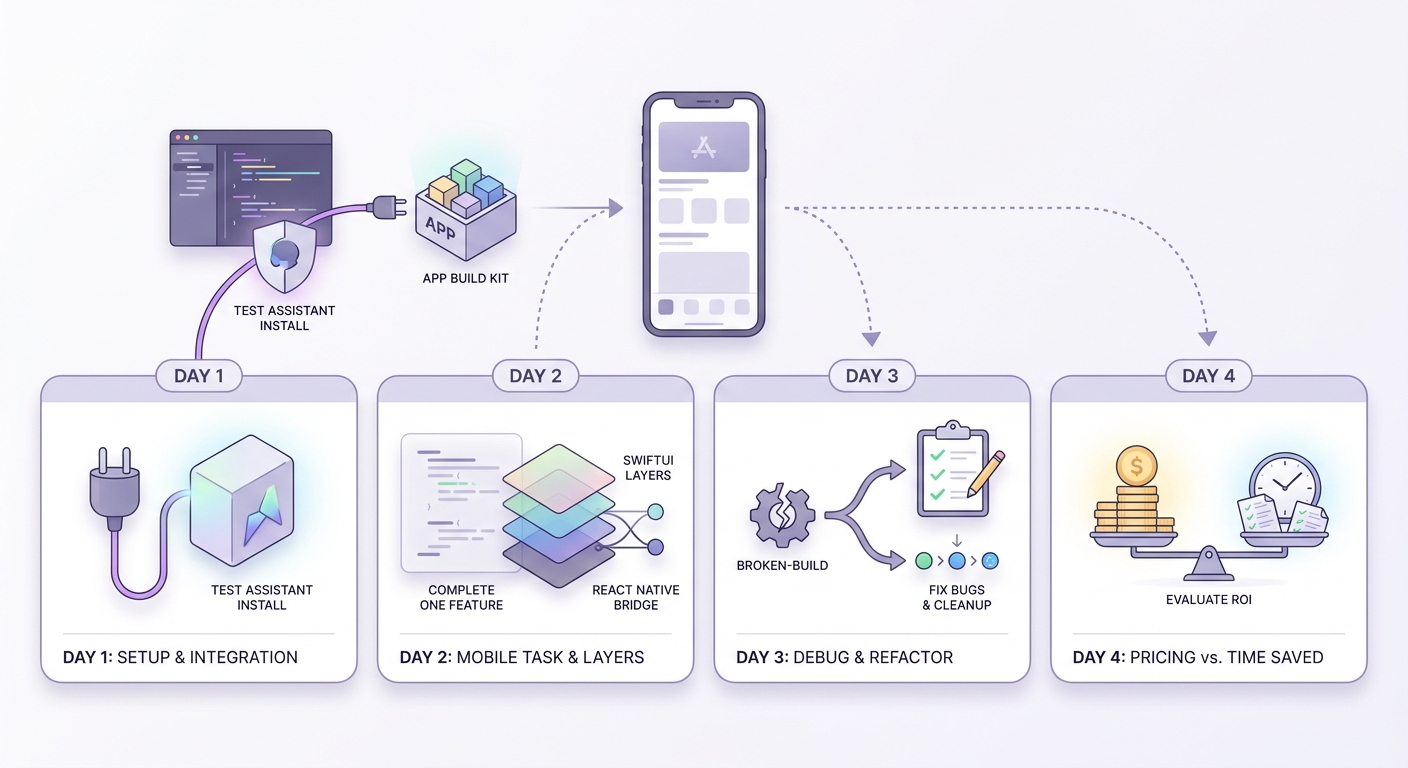
A short trial timeline for mobile teams: day 1 connect the IDE, day 2 test one SwiftUI or React Native task, day 3 compare debugging output and edit cleanup, day 4 decide whether the pricing matches the saved time. This should help readers evaluate assistants in a realistic mobile-development sprint.
Rankings help, but the fastest way to decide is to measure where the assistant saves real engineering time: fewer retries, fewer broken builds, and fewer review cycles. Do a small evaluation that matches your actual release discipline.
Run a two-task trial (plan 60-120 minutes per tool)
Pick one real bug fix and one small feature scaffold in your repo. Track prompt retries, manual edit passes, and whether it passes CI plus a basic device check.
Add lightweight guardrails (so speed does not turn into regressions)
Keep diffs small, require CI green, and name a short list of sensitive files (signing, native project files, build scripts) that require senior review. If your tests are thin, compensate with a stricter manual smoke test checklist.
Choose based on your highest-frequency pain
- Multi-file refactors across layers: prioritize context handling (Cursor often wins here).
- SwiftUI state and lifecycle bugs: prioritize reasoning quality (Claude Code is usually strong).
- Mostly TS components and incremental edits: prioritize low friction in VS Code (Copilot fits).
AI App Positioning Without Policy Risk reframes the same problem with a slightly different lens - useful before you finalize.


