
Choosing the best mobile app development software in 2026 is less about finding one perfect stack and more about matching tools to how your team actually ships. Some products need the fastest possible MVP path, while others need deeper native access, tighter QA, or lower maintenance overhead six to twelve months after launch. This shortlist helps you compare credible options, understand tradeoffs, and choose a stack that fits your app, team, and budget.
Web App or Mobile App? The Real Tradeoffs Founders Face in 2026 goes deeper on the ideas above and adds concrete next steps.
Why do the best mobile development tools still split between speed, control, and maintenance?
| Signal | What it suggests | Practical interpretation | Business impact |
|---|---|---|---|
| Official docs and mainstream comparison coverage still regularly center Flutter and React Native as leading cross-platform options | Cross-platform remains the default starting point for many teams | One shared codebase can speed up delivery for small teams | Lower initial build effort, though native edge cases still add time |
| Android and Apple official workflows still rely on Android Studio and Xcode | Native tooling remains essential, even in mixed stacks | Teams still need platform debugging, signing, profiling, and release tooling | Fewer late surprises during submission and updates |
| Firebase and Supabase are still common backend accelerators in product teams and tool roundups | Backend choice affects speed almost as much as framework choice | Auth, data, storage, and notifications can remove days or weeks of setup | Faster MVPs, with future pricing and portability tradeoffs |
| Expo and Appium continue to show up in workflow discussions and official docs | Delivery speed depends on more than the UI framework | Build, test, and release tooling reduces repeated manual work | Cleaner releases, if the team maintains the setup |
These are directional signals drawn from official platform documentation, vendor docs, and common 2025 to 2026 comparison coverage, not a precise market ranking. The useful pattern is consistent: teams usually choose between faster shared development and deeper platform control, then fill gaps with backend and QA tools.
What this means in practice is simple. The best setup is rarely one tool. Framework choice affects delivery speed, backend choice affects future cost and flexibility, and testing tools affect how often releases slip.
Which are the best mobile app development tools to consider in 2026?
This works better as a practical shortlist than a strict top-10 ranking. The right choice depends on team skills, roadmap, compliance needs, and how much native control you will actually need after launch.
| Tool | Best for | Main strength | Main limitation |
|---|---|---|---|
| Flutter | Fast cross-platform delivery with polished UI | Strong shared UI model | Native edge cases still need extra work |
| React Native | JavaScript teams shipping to iOS and Android | Familiar web-to-mobile workflow | More dependency and bridge management |
| Android Studio | Android-first products | Full Android SDK access and debugging | Not cross-platform by itself |
| Xcode | iOS-first products | Essential for Apple build and release workflows | Best only if Apple is a real priority |
| Firebase | MVP teams needing backend speed | Fast setup for auth, data, and messaging | Costs can rise with usage |
| Supabase | Teams wanting SQL-friendly backend speed | Postgres-based workflow and portability appeal | Less turnkey for some mobile cases |
| Expo | React Native teams wanting less setup friction | Easier builds and developer workflow | Full native customization can get more complex |
| Kotlin Multiplatform | Teams sharing logic but keeping native UI | Reuse with native control | Not ideal if you want one shared UI layer |
| Appium | Teams needing cross-platform test automation | Broad regression coverage | Setup and upkeep take discipline |
| SwiftUI | Apple-focused teams building modern interfaces | Faster UI work in the Apple stack | Limited to Apple platforms |
For factual positioning, use source context carefully. Flutter and React Native are commonly framed as leading cross-platform options in their own docs and broad industry roundups. Android Studio and Xcode are anchored in official Android and Apple workflows. The rest should be judged against official documentation and your actual feature needs, not headline comparisons alone.
How do you choose the best mobile app development platform for your team?
If you need an MVP fast, Flutter, React Native, Expo, Firebase, and Supabase are common starting points. In many small-team cases, they can cut several days to a few weeks of setup compared with building every layer from scratch.
The tradeoff is that speed now can create constraints later. Backend pricing, native feature gaps, upgrade friction, and architecture shortcuts tend to matter more once the app has real usage.
If native access and platform control matter more, Android Studio, Xcode, SwiftUI, and Kotlin Multiplatform deserve closer attention. They usually require more specialized effort up front, and hiring for that skill mix can take longer, but they reduce compromise for hardware access, performance tuning, and platform-specific UX.
| Priority | Strong starting tools | Watch-outs |
|---|---|---|
| Fast MVP | Flutter, React Native, Expo, Firebase, Supabase | Future pricing, native gaps, technical debt |
| Native control | Android Studio, Xcode, SwiftUI, Kotlin Multiplatform | Higher initial effort, more specialized hiring |
| Release reliability | Appium plus native debugging tools | Test automation needs ongoing maintenance |
One thing worth noting: migration is rarely free. Moving from Expo to heavier native customization, or from a quick backend setup to a more portable architecture, can take weeks for a simple app and much longer for a production app with payments, notifications, analytics, and CI already in place.
Which risks show up after launch?
Shipping quality is a stack decision, not a last-minute QA task. Appium belongs on this shortlist because regression coverage matters once updates become routine.
In practice, release reliability takes real work. Even with strong tools, teams still need time for test writing, CI upkeep, SDK upgrades, dependency cleanup, and store submission checks. On lean teams, that often means a few extra hours each sprint plus a stabilization pass before major releases.
There are also operational dependencies to plan for:
- App store review can still delay urgent fixes, especially on iOS
- Third-party SDK changes can break builds or force rushed upgrades
- Backend vendors can become expensive or harder to leave once usage grows
- Test suites can become flaky if nobody owns maintenance
What is the practical takeaway?
The best mobile development platform in 2026 depends on what you are optimizing for first. If the priority is launch speed, start with Flutter or React Native and pair that with Expo, Firebase, or Supabase where it fits. If the priority is control or platform-specific capability, Android Studio, Xcode, SwiftUI, and Kotlin Multiplatform are often safer bets.
The expensive mistakes usually come from evaluating only the framework. Backend cost, testing discipline, hiring constraints, app store friction, and native debugging needs often determine whether your stack still feels right a year later.
Category: Outcomes
Statistic: 38%
Label: First-pass approval rate
Context: When metadata is complete upfront
Category: Speed
Statistic: 4 hrs
Label: Median fix time
Context: After a store rejection notice
Category: Maintenance
Statistic: 4 clusters
Label: Shortlist coverage areas
Context: Frameworks, native IDEs, backend accelerators, and testing tools balance launch and upkeep
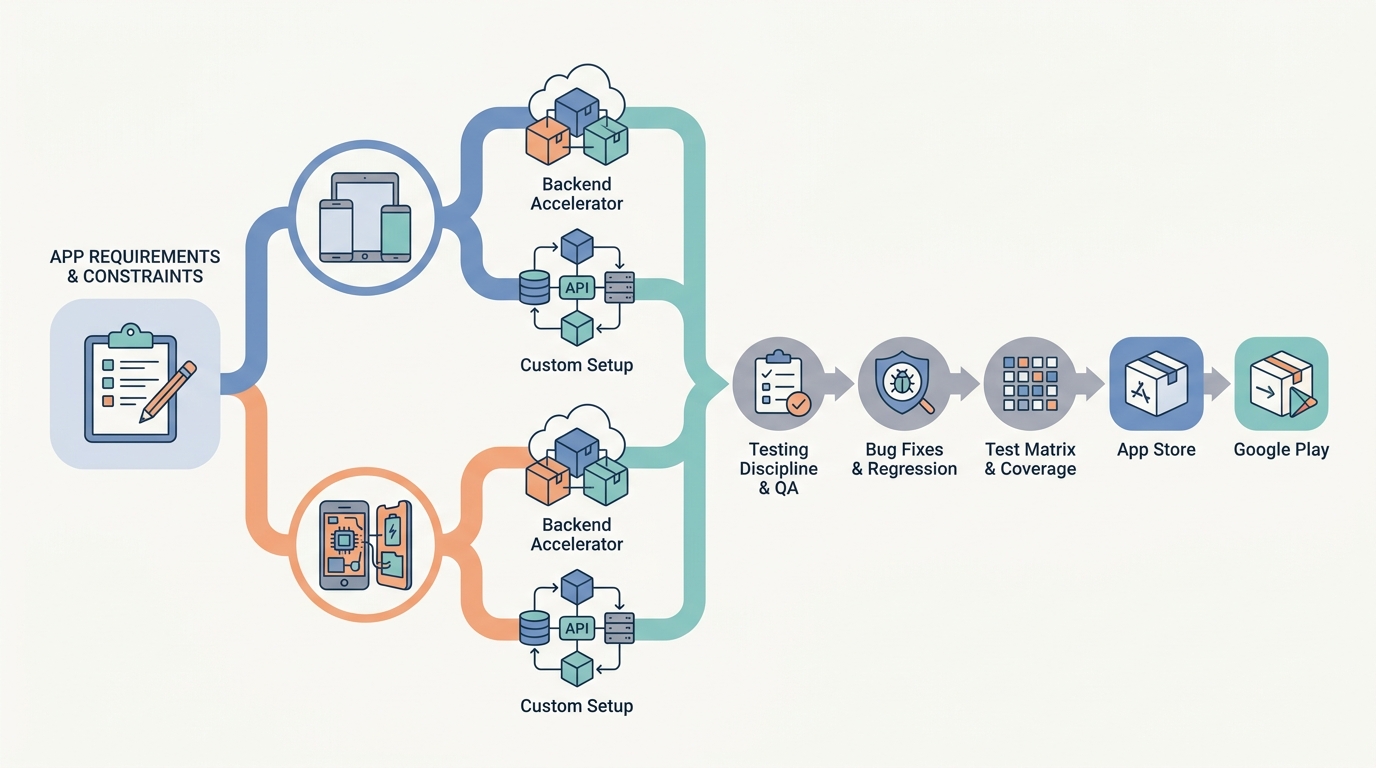
A decision-flow diagram showing how a team moves from product constraints to tool choices: cross-platform versus native, backend accelerator versus custom setup, then testing and release checks before App Store and Google Play submission.


