
If you have ever tried to ship an iOS or Android build and hit a last minute "missing certificate" error or an install warning that scares testers away, you have already met the real cost of code signing. Code signing is the release gate that proves your app came from your team and has not been altered, so stores, devices, and users can trust it. By the end of this guide, you will be able to explain what code signing is in plain English and run a minimal, reliable signing workflow before every release.
| Early proof snapshot | What it shows | Why it matters for your launch |
|---|---|---|
| The same few signing issues recur across teams | Expired certificates, mismatched bundle IDs, wrong provisioning profiles, and missing permissions are common release blockers in practice (directional, not a universal statistic) | You can prevent a lot of launch-day thrash with a short checklist and an owner |
| Signing is a process, not a one-time setup | Certs expire, keys rotate, accounts change, and CI machines get rebuilt | Planning for renewal and access reduces surprise failures |
| A device install test catches problems early | Store processing can succeed while installs fail for testers due to entitlements or profile mismatches | One real-device verification before you announce release saves time and credibility |
Explanation: These are common patterns teams hit when shipping iOS and Android, especially when access, devices, or CI machines change.
Interpretation: Most signing issues are not conceptually hard, but they are time-sensitive and permission-dependent, so they show up right before launch.
Reader impact: With an owner, an expiry check, and a real-device install check, many releases only need a short signing touch-up. But timelines vary because you can get blocked by account admin response times, Apple and Google processing and review delays, and CI environment drift.
Why Code Signing Is the Most Confusing Part of iOS Publishing goes deeper on the ideas above and adds concrete next steps.
Why is code signing important before a mobile launch?
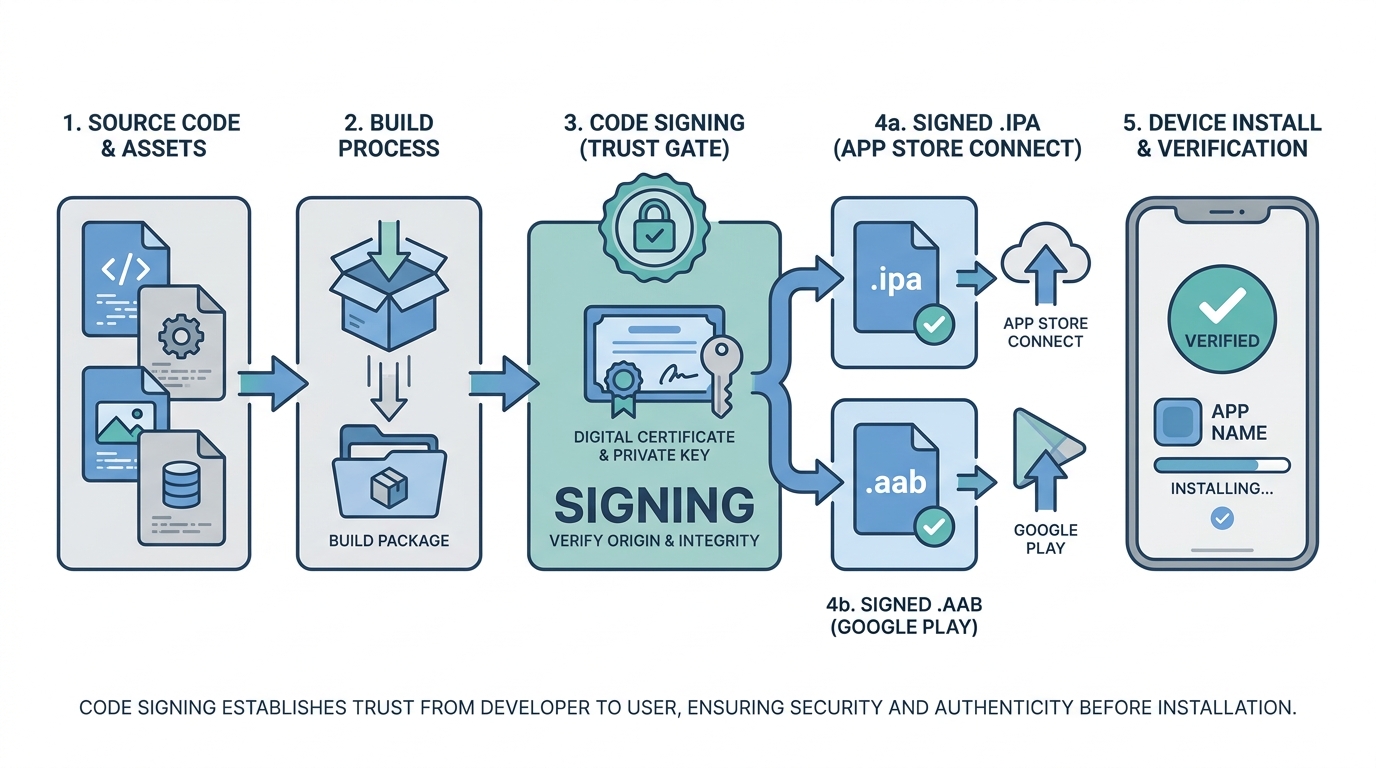
A clean process diagram showing a founder’s app moving from source code to a signed .ipa or .aab, then through App Store Connect or Google Play upload, and finally onto a device where the signature is verified before install.
When you export an iOS .ipa for App Store Connect or an Android .aab for Google Play, code signing is the identity and tamper check that makes the package acceptable to the store and trustworthy on devices. In plain English, the signature answers two questions: who published this app, and did anything change after it was built. Apple describes this as binding your code to a signing identity so the system can validate integrity before running it (Apple Code Signing Guide, Apple Support).
What this means for founders is practical: fewer last minute upload failures, and fewer scary install prompts for testers and customers. Signing is not a judgment of app quality, it is a release prerequisite. The constraint is that it depends on the right accounts and permissions, not just code.
If a build is unsigned or mis-signed, you will typically see:
- Upload rejection or stalled processing because the package does not match the expected signing identity.
- Install failures or warnings on tester devices when the certificate, provisioning profile, or key does not line up.
- Release delays that force rebuilds even when the app itself is ready to ship.
Plain-English signing model
Focus on picking the right iOS and Android signing path, confirming account prerequisites, and verifying a signed build before launch day.
Continue to the plain-English model
How does code signing work?
Category: Distribution
Statistic: Signed build
Label: Store upload accepted
Context: App Store and Google Play expect a valid signature to verify publisher identity and integrity
Category: User Trust
Statistic: Unsigned build
Label: Install warnings or blocked
Context: Devices can’t verify who built it or whether it was modified after build
Category: Risk
Statistic: Higher release confidenc
Label: Integrity verified at install
Context: Signature checks link the app to a certificate chain, reducing tampering risk in distribution
Code signing is a trust chain. Your private key is the secret you protect; it creates the signature. A certificate is the identity linked to that signature, tied to your Apple Developer or Google Play publishing setup.
When you produce a signed build, the store or device can verify the signature and confirm the package has not been altered since signing. In practice, most "signing bugs" are really "the wrong identity, permission, or environment was used."
One thing worth noting: operational dependencies matter. If 2FA is tied to one phone, the wrong person owns the account, or a certificate expires, you can have a perfectly fine app that still cannot ship.
| Platform | What you manage | Where it is managed | What tends to bite teams |
|---|---|---|---|
| iOS | Certificates, private keys, provisioning profiles, App ID or bundle ID, entitlements | Apple Developer + Xcode/CI | Expiry, wrong profile, wrong team/account, missing device/profile for testing |
| Android | App signing key, upload key (often), keystore storage, applicationId | Play Console + build system/CI | Key loss, wrong keystore in CI, Play App Signing state confusion |
What is the simplest step-by-step code signing workflow for founders?
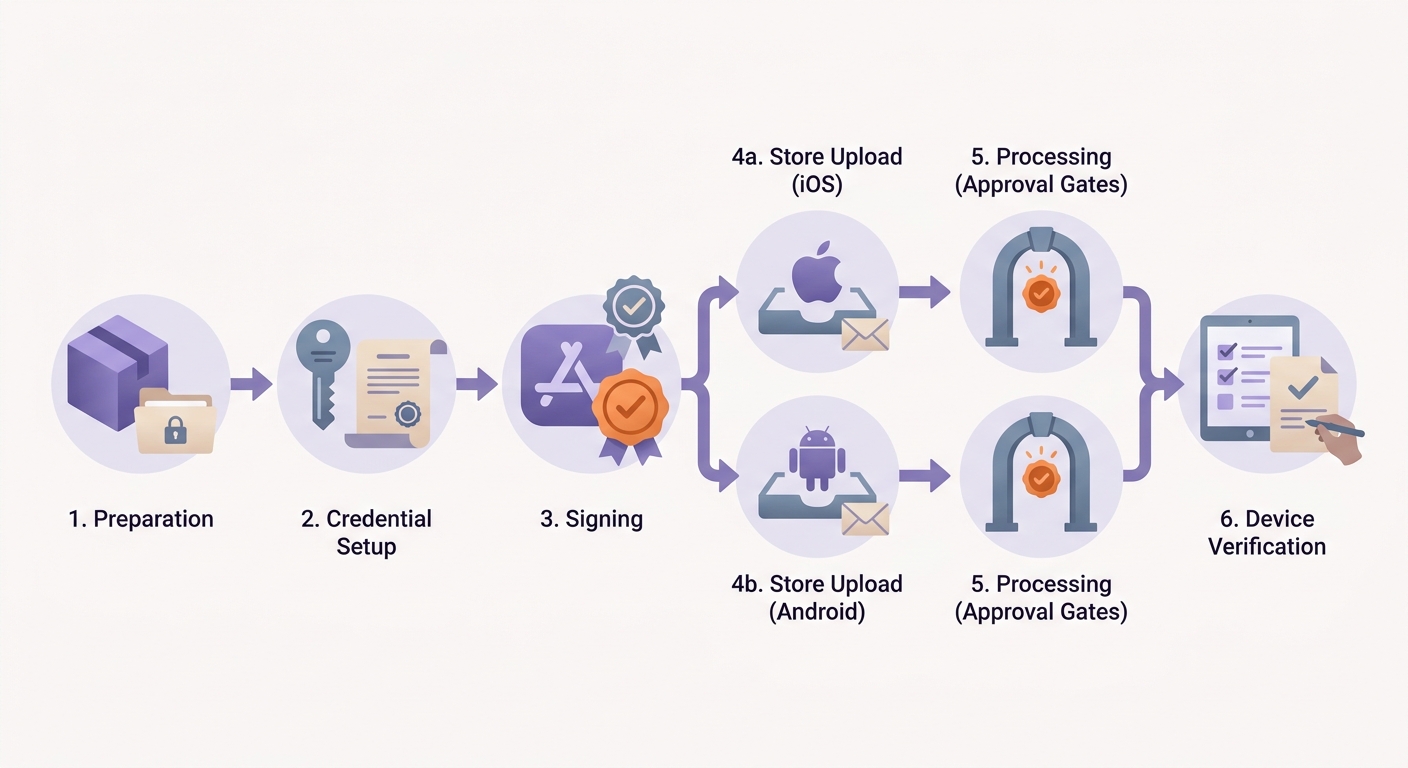
A release timeline showing preparation, credential setup, signing, store upload, processing, and device verification, with checkpoints for App Store and Google Play before launch approval.
Plan on 30-90 minutes for initial setup only if you already have (1) Apple Developer and Play Console access, (2) the right roles, and (3) working 2FA. If you need enrollment approval, console invites, or account recovery, it can take hours to days, and may require whoever controls legal, finance, or the Apple and Google accounts.
Confirm the release channel and artifact
Decide if this is App Store, TestFlight, Google Play internal testing, or a partner handoff. Then confirm the artifact:
.ipafor iOS,.aab(or.apk) for Android.Assign a release owner
Name one person accountable for certificates, keys, and store access. This is not about centralizing power, it is about reducing time lost when something breaks.
Create and protect signing credentials
iOS needs a certificate plus the matching private key and a provisioning profile. Android needs a signing key setup, and often a separate upload key for Play. Store secrets in a controlled vault or CI secret store, not a shared drive.
Sign, upload, and verify on a real device
Sign during export or in CI, upload to the correct track, then install via TestFlight or internal testing. Budget 10-20 minutes for the device check plus whatever time it takes to reach a tester and get a device online.
A practical tradeoff: locking this down adds a bit of process (permissions, vault access, documentation). The upside is fewer late-night fire drills when a laptop dies, someone leaves, or CI runners get rebuilt and lose keychains.
What mistakes should founders avoid with code signing?
The most expensive mistakes are usually boring ones: expiry, access drift, and signing the wrong app identity.
- Expiry and renewal surprises: certificates and profiles can expire, and renewal sometimes requires access you do not personally have.
- Wrong key, profile, or signing identity: a development identity where production is required triggers last minute failures.
- Access and 2FA bottlenecks: if only one person can approve console changes, you have a schedule risk.
- CI environment drift: rebuilt runners, wiped keychains, or rotated secrets can break signing even if nothing changed in code.
A real tradeoff: Xcode automatic signing is fast for early development, but it can reduce visibility into which profiles and certs are being used. Many teams start with automatic signing, then tighten control for release builds once the app stabilizes.
What should you check before and after every signed release?
A lightweight routine often costs 15-30 minutes per release if you already have access and nothing is expired. If access is missing, 2FA is broken, Apple or Google processing is slow, or keys are lost, the same routine can stretch into a longer delay.
Here is a compact checklist you can reuse without repeating the same advice across docs.
| Check | Owner | When | Typical time cost (if unblocked) |
|---|---|---|---|
| Confirm Apple Developer and Play Console access (roles, 2FA) | Release owner + account admin | 1-2 days before release | 5-10 min, or hours to days if admin is unavailable |
| Verify signing assets are unexpired and mapped to the right app (bundle ID/applicationId) | Release owner | Before build/export | 5-10 min |
| Confirm CI secrets exist and build agent has required tooling (keychain/keystore access) | Release owner + build engineer | Before the release build | 10-30 min, longer if runners were rebuilt |
| Upload to the correct track and confirm processing completes | Release owner | After upload | 5-15 min plus store processing time (variable) |
| Install from TestFlight/internal testing on a real device and complete one core flow | Release owner or QA | After processing | 10-20 min plus device availability |
One directly actionable check and one metric to track:
- Check: Add a CI step that warns or fails when signing assets are near expiry (for example, under 14 days), based on the dates you track.
- Metric: Track
days until expiryandsigning-related build failures per release. If failures rise, you likely have access drift, undocumented key changes, or unstable CI.
Build a lightweight signing log
Track owner, storage location, and expiry dates for iOS and Android signing materials, then review it before every submission.
Create your signing log


