
Getting a React Native app running on your phone is the easy part. Getting it approved and live in the App Store and Google Play is where teams lose time to certificates, signing keys, store metadata, and last minute release-only bugs. A lot of delays come from a small set of predictable steps, but you often only discover them after a rejection or a broken release. This guide gives you a founder-friendly checklist you can run end to end so you ship a review-ready build with the right configuration, assets, and rollout plan with fewer surprises.
Publishing Apps Built With Flutter, React Native, or Native goes deeper on the ideas above and adds concrete next steps.
Early proof: why a checklist beats improvisation
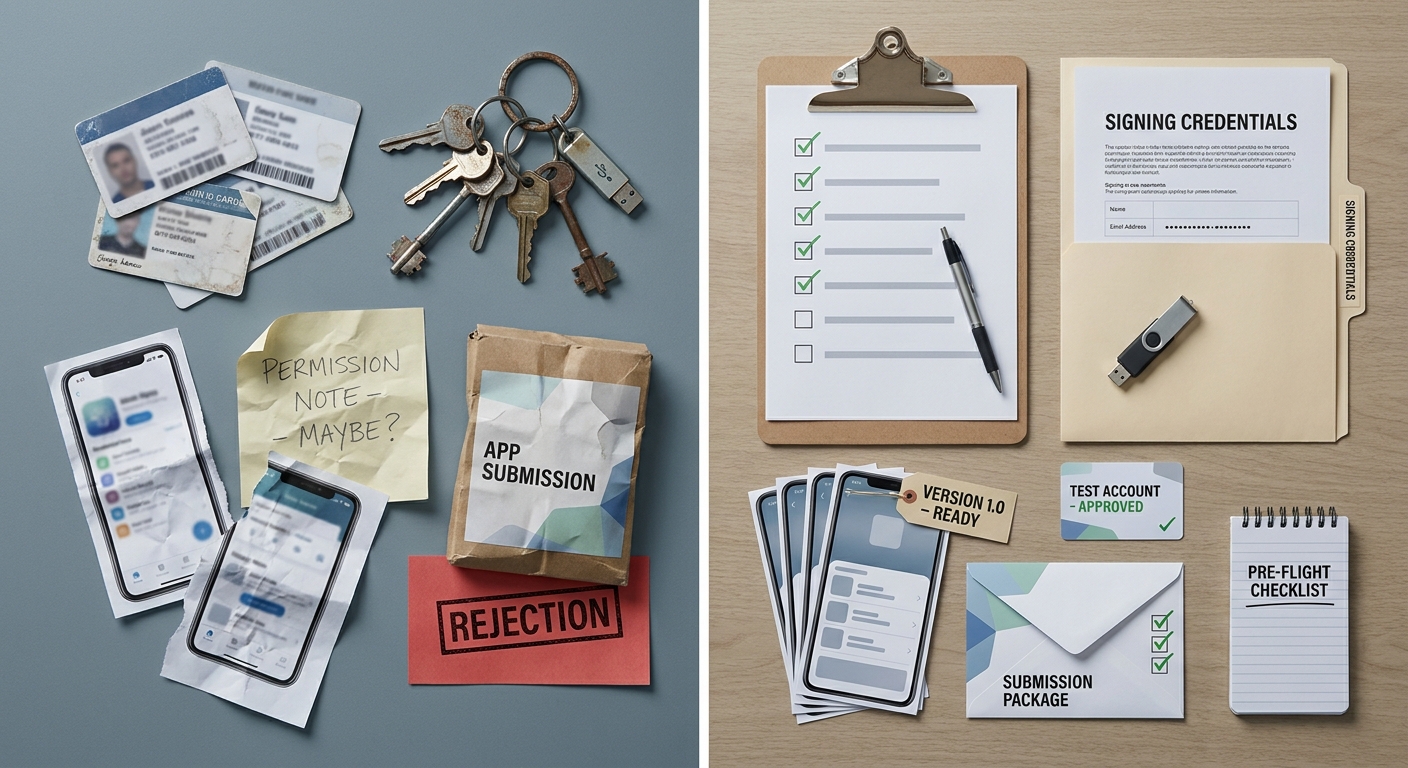
A compact proof block showing a side-by-side comparison of a rushed React Native launch versus a checklist-driven launch, highlighting signing, metadata, and review readiness differences before App Store and Google Play submission.
| Area | Improvised pre-submit (common outcome) | Checklist-driven pre-submit (common outcome) |
|---|---|---|
| Signing and identity | Bundle ID/package name confusion; keys created late or on one laptop | IDs confirmed early; signing assets stored and reproducible |
| Versioning | Build numbers bumped inconsistently; hotfixes collide | Version code/build number incremented intentionally per release |
| Store metadata | Screenshots, privacy, and review notes rushed at the end | Listing copy, screenshots, and disclosures prepared before upload |
| Review readiness | Missing permission strings; broken login; no test account | Reviewer path validated; test credentials and notes included |
| Release confidence | First submission becomes a discovery phase | First submission is mostly verification |
This does not guarantee approval, but it reduces preventable errors that trigger avoidable delays. The biggest win is operational: fewer resubmissions, less context switching, and a more predictable release window.
To make this measurable, pick one launch metric and watch it. For example, track crash-free sessions and top crashers in Sentry or Firebase Crashlytics and agree on a simple internal rule like: investigate immediately if crash-free sessions drop by 0.5 to 1.0 percentage points versus your pre-launch baseline, or if a single new crash affects 50+ users in the first day. Calibrate those thresholds to your scale, but have a decision rule before you need it. The user impact is fewer broken first impressions, and the team impact is faster, calmer decisions.
When you move from outline to execution, How Solo Founders Can Navigate App Publishing Without Losing Weeks helps close common gaps teams hit here.
What does it take to publish a React Native app?
Publishing is two parallel releases with shared product intent but different gatekeepers. iOS requires Apple Developer enrollment, App Store Connect setup, and a certificate and provisioning chain that matches your bundle ID. Android requires keystore management and Play Console setup, and if you lose the keystore, updates can become painful and sometimes impossible.
Plan for real time here. If your accounts, roles, and devices are not set up, expect 2-6 hours of hands-on setup plus waiting on emails, approvals, or tax and banking verification spread over 1-3 days. If you have done it before and have stable CI, you can sometimes compress it into a focused half day, but first-time publishing rarely fits neatly into one calendar block.
A complementary angle worth comparing lives in How to Publish Your Bolt-Generated Mobile App.
What counts as a successful publish on both stores?
A successful publish is not just uploading a build. It is a signed release artifact, a complete store listing, a reviewer path that works without you present, and a rollout plan that matches your risk tolerance.
- iOS done state: a signed release build uploaded to App Store Connect, metadata completed, and the submission through review to release.
- Android done state: a signed release (usually AAB) uploaded to Google Play Console, assigned to a track (internal testing, closed, open, production), and rolled out.
- Key differences to plan for:
- Signing: iOS uses certificates and provisioning profiles; Android uses a keystore.
- Review and rollout: iOS is a single review gate; Android adds track strategy and staged rollout.
- Console validations: both have compliance checks, but required fields differ.
One thing worth noting: a "successful publish" may still include a small follow-up release. It is normal to find edge cases after real users arrive, so plan capacity for at least one patch cycle.
For tradeoffs, checklists, and edge cases, What Founders Should Know Before Their First Submission rounds out this section.
What should you prepare before publishing?
The fastest way to miss your target date is to start building before you have access and ownership sorted. If you are a founder delegating to a contractor, confirm this up front.
- Accounts and access
- Apple Developer Program and Google Play Developer accounts
- Correct roles in App Store Connect and Play Console (and access to the email inbox tied to them)
- Access to the app’s bundle ID (iOS) and package name (Android)
- Build and release basics
- Production environment variables and secrets (API base URL, auth redirect URIs, analytics keys)
- Versioning plan (iOS build number and version; Android versionCode and versionName)
- Icons and splash assets finalized (or at least stable for v1)
- Reviewer-facing package
- Privacy policy URL and support contact
- Test account credentials if login is required
- App store screenshots and short description approved by whoever owns the product message
First-time account setup, legal entity details, and bank or tax verification can introduce waiting time. Treat those as external dependencies and avoid scheduling a public launch until they are cleared.
How a Solo Founder Prepared Their App for Launch Without Hiring an Agency reframes the same problem with a slightly different lens - useful before you finalize.
How do you publish a React Native app step by step?
Prepare the release build before touching the stores
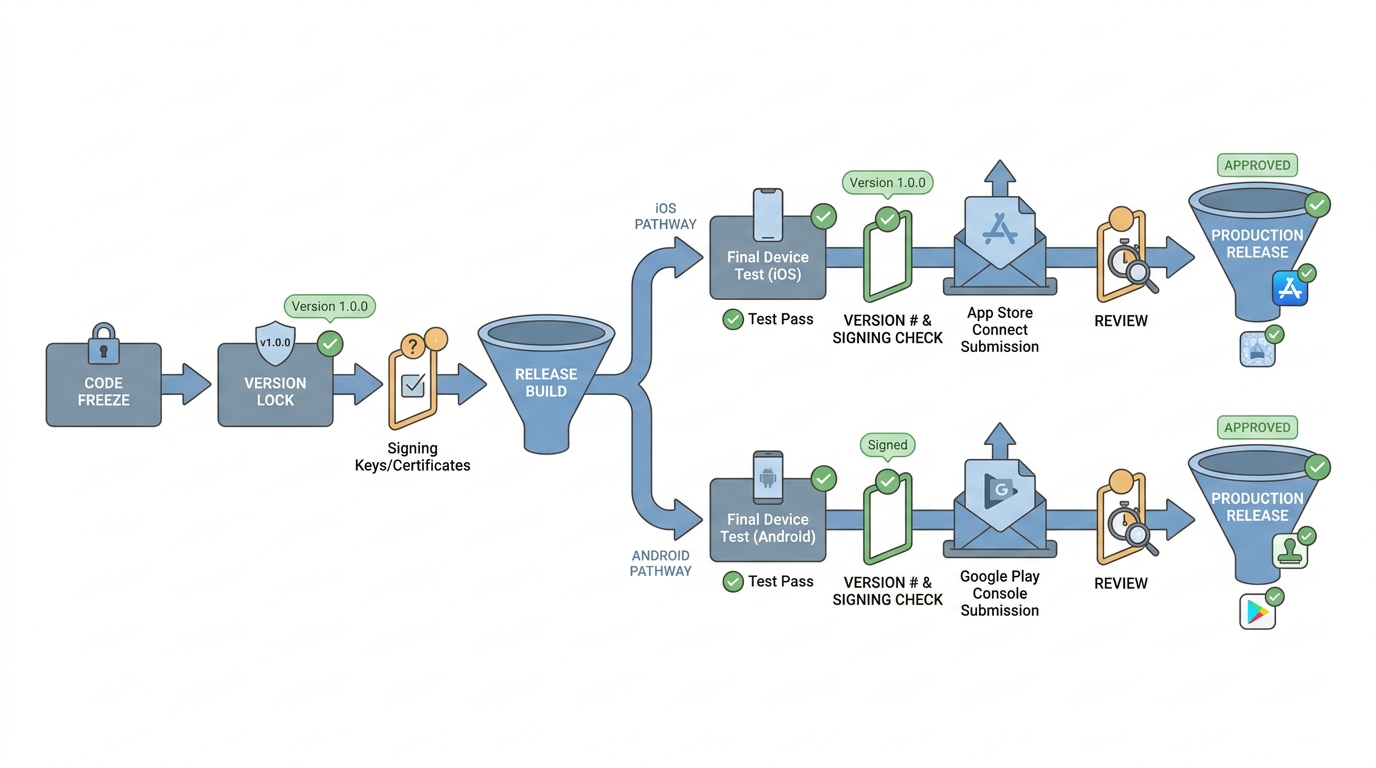
A simple release pipeline diagram that traces a React Native app from code freeze to release build, then to App Store Connect and Google Play Console submission, with validation checkpoints for versioning, signing, and final device testing.
Lock versioning and environments
Set iOS
CFBundleShortVersionStringandCFBundleVersion, plus AndroidversionNameandversionCode. Point the app at production config and disable debug-only tooling. Budget 30-90 minutes if your env setup is clean, longer if you have multiple flavors or a half-migrated config setup.Finalize native details reviewers will notice
Confirm icons, splash screens, and permission strings are production-ready. On iOS, missing
Info.plistusage descriptions (camera, photos, location) can cause rejection or a crash on the first prompt. On Android, request only what you actually use to reduce review questions and user distrust.Run a true release build and test the primary flow
Build in release mode (locally or CI), install on at least one real device per platform, and run the main journey end to end (launch, sign up or log in, core action, logout). Expect 30-60 minutes for a focused smoke test, and plan extra time if you need to debug device-only issues like deep links, push permissions, or production OAuth.
One practical constraint: payments, identity verification, and certain privacy prompts can behave differently in sandbox vs production. If your app depends on these, schedule time for at least one realistic end-to-end test case per platform.
Create the iOS and Android store-ready packages
iOS: archive with correct signing
Create an Xcode Archive and confirm the correct bundle identifier, provisioning profile, and distribution certificate. If you are new to iOS signing, plan 2-4 hours the first time because small mismatches can take a while to diagnose, especially across multiple Apple accounts or teams.
Android: generate a signed AAB
Build a release Android App Bundle (AAB), sign it with your keystore, and document where the keystore and passwords are stored (password manager plus a backup process). Decide who owns this in a small team: if a contractor holds the only copy, you are taking an avoidable long-term risk.
If you are using Play App Signing, confirm it is enabled and that you understand which key you control vs what Google manages. This is usually helpful, but it is still worth documenting.
Keep versions aligned across platforms
Ensure both artifacts represent the same release version so your store listing and release notes match what users install. This is not required by the stores, but it prevents support confusion during launch week.
Submit the app and verify the review path
Upload to App Store Connect and Play Console
Upload the iOS build via Xcode or Transporter, and upload the AAB in Play Console. Confirm the build appears under the correct app record and track. Plan 30-60 minutes, plus extra time if your upload pipeline is flaky.
Dependency note: Apple and Google account verification, role changes, and compliance checks can take time to propagate. Even if you did everything right, you may be blocked by waiting, so do a dry run upload early.
Complete metadata before requesting review
Add screenshots, description, privacy details, age rating, and release notes. Mismatches between what you claim and what the app does are a common trigger for review questions and rejections.
Also watch for non-metadata rejection causes that catch teams off guard:
- Guidelines and policy: restricted content, medical claims, UGC moderation requirements, or unclear value props.
- Payments and subscriptions: missing disclosures, broken restore purchases, or confusing pricing screens.
- Privacy: missing tracking prompts, inaccurate data collection disclosures, or unclear permission rationale.
Monitor status and respond quickly
Watch review status and reply to clarifications the same day if you can, or at least within 24 hours to avoid extra back-and-forth. Review times vary by category and app history, so treat them as a dependency, not a promise. Many teams see something like 1-3 business days, but first submissions, policy-sensitive categories, and repeated rejections can stretch longer.
Launch help
If signing, CI builds, native modules, or store compliance are your bottleneck, it can be worth handing off release work so you can keep the product moving.
Get launch help
What can go wrong, and how do you avoid it?
Most surprises are avoidable, but only if you name them early and assign ownership. The practical takeaway: pick an owner per risk and do a dry run while you still have time to fix access and tooling.
| Risk or dependency | What it looks like | Mitigation that actually helps |
|---|---|---|
| Lost Android keystore (or unclear key ownership) | You cannot ship updates to the same app listing | Store in a password manager, backup access, document who owns it and how handoff works |
| Wrong App Store Connect or Play Console roles | You cannot upload, edit listing, or reply to review | Confirm roles 1 week before launch; test access with a dry run upload |
| Missing test account or broken login | Reviewer cannot get past first screen | Provide credentials, add review notes, validate on a fresh install |
| Privacy disclosure mismatch | You claim you do not collect data, but SDKs do | Audit SDKs, align disclosures, update policy URL before submission |
| Payments and subscription edge cases | Purchases fail, restore does not work, or pricing is unclear | Test store flows on release builds; document expected behavior in review notes if needed |
| Prod-only crash | Debug works, release crashes | Test the signed artifact on real devices; verify prod keys and redirects |
| CI or cloud Mac flakiness | iOS build cannot be produced on schedule | Budget setup time; keep a manual fallback path for final signing and uploading |
What should your pre-launch checklist include?
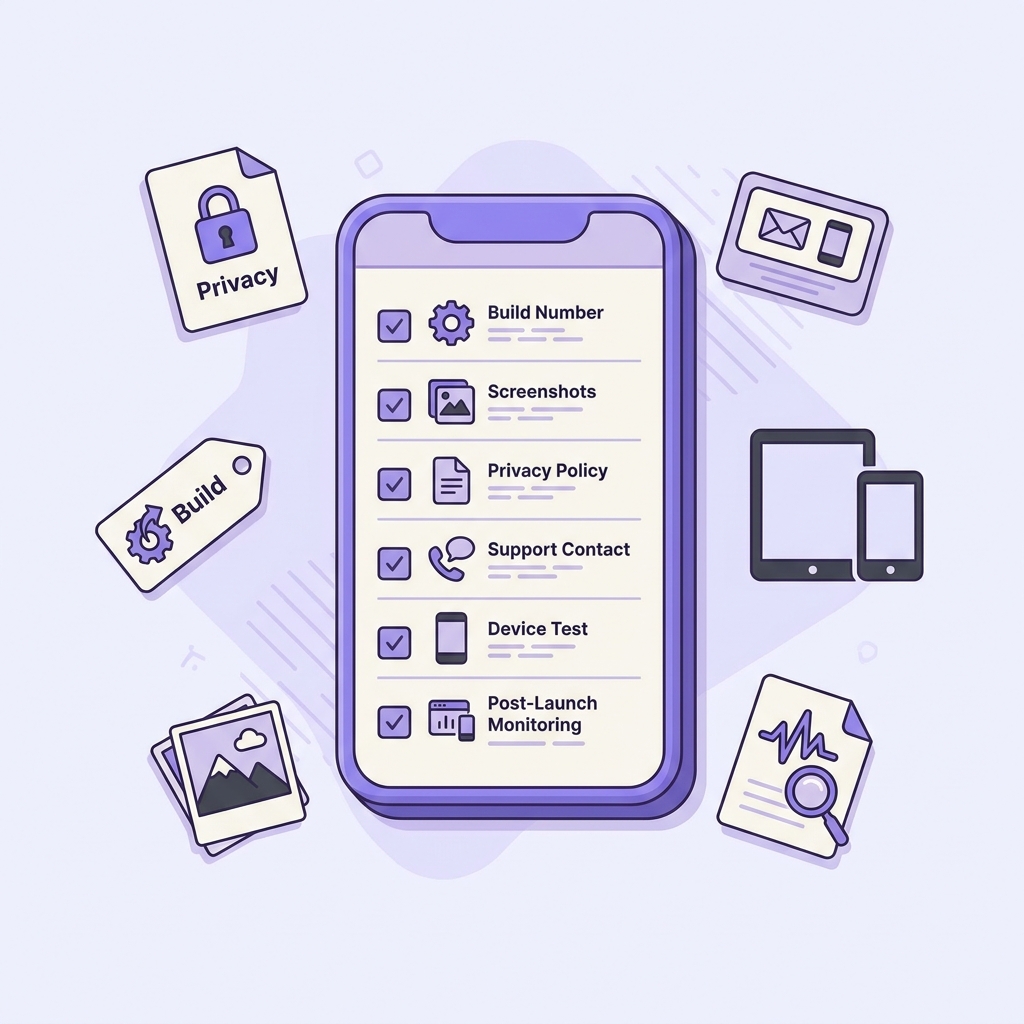
A mobile-friendly checklist block for the last pre-submit pass, covering build number, screenshots, privacy policy, support contact, device test, and post-launch monitoring for a React Native app.
A pre-launch checklist is only useful if it is fast to run. The goal is not perfection, it is catching the common blockers before you hit submit.
| Check | Why it matters | Owner |
|---|---|---|
| Version locked (iOS build + version, Android versionCode + versionName) | Prevents upload failures and hotfix collisions | Release manager |
| Signed release artifacts produced (IPA/AAB) | Surfaces signing and config issues early | Mobile dev or CI owner |
| Fresh-install smoke test on real devices | Catches permission, deep link, and prod-config bugs | QA or mobile dev |
| Reviewer path works (login, core action) + test account in notes | Avoids auto-rejects and stalled reviews | Product or QA |
| Store listing complete (screenshots, description, privacy, support) | Reduces back-and-forth and user confusion | Product or marketing |
| Crash monitoring ready (Crashlytics/Sentry) | Lets you react in the first 24 hours | Engineering |
If you are trying to hit a date, schedule this as a real work block. For many teams, a careful pre-flight takes 60-120 minutes, and the first time can take longer if you are still creating accounts, fixing permissions, or producing assets.
What should you monitor after launch (first 24 hours)?
This is where small issues turn into big ones if you do not have visibility. You do not need a fancy setup, but you do need a plan.
- Track crashes and ANRs in Crashlytics or Sentry, plus a small set of funnel events (install to open, sign up completion, purchase or core action).
- Test the live app yourself: login, payment, and permissions can fail only with real production keys and store builds.
- Decide your rollback lever up front:
- Android: pause staged rollout or halt promotion to production.
- iOS: remove from sale (often slower), or ship a hotfix if the issue is severe.
One constraint: Apple rollbacks are rarely instant, so the safer move is often preventing a bad build from going wide in the first place (release-mode testing plus monitoring).
Pre-submit sanity check
If you want one next step: run the pre-flight checklist, produce signed IPA/AAB artifacts, and do a fresh-install device test before you promise a launch date.
Use the checklist


