
Ship a reproducible reviewer path or expect likely resubmits. Reviewers often reject builds they cannot exercise; giving them deterministic demo steps reduces the chance of schedule-impacting re-submits and last-minute delays. Plan a small investment of engineering and QA time now; the exact cost depends on your app complexity.
My App Has No Public Content Yet: Will Apple Reject It? goes deeper on the ideas above and adds concrete next steps.
How do reviewers detect placeholders early?
Category: Outcomes
Statistic: 38%
Label: First-pass approval rate
Context: When metadata is complete upfront
Category: Speed
Statistic: 4 hrs
Label: Median fix time
Context: After a store rejection notice
Category: Efficiency
Statistic: 2.1x
Label: Faster resubmission
Context: With a structured pre-review checklist
Evidence
Reviewers focus on reproducible flows such as login, onboarding, content display, and purchase paths. Builds that stop at static placeholders frequently get flagged as "incomplete functionality" or "insufficient app content."
Interpretation
This is an operational verification issue, not just a design nitpick: reviewers need to reproduce behavior inside the app, not only read notes. In audits, apps that provided seeded demo content and explicit reviewer steps moved through review more predictably.
Business/user impact
Investing a small amount of targeted development and QA time up front usually avoids a likely resubmit later. Typical effort ranges from a half-day for very simple apps, a few days for moderate apps, and 1-2+ weeks for complex backends. Common failure modes include demo leakage and gating misconfigurations, so plan access controls and a quick audit.
When you move from outline to execution, How to Publish Your Rork App: App Store + Google Play Checklist helps close common gaps teams hit here.
Why do placeholders cause instant rejections?
Placeholders usually trigger rejections because they block verification of minimum functionality. If a reviewer cannot reach a core journey, the safe choice for the store is to mark the build incomplete.
What this means in practice is that an in-app, reproducible reviewer path is generally necessary to pass initial triage. Reviewer timelines vary, so budget buffer time and avoid last-minute submissions.
A complementary angle worth comparing lives in Minimum Functionality on Google Play: Why Static or PDF-Only Apps Get Rejected.
What do review policies actually require?
Reviewers need an in-app path they can reproduce without extra tools; notes help but do not replace functioning flows. The practical items most reviewers expect are clear credentials, deterministic content, and short walkthrough steps.
- Provide demo credentials or a reviewer walkthrough in submission notes.
- Avoid public entry points that show only placeholder content.
- Seed demo content or enable a reviewer demo mode so testers can reach functioning features.
One tradeoff is engineering time: reviewer-only flags, deterministic demo data, and deterministic flows require development and QA. For tight schedules, weigh that cost against the probable delay of a resubmit.
For tradeoffs, checklists, and edge cases, How to Fix App Store Minimum Functionality Rejection rounds out this section.
Evidence: how reviewers detect placeholders and how to respond
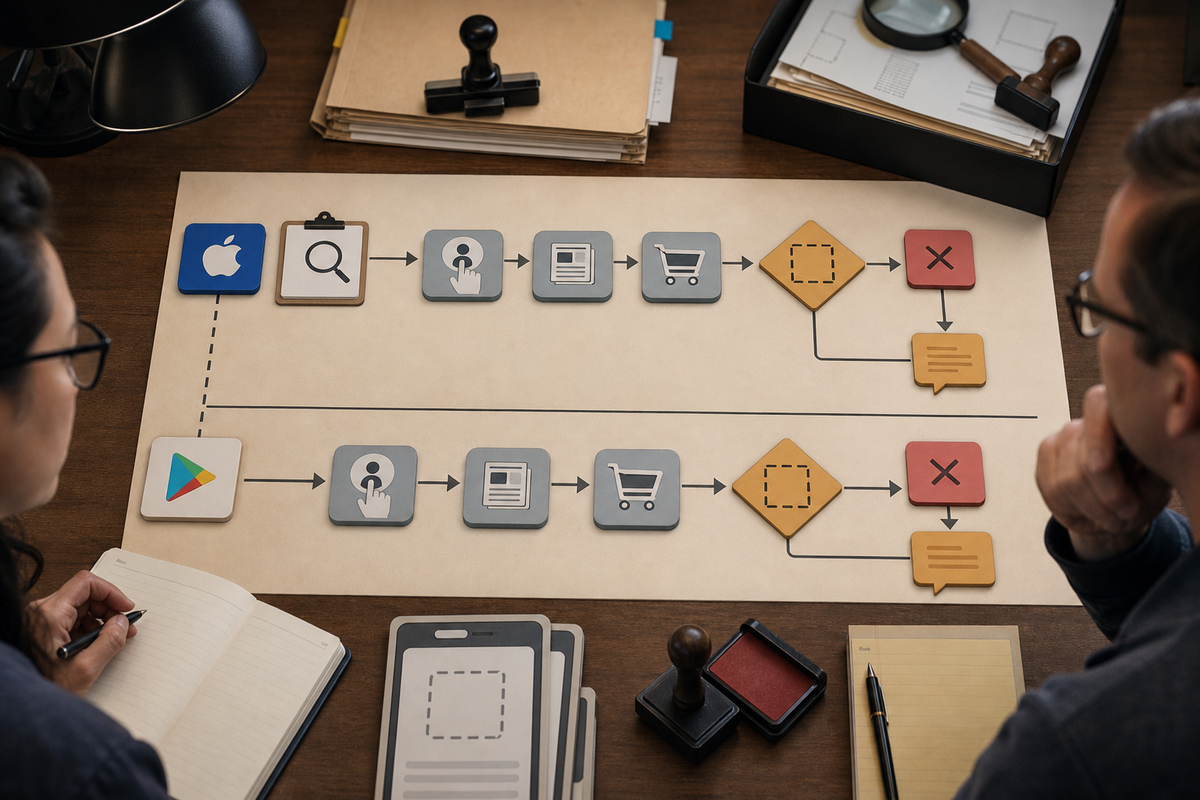
A flow diagram illustrating reviewer steps: initial triage -> attempt core flows (login, content, purchase) -> hit placeholder? -> reject or request more info. Separate lanes for App Store and Google Play with actionable check nodes like 'Attach demo credentials' and 'Enable feature flag'.
Both Apple and Google and their automated checks will try to exercise critical flows and may flag static placeholders as insufficient. Remediation is usually adding a reviewer path that consistently reproduces the flow.
App Store
Apple reviewers typically exercise login, feeds, and purchase flows. If a path ends on a static placeholder, they often mark the app incomplete. Fix: ship a build with seeded content and step-by-step reviewer instructions.
Google Play
Play reviewers look for reproducible minimum functionality and may return builds labeled "insufficient app content" when features are blocked. Fix: add a demo mode or bypass for tester accounts.
One thing worth noting is timing: expect an initial decision often in 24-72 hours, but this varies with weekends, holidays, and peak review volume. Plan for uncertainty.
What you must include with your submission
Make the reviewer path easy to reproduce and verify. The goal is to let a reviewer exercise the same flow you expect real users to take.
- Reproducible demo credentials and a concise "How to review" checklist.
- Screenshots showing functioning flows, not just marketing images.
- Deep links or account-based bypasses that land reviewers on seeded content.
- A short note about any backend dependencies or third-party services the reviewer might need access to.
Be cautious: seeded demo content can leak if gating is misconfigured. Use reviewer-only accounts, feature flags, and audit access controls before submission.
Strategic implications and a compact pre-submission checklist

A compact visual checklist mirroring the seven pre-flight items: demo credentials, seeded content, feature flags, screenshots of flows, QA sign-off, remove placeholder endpoints, alternative publishing options - designed for printing or sharing with release managers.
Make the submitted binary verifiable so unfinished features stay hidden from the public while reviewers can test them. That reduces rework and helps keep launches on schedule, but it requires upfront coordination between product, engineering, and QA.
What teams should change now
- Add reviewer-only feature flags so unfinished features stay hidden from public users while reviewers can test them.
- Seed deterministic demo content or a demo mode and verify it via internal testing tracks.
- Use TestFlight or Play internal testing to validate reviewer paths before public submission.
Expected effort and common risks
- Typical engineering and QA effort: half-day for simple apps, a few days for moderate apps, and 1-2+ weeks for complex server-backed features. These are rough estimates and depend on existing test infrastructure.
- Common risks: demo data leaking to production users, misconfigured feature flags, and missing backend mocks or third-party test accounts.
Pre-submission checklist (clear these before pressing Submit)
Demo credentials included
Add a simple username/password or a short-lived token and indicate which user state the reviewer should use.
Short step-by-step test instructions
Provide three to five steps that get a reviewer to a functioning flow, including any deep links.
Seeded demo content or demo mode active for reviewer accounts
Make content deterministic so reviewers see consistent behavior across attempts.
No public entry point that only shows "Coming Soon"
Verify at least one path lands on real, verifiable content from a fresh device.
Screenshots showing actual functioning flows
Replace placeholder images in the store listing with real in-app screenshots that match the reviewer path.
QA sign-off from an internal test track
Confirm the reviewer path works end-to-end from a clean device or test account.
Feature flags and access controls audited
Ensure demo data and gating cannot be accessed by production users.
If you cannot ship full functionality in time, consider delaying the public binary or using pre-registration and internal testing while you finish core flows. That reduces the risk of a rejected submission, but it may shift marketing timelines.


