
Publishing a Rork app is rarely blocked by your best demo. It is more often slowed by what happens on a reviewer’s first fresh install. If you are preparing for App Store or Google Play submission, the real job is to make the shipped build stable, honest, and easy to understand in the first session.
This guide gives you a practical checklist to run before submission. By the end, you should know how to test the exported build, prepare accurate store assets, complete privacy and data disclosures, and reduce avoidable rejection risk without assuming everything will pass on the first try.
| Review-ready proof point | What it shows | Why it matters |
|---|---|---|
| Fresh install on a real device | Logged-out first launch, cold permissions, real loading states | Helps you catch issues your dev environment can hide |
| Screenshots from the current build | Store listing matches the shipped UI | Reduces trust issues and review friction |
| Disclosure audit of SDKs and data flows | Privacy answers match real behavior | Lowers policy risk from inaccurate forms |
| Cross-device spot checks | Layout and core flow survive common Android differences | Can reveal issues one device will miss |
What this means is simple: local success is not the same as review readiness. In practice, fresh-install QA, screenshot updates, and disclosure checks can take a few focused hours for a simple app, and longer if login, payments, multiple SDKs, or account setup are involved.
The reader impact is practical. A tighter pre-submit pass can reduce avoidable rejection loops, but it cannot guarantee approval because reviewers may still hit edge cases you did not reproduce.
How to Publish Your Lovable App: From Export to Approval goes deeper on the ideas above and adds concrete next steps.
What do App Store and Google Play reviewers check first?
Reviewers are not grading your roadmap. They are validating whether the current build installs, opens, explains itself, and completes one meaningful action without confusion.
Platform guidelines point back to the basics: functionality, accuracy, and trust. In many submissions, the first problems to surface are simple ones like crash on launch, endless spinner, unclear onboarding, broken login, or buttons that appear tappable but do nothing. Apple’s App Store Review Guidelines reinforce those themes.
Here is the thing: reviewers see the app cold. They do not have your cached session, ideal wifi, or product context. If your app depends on network data, account state, region-specific access, or manual account approval, say that clearly in the build and in review notes.
When you move from outline to execution, Minimum Functionality: Avoid the 'Feels Like a Demo' Rejection helps close common gaps teams hit here.
How should you prepare a Rork app for submission?
Test the actual exported build
Install the same build you plan to submit on a real device. Use default settings, no cached account, and normal network conditions so you can see what a reviewer is more likely to experience.
Walk the first session end to end
Check onboarding, login, password reset, guest mode if available, and at least one failure state. For a simple app, this often takes 20 to 45 minutes per platform, and longer if you need multiple accounts or devices.
Validate one core action
Reviewers do not need every feature. They need to complete one clear action, such as creating an item, saving a preference, booking, or viewing key content, and get visible confirmation that it worked.
Check the quiet failure points
Open support and privacy links, test empty states, and confirm every important button has an obvious result. Non-responsive UI can look just as unfinished as a crash.
Prepare listing assets from the final build
Capture fresh screenshots and write descriptions that match what exists today. If a feature is planned, hidden behind a flag, or not ready in all accounts, leave it out.
Audit disclosures before submit
Map analytics, auth, crash reporting, payments, and AI features to Apple privacy answers and Google Play Data safety. This step can be tedious because it may require SDK inventory work across tools, but skipping it creates avoidable policy risk.
A complementary angle worth comparing lives in How to Publish a Replit-Built Mobile App.
Why do Rork app submissions get delayed or rejected?
A common Apple-side risk is minimum functionality. If the app opens to placeholder screens, empty tabs, or very thin content, it can look unfinished even when the stack is technically sound.
Another frequent problem is listing mismatch. Old screenshots, inflated copy, or vague onboarding can make the submission feel misleading. The practical takeaway is to stabilize the first screen and make one core action work reliably before polishing everything else.
On Google Play, similar root issues can show up through a different lens. Data safety drift, early permission prompts, weak poor-network behavior, and device inconsistency are all worth checking, especially if your app relies on third-party SDKs or background behavior. Google’s Android vitals guidance is also a reminder that crash and responsiveness quality matter.
One thing worth noting is that cross-device testing has limits. Even a careful pass on two or three devices may still miss reviewer-specific edge cases tied to OS version, account state, or manufacturer behavior, and broader coverage usually means more setup time.
For tradeoffs, checklists, and edge cases, How to Publish an Emergent-Built Mobile App Successfully rounds out this section.
Final pre-flight checklist
Use this right before submission:
- Fresh install works on at least one real device per platform
- App launches without crash, freeze, or endless spinner
- Reviewer can complete one core flow through login or guest mode
- Empty and error states explain what to do next
- Support and privacy links open correctly
- Screenshots come from the current build
- App name and descriptions match shipped features only
- Apple privacy answers reflect actual SDK and data behavior
- Google Play Data safety matches real collection and sharing
- Permission prompts appear only when tied to user action
- Review notes include credentials, region limits, or setup dependencies if needed
This checklist will not eliminate every review risk, but it removes many preventable ones. For a broader release sanity check, this submission checklist guide can help as a final cross-check.
How Automated Publishing Tools Cut Time to Launch reframes the same problem with a slightly different lens - useful before you finalize.
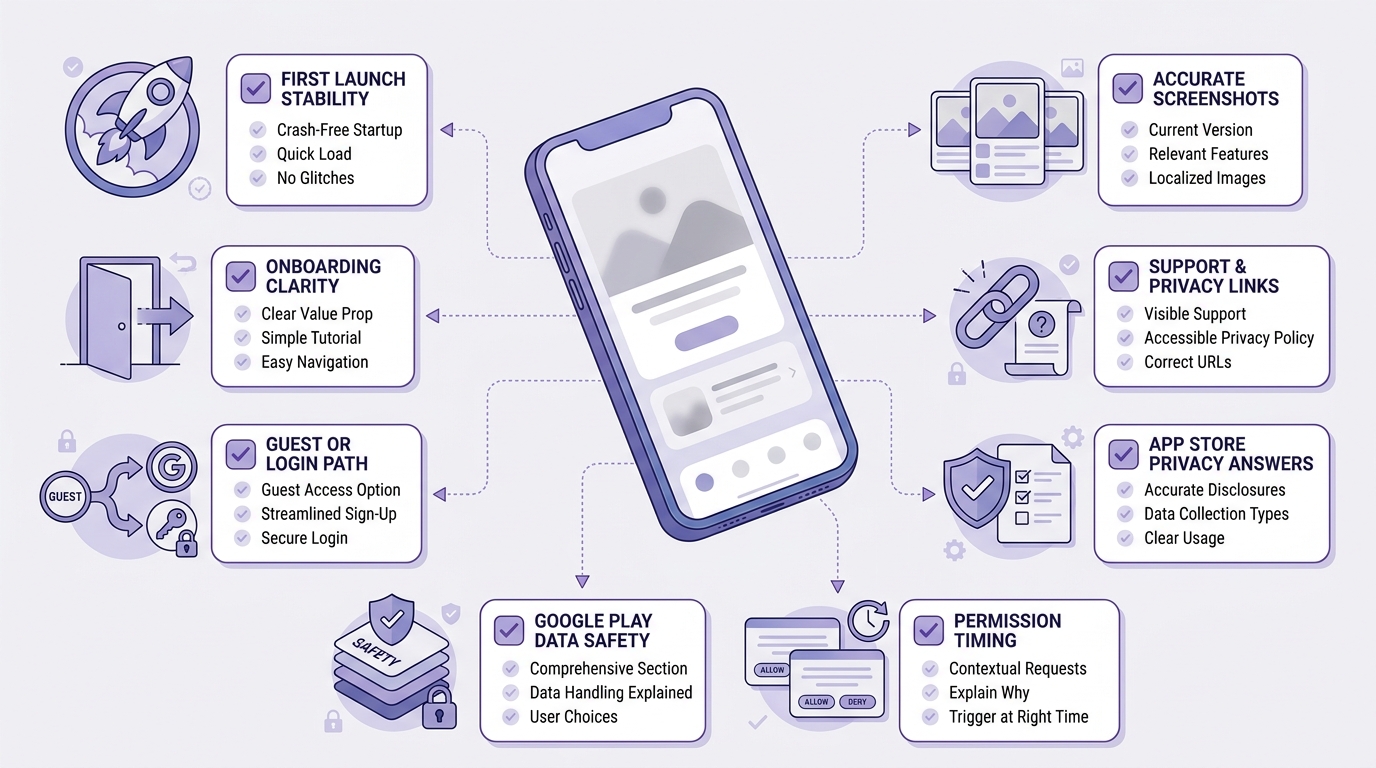
A scannable pre-flight checklist for a Rork app submission with grouped checks for first launch, onboarding, guest or login path, screenshots, support and privacy links, App Store privacy answers, Google Play Data safety, and permission timing.


