
If you built your app fast with AI, templates, or a stack of SDKs, publishing is often where the gap shows up. The app may work on your phone or in TestFlight, but store review tests the first-run experience as submitted, not your intent. This guide focuses on practical changes that can improve approval odds on the App Store and, more cautiously, reduce avoidable friction on Google Play without implying any guaranteed outcome.
How to Publish Your Lovable App: From Export to Approval goes deeper on the ideas above and adds concrete next steps.
Early proof: what changes between a fast-built app and a review-ready submission
The table below is an operational checklist based on Apple review documentation and common submission patterns around app completeness, accurate metadata, privacy disclosures, and permission use. It is directional, not a quantified benchmark, and Google Play may evaluate some areas differently.
| Review area | Prototype signal | Review-ready signal | Why it matters |
|---|---|---|---|
| First-run clarity | Placeholder screens, unclear next step | One obvious primary action in the first minute | Apple can reject apps that feel incomplete or hard to use on first launch |
| Onboarding resilience | Happy-path only | Clear loading, error, and recovery states | Dead ends can make the app look unfinished |
| Support and trust | Missing support path or account controls | Working support link and basic settings | Basic trust signals help the app feel usable, not like a demo |
| Listing accuracy | Old screenshots or broad claims | Listing matches the release build | Apple reviews metadata for misleading or mismatched claims |
| Data disclosures | Privacy answers completed late | Disclosures aligned with actual SDK behavior | Store disclosures can be checked against app behavior and integrated services |
| Permission timing | Prompts shown at launch | Prompts shown at moment of use | Context-free prompts create trust issues and can raise review questions |
What this means: many fast-built apps are not blocked because the idea is weak. They run into trouble because the first session feels unfinished, disclosures do not match the stack, or the listing promises more than the build delivers.
The practical impact is usually fewer review cycles and a more predictable launch window. Cleanup still takes time. For a small app, expect a few focused hours to two days if screenshots, disclosures, and first-run testing all need attention.
When you move from outline to execution, How App Store Review Actually Works - A Step-by-Step Breakdown helps close common gaps teams hit here.
Why do fast-built apps usually fail review?
The core review question is simple: can a first-time user install the app, understand it quickly, complete the main action, and trust what the app says about data and permissions?
Fast-built apps tend to miss that standard in repeatable ways:
- vague home screens with no clear next step
- placeholder or empty settings pages
- unfinished tabs still visible
- permission prompts shown before value is clear
- screenshots and descriptions from older builds
These risks map most directly to Apple guidance on minimum functionality, completeness, accurate metadata, and privacy transparency. For Google Play, similar issues can still create friction, but the evidence base here is stronger for Apple-specific review expectations.
One thing worth noting: fixing this is usually product work, not just submission work. If you need to retake screenshots, rewrite metadata, audit SDKs, and test clean installs on both iPhone and Android, plan for real effort rather than a same-day upload.
A complementary angle worth comparing lives in Privacy Made Simple: Map Your App Data Flows in 30 Minutes.
What should you check before submitting your app?
Treat publishing like a short release process, not a final upload step. Small apps can often do this in half a day to two days. Apps with subscriptions, several SDKs, or gated flows may need longer.
Define one primary first-session outcome
Pick the one thing a new user should complete within the first minute. If several actions compete for attention, the app can read as unclear rather than flexible.
Hide unfinished branches
Remove placeholder tabs, empty templates, and non-working actions from the review build. A smaller coherent app usually reviews better than a broader but fragile one.
Add fallback states
Cover slow loads, login failures, empty states, denied permissions, and interrupted sessions. The goal is not perfection. The reviewer just needs a clear next step.
Run a clean-install test
Test from zero on at least one iPhone and, if relevant, one Android device. This often takes 30 to 60 minutes and catches issues that never appear on a founder's daily device.
A workflow that reduces avoidable review friction
A simple SDK and submission preflight often catches more than UI review alone.
| Check | What to confirm | Typical effort |
|---|---|---|
| SDK inventory | Auth, analytics, crash reporting, AI APIs, subscriptions, support widgets | 30-90 minutes |
| Privacy alignment | App Store privacy details, privacy policy, and any Play disclosures match | 30-120 minutes |
| Reviewer notes | Test credentials, gated flows, unusual permissions, hardware dependencies explained | 10-20 minutes |
| Listing match | Screenshots and description reflect the release candidate | 30-90 minutes |
| First-run retest | Clean install, denied permissions, app switching, weak network | 30-60 minutes |
Here is the thing: disclosures often fail because teams answer from memory instead of from the actual stack. If an SDK sends analytics, crash logs, subscription events, or support data, that should be reflected consistently across store disclosures and policy language.
Reviewer notes are another useful detail, especially for Apple review. A short note explaining test credentials, where the core workflow starts, or why a permission appears can reduce avoidable back-and-forth. It will not rescue a weak app, but it can remove confusion.
Failure modes are often mundane. Reviewers may be unable to access gated flows if credentials fail, and third-party auth, payments, or API outages can make an otherwise solid build look broken during review. SDK behavior can also differ between sandbox, production, and reviewer environments, so test the submitted configuration where possible.
How do you align permissions, privacy, and store listing claims?
Permission timing affects both trust and review interpretation. Ask for camera when the user taps scan or upload, notifications when they enable reminders, and location only when a feature clearly needs it.
Listing accuracy matters just as much. Use screenshots from the release candidate, not design mocks or earlier branches. Rewrite the description around what the app does now, not what you hope to ship next month.
The tradeoff is straightforward: tightening disclosures and retesting first-run flows is tedious. But that work is usually cheaper than multiple rejection cycles, rushed fixes, and a delayed launch.
Conclusion
In practice, review readiness is less about polish theater and more about consistency. The build, listing, permissions, and disclosures need to tell the same story on a clean first run.
That does not guarantee approval. It does tend to reduce avoidable confusion, shorten feedback loops, and make launch timing easier to manage.
Category: Store Listing
Statistic: 100% accurate
Label: Listing accuracy
Context: Prototype: aspirational copy or screenshots → Submission-ready: metadata, screenshots, and feature claims reflect the su
Category: Outcomes
Statistic: 38%
Label: First-pass approval rate
Context: When metadata is complete upfront
Category: Policy Fit
Statistic: 1:1 match
Label: Disclosure alignment
Context: Prototype: privacy or permission claims drift → Submission-ready: in-app behavior, data use, and policy disclosures agre
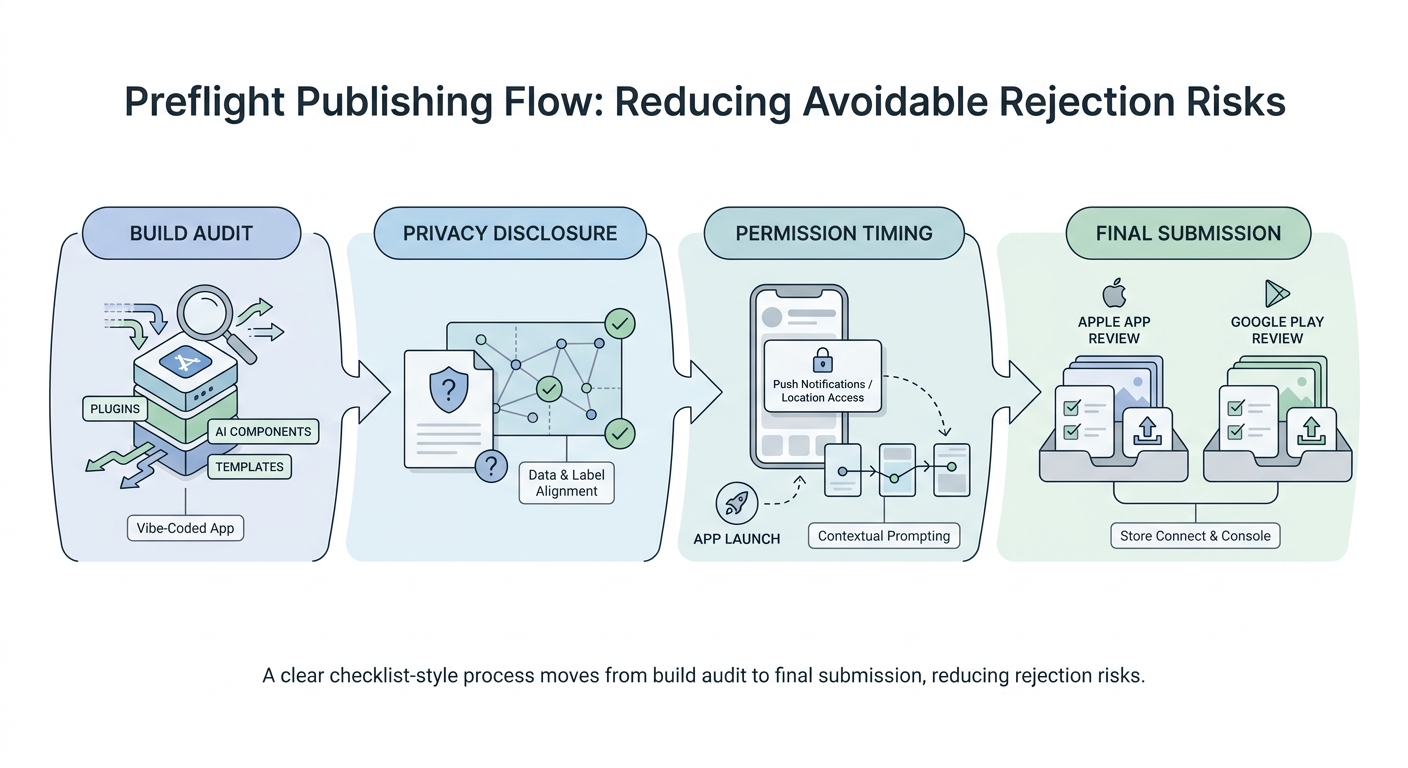
A simple process diagram tracing the path from build audit to privacy disclosure update to permission timing review to final App Store Connect and Play Console submission, tailored to vibe-coded apps that added SDKs quickly.


