
An AI agent can give a growing company more operating capacity when it owns a narrow, repeatable workflow with clear limits. The goal is not to replace judgment, but to reduce coordination work, support faster first actions, and make exceptions easier for people to handle.
Illustrative workflow snapshot
Before: Manual inbox review, CRM lookup, repeated drafting, and manager approval
After: Agent classification, approved-data retrieval, drafted action, and human review
Track: Handoffs, first-action time, corrections, unresolved exceptions, and approval points
Potential impact: More consistent handling and clearer visibility into work that still needs judgment
This snapshot is illustrative, not a sourced customer benchmark. It shows what teams can compare when they measure manual coordination against supervised execution.
The intended gains depend on data quality, integration coverage, escalation rules, and how repeatable the workflow is. Measure them rather than assuming faster actions or fewer handoffs will happen automatically.
What can an AI agent do for a growing company?
An AI agent is most useful for bounded work such as support triage, lead qualification, document extraction, meeting follow-up, or internal reporting.
In my own workflow, the recurring work was rarely one difficult task. It was the morning loop of checking the support inbox, looking up CRM context, finding an approved answer, drafting a response, and asking someone else to review it. That made it a better automation target than open-ended decision-making.
A sensible goal is to reclaim operating capacity while keeping business rules, customer experience, and final authority with the team.
A supervised workflow typically looks like this:
- An inbound request arrives.
- The system identifies its intent and urgency.
- It retrieves information from approved sources.
- It drafts the next action.
- A person reviews sensitive or uncertain cases.
- Exceptions move into a visible queue.
That queue is part of the design. It shows where context is missing, records conflict, or human judgment still matters.
Which business tasks should I automate with an AI agent?

A process diagram showing an inbound request moving through classification, approved knowledge retrieval, CRM or help-desk lookup, draft action, human approval for sensitive decisions, and escalation when context or confidence is insufficient.
The safest first use cases have frequent requests, reasonably structured inputs, clear success criteria, and a manageable cost of human review.
Start with a workflow, not the phrase "AI agent"
Evaluate a candidate workflow with five questions:
Is the work frequent?
Several instances a day provide enough repetition to measure and improve the process.
Are the inputs reasonably structured?
Emails, forms, tickets, and standard documents are usually easier to handle than ambiguous executive decisions.
Can success be defined clearly?
"Route the request to the correct team" is measurable. "Make the best business decision" is not.
Is the cost of a wrong action acceptable?
A misrouted internal request is different from an incorrect refund, contract commitment, or financial decision.
Can a person review the output?
Drafting and classification are safer starting points when approval is possible before an action becomes final.
Support triage, lead routing, meeting follow-up, and knowledge retrieval often meet these conditions. Autonomous pricing, hiring, and financial decisions usually need stronger controls and should remain out of scope initially.
Define boundaries before connecting company data
Give the agent only the access required for its job, and add approval gates for sensitive or irreversible actions.
- Specify which systems it may read or write, such as the CRM, help desk, knowledge base, inbox, or team chat.
- Require approval for refunds, contractual commitments, customer-facing sends, account changes, and sensitive personal or financial data.
- Create an exception path for missing context, conflicting records, low-confidence classifications, and requests outside approved sources.
- Log source material, tool calls, approvals, exceptions, and final outcomes.
Ask what happens when the agent is wrong. Estimate the cost of an incorrect answer, missed request, duplicate action, or delayed escalation before implementation.
A discovery sprint may take a few days for a simple workflow or several weeks when access, security review, data cleanup, or complex integrations are involved. These are planning ranges, not general benchmarks.
How do you integrate an AI agent into real business workflows?
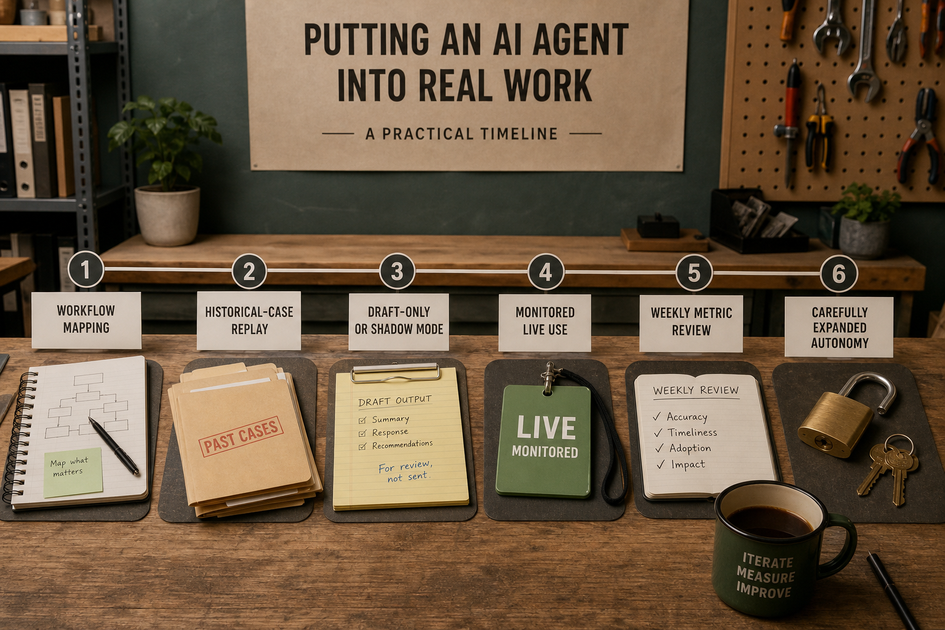
A short staged timeline covering workflow mapping, historical-case replay, draft-only or shadow mode, monitored live use, weekly metric review, and carefully expanded autonomy.
Start with one constrained workflow, test it against real examples, and expand only when the evidence supports it.
Build the first version around decisions, tools, and handoffs
Describe the workflow in operational terms rather than as a list of AI features.
Document the workflow
Record the trigger, required inputs, decision rules, allowed tools, output format, approval point, and failure route.
Connect essential systems only
A support use case might need the inbox, CRM, and approved knowledge base. Broader company automation can wait.
Add observability from the beginning
Log retrieved sources, tool calls, drafts, approvals, exceptions, and final outcomes so the team can audit and improve behavior.
This produces a maintainable first version rather than a demonstration that works only with ideal prompts.
Test with real cases before expanding autonomy
Historical cases reveal weaknesses that clean test prompts often miss.
Replay representative requests
Include ambiguous, incomplete, duplicate, outdated, and adversarial examples before allowing live actions.
Start in draft-only or shadow mode
Compare the agent with the existing process while keeping approval mandatory for customer-facing or irreversible actions.
Review metrics weekly
Track handled volume, escalation rate, correction rate, response time, and operator minutes saved. Change rules, sources, or integrations before widening the scope.
A simple workflow may take several weeks to move from mapping to monitored live use. Security reviews, multiple integrations, and poor historical data can extend that timeline.
What does ongoing maintenance require?
An AI agent needs an owner and recurring operational work after launch. Plan for exception and metric review, knowledge-base updates, integration upkeep, usage-cost checks, and a clear response when the system fails.
For example, an operations lead might review the exception queue every Friday, sample corrected tickets, and update routing rules when the same issue appears repeatedly. If the CRM integration fails, the workflow should stop or switch to a manual queue rather than continue with incomplete records.
A small internal workflow might need less than an hour of weekly review, but that is an illustrative planning estimate. Customer-facing systems can require substantially more monitoring, testing, privacy review, and incident response.
The intended outcome is a more consistent process, potentially faster first actions, and fewer repetitive handoffs. Those results require measurement, and poor source data or fragile integrations will limit performance regardless of the model.


