
Xcode Cloud is pushing iOS teams toward a new default: publishing is no longer a frantic last mile ritual. It is a release path you design early, or you pay for later. If you have ever had a clean build in Xcode but a messy release in App Store Connect, the root issue is often the gap between CI and Apple’s signing, roles, processing delays, and review rules. This guide walks you through a practical publishing setup, plus the most common ways it breaks, so your next release is calmer and more repeatable.
Step-by-Step Guide to Publishing Your First Mobile App goes deeper on the ideas above and adds concrete next steps.
What does Xcode Cloud remove, and what still remains?
| Release step | Traditional flow | Xcode Cloud-driven flow |
|---|---|---|
| Build + archive | Local Xcode archive | Cloud build produces archive |
| Signing | Manual fixes, profile churn | Managed in workflow settings (still needs correct entitlements) |
| Upload | Xcode Organizer or Transporter | Delivered into App Store Connect |
Explanation: Xcode Cloud can build, test, archive, and deliver to TestFlight and App Store Connect as one integrated workflow, as Apple documents (Xcode Cloud, Distributing your app, Upload builds).
Interpretation: you remove a couple of brittle handoffs, but you do not remove Apple’s signing, metadata, compliance, and review requirements.
Reader impact: on one recent 2-target app, first-time configuration took about 3 hours and App Store Connect processing took 10-40 minutes before the build was selectable. Treat those as anecdotal and highly variable based on signing hygiene, entitlements, and access. A repeatable metric to track in your team is time from "workflow finished" to "build selectable in App Store Connect", plus how often builds fail due to signing/entitlements.
When you move from outline to execution, How to Set Up CI/CD for Your iOS App - Beginner's Guide helps close common gaps teams hit here.
Why does Xcode Cloud change how you publish an app?
What changes is discipline, not magic
Xcode Cloud is not just "CI, but Apple." The shift is that publishing stops being a one-off export ritual and becomes a defined lane where build, test, signing, and delivery are designed together.
What this means in practice: you get more consistent artifacts (the thing you tested is the thing you upload), but the pipeline will surface problems you used to paper over. If your team relies on "the one person who knows signing," expect a few hours of upfront documentation and cleanup to make the setup repeatable.
One thing worth noting: the work does not end after the first successful upload. Certificate rotation, new targets/extensions, and role changes in App Store Connect can break a previously healthy lane, usually at the worst time.
A complementary angle worth comparing lives in The Last Step AI App Builders Don't Solve: Publishing.
How do you publish from Xcode Cloud without getting stuck?
How do you set up a workflow that matches how you actually ship?
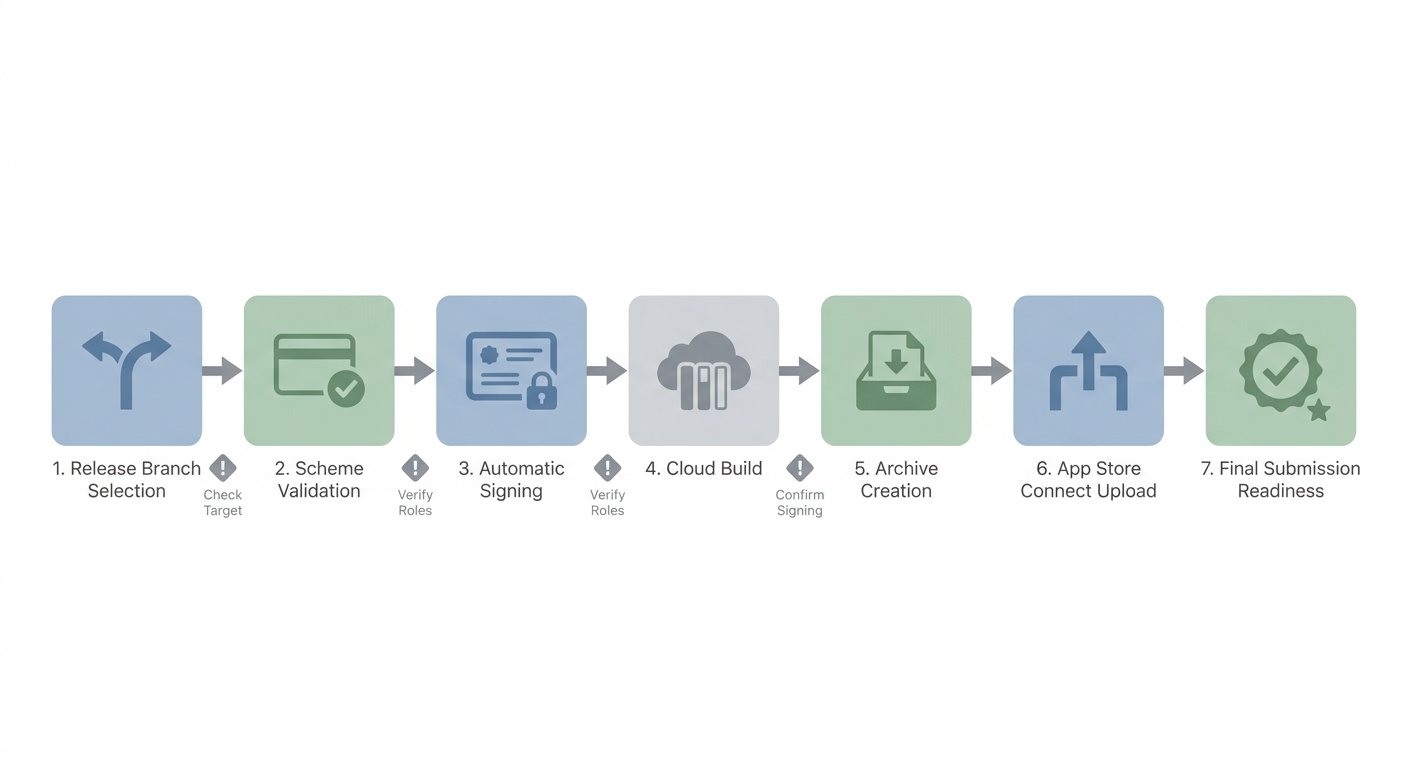
A step-by-step release pipeline diagram showing release branch selection, scheme validation, automatic signing, cloud build, archive creation, App Store Connect upload, and final submission readiness.
Bind the workflow to the release branch and the right scheme
Choose the branch you ship from (often
mainorrelease/*) and a scheme that matches your App Store config, not a debug variant. A practical approach: name the branch owner for each release branch and keep the scheme name unambiguous (for example,MyApp-Release).Plan 20-45 minutes to pick the branch/scheme, run a workflow, and confirm the produced archive matches what you ship (Configuring your first Xcode Cloud workflow). If you have multiple targets, expect extra time to confirm each one is using the intended settings.
Stabilize signing, identifiers, and entitlements before the first publish attempt
Verify automatic signing, bundle identifiers, and entitlements early. A common failure mode is a capability mismatch: push notifications, associated domains, or Sign in with Apple can be configured in one place but not the other, and the cloud build will fail or produce an archive you cannot submit.
Budget 30-90 minutes for a simple app, and longer if you have extensions, multiple bundle IDs, or older provisioning history. The dependency here is access: if you cannot edit the right App IDs or profiles, you can lose a day waiting on an admin.
What does "delivered" mean, and what still has to be done by a human?
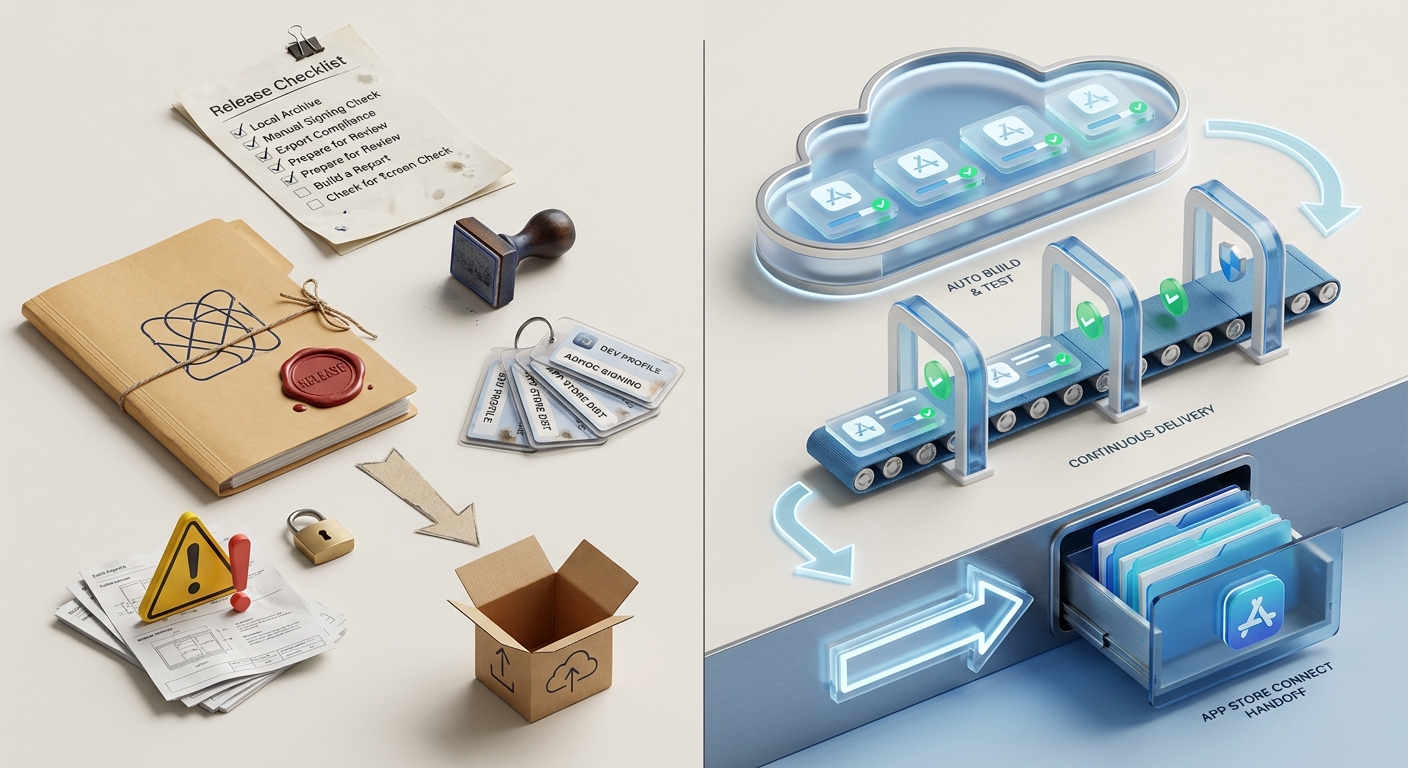
A two-column workflow comparison showing a traditional iOS release path versus an Xcode Cloud-driven path: local archive, manual signing, upload, and review prep on one side; automated build, test, archive, and App Store Connect handoff on the other.
After a successful run, the build should appear in App Store Connect once Apple finishes processing it (Upload builds). Processing can take minutes or longer, and it is an external dependency you cannot reliably speed up, so avoid scheduling "submit" right against a deadline.
"Build delivered" is not "submitted." You still need to attach the build to a version, complete metadata (screenshots, privacy details, export compliance if applicable), and click Submit for Review.
If a delivered build is not selectable, the usual culprits are: processing still in progress, missing export compliance, or a mismatch between the build and the version state. The practical move is to check the build status in App Store Connect, confirm compliance fields, and keep a fallback window (for example, "we need a selectable build by 2pm or we slip submission to tomorrow").
CTA: Build a release checklist that survives release day
Write a one page checklist covering branch, scheme, signing, metadata, and the single owner for the final submit click. It takes about 30 minutes and saves hours later.
Build the checklist
For tradeoffs, checklists, and edge cases, Publishing Apps Built With Flutter, React Native, or Native rounds out this section.
What breaks in practice, and what should you plan for?
Xcode Cloud makes problems visible earlier, but it does not remove policy work. If your signing and App Store Connect setup are inconsistent, automation will fail fast.
Common "we are stuck" problems to plan around:
- App Store Connect permissions bottleneck: the person doing setup cannot access the right app, role, or team. Fixing this can take a day or more if the right admin is unavailable.
- Signing and capability mismatches: entitlements drift, bundle IDs do not match, or a new extension was added without updating the App ID config.
- Processing delays: a build uploads but does not appear immediately, which can block a same-day submit.
- Review back-and-forth: even a clean lane can be delayed by review questions, metadata changes, or compliance answers. For new apps or sensitive categories, plan for 1-2 cycles.
Ongoing ops are also real. Certificates rotate on a cadence, team roles change, and sometimes App Store Connect has transient hiccups that look like "random" failures. The practical hedge is to keep a small buffer before submission, track your "workflow finished to selectable build" time, and document who can fix signing and permissions when the primary owner is out.
What are the tradeoffs of Xcode Cloud lock-in?
Xcode Cloud is tightly coupled to Apple’s build and distribution mechanics (Xcode Cloud). That is the advantage for iOS-focused teams, and a constraint for teams trying to standardize release ops across iOS, Android, and web.
The practical takeaway: treat Xcode Cloud as your iOS lane, not your entire release system. Many teams keep separate CI for shared tooling, backend deploys, or cross-platform coordination.
How to Publish a Bravo Studio App reframes the same problem with a slightly different lens - useful before you finalize.
What should you do next before publishing with Xcode Cloud?
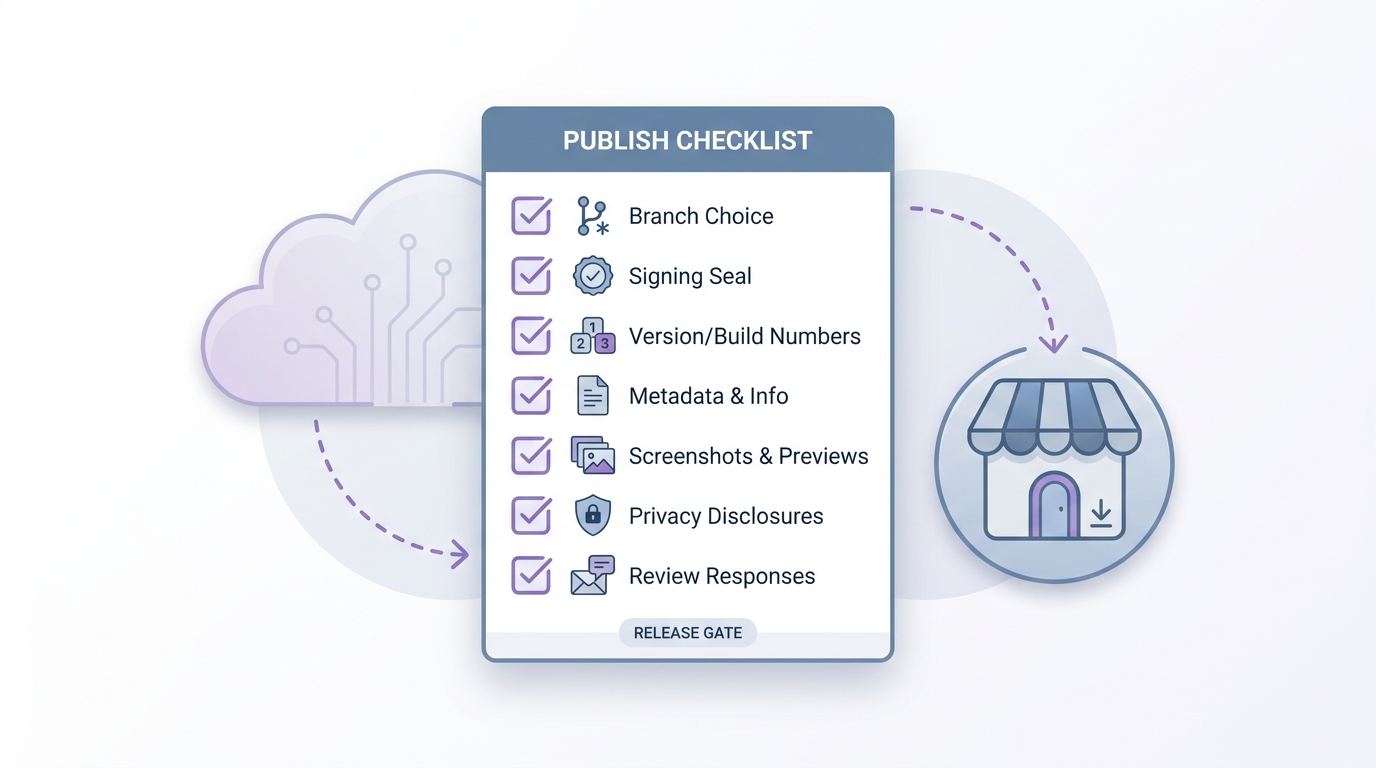
A practical release checklist card for Xcode Cloud publishing with items for branch choice, code signing, version/build numbers, App Store Connect metadata, screenshots, privacy disclosures, and review-response ownership.
Use a lightweight publish gate that matches App Store reality:
- Release branch selected and frozen (no surprise commits)
- Scheme confirmed (the one used for the submission build)
- Signing verified (team, bundle ID, profiles, entitlements)
- Version and build numbers updated correctly
- App Store Connect metadata complete (privacy, age rating, pricing, screenshots)
- Test gates run (at minimum: unit tests plus a quick device smoke pass)
- Owner assigned for Submit for Review and for responding to review messages
This is not about ceremony. It is about making sure your pipeline does not move faster than your ability to submit safely.
CTA: Run one full release drill before the next real submission
Do a dry run that goes all the way to a processed build in App Store Connect and a ready to submit state. Budget half a day the first time, and document every snag.
Run the drill


