If you are choosing a cross-platform stack for a 2026 mobile roadmap, the real risk is not picking the wrong framework - it is locking your team into a delivery model that fights your product constraints on UI fidelity, platform access, and ongoing maintenance. This write-up compares Kotlin Multiplatform and Flutter using signals you can sanity-check in your own repo: what you can realistically share, who owns UI work, and what tends to break during OS and dependency upgrades. By the end, you will have a practical decision rule for your app type and team structure, plus a short list of checks to run before you commit.
Best Cross-Platform App Development Tools Ranked 2026 goes deeper on the ideas above and adds concrete next steps.
What early signals show how KMP and Flutter differ in delivery, QA, and staffing?
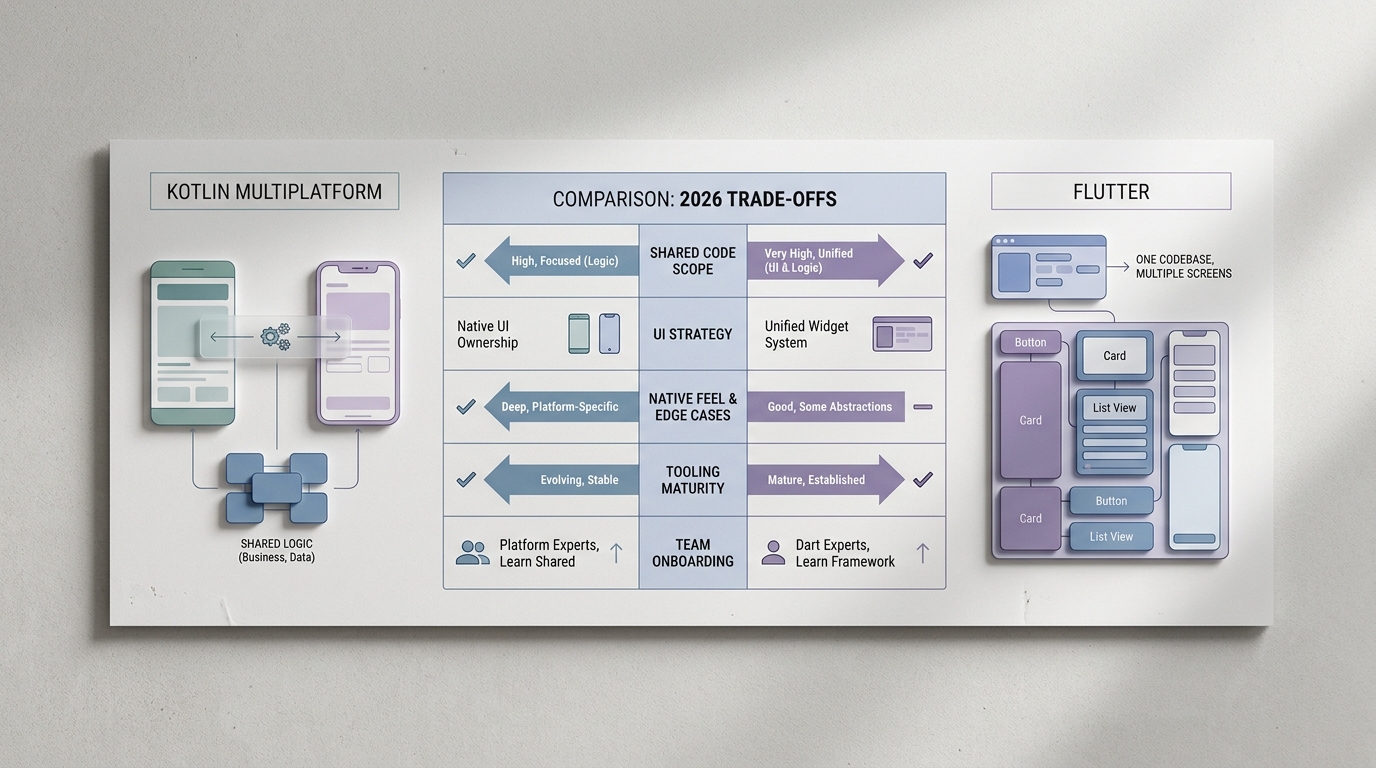
A compact comparison table showing Kotlin Multiplatform vs Flutter across shared code scope, UI ownership, native integration, team fit, and 2026 delivery speed, with directional ratings rather than fake precision.
| Dimension (directional) | Kotlin Multiplatform (KMP) | Flutter |
|---|---|---|
| Shared code scope | High for business logic; UI can be shared with Compose Multiplatform (adoption varies by team) | Very high - UI + logic in one codebase |
| UI strategy | Native-first UI (or shared Compose UI when it fits) | Custom-rendered UI for consistency |
| Native feel and edge cases | Strong - integrates with native patterns and SDKs | Good, but some UI and platform edge cases need workarounds |
| Tooling maturity and ecosystem | Improving fast; still more fragmented than Flutter in places | Mature, cohesive, widely adopted |
| Team onboarding | Best for Android/Kotlin-heavy orgs adding iOS | Best for single-stack teams ready for Dart |
- Explanation: This is a synthesis of common team reports and the underlying mechanics (shared UI vs shared logic, plugin ecosystems vs native bridging), not a controlled benchmark.
- How to interpret: Read it as an operating model choice. Flutter concentrates UI and logic into one runtime; KMP usually shares logic while keeping two UIs (unless you also standardize on shared Compose UI).
- Impact on your roadmap: It affects iOS UI ownership, QA surface area (one UI layer vs two), and upgrade chores (Flutter engine/plugins vs Kotlin/KMP/Compose and native dependencies).
Two concrete proof signals you can track in a POC without guessing market stats:
| POC signal to track | Why it matters | What "good enough" looks like |
|---|---|---|
| Shared module surface area (explicit list) | Prevents accidental over-sharing or under-sharing | Clear boundaries like: auth/session, API client, caching, analytics events, feature flags, domain models, error mapping |
| Native bridge count (Flutter channels or KMP interop points) | Each bridge adds test and upgrade surface | Small, intentional list tied to must-have SDKs (push, payments, camera), not dozens of one-off calls |
| CI build time and release steps (minutes, checklist) | Impacts iteration speed and on-call stress | Repeatable builds with signing, symbols, and crash reporting wired in early |
One thing worth noting: neither option guarantees faster delivery. Accessibility QA, device coverage, store review constraints, and compliance reviews can add days or weeks, especially after the first release when real edge cases show up.
When you move from outline to execution, Top 10 Mobile App Development Tools You Need in 2026 helps close common gaps teams hit here.
What is the real 2026 decision question for KMP vs Flutter?
This comparison is about shipping and operating mobile apps in 2026, especially new builds and major rebuilds where cross-platform choices change your cost structure. It is not a language debate, and it will not predict exact performance for your app.
Here is the thing: Kotlin Multiplatform and Flutter optimize different delivery models. "Better" means fewer duplicated bugs, fewer release coordination surprises, and a maintenance plan your team can sustain through upgrades and staff changes.
Decision criteria to use (and why they matter)
- UI fidelity and platform conventions (including accessibility and navigation patterns)
- What you want to share (UI plus logic vs logic only)
- Native SDK and OS access (including entitlements and edge-case behaviors)
- Team fit and hiring risk (Kotlin, Dart, iOS, Android)
- Release reliability under store review and regression pressure
- Upgrade burden as dependencies and OS versions change
Limits and realism (read this before trusting any "X is best" take)
Public surveys and vendor content are inconsistent across samples and years, so avoid treating adoption claims as settled facts unless you have citations and comparable cohorts. Your outcome swings based on team experience, UI complexity, plugin and SDK choices, and quality bar. Treat this article as a decision framework, then validate with a thin-slice build in your environment.
Which data points should drive the 2026 decision?
Category: Shared UI vs Shared Logic
Statistic: 0 - 90%
Label: UI sharing (KMP range)
Context: Logic-first by default; Compose Multiplatform can push UI sharing much higher
Category: Shared UI vs Shared Logic
Statistic: 100%
Label: UI + logic in one codebase
Context: Flutter optimizes for single-team UI ownership and consistent design across platforms
Category: Capacity
Statistic: 5.4x
Label: Review throughput
Context: Per reviewer per week
What are you actually sharing: UI ownership vs logic ownership?
- Kotlin Multiplatform (KMP): strongest when you share business logic across iOS and Android (domain rules, networking, persistence, SDK wrappers) while keeping native UI ownership. Tradeoff: you are still staffing two UI codepaths, and parity work becomes a recurring task that needs time in the roadmap.
- Flutter: strongest when one team owns the UI and logic from one codebase, so design changes land once and ship everywhere. Tradeoff: you commit to Flutter as the UI runtime, and you still need native work for certain SDKs and operating-system behaviors.
What "native integration risk" looks like in practice
- KMP: often fits SDK-heavy apps because the UI layer stays native, and platform APIs are first-class. Dependency caveat: you still need iOS coverage for UI reviews, on-call, and OS-specific issues, even if most business logic is shared.
- Flutter: can feel fast for greenfield UI delivery, but budget real time for plugin selection, upgrades, and bridge maintenance. A common failure mode is a critical plugin lagging behind an iOS beta or a new Android target SDK requirement, forcing a fork, a patch, or a temporary workaround.
How should teams choose between Flutter and KMP without overthinking it?
A practical decision rule (with constraints)
Pick Flutter when UI unification is the product
If your advantage is a single, brand-consistent UI across iOS and Android, Flutter is often the simplest operating model. Plan for periodic engine and plugin upgrade windows, app size and performance tuning, and heavier accessibility QA than your team expects the first time around.
Pick Kotlin Multiplatform when native roots and shared logic are the goal
If you already have a meaningful Android base, or you want to share domain logic without replacing the UI stack, KMP often lowers migration risk. Constraint: unless you standardize on shared UI, you will run two UI backlogs, and you will need iOS UI ownership for reviews, parity drift, and on-call.
A quick checklist you can answer in a meeting
- Do we need deeply native UI behavior, or mostly shared domain logic?
- Can we staff iOS UI long-term, including code review and on-call?
- Is this greenfield, a partial rewrite, or staged modernization?
- Which upgrade cadence can we support (Flutter engine/plugins vs KMP plus native dependencies)?
- What is our tolerance for forks and workarounds when dependencies lag?
Platform strategy review Get a stack shortlist tied to your portfolio, deadlines, and release constraints (including QA and CI implications). Plan your 2026 delivery path
What should you validate before choosing KMP or Flutter in 2026?
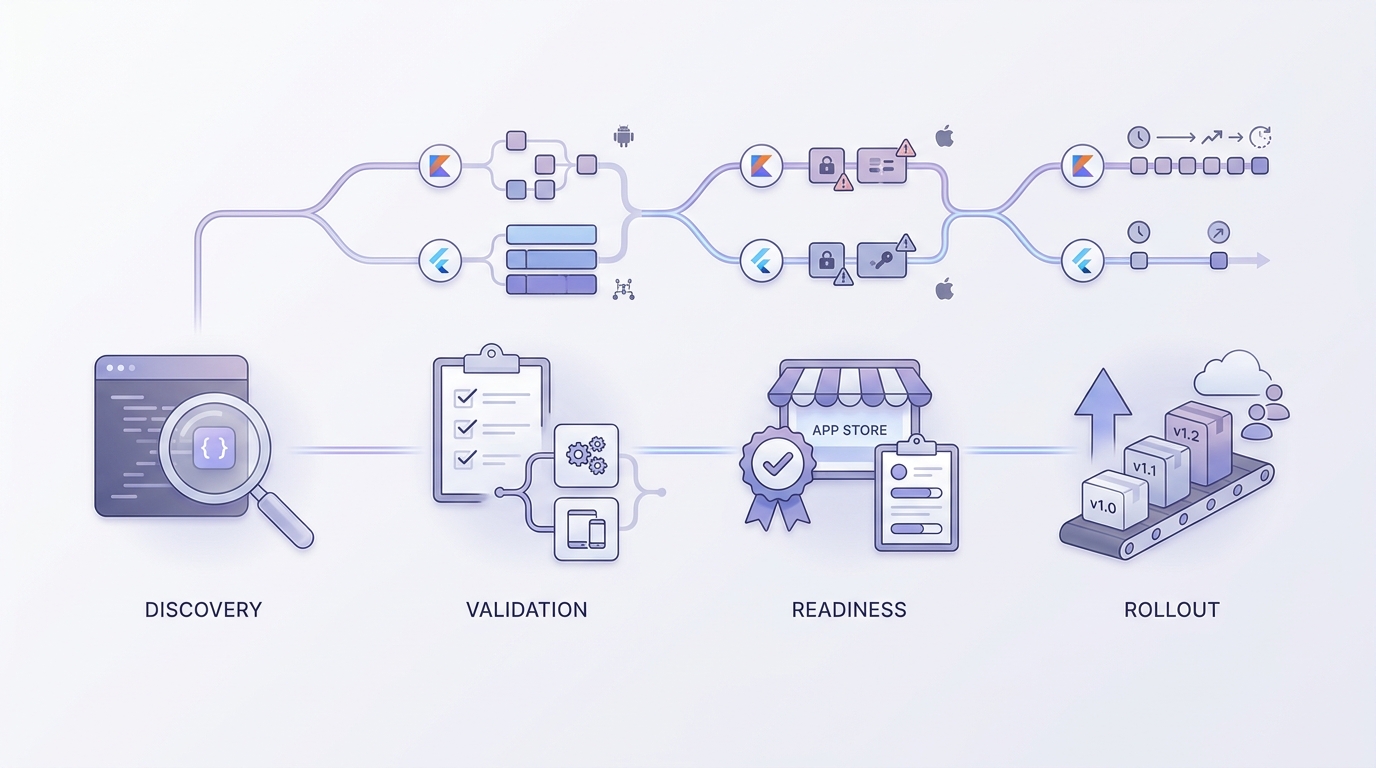
A concise implementation timeline showing how a team would validate either Kotlin Multiplatform or Flutter across discovery, proof of concept, app-store readiness, and rollout in a 2026 planning cycle.
Common mistakes (that show up after the first release)
- Choosing Flutter because demos feel fast, then discovering long-tail work in plugins, platform quirks, and accessibility gaps for your specific UI.
- Choosing KMP because your Android team is strong in Kotlin, then underestimating iOS UI effort and the ongoing cost of keeping two UIs aligned.
- Deciding before auditing your release pipeline (CI, signing, crash monitoring, staged rollouts), then paying for it during the first hotfix.
A thin-slice POC that settles most arguments
Aim for a 1 to 2 week POC for one experienced team. Add time if you need security review, design approval, procurement, or real device testing (those dependencies commonly turn a 2-week build into 3-4 weeks end-to-end).
Include:
- One critical flow: login plus a core in-app workflow (not a hello world screen)
- One hard dependency: payments, push notifications, maps, camera, or another SDK that historically causes trouble for you
- Operational hooks: crash reporting (Crashlytics or Sentry) and a basic CI run
- One measurable target: time to build the flow on both platforms, plus a simple performance and accessibility pass on a mid-tier device
What this means: you are not trying to crown a winner in a week. You are trying to expose integration debt, QA load, and who is on call when something breaks at 2 a.m.
| Phase | Validate (typical) | Who usually owns it |
|---|---|---|
| Discovery | Shared vs native surface area; required SDKs; OS constraints | Tech lead + product |
| Thin-slice POC | One flow on iOS + Android + one hard SDK | Feature team |
| Store readiness | CI, signing, symbols, crash reporting, basic device pass | Release owner + QA |
| Rollout plan | Flags, staged releases, rollback runbook | Product + ops |
Stack decision workshop Pressure-test your assumptions with a thin-slice plan, staffing model, and a release-readiness checklist you can execute in 1 to 2 weeks. De-risk your stack choice