If your app updates feel like a string of last-minute fixes, you are not just burning engineering time, you are training users to expect instability and giving the stores fewer reasons to surface your app. Most teams either ship too often without a plan, or wait too long and get blindsided by OS changes, store review delays, and brittle dependencies. By the end of this guide, you will have a more durable update system with clear release buckets, a roadmap you can maintain, and a measurement loop that makes progress visible instead of turning every release into a fire drill.
| Early proof (directional benchmark) | What you can do with it |
|---|---|
| A common pattern in mobile release process guidance is 3 release "lanes": fast hotfixes, a regular planned release, and periodic platform maintenance. Timing varies by team size, app risk, and store constraints (Coderio, Runway). | Use lanes to reduce chaos: decide what ships when, set expectations with support and stakeholders, and budget real time for QA, store review, and monitoring. |
Explanation: This is directional, not a universal standard or guarantee. It is a practical way to separate urgent risk from planned improvement and long-term maintenance.
Interpretation: Cadence problems are usually consistency and decision-making problems, not just speed problems.
Reader impact: With clear lanes and triggers, you can protect roadmap time, reduce store and rollout surprises, and spot regressions earlier, but results still depend on tooling quality, team capacity, and how variable store review is for your category.
When and How to Update Your App Without Hurting Rankings goes deeper on the ideas above and adds concrete next steps.
Why a long-term update strategy matters for your app
App updates are not just bug fixes. They are also how you stay compatible with iOS and Android changes, manage SDK and policy churn, and rebuild trust when something goes wrong. A strategy will not prevent every bad release, but it can reduce how often small issues turn into user-facing incidents.
One thing worth noting: a "better cadence" often means saying no to some changes until they fit the right lane. The tradeoff is that some requests wait longer, but your releases become easier to test and explain.
Who this strategy is for
- Solo founders shipping to both the App Store and Google Play without a dedicated release manager, where every submission and rollback steals focus from product work.
- Small product teams balancing features, bug fixes, QA time, and store review timing, where a missed window can block a launch or create weeks of churn.
- Apps exposed to frequent SDK changes, device fragmentation, or store policy updates (or any app where ratings and retention are meaningful growth levers).
What goes wrong without a plan
- Fixes land too late. Small crashes can snowball into support spikes and review damage that takes weeks to unwind.
- Releases lose a clear story. Users get vague notes instead of a reassuring narrative of improvement.
- Compatibility work gets handled at the last minute. OS releases, dependency deprecations, and policy shifts become emergency work that forces testing shortcuts.
The decision this article helps you make
This guide helps you pick a repeatable system: what qualifies as a hotfix vs a scheduled release vs a platform sweep, how to set a cadence you can sustain, and which metrics show whether your updates are helping. The practical takeaway is simple: define buckets, define triggers, then review outcomes often enough that the system stays honest.
When you move from outline to execution, Does Your App Need a Privacy Policy? (Yes - Here's Why) helps close common gaps teams hit here.
What does a healthy app update cadence look like?
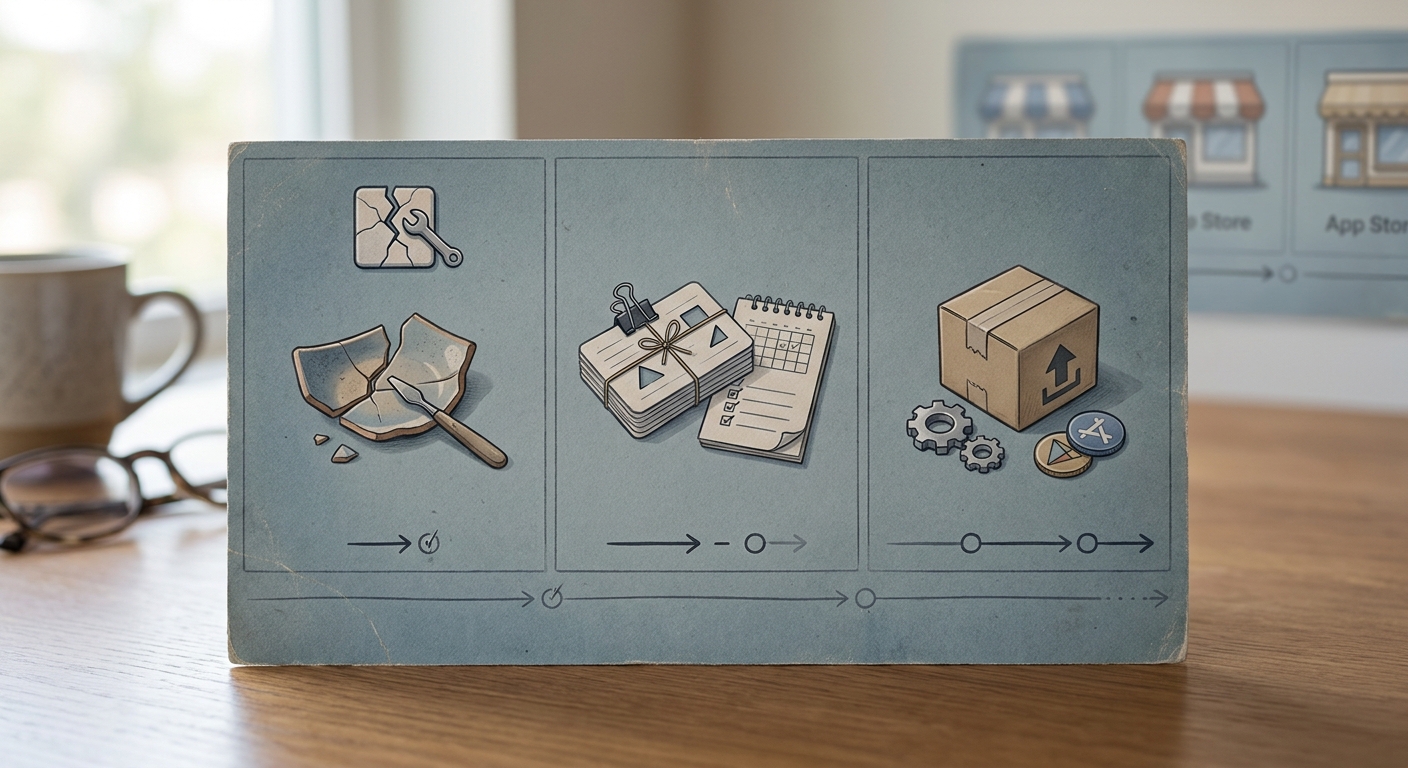
A compact comparison card showing hotfixes, scheduled feature releases, and platform compatibility updates for an app team planning across App Store and Google Play.
A healthy cadence is rarely "ship constantly." It is a repeatable mix of fast fixes, scheduled improvements, and planned platform upkeep. Use this as a starting point, then tune it to your team size, app criticality, QA capacity, and tolerance for store review variability.
Important boundary: the timing ranges below are heuristics, not norms. Teams in regulated categories, apps with heavy QA matrices, or apps with unpredictable review history will need more slack.
| Update type | What it is | Typical timing (directional) | Store and rollout reality | Primary impact |
|---|---|---|---|---|
| Hotfix | Crash spike, severe regression, security issue, broken checkout or login | Same day to 72 hours | Usually still needs store review. Server-side mitigations (remote config, kill switches) can reduce blast radius while review runs. | Reduces user pain quickly, limits review fallout |
| Scheduled release | Bundled features, UX improvements, non-urgent bug fixes | Every 2 to 6 weeks | Review time varies. Add buffer if launches are time-sensitive or need coordinated comms. | Creates a steady product narrative and momentum |
| Platform sweep | OS compatibility, SDK updates, store policy changes, dependency deprecations | Quarterly, plus pre-iOS/Android major releases | Higher QA load due to device and OS matrix. Some work stays invisible until it becomes urgent. | Lowers long-term risk and last-minute churn |
Contextual inline image: a compact comparison card showing these three lanes across a 6 to 12 week timeline for App Store and Google Play.
What the early proof means for your team
If everything is a hotfix, nothing is planned. If everything is planned, nothing is urgent.
What this means in practice: your buckets should match how work actually flows across engineering, QA, support, and store constraints. Predictability reduces last-minute pressure because people know what can safely wait and what cannot.
A realistic planning note: even a "small" release has overhead. For many small teams, expect 1-2 hours per week for triage and coordination, plus 0.5-1 day per release for QA time, store metadata, release notes, rollout monitoring, and handling the first wave of tickets. If you ship more frequently, that overhead will take time from feature work.
Signals that your cadence is too loose or too rigid
- Too loose: crashes or critical bugs stay open for weeks, and reviews repeat the same complaint across versions.
- Too rigid: you ship on a calendar even when crash rates or support volume show users need an immediate fix.
- Too reactive: every small issue becomes a release, which burns review cycles and increases the chance of shipping new bugs.
A complementary angle worth comparing lives in App Store Trends This Week - What's Rising and Falling.
How do you build a long-term app update strategy step by step?
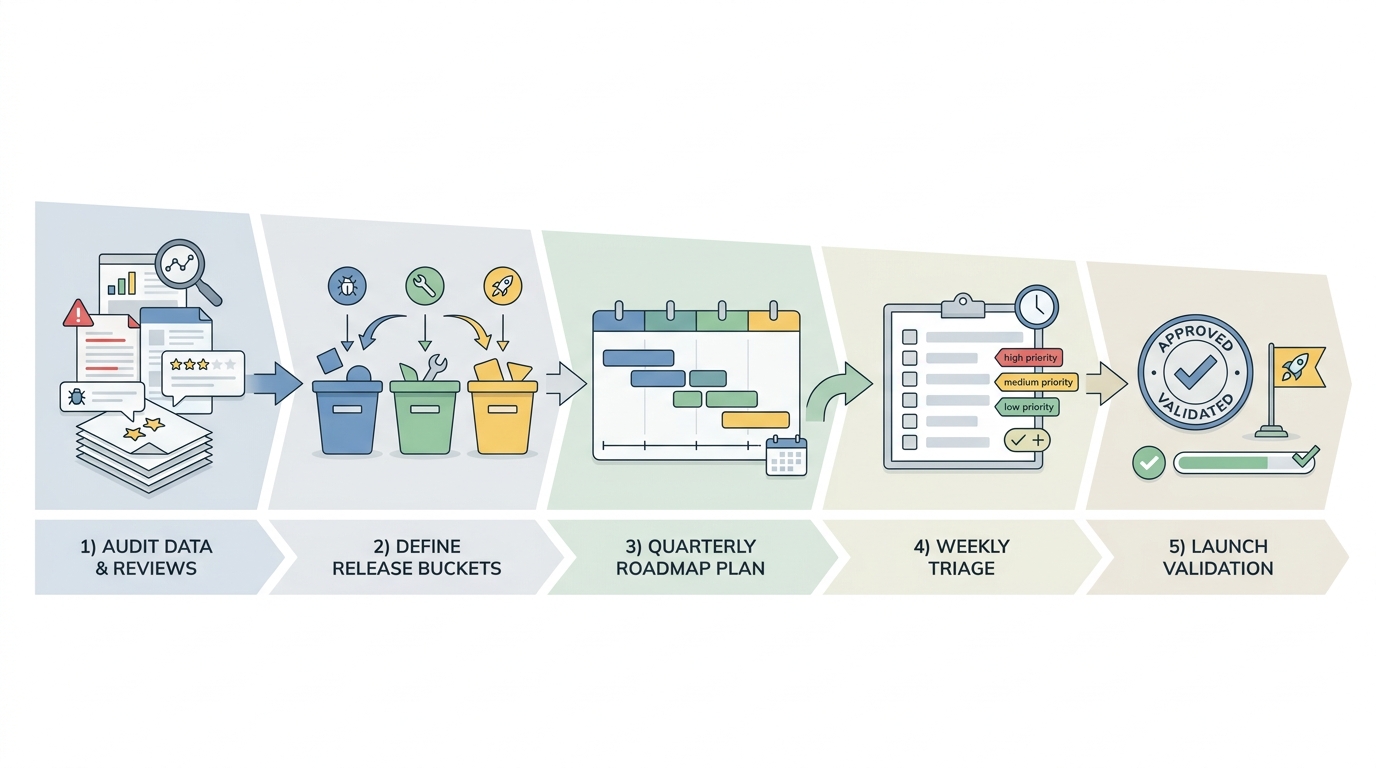
A process diagram that moves from auditing crash and review data to defining release buckets, then building a quarterly roadmap, weekly triage, and launch validation for mobile app updates.
The goal is a system your team can run on a busy week. That usually means one clear workflow, a few measurable triggers, and a lightweight checklist.
Step-by-step workflow (one loop you repeat)
Define lanes and ownership
Pick 3 lanes (hotfix, scheduled, platform) and name an owner for the process (calendar, agenda, decision log). This is usually 30-60 minutes to set up, plus 15 minutes a week to keep it current.
Set triggers and thresholds
Decide what forces a hotfix and what can wait. Include at least one measurable threshold so decisions are not purely subjective. Example triggers are below.
Plan the next 4 to 8 weeks
Keep it small: a single scheduled release theme, a list of platform chores, and a placeholder for "unknown hotfix time." Expect 60-90 minutes to plan if you already have a backlog, longer if priorities are unclear.
Execute with a pre-flight checklist
Make the release boring: scoped changes, QA coverage, rollout settings, and comms. This is where you trade a bit of speed for fewer surprise regressions.
Monitor and close the loop
Watch the first 24 to 72 hours closely, then write down what happened. This is typically 20-30 minutes of disciplined follow-up that saves hours later.
A practical bucket-to-SLA table (so decisions are fast)
| Bucket | Trigger (example) | Target timeline | Minimum QA scope | Rollout and comms |
|---|---|---|---|---|
| Hotfix | Crash-free sessions drops below 99.5% for a key app version, or crash rate increases 50%+ vs a 7-day baseline (calibrate to your scale) | Start same day, ship as soon as verified | Repro if possible, smoke test critical paths (login, checkout, onboarding), test 1-2 top devices per platform | Consider staged rollout. Tell support what changed and what to watch |
| Scheduled | UX improvements, non-urgent bugs, performance work | 2 to 6 weeks | Regression pass on key flows, upgrade path from last 1-2 versions | Standard rollout plan, clear release notes |
| Platform sweep | SDK deprecation, OS compatibility risk, policy deadline | Monthly to quarterly planning, ship before deadlines | Wider device and OS matrix, pay down flaky tests | Communicate internally early, avoid last-minute Friday submissions |
Tooling note: you can implement this with Firebase Crashlytics (or Sentry) for crashes, plus App Store Connect and Google Play Console for rollout controls and review monitoring. If your crash reporting is misconfigured or not sampled correctly, thresholds like the above will mislead you, so validate your instrumentation before treating it as a gate.
Audit your last 3 to 6 months (once, then quarterly)
Pull a timeline of release dates and changelogs, then overlay crash rate, ANR rate (Android), rating trend, and weekly support volume. If tools are already wired, this can take 2-4 hours; if data lives across dashboards and inboxes, budget a day.
Then classify incidents by the real trigger: regression, store or policy change, device or OS compatibility, or feature request. A common failure is mislabeling review spikes as "feature demand" when they are actually a regression (login, checkout, slow load, broken deep link).
For tradeoffs, checklists, and edge cases, App Store Keywords: The Only Guide You Actually Need rounds out this section.
What mistakes break an app update strategy?
Shipping updates only when something breaks
This creates a chaotic cycle: urgent bugs compete with planned work, so features slip and quality still does not improve. Teams start bundling unrelated fixes into a rushed release, QA gets overloaded, and you miss the window to address problems before reviews pile up.
You also see it in vague release notes. When you are scrambling, you ship "stability improvements" instead of explaining what changed and who benefits.
The practical fix is a standing hotfix policy: clear triggers, who can approve, and how you communicate internally and to users.
Treating phased rollout and remote config as a safety net
Phased rollout and feature flags help, but they are not a substitute for QA or monitoring. They can also hide problems until you hit a wider percentage of users.
Concrete failure modes to plan for:
- Rollout masking a bug: a crash only appears on certain devices or regions, so early rollout looks fine until the long tail shows up.
- Analytics blind spot: phased rollout still fails if crash reporting or funnels are misconfigured, delayed, or filtered incorrectly.
- Hotfix churn: a hotfix lane can create release fatigue and new regressions if you repeatedly skip QA and validation.
How the App Store Algorithm Works in 2026 reframes the same problem with a slightly different lens - useful before you finalize.
What should your update execution checklist include before and after launch?
Pre-flight checks before you submit
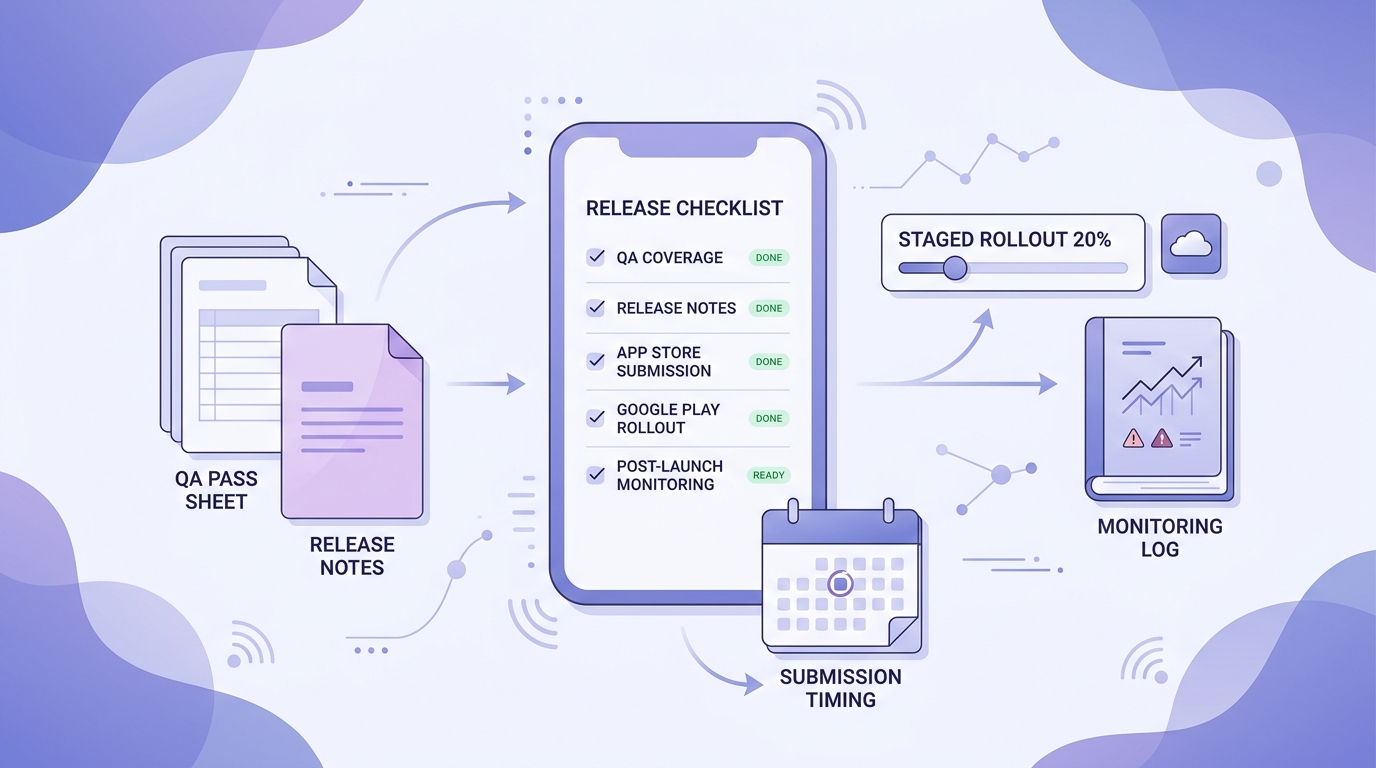
A mobile-friendly checklist block for pre-launch verification, including QA coverage, release notes, App Store submission timing, Google Play rollout settings, and post-launch monitoring.
A checklist prevents a common failure mode: shipping a change that belongs in a different bucket, with rushed QA and unclear comms. The tradeoff is time and discipline, but it reduces rework and makes releases less dependent on tribal knowledge.
- Confirm the change matches the bucket (hotfix vs scheduled vs platform) and the rollout method you planned.
- Re-run QA on failure-prone edges: oldest supported devices, newest OS, low storage, poor network, logged-out and freshly created accounts.
- Validate upgrade paths (previous 1-2 versions) and migrations (flags, schema, caches).
- Prepare release notes and in-app messaging that explain user impact in one sentence.
- Draft support macros for expected tickets and link to a status page if relevant.
- Double-check store details: screenshots, privacy disclosures, permissions, review timing, staged rollout settings.
Planned visual: A mobile-friendly checklist block showing QA coverage, release notes, submission timing, rollout settings, and monitoring.
Post-launch follow-up in the first week
The first week is about fast learning, not just watching downloads. Dependency caveat: you need crash reporting and analytics wired well enough to trust the signal, otherwise you are guessing.
- Check daily: crash-free sessions, crash rate by version, ANRs (Android), review sentiment, and your key funnel conversion.
- Verify the update fixed the original problem without creating a new dead end elsewhere.
- Compare expected vs actual behavior by segment (device, OS, region, new vs returning).
- Decide within 24 to 72 hours: expand rollout, pause, or roll back based on the first clear signal.
- Log findings as backlog items tied to the next release bucket.
How to keep the system alive over time
The system stays alive when it is lightweight enough to run during busy weeks. If it depends on one hero engineer, perfect sprint hygiene, or everyone remembering unwritten rules, it will drift.
Build around small habits:
- One owner for the calendar and triage agenda (not all decisions, just the system).
- A single doc page with bucket definitions, triggers, and severity thresholds.
- A consistent release day when possible, plus an exception path for true hotfixes.
- A short post-release note capturing outcomes and follow-ups (20-30 minutes, but it compounds).
Turn your cadence into a repeatable runbook
Get a lightweight release calendar, bucket definitions, and a weekly triage agenda you can copy into your team docs.
Get the runbook template
Want a second set of eyes on your cadence?
Share your last 3 releases (dates, notes, and any spikes) and get a practical recommendation for buckets, timing, and the smallest checklist that will actually stick.
Request a cadence review