
Releasing an app update should not feel like rolling the dice on your rankings. If you have hard-won keyword traction or a fragile rating trend, one messy release can trigger crashes, negative reviews, and short-term chart volatility that can take days or weeks to rebuild. This is a practical, ranking-safer update plan for indie teams: what to ship, what to separate, and how to monitor the first 72 hours without pretending you control the algorithm.
App Store Optimization in 2026: What Actually Moves the Needle goes deeper on the ideas above and adds concrete next steps.
How can you ship updates without losing App Store momentum?
The real question is not "How do I ship faster?" It is "How do I ship without resetting momentum I already paid for with time, ads, or content?" In App Store terms, your ranking-sensitive assets are your rating, review velocity, conversion from search, and the post-update stability signals users generate.
This is written for indie apps with limited on-call bandwidth. The goal is lower downside risk, not a promise that rankings will never move.
Scope and limits of the evidence
- App Store outcomes vary by category, country, install base size, and algorithm shifts, so impact is directional rather than guaranteed. Pattern-based analysis like iAppList is useful, but it is not an official formula.
- Timing guidance here is mostly about operational risk (your ability to respond), not "gaming" the algorithm.
- This focuses on Apple App Store review, ratings, and momentum. Google Play differs, but post-update user experience still drives outcomes.
- Sources include observed factor overviews (Apple Charts, iAppList) plus Apple’s release controls like phased release (App Store Connect Help).
When you move from outline to execution, Publishing at Every Stage: How App Store Strategy Changes as You Grow helps close common gaps teams hit here.
Which update variables most affect App Store rankings?
Category: Quality
Statistic: ≥99.5% crash‑free
Label: Stability threshold that protects rank
Context: Dips in crash-free rate tend to pressure ratings and visibility
Category: Timing
Statistic: ±24 - 72 hrs
Label: Ranking movement after release
Context: Most volatility clusters in the first few days post-update
Category: Reputation
Statistic: ≤24 hrs
Label: Fast review response window
Context: Quick replies can soften negative sentiment after updates
Here is the pattern I have seen in real releases: rankings rarely dip because you shipped an update. They dip because the update changes what users experience (crashes, friction, confusion), and you do not catch it fast enough.
The table below is a risk map, not a guarantee. The example thresholds are starting points to tune to your baseline, traffic volume, and support capacity.
| Update variable you control | What typically changes | When impact shows up | Example thresholds (adjust to your baseline) | Business meaning for indie teams |
|---|---|---|---|---|
| Crash rate and severe bugs | Uninstalls, low ratings, negative reviews | 24 to 72 hours | Crash-free sessions drops below ~99.5% overall, or any repeatable S1 on login, paywall, restore, data loss | A bad build can cost a week of cleanup and trust repair |
| Release timing vs team availability | Speed of support and rollback decisions | Same day | If you cannot monitor for 1-2 hours post-approval and check twice daily for 2 days, treat the release as higher risk | Slow response turns small regressions into review pile-ons |
| Metadata changes (title, subtitle, keywords, screenshots) | Search visibility and conversion | 1 to 14 days | Search-to-product-page conversion drops >10-20% for 24+ hours (if you have enough volume) | Small copy changes can shift what you rank for and how you convert |
| Review response speed and support handling | Review sentiment, future conversion | 1 to 7 days | Support volume jumps 2x vs normal, or average response time slips beyond 24 hours | Calm, fast replies can limit churn and future 1-star reviews |
| Update frequency (too often or too rarely) | User trust, review fatigue | Weeks to months | More than 1 meaningful release/week without clear user value, or long gaps while known bugs persist | Consistency beats chaos, but quality still matters |
Interpretation: updates are not "penalized" by default, but the store reflects what users do afterward. External analyses tend to point back to conversion and engagement patterns, not the act of submitting a binary (Apple Charts, iAppList).
Reader impact: you cannot control reindex timing, review timing, or category volatility. You can control early stability and response time. If crash-free sessions, review velocity, or conversion moves the wrong way for a full day, pause distribution (phased release) and fix the experience before you run experiments like new screenshots or keyword shifts.
A complementary angle worth comparing lives in The True Cost of Slow App Releases for Startups.
How do you plan and ship an app update safely?
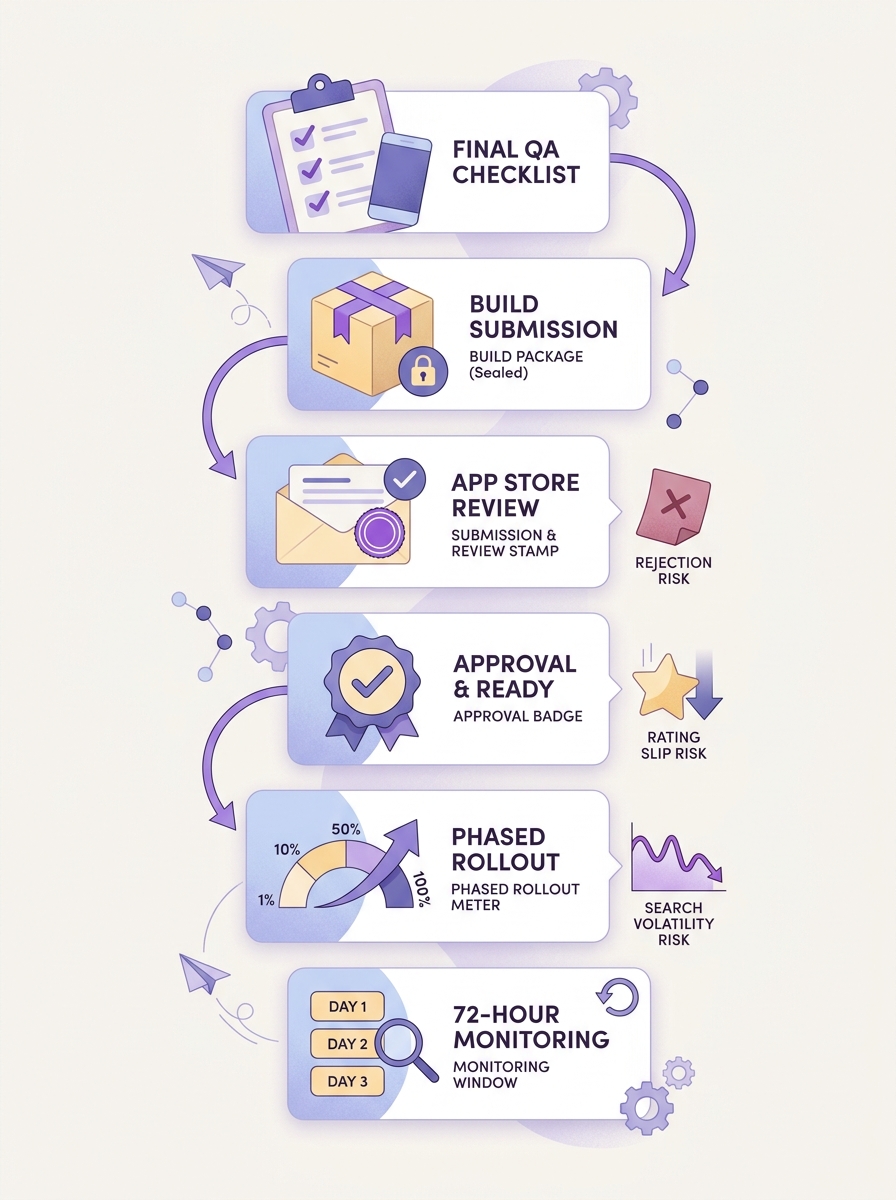
A release timeline showing the path from final QA, build submission, App Store review, approval, rollout, and the first 72 hours of monitoring, with callouts for where rating drops, rejection, or search volatility can appear.
Most ranking pain I have lived through was not one huge mistake. It was stacking risks in the same release while the team was offline, then discovering the blast radius in reviews.
A realistic indie release workflow (tools + thresholds)
Plan on real time, not wishful time. A safe-ish cadence for a small team is usually:
- Pre-flight: 30 to 60 minutes
- Submission/admin: 15 to 30 minutes (more if compliance or paywall changes)
- Approval day: 45 to 90 minutes total monitoring
- Next 2 days: 10 to 15 minutes, twice per day
- If you need a hotfix: several hours spread across 1-2 days (build, test, notes, review, support)
Pre-flight (30 to 60 min)
In Xcode Organizer or Firebase Crashlytics, review the last version’s crash trend and top crash signatures. If crash-free sessions are already below roughly 99.5% (or you see any S1 on login, paywall, restore, sync, or data loss), treat the next release as stability-first.
Submission (15 to 30 min)
In App Store Connect, verify version/build numbers, export compliance, and review notes. If you changed anything that could look like a policy shift (new paywall flow, account requirements, UGC, tracking), spell it out clearly in reviewer notes to reduce back-and-forth.
Approval day monitoring (45 to 90 min total)
Watch crash reports, support inbox volume, and rating trend. Decide early whether you are in "observe" mode or "intervene" mode, because waiting a full day is how small issues turn into a multi-day cleanup.
First 72 hours (10 to 15 min, 2x/day)
Track crash-free sessions, rating trend, and one funnel metric you actually trust (activation, trial start, purchase). Ignore single-hour blips, but act on sustained signals that persist across multiple checks.
Tradeoff: separating risky code changes from metadata work slows full rollout by a cycle and can delay revenue tests. In exchange, you get cleaner attribution and usually less firefighting.
One practical decision example (with numbers)
During a phased rollout, we saw crash-free sessions drop from 99.7% to 99.2% within a few hours at 10% distribution. We paused rollout, shipped a hotfix targeting the top crash signature, then resumed when crash-free recovered above baseline. That pause cost about a day of rollout speed, but it likely prevented a wider wave of 1-star reviews.
When this can still fail (even if you do the "right" stuff)
- Silent conversion drops: you can ship a stable build that makes onboarding slightly worse, and you might not notice until a week later if volume is low.
- Review lag: ratings sometimes reflect frustration days after the issue, especially if users update late.
- Phased rollout is not a shield: existing users can still update quickly, and your most engaged users often update first.
- Dependencies you do not control: category volatility, App Review timing, and metadata reindexing can blur cause and effect for several days.
Choose the release window around risk, not convenience
- Avoid major builds right before weekends, holidays, travel, or any period you cannot respond for 24 to 72 hours.
- Prefer lower-traffic windows for risky code changes so the first-wave impact hits fewer users.
- If you are doing meaningful metadata changes (screenshots, keywords, pricing, onboarding), do not bundle them with risky technical changes unless you accept messy attribution.
Write update notes users and reviewers will actually notice
- Lead with the user outcome: "Fixed sync delays on slow networks" beats "Performance improvements."
- Name the surface area: onboarding, login, subscriptions, widgets, export, notifications.
- If behavior changes could look suspicious (new account flows, new paywalls), mirror the same detail in reviewer notes.
- If the build is tiny, one clear line is better than vague filler.
For tradeoffs, checklists, and edge cases, App Store Keywords: The Only Guide You Actually Need rounds out this section.
Practical implications: a pre-flight checklist for protecting rating, reviews, and search position
Use this when you are tempted to ship "just to get it out." It is designed for indie constraints and limited support coverage.
Pre-flight checks before you hit submit
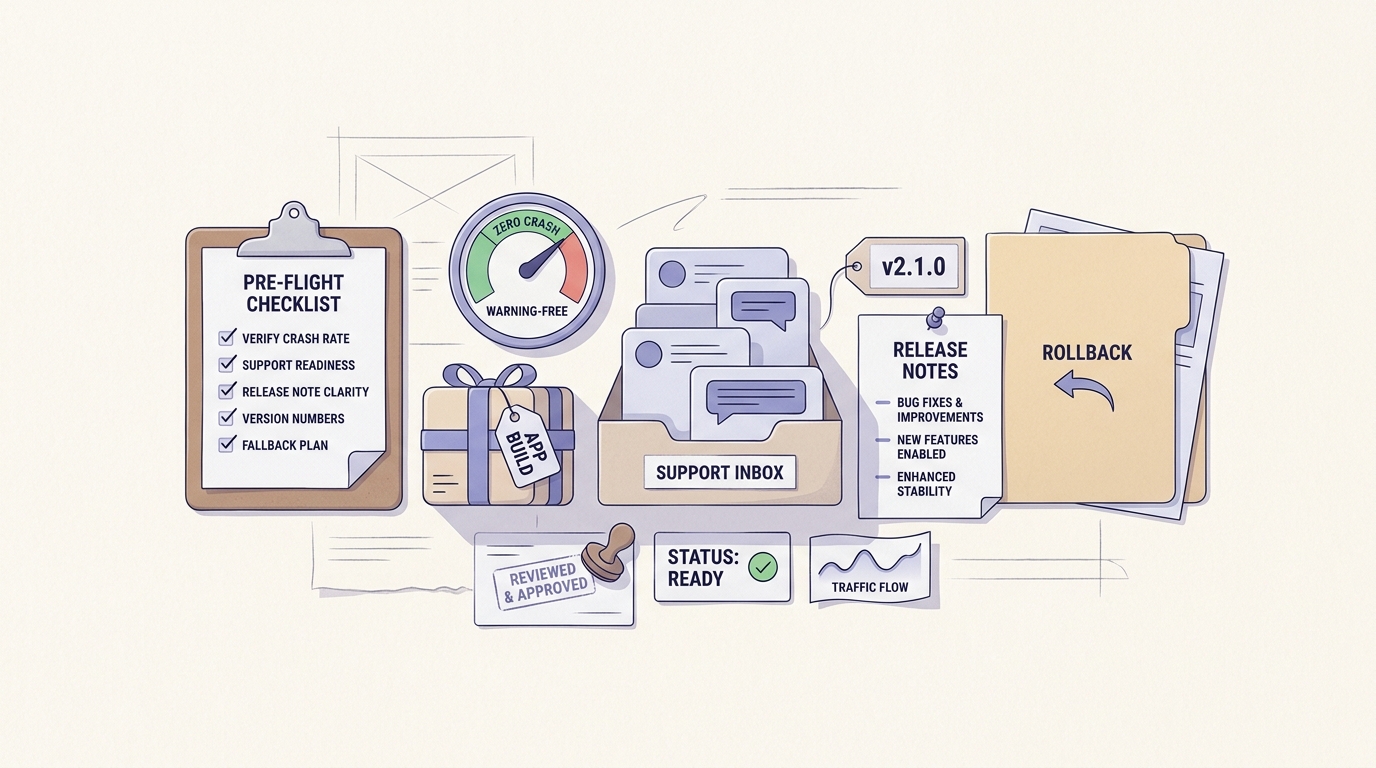
A mobile-friendly pre-flight checklist for indie app teams covering crash rate, support readiness, release note clarity, version numbers, and a fallback plan if App Store review or user feedback turns negative.
- Confirm the update fixes a user-visible problem, not only internal cleanup.
- Test critical paths: install, onboarding, login, paywall, restore purchases, core action, notifications.
- Review crash trend and top issues in Xcode Organizer or Crashlytics.
- Scan the last 20 to 50 reviews for recurring complaints you can address in notes or support macros.
- Prepare a basic response plan: known-issues note, 2-3 canned replies, and a clear "pause rollout" rule.
Pitfall: shipping a big refactor plus a new paywall plus new screenshots is "one release" for you but multiple risk multipliers for users.
When to delay instead of shipping now
- Delay if you have unresolved crashes, payment failures, or onboarding regressions. Fixing these first usually protects ratings more than new features lift them.
- Hold the release if you cannot respond to App Review questions or user complaints within a day.
- Avoid stacking changes when rankings are already unstable from another move (pricing test, acquisition shift, major metadata rewrite).
Does Your App Need a Privacy Policy? (Yes - Here's Why) reframes the same problem with a slightly different lens - useful before you finalize.


