Pick the right mobile app publishing assistant to reduce release errors and match your team's engineering support level. This short guide ranks five options, shows when to pick managed publishing versus automation or DIY, and gives a compact checklist to run a pilot release in a few days to a couple of sprints depending on credential readiness.
How to Publish a Bravo Studio App goes deeper on the ideas above and adds concrete next steps.
Which mobile app publishing assistants are best for my team?
Category: Top pick
Statistic: 4/4 supported
Label: Froxi - White‑glove
Context: App Store upload, Play upload, Screenshots, Localization
Category: Top pick
Statistic: 4/4 supported
Label: Fastlane - Automation‑first
Context: App Store upload, Play upload, Screenshots, Localization
Category: Top pick
Statistic: 4/4 supported
Label: Codemagic - CI/CD publish
Context: App Store upload, Play upload, Screenshots, Localization
Managed publishers are best for compliance-heavy or risky releases; automation-first tools are best for frequent CI-driven workflows.
| Assistant | Best for | App Store upload | Play upload | Screenshot gen | Metadata localization | Scheduled releases |
|---|---|---|---|---|---|---|
| Froxi | White-glove publishing | Yes | Yes | Limited | Yes | Yes |
| Fastlane (OSS) | Automation-first | Yes | Yes | Yes | Yes | Yes |
| Codemagic | CI/CD with publish | Yes | Yes | Yes | Yes | Yes |
| Appfigures | ASO + monitoring | Limited | Limited | No | Yes | No |
| Native consoles | Full control DIY | Yes | Yes | No | Yes | Yes |
Note: "Yes" and "Limited" are shorthand for commonly supported capabilities - they typically require configuration, credentials, or integration work and are not turnkey guarantees.
Explanation: the table is capability shorthand. Use a managed publisher if you want human review and fewer manual compliance mistakes; use Fastlane or Codemagic to move fast with automation. The practical takeaway is choosing by release cadence and who will maintain the pipeline.
Impact: for a pilot, expect automation setup to take 1-3 days if credentials and signing keys are already available; if not, plan 1-2 sprints to provision accounts and keys and complete security reviews. White-glove publishers typically onboard in 2-7 business days and add 1-3 hours of human review per release; that reduces some rejection risk but increases vendor cost and dependence.
One thing worth noting: common failure modes are expired certificates, revoked keys, store API or UI changes, and lost credentials. Account for these risks in your timeline and run a recovery runbook before the pilot.
When you move from outline to execution, How a Solo Founder Prepared Their App for Launch Without Hiring an Agency helps close common gaps teams hit here.
What are the top mobile app publishing assistants?

A compact checklist block for the first test release: 1) confirm store credentials & sandbox access, 2) verify signing identity and provisioning, 3) upload localized metadata for one locale, 4) schedule internal test track, 5) validate rollback process. Each item includes a quick note on who owns the step (dev, PM, or publisher).
Short answer: Froxi for high-compliance releases, Fastlane or Codemagic for CI-driven workflows, and native consoles when you must avoid third parties.
| Assistant | Best for | Quick tradeoff and effort |
|---|---|---|
| Froxi | High-compliance or high-stakes releases | White-glove onboarding (2-7 business days). Lower internal work but higher cost and vendor dependency; scope SLAs and recovery terms during contract. |
| Fastlane (open-source) | CI-driven automated publishing | Maximum scripting control; initial pipeline often takes 1-2 sprints. Requires ongoing maintenance after store API changes and an engineer owner. |
| Codemagic | Flutter and native teams wanting managed CI/CD | Faster initial setup than building lanes yourself (1-3 days if keys ready). Less hands-on metadata QA; you still need to own signing and secrets. |
| Appfigures | ASO, analytics, and light publishing helpers | Great for analytics and localization signals, not a full publishing replacement. Best used alongside CI for full automation. |
| Native consoles | No third-party dependency, full control | Avoids credential sharing; expect 1-4 hours manual work per medium update until automated. Good for tight security policies but higher manual run rate without automation. |
What this means: each option has tradeoffs in cost, maintenance, and operational risk. Pick based on who will maintain the flow and how quickly you need to scale releases.
A complementary angle worth comparing lives in Should You Publish Your App Yourself or Hire Someone?.
How do I choose the right mobile app publishing assistant?
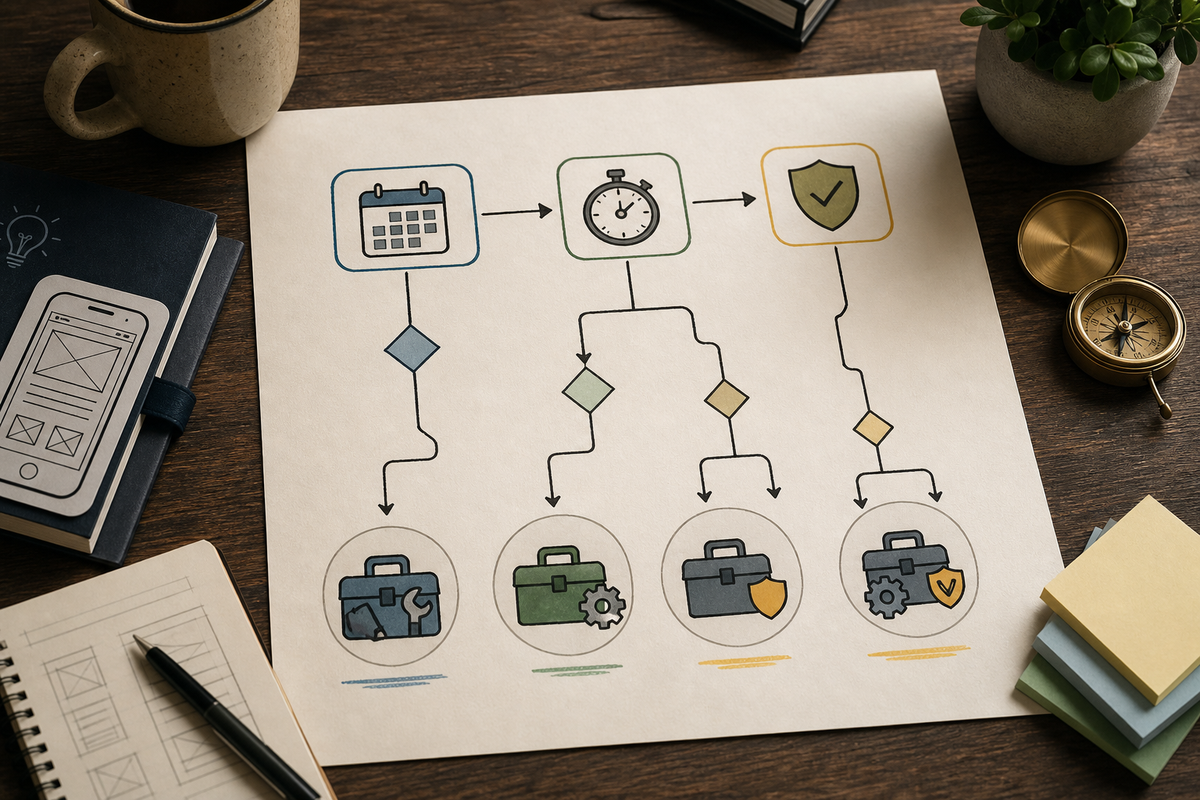
A decision flowchart that routes readers by three questions: Release cadence (infrequent vs continuous) → Engineering capacity (none vs available) → Compliance needs (low vs high). Terminal recommendations map to Froxi for infrequent/high‑compliance, Fastlane/Codemagic for continuous/engineering teams, and native consoles for strict control.
Choose by matching release cadence, engineering capacity, and compliance needs, then validate with a single pilot release.
High-frequency releases
If you ship weekly or continuously, prefer automation-first tools like Fastlane or CI/CD platforms. Expect 1-2 sprints to automate the core flow and weekly maintenance after store API changes.
Infrequent releases with compliance needs
If releases are irregular and regulatory checks matter, prefer white-glove vendors to reduce review risk and avoid missed steps. Plan 2-7 business days for onboarding and budget ongoing vendor fees and some loss of direct control.
No third-party allowance
If your org forbids third parties, use native consoles and invest in internal automation and secure key storage. Expect an initial sprint to build and test automation plus periodic effort to rotate keys and handle account issues.
For tradeoffs, checklists, and edge cases, Why Publishing Requires Structured Execution, Not Guesswork rounds out this section.
Implementation checklist (first release)
Run a pilot release to validate tooling and timing; estimate 1-5 days depending on credential readiness and automation level.
Confirm store credentials and sandbox access
Ensure owner or delegated access for App Store Connect and Play Console, and verify internal testing tracks are enabled. Missing access is the most common blocker and can add days to your pilot.
Verify signing identity and provisioning
Confirm certificates, provisioning profiles, or Play signing keys are present and stored securely. Expired or mis-scoped keys cause submission failures; allow time for key rotation and account recovery if needed.
Upload localized metadata for one locale
Prepare one locale with copy, screenshots, and assets to validate formatting and truncation. This typically takes a few hours and surfaces UI and copy issues early.
Schedule internal test track
Use TestFlight or an internal Play track so testers validate the build before public release. Allocate 24-72 hours for basic acceptance testing and factor in tester availability.
Validate rollback and emergency patch process
Confirm who can unpublish, revert, or hotfix and how long each action takes. Practice a dry run for key rotation or account recovery if possible; worst-case scenarios often take multiple days to resolve.
App Publishing Agency vs AI Publishing Assistant reframes the same problem with a slightly different lens - useful before you finalize.