
Mobile apps ship fast, but security gaps in dependencies, misconfigurations, and leaked secrets can follow you into app review delays, incident response, or quiet data exposure in production. The hard part is not knowing you need security testing; it is picking tools that fit Android and iOS workflows, integrate with CI/CD, and catch issues early enough to fix without derailing a release. This ranked shortlist of 5 mobile app security tools shows what each option is best for, where it falls short, and how to combine them into a practical stack with realistic time and tuning expectations.
Top 5 App Security Tools for Mobile Developers Ranked goes deeper on the ideas above and adds concrete next steps.
What are the best mobile app security tools to start with?
Callout: This is an editorial ranking based on developer usefulness and workflow impact, not a synthetic numeric score.
| Tool | Best use case | Where it fits | Practical workflow note |
|---|---|---|---|
| MobSF | Mobile app SAST and basic dynamic testing | CI, pre-release | Scan an APK/IPA artifact; review exported components, cleartext traffic, insecure storage (source) |
| Oversecured | Automated mobile app security testing | CI, pre-release | Strong at mobile-specific findings; expect triage and some rule tuning (source) |
| GitGuardian | Secrets detection across code and repos | Pre-commit, CI | Block hardcoded keys early; plan rotation and cleanup work when it finds real leaks (source) |
| AppArgus | App security assessment and monitoring | Pre-release, production monitoring | Useful for posture tracking; depends on alert ownership and follow-through (source) |
| TitanShield | Mobile security platform for Android and iOS | CI, pre-release | Broader platform approach; validate build impact and integration effort (source) |
- Explanation: These five tools map to repeatable jobs teams can actually schedule: artifact analysis, mobile-specific testing, secrets detection, and monitoring.
- Interpretation: Use this as a starting stack, not a universal best list. Results vary by tech stack (native vs Flutter/React Native), obfuscation, signing model, and whether you can run emulators/simulators for dynamic checks.
- Reader impact: You can reduce late-stage surprises by running small checks early, but only if you budget time for setup (often 1-3 days), first-run triage (often 0.5-2 days), and ongoing ownership (a few hours per sprint).
When you move from outline to execution, Top 7 Mobile App Analytics Tools Ranked for 2026 helps close common gaps teams hit here.
Which mobile app security tools should developers know?
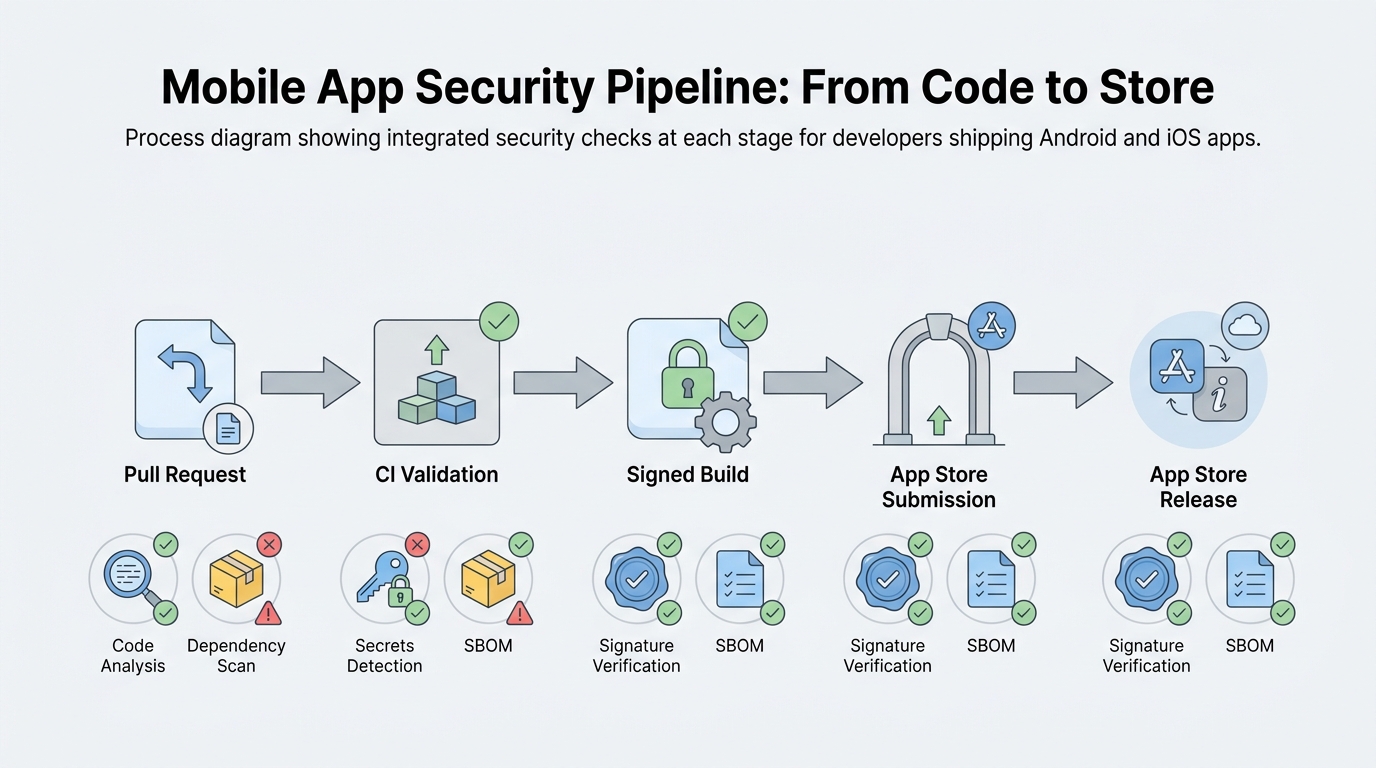
A simple pipeline diagram showing a mobile code change moving from pull request to CI to signed build to app store submission, with security checks placed at each stage for code analysis, dependency scanning, and secrets detection.
Category: Outcomes
Statistic: 38%
Label: First-pass approval rate
Context: When metadata is complete upfront
Category: Speed
Statistic: 4 hrs
Label: Median fix time
Context: After a store rejection notice
Category: Coverage
Statistic: 5
Label: Core tool categories to shortlist
Context: Static, dependencies, secrets, runtime, and release gating
Here is the thing: these are ranked for common mobile CI use and day-to-day developer workflow impact, not as a definitive security benchmark. If your release process depends on signed builds, private runners, or limited CI minutes, the practical ranking can change.
A complementary angle worth comparing lives in How to Secure User Data in Your Mobile App.
MobSF
- Best for: A widely used baseline for analyzing Android and iOS packages and generating shareable reports.
- Strengths: Strong artifact-based workflow; good at spotting manifest/entitlement/config issues earlier than manual review.
- Limitations: Will not prove server-side authorization is correct or catch most business logic abuse. You also need consistent packaging, and iOS scanning can depend on how you produce the IPA.
For tradeoffs, checklists, and edge cases, Best Cross-Platform App Development Tools Ranked 2026 rounds out this section.
Oversecured
- Best for: Automated, mobile-specific testing that tends to surface platform patterns generic scanners miss.
- Strengths: Useful coverage for Android and iOS security issues that appear in real app behavior.
- Limitations: Expect onboarding time and some false positives, especially with mixed stacks (Flutter/React Native plus native modules) and heavily obfuscated builds. Some deeper checks may require device/emulator availability.
7 Breakout Android Apps Making Waves in June 2026 reframes the same problem with a slightly different lens - useful before you finalize.
GitGuardian
- Best for: Preventing secrets from landing in repos, CI logs, or build outputs (common with analytics keys, push credentials, and backend tokens).
- Strengths: Fast feedback and high practical value because findings are usually actionable.
- Limitations: Detection is not remediation. Real secret leaks often require coordinated rotation with backend owners and can create short-term delivery friction.
AppArgus
- Best for: Ongoing assessment and monitoring when you need a view of posture over time, not just pre-release scanning.
- Strengths: Helps track drift and keep security visible across releases.
- Limitations: Monitoring only reduces risk if someone owns alerts and can investigate within a defined SLA. Also validate legal/privacy constraints for any production telemetry or monitoring approach.
TitanShield
- Best for: Teams that want a more unified platform approach across Android and iOS, especially for standardized reporting.
- Strengths: Consolidation can simplify vendor management and centralize workflows.
- Limitations: Platform adoption can mean deeper integration work, build-time tradeoffs, and more regression surface area. If you add runtime protection, validate against instrumentation tests, obfuscation, and crash reporting before rolling out.
Next step
Get a 1-week pilot checklist for these tools (what to scan, who triages, what blocks release)
Download the checklist
How do you choose the right mobile app security tool stack?
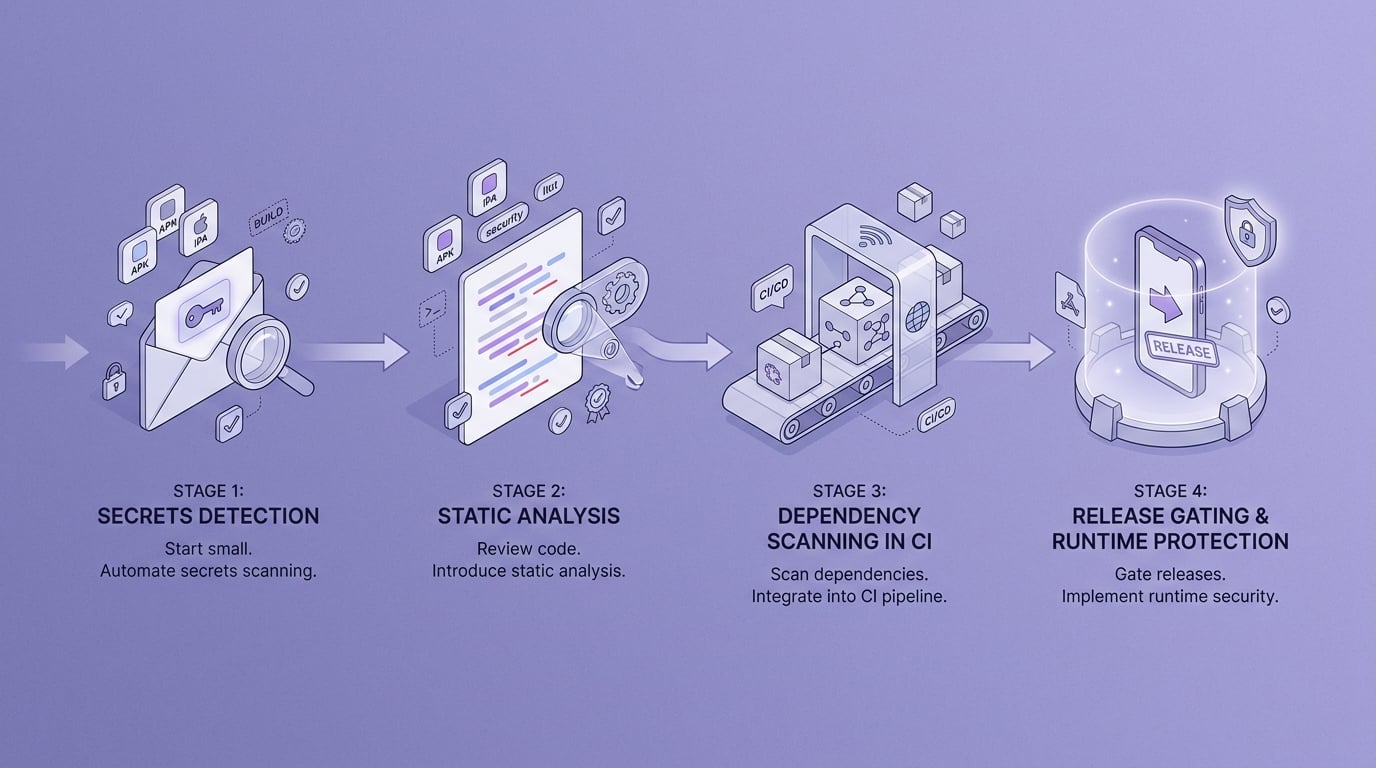
A short adoption timeline for smaller mobile teams showing a phased rollout: secrets detection first, static analysis next, dependency scanning in CI, then release gating or runtime protection for higher-risk apps.
Match the tool to the stage of the release pipeline
Pre-commit and pull request checks
Start with secrets detection and lightweight checks to prevent rework before artifacts are built and signed. Plan a few hours to a day for initial allowlists and developer guidance, then small weekly upkeep as new patterns appear.
CI build and test stage
Run artifact scans on build outputs to catch risky configs and known-bad dependencies before promotion. A realistic gate is to fail builds on new Critical/High only, then baseline existing debt so you can tighten rules over a few sprints.
Pre-release and store submission
Add stricter gates for higher-risk apps or regulated teams, but plan for exceptions and documentation. Common policies include: no debug flags, no cleartext traffic unless justified, no exported Android components without explicit permissions, and no known Critical CVEs in shipped dependencies.
Production
Consider runtime protection and monitoring for apps with higher abuse risk (fraud, account takeover, tampering). The tradeoff is performance overhead and more test combinations, plus dependency on stable build tooling and crash reporting to spot regressions quickly.
Concrete operational details (so this works in real CI)
- Cadence: PR scans for secrets; main-branch or nightly scans for heavier artifact analysis (often 10-30 minutes depending on app size and CI capacity).
- Gating metric: Fail only on new Critical/High issues; warn on Medium/Low to avoid permanently red pipelines.
- Example finding to expect: an exported Android
ActivityorBroadcastReceiverwithout permission protection, which can enable intent hijacking or unauthorized entry points. - One CI integration example: GitHub Actions: run GitGuardian on every PR; run MobSF on a nightly build artifact; publish findings as SARIF into GitHub code scanning for developer visibility.
- Ownership: assign one rotating engineer per sprint to triage and file tickets. Without ownership, tools produce backlog, not risk reduction.
- Dependencies to check early: signed IPA handling, emulator availability for dynamic checks, and any constraints on uploading artifacts to third-party services.
Recommended rollout
Share your current pipeline (Android/iOS, CI vendor, release cadence) and get a realistic tool stack and gating policy
Request a stack review


