
Decide quickly whether CI/CD will save you time or become extra maintenance - run a compact break-even check and a one-day pilot to get evidence for a go/no-go decision. This guide gives a short break-even sanity check, a decision checklist, a provider shortlist, and a minimal pilot plan you can complete in a day.
How to Publish an App on the App Store in 2026 (Complete Guide) goes deeper on the ideas above and adds concrete next steps.
How do I check CI/CD break-even for my app?
CI/CD is worth it when annual hours saved exceed setup plus realistic maintenance time. Use conservative estimates and a 12-month window to avoid optimistic surprises.
Example values for planning only
| Metric | Example value |
|---|---|
| Manual publishing cadence | 4 releases / year |
| Time saved per release with CI/CD | 2 hours |
| Time saved per year | 8 hours |
| Initial CI/CD setup | 20 - 40+ hours |
| Maintenance | 1-4 hours / month typical after setup |
| Break-even releases/year (20 setup hours) | 10 releases (20 / 2) |
| Break-even releases/year (40 setup hours) | 20 releases (40 / 2) |
Explanation: plan for 20-40 upfront hours for a working mobile pilot; platform complexity, signing, and store integration can push that higher. Interpretation: with 4 releases/year many small teams will not recoup year-one setup time unless they automate additional manual steps or increase cadence. Reader impact: run a one-day pilot to measure real setup time, failure modes, and whether the assumed savings per release are achievable.
Formula: break-even releases/year = (estimated_setup_hours + estimated_annual_maintenance_hours) / estimated_hours_saved_per_release. Use conservative savings.
When you move from outline to execution, Publishing Android Kotlin library along with source code helps close common gaps teams hit here.
How to choose a CI/CD provider for mobile apps?
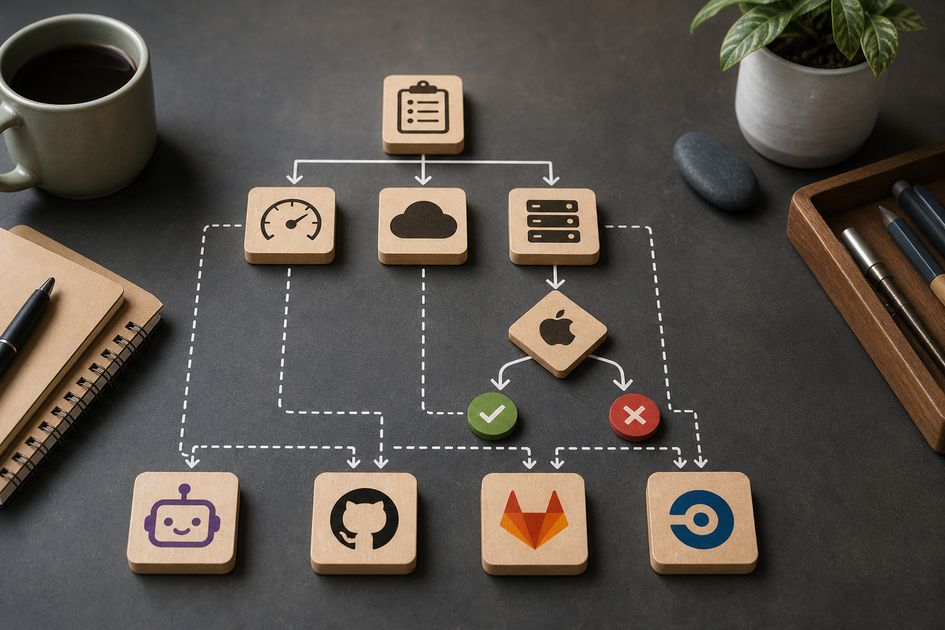
A flow diagram that maps the 'Step-by-step decision checklist' into branches: estimate releases → choose hosted vs self-hosted → need macOS? yes/no → pick Bitrise/GitHub Actions/GitLab/CircleCI → add Fastlane lane. Each branch includes a short icon for macOS, cloud runner, or self-hosted server.
Pick a provider that matches your runner needs and your tolerance for ops tradeoffs; hosted runners cut setup time, self-hosted reduces per-minute cost but adds maintenance overhead. Start with the runner decision, then assess features and billing.
Estimate releases and compute break-even
Calculate expected releases for the next 12 months and apply the break-even formula. Use the lower-bound savings per release for planning.
Decide runner requirement
If you must build and sign iOS, plan for macOS hosted runners or a self-hosted macOS box; self-hosting typically adds several hours of ops setup and ongoing patching.
Choose hosted vs self-hosted
Hosted runners shorten pilot time but can be costlier per minute and impose concurrency limits; self-hosted lowers run costs but requires backups, security, and OS updates.
Run a one-day pilot
Configure one Fastlane lane or equivalent, wire secrets, and upload an internal build. Track actual elapsed time, failures, and manual fixes to inform your decision.
Provider shortlist for common indie scenarios:
- Bitrise - mobile-first with prebuilt steps; expect per-minute macOS billing and a modest learning curve.
- GitHub Actions - fast if your code is already on GitHub; YAML-driven and extensible but often requires debugging community actions.
- GitLab CI - good for integrated repos and self-hosting; macOS support needs self-hosted runners.
- CircleCI - strong parallelism and performance; check macOS pricing and concurrency caps for your workload.
- Fastlane - run inside any CI to standardize builds, signing, and uploads; it reduces repetition but still requires store-side metadata work.
A complementary angle worth comparing lives in Fastlane app publishing reviews.
Common mistakes, realistic maintenance costs, and what to expect

A visual checklist block that lists pre-flight items (document manual release, collect credentials, store secrets, create Fastlane lane), run items (execute CI job, validate internal upload), and post-run items (measure time saved, schedule certificate audits). Includes small checkbox graphics for each line.
Automate only after you stabilize the manual flow; automation speeds both good and bad processes, so it can magnify mistakes. Expect ongoing maintenance like certificate expiries, runner image updates, and store API changes that commonly consume 1-4 hours per month and spike during upgrades.
Named anti-patterns and how to prevent them:
- Automating before documenting the manual flow - write and validate a repeatable manual release checklist first.
- Assuming uploads mean store readiness - screenshots, privacy labels, and review notes usually remain manual initially.
- Storing certs in plaintext or on one laptop - use encrypted secret stores or a vault and plan rotations.
One thing worth noting: automation adds a vendor or tooling dependency and often a subscription cost; validate exportability and failure modes before fully committing.
For tradeoffs, checklists, and edge cases, Froxi AI vs Fastlane: Which Is Better for Founders? rounds out this section.
How much time does iOS signing and store API work take?
iOS signing and store API work is recurring and needs scheduled checks; allocate modest recurring time and extra hours after major tool upgrades to avoid surprise failures. Plan for short monthly checks and longer verification after big changes.
- Audit certificates and provisioning profiles monthly; set reminders 30 days before expiry. Typical time: 15-60 minutes/month once alerts are automated.
- Re-test App Store Connect/API key scopes after Xcode or bundle ID changes; allocate 1-2 hours for verification after major tool updates.
- Plan 2-4 hours to validate compatibility after each major Xcode or Gradle upgrade, including test builds and signing checks.
- Pin runner images where reasonable to reduce unexpected changes, and subscribe to store API notices for proactive fixes.
A Complete Guide to build CI/CD for Your iOS App reframes the same problem with a slightly different lens - useful before you finalize.
Execution checklist - minimal and measurable
Run a focused pilot that produces a clear go/no-go signal inside one day. Measure time, retries, and manual interventions to extrapolate realistic savings.
Pre-flight
Document the manual release steps, required artifacts, and where metadata lives. Collect store credentials and add them to the CI secret store.
Run
Create a small Fastlane lane or equivalent that builds, signs, and uploads to internal testing. Execute one CI job, record elapsed time, retries, and any manual fixes.
Post-run
Compare measured time saved to your break-even calculation and decide whether to expand automation. If listings and screenshots are the bottleneck, evaluate listing tools and their integration cost.
One practical tradeoff: a one-day pilot won't capture long-term maintenance, but it reveals immediate friction points and gives a realistic starting estimate.


