
Founders often share App Store Connect or Google Play Console credentials to ship faster. It feels like a harmless shortcut, but it can quietly hand over control of your app business: who can push updates, who can change payout settings, and who can recover the account when something goes wrong. This guide lays out a safer publishing workflow that keeps you moving without casually giving away ownership, access, or signing keys.
How to Protect Your App Store and Google Play Accounts goes deeper on the ideas above and adds concrete next steps.
What are the three biggest risks of sharing app store credentials?
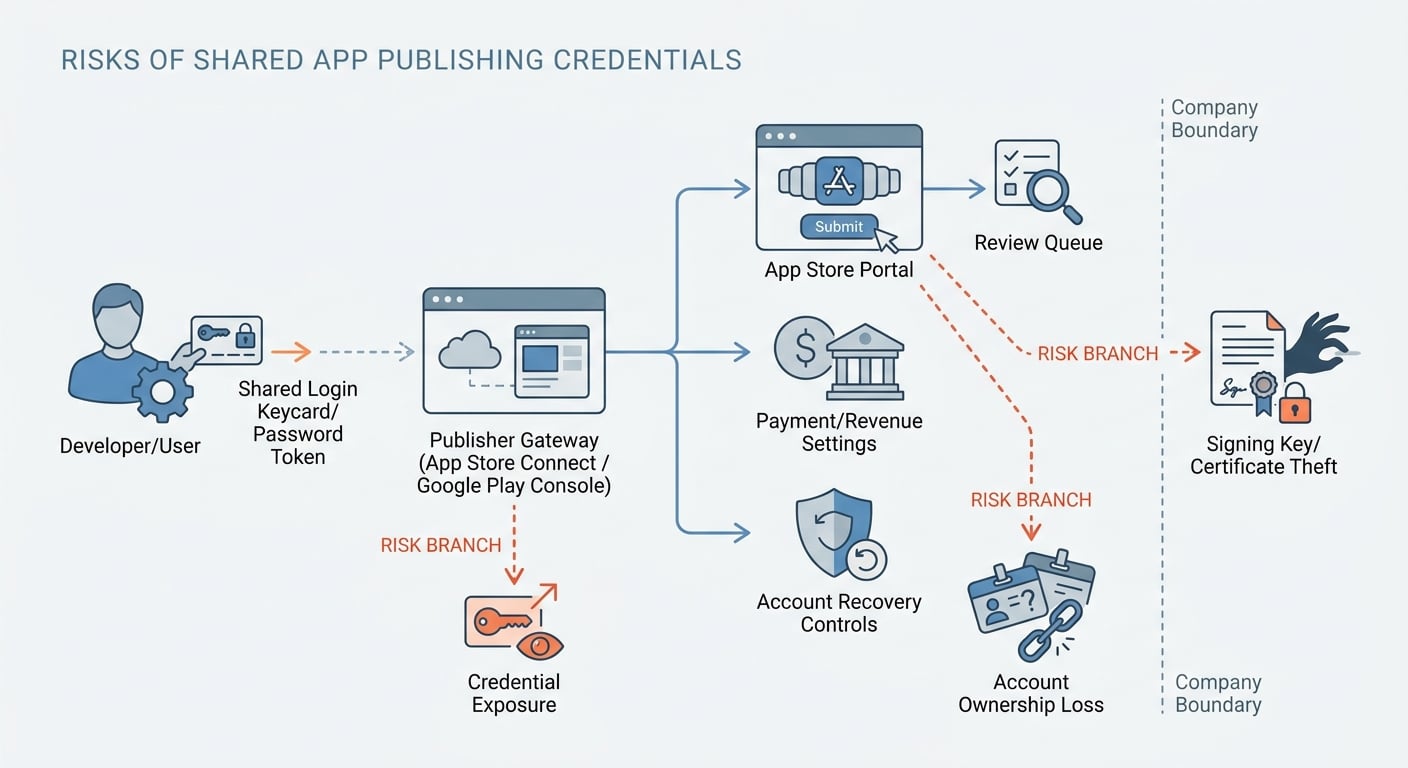
A simple flow diagram showing how a shared App Store Connect or Google Play Console login can expose submission, reviews, payment settings, and recovery controls, with branching warnings for credential exposure, ownership confusion, and signing asset loss.
Manual publishing usually fails in three predictable ways: credentials spread, ownership gets muddled, or signing assets leave the company. Those are different problems with different fixes, and they show up most often during rush periods like first launch, a hotfix, a rejection, or a finance change.
| Risk | How it typically happens | What it can break | Founder impact |
|---|---|---|---|
| Credential exposure | Password shared by chat/email, stored in a contractor vault, left logged in on an unmanaged laptop | Unauthorized changes, surprise releases, access lingering after offboarding | You cannot confidently say who still has access |
| Account ownership loss | App created under an agency account "for speed" | Transfer disputes, payouts tied to the wrong entity, legal and tax friction | You may not be the true owner of the listing or revenue |
| Certificate/keystore loss | Vendor generates and keeps iOS private keys or Android keystore/upload key | Updates blocked, forced rebuilds, slow recovery with support | You lose the ability to ship on your schedule |
Explanation: These show up in real teams because access is often granted informally and never written down.
Interpretation: Each risk maps to a different control: scoped roles, clear account ownership, and company-managed signing assets.
Reader impact: In my experience with small teams, tightening these three areas reduces the chaos during urgent updates and vendor offboarding, but timelines still depend on platform review, verification status, and support responsiveness.
Google’s guidance is direct about not sharing passwords and protecting linked services like Gmail and payments access. It recommends proper access controls instead: https://support.google.com/googleplay/android-developer/answer/2543765?hl=en.
When you move from outline to execution, Froxi AI vs Manual Publishing: Risk, Complexity, and Speed Compared helps close common gaps teams hit here.
Why is sharing App Store or Google Play logins risky?
Publishing is not just an upload step. These accounts control releases, listings, user permissions, payouts, tax and banking workflows, and account recovery. Password sharing is an ownership and security decision, not just a convenience decision.
Here is the thing: the highest risk moments are after launch. Hotfixes, compliance updates, policy warnings, and banking changes tend to hit when you are already busy, and platform support is not always same-day. If access is messy, response time slows down when you need it most.
What a shared developer login can actually control
A shared login can control far more than build submissions. If you give someone primary access instead of a scoped role, you are usually exposing:
- Release controls (submissions, rollouts, pauses, compliance forms)
- Store presence (metadata, screenshots, experiments, pricing changes)
- Reputation levers (review responses, visibility signals)
- Money and business settings (banking, tax, agreements, financial reporting access)
- Security and recovery (who can invite admins, reset 2FA, or lock you out)
Apple supports fine-grained roles in App Store Connect so you can grant task-level permissions instead of sharing a password: https://developer.apple.com/documentation/appstoreconnectapi/userrole.
Why "speed" creates a hidden dependency
Password sharing often creates a long-tail dependency you did not intend:
- The password ends up in a contractor password manager, shared inbox, or a logged-in browser profile.
- Even after you rotate the password, you still have to unwind access across devices, sessions, and recovery methods (and sometimes you cannot verify it quickly).
- Ownership fixes (especially transfers) can depend on Apple/Google verification and support, which can add days of calendar time.
The practical takeaway: the fastest path to launch can become the slowest path to your next update.
What Apple and Google recommend instead
The safe alternative is not complicated, but it does require coordination and at least one test run.
- Apple: use App Store Connect roles, keep the Account Holder under your company control: https://developer.apple.com/documentation/appstoreconnectapi/userrole.
- Google: do not share passwords, enable strong authentication, and use Play Console users and permissions: https://support.google.com/googleplay/android-developer/answer/2543765?hl=en.
- Google Play App Signing: understand the difference between the app signing key (managed by Google when enabled) and the upload key (still a critical asset you must control).
Operator note: treat the store owner login like a break-glass credential. You should not need it for normal work, and you should be able to ship without it day-to-day.
A complementary angle worth comparing lives in Should You Publish Your App Yourself or Hire Someone?.
How can you publish without sharing passwords?
Category: Reliability
Statistic: 31%
Label: Less launch slip risk
Context: When release prep is standardized
Category: Outcomes
Statistic: 46%
Label: Teams reporting faster reviews
Context: After tightening pre-submit checks
Category: Prevention
Statistic: 5.2x
Label: More issues caught early
Context: Before formal store review
This is the workflow I recommend when a founder wants speed without losing control. The goal is simple: the company owns the account, the company controls recovery, and vendors get only task access for a limited window.
Prerequisites (what you need before you invite anyone)
- A company-controlled email and phone for Apple ID/Google account recovery
- 2FA enabled (and recovery codes stored somewhere you can actually find later)
- A place to store secrets and access notes (1Password or Bitwarden shared vault works well)
- A named internal owner for store admin tasks (usually founder or head of engineering)
Effort note: budget 30-90 minutes if you are starting fresh. If you are changing recovery methods, cleaning up an old agency setup, or waiting on verification/support, plan for 1-5 business days of calendar time.
Role recommendations by common task (default starting point)
Use this to avoid the "just make them admin" trap. Expect one adjustment loop when a vendor hits a permissions wall, especially on launch week.
| Task | Apple (App Store Connect) | Google (Play Console) | Notes and constraints |
|---|---|---|---|
| Upload builds and manage releases | App Manager (often enough) | Release permissions (org-dependent) | Test on a non-critical change first |
| Edit store listing assets | Marketer | Store presence permissions | Keep marketing separate from release where possible |
| Reply to reviews | Customer Support | Reply to reviews permission | Still needs accountability and tone control |
| Finance, banking, tax | Account Holder only (or tightly limited) | Payments/financial access tightly limited | Only grant to vendors if contractually required |
| Invite/remove users and security | Account Holder | Owner/Admin only | Offboarding should not depend on a vendor being responsive |
Minimal access log workflow (10-20 minutes to set up)
You do not need a fancy system. A single shared doc prevents "who still has access?" meetings later.
Create a Google Sheet or Notion table with:
- Person and vendor/company
- Platform (Apple/Google) and role granted
- Why they need it (one line)
- Date granted and planned removal date
- Removed? (Y/N) and date
- Notes (for example, "waiting on Apple agreement renewal")
Metric to watch: number of users with Admin/Owner level access. Keep it as close to 1 as operations allow, and review it after every release.
Validate the setup before launch day
Do a dry run before you are under pressure. The goal is to prove you can remove the helper and still ship, even if review timelines are unpredictable.
Practical validation checklist (aim for 24-48 hours before launch):
- Temporarily remove the helper and confirm the company owner can still log in and approve releases.
- Confirm payment, tax, and agreements are accessible to the company owner (not routed through a vendor-owned email).
- Document signing ownership: where the iOS cert and private key live, and whether Play App Signing is enabled and who holds the upload key.
- Re-add the helper with the minimum role needed to finish the publishing task.
- After release, remove temporary access and update the access log.
One thing worth noting: access removal is not always instantly observable. Depending on platform state, device sessions, and what the user already set up, assume there can be a short window where access lingers, and plan offboarding with a buffer.
For tradeoffs, checklists, and edge cases, Everything You Need to Know About Apple and Google Developer Accounts rounds out this section.
Final checklist and next step for safer publishing
Use this as an operating rhythm: a pre-flight you do before every release, plus post-launch cleanup that prevents lingering access.
Pre-flight checklist for the next release
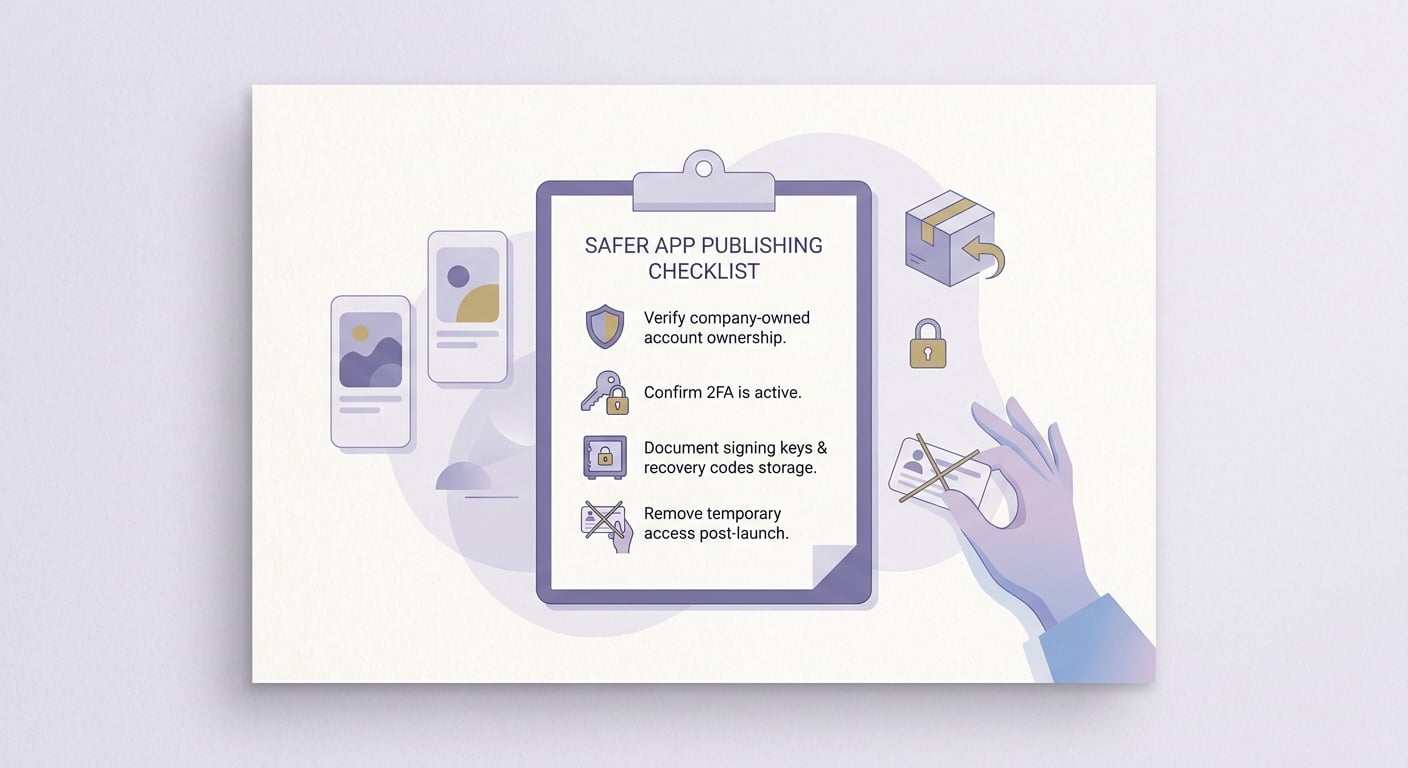
A compact pre-release checklist focused on App Store and Google Play security: verify account ownership, confirm 2FA, document signing asset storage, and remove temporary access after launch.
- Confirm the app is under your company’s App Store Connect and Google Play Console accounts, not a vendor account.
- Enable 2FA and store recovery codes in company-controlled storage (vault plus a backup procedure).
- Document signing asset storage:
- iOS: where the distribution certificate and private key are stored, and who can export them
- Android: where the keystore/upload key is stored, and who can access it
- Verify roles: each helper has the minimum permission needed, and nothing more.
- Confirm payout, tax, and agreement settings are accessible to the company owner.
Post-launch cleanup (15-30 minutes, easy to skip)
- Remove vendors and freelancers from temporary roles and update the access log.
- Revoke sessions where available, and rotate passwords only when it is warranted (rotation can create churn if multiple internal systems depend on it).
- Confirm the company owner can ship a small change without the helper (for example, a metadata edit). This is a fast control test.
Edge case: if you keep an agency on retainer, keep it role-based, documented, and reviewed quarterly. Expect real overhead: invites, 2FA prompts, and occasional "can you approve this?" messages.
Why Code Signing Is the Most Confusing Part of iOS Publishing reframes the same problem with a slightly different lens - useful before you finalize.


