
App Store review feels random because the most important work happens after you lose direct control. You click Submit for Review in App Store Connect, then wait for a status change, rejection note, or approval. This guide breaks the review path into practical stages so you can prepare the build, listing, first-user experience, and launch plan before Apple starts reviewing.
What the App Store Review Team Actually Tests goes deeper on the ideas above and adds concrete next steps.
Early proof: review is a sequence, not one decision
The clearest way to reduce App Review anxiety is to stop treating it as a single yes-or-no event. Apple's App Store Connect submission overview shows that apps move through submission statuses and review outcomes, while developer-reported sources such as AppStoreReview.app show that timing can vary by period and submission type.
Use the table below as a planning model, not a guaranteed timeline.
| Stage | What is checked | Reviewer input | Common failure type |
|---|---|---|---|
| 1. Automated pre-checks | Build format, required files, technical configuration | Binary, entitlements, metadata, privacy manifest | Technical or setup issue |
| 2. Listing review | Whether the store page is accurate | Description, screenshots, previews, category, age rating | Metadata or claim mismatch |
| 3. First-session test | Whether the app works for a new user | Clean install, onboarding, login, loading states | UX, access, or stability issue |
| 4. Compliance review | Whether sensitive flows follow policy | Permissions, IAP, subscriptions, UGC, privacy | Policy, safety, or business-model issue |
The interpretation is practical. Early failures are often configuration fixes, while later failures may require product, design, legal, or copy changes.
The business impact is launch planning. If approval affects a campaign, customer fix, subscription release, or press date, submit early enough to absorb at least one rejection cycle. A safer plan usually means days of buffer, not hours.
When you move from outline to execution, The Invisible Rules That Determine Whether Your App Goes Live helps close common gaps teams hit here.
Why App Store review feels random when it usually is not
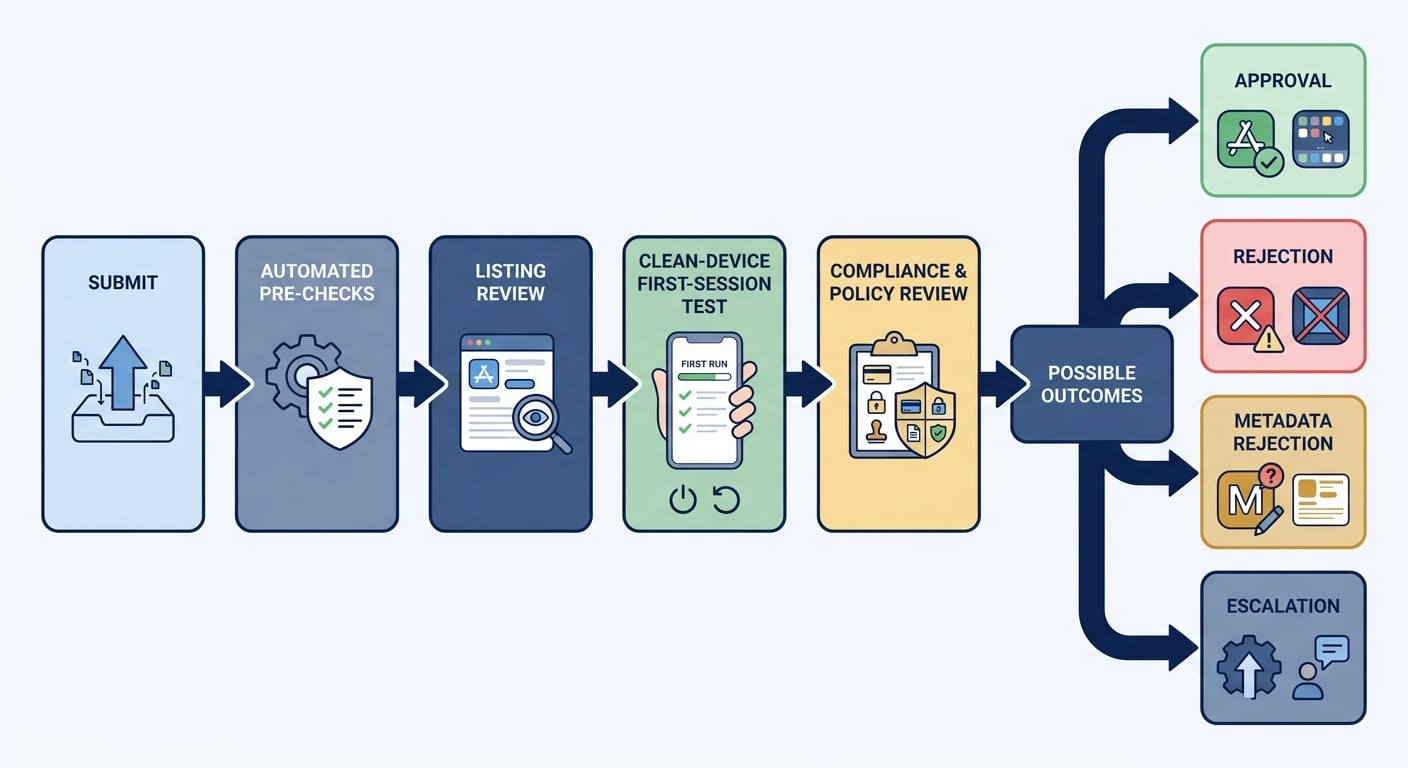
A horizontal process diagram showing the App Store review path: Submit in App Store Connect, automated pre-checks, listing review, clean-device first-session test, compliance and policy review, then approval, rejection, metadata rejection, or escalation.
App Review is not one mysterious decision. It is a sequence of checks across your binary, App Store listing, first-session experience, privacy disclosures, payments, and policy-sensitive features.
It can still feel unpredictable because you do not see every internal handoff. A simple bug-fix update may move quickly, while a new app with subscriptions, sensitive data, login requirements, or unclear metadata may need deeper review.
The useful move is to reduce avoidable friction before submission. Make sure the build, listing, privacy labels, review notes, and first-user flow all tell the same story.
Apple's App Review Guidelines make more sense when you read them from the reviewer perspective. Reviewers are trying to protect users, the App Store, and platform trust.
They are usually checking for:
- A stable binary that installs and runs under normal conditions.
- Honest metadata that matches the app users actually receive.
- A clear first-user experience with working core flows.
- Accurate privacy disclosures and permission explanations.
- Compliant in-app purchases, subscriptions, and payment flows.
- Age-appropriate content, moderation, and safety controls.
Automated systems and human reviewers check different things. Passing upload validation does not guarantee policy approval, and a strong policy explanation will not save a broken first launch.
A complementary angle worth comparing lives in App Store Connect vs Google Play Console: Key Differences.
What happens after you submit an app for review?
After submission, your app moves from team-controlled preparation into Apple's review process. You still have leverage, but it comes from what you prepared in advance: accurate metadata, working credentials, clear notes, and a reviewable first session.
Before Apple can review cleanly, your App Store Connect version needs to be complete and internally consistent.
Check these items before submission:
- The correct uploaded build is attached to the App Store version.
- Required metadata is complete, including description, keywords, support URL, category, age rating, and version notes.
- Privacy labels match what the app and third-party SDKs actually collect.
- Privacy manifest requirements are addressed where applicable.
- Permission usage strings explain why the app asks for access.
- Review notes explain anything a reviewer may not discover naturally.
- Demo credentials work and can access paid, gated, or region-specific features.
If the app requires setup, do not assume the reviewer will contact you. Give them the shortest reliable path to the feature they need to evaluate.
For tradeoffs, checklists, and edge cases, Submitting vs Publishing an App: What's Different rounds out this section.
The four review stages in practice
Automated pre-checks
Apple's systems validate the submission at a technical and configuration level. This can include build format, required metadata, privacy manifest presence, entitlement consistency, private API risk, and obvious permission mismatches.
The common mistake is treating a successful upload as a successful review. Upload validation only means Apple can process the build. It does not mean the app experience or policy model is acceptable.
Listing review
A reviewer may compare the App Store listing against what the app appears to offer. They look at the description, screenshots, preview videos, category, age rating, and in-app purchase metadata.
The practical checkpoint is to undersell slightly rather than oversell. Remove claims, screenshots, and feature promises that the submitted build cannot demonstrate during review.
First-session test
The reviewer installs the app like a new user, often on a clean device with no cached state. They test onboarding, loading states, login, network handling, and the first meaningful action.
This is where teams get surprised. The app may work for developers because they have seeded accounts, fast office WiFi, debug settings, or cached permissions. Reviewers do not.
Compliance and policy checks
The reviewer looks more closely at policy-sensitive flows. That includes permission prompts, in-app purchase and subscription flows, age rating alignment, user-generated content controls, and dark-pattern risks.
Test the submitted build on a non-development device over imperfect WiFi. Complete the same path a reviewer will see: clean install, onboarding, login or guest mode, permission prompts, first data load, purchase flow, and access to paid or gated features.
The practical takeaway is that App Review is often a first-user QA test plus a policy audit. If the first session is confusing, incomplete, or blocked, the reviewer has limited reason to trust the rest of the product.
How to Publish Your Vibe-Coded App (Without Getting Rejected) reframes the same problem with a slightly different lens - useful before you finalize.
How long does App Store review take?
Review timing varies by queue volume, submission complexity, policy risk, and whether Apple needs clarification. Apple does not publish a guaranteed review SLA, and developer-reported timing sources such as AppStoreReview.app should be treated as directional planning signals rather than official commitments.
Use these ranges for planning. If the release affects revenue, press, compliance, or a customer-impacting fix, build in more buffer than the table suggests.
| Submission type | Practical planning range | What can stretch it |
|---|---|---|
| First App Store submission | 1-3 business days commonly | New app scrutiny, unclear metadata, login issues, sensitive categories |
| Minor update | 1-2 business days commonly | Crashes, changed permissions, metadata mismatch |
| New-feature update | 1-3 business days commonly | New subscriptions, new data collection, new claims |
| External TestFlight beta review | Around 24 hours commonly | Sensitive functionality, incomplete test notes |
| Appeal or escalation | 3-7+ business days | Guideline interpretation, legal or policy review |
| Holiday or high-volume period | Submit at least a week early | Queue volume, launch freezes, team availability |
The safest launch plan is not "submit the night before." Submit early, leave time for one rejection cycle, and avoid major listing changes once review has started unless they are necessary.
If you are shipping a critical bug fix, Apple offers expedited review requests in limited cases. Use them for urgent customer harm, legal compliance, security issues, or real-world event deadlines, not ordinary launch pressure.
Why do App Store reviews get delayed or rejected?
Review slows down when Apple needs more confidence. That can mean a deeper look by a senior reviewer, a request for clarification, or a rejection that asks you to change the app, metadata, or explanation.
Escalation is not always bad. It often means the app touches a category where mistakes can create user harm, privacy risk, payment confusion, or platform trust issues.
Common anti-patterns that create review friction:
- The listing promises features the submitted build does not show.
- Permission prompts appear on launch with no user context.
- Subscription pricing, trial terms, or purchase benefits are unclear.
- Login blocks the reviewer and no working demo credentials are provided.
- Screenshots show outcomes a new user cannot realistically reach.
- Privacy labels omit SDK behavior, tracking, analytics, or account data.
- Review notes are missing for gated, regional, or role-based features.
The pattern behind these issues is mismatch. If the reviewer cannot connect the listing, first session, and policy-sensitive flow, they may investigate further or reject.
Some categories naturally receive more scrutiny because user harm or policy risk is higher:
- Health, medical, wellness, or diagnostic claims.
- Financial advice, investing, lending, insurance, or crypto features.
- Kids-category apps or apps likely to attract children.
- User-generated content without visible moderation, blocking, or reporting tools.
- VPNs, privacy tools, security claims, or sensitive data handling.
- Apps that duplicate first-party iOS functionality without clear differentiation.
This does not mean these apps cannot be approved. It means your claims, safety controls, disclosures, and reviewer notes need to be especially clear.
What to do if Apple rejects the app
Start by identifying the rejection type. A metadata rejection usually means the app binary may not need to change. A binary or policy rejection may require a new build, product adjustment, or clearer explanation.
For technical or metadata rejections, fix the exact field, binary issue, screenshot mismatch, or privacy disclosure inconsistency Apple cited. Avoid broad rewrites unless the issue points to a larger mismatch.
For policy rejections, reply in Resolution Center with a concise explanation. Reference the specific guideline, explain how your app complies or what changed, and attach screenshots or screen recordings if they make the flow easier to verify.
Keep the response calm and specific. Reviewers do not need a long defense. They need enough evidence to confirm the fix or understand the intended behavior.
One tradeoff is speed versus quality. Rushing a partial fix may get you back into the queue faster, but it can also create a second rejection if the underlying mismatch remains. If the issue affects subscriptions, privacy, health claims, or safety controls, take the extra time to fix it properly.
Pre-submit checklist for a smoother review
The best App Review strategy is a short pre-submit pass that mirrors Apple's likely path. Run it before the build is submitted, not after the rejection arrives.
Use this checklist across build, listing, first-session experience, compliance, and launch timing.
| Area | What to verify | Time to budget |
|---|---|---|
| Build | Correct build, clean install, no obvious crashes, production configuration | 30-60 minutes |
| Metadata | Description, screenshots, version notes, category, age rating, support URL | 30-45 minutes |
| Privacy | Privacy labels, SDK behavior, permissions, tracking disclosures | 45-90 minutes |
| First session | Onboarding, login, demo credentials, core action, empty states | 45-90 minutes |
| Payments | StoreKit products, subscription terms, paywall copy, restore flow | 45-90 minutes |
| Review notes | Credentials, test steps, special setup, sensitive feature explanation | 20-40 minutes |
| Launch plan | Campaign timing, support coverage, rollback plan, one rejection buffer | 30-60 minutes |
For a simple update, this pass may take an hour. For a new app with subscriptions, sensitive data, or gated workflows, expect half a day or more. That effort is still usually cheaper than losing a launch window to an avoidable rejection.
Before clicking Submit for Review, confirm:
- Version notes match the functionality in the submitted build.
- Screenshots and preview videos do not show unreleased features.
- The first meaningful action is reachable without confusion.
- Demo accounts are active, stable, and not rate-limited.
- Paid or gated features are accessible to the reviewer.
- Permission prompts appear with clear user context.
- Subscription terms are understandable before purchase confirmation.
- Privacy disclosures match actual collection and sharing behavior.
The goal is not to eliminate all review risk. That is unrealistic. The goal is to remove surprises that make Apple's job harder and give your team enough time to respond if review takes longer than expected.
Practical launch planning
Treat App Review as a dependency in your release plan, not as a final administrative step. The review window can affect marketing, support staffing, customer communications, and revenue timing.
A practical launch plan includes:
- A submission date at least a few business days before the public launch.
- A person responsible for monitoring App Store Connect and Resolution Center.
- Working demo credentials and a fallback account.
- Support coverage in case approval lands outside normal hours.
- A rollback or communication plan if the release is delayed.
- Enough time for one rejection, fix, resubmission, and re-review.
The tradeoff is that submitting early may require freezing the build sooner. That can feel uncomfortable when product work is still moving, but it is usually better than rushing a late build into review with avoidable mismatches.
If you need to keep developing after submission, be clear internally about what can still change. Metadata edits, new builds, or late feature changes can reset assumptions and sometimes add review risk.


