
Rejection emails can feel personal, but for app teams they are usually an execution problem. A reviewer found a gap between your app, your metadata, or your disclosures and the platform's review expectations. This guide shows you how to reply clearly, choose the right template, and move your build back into review with less avoidable back-and-forth.
What Happens When Your App Gets Rejected - and How to Respond goes deeper on the ideas above and adds concrete next steps.
Early proof: clearer replies reduce reviewer uncertainty
This proof block is directional, not a formal benchmark. Apple explicitly supports replying to App Review messages in App Store Connect, and both Apple and Google review against published policies, disclosures, and app behavior. In practice, specific replies usually make issues easier to locate and retest than vague ones.
| Reviewer concern | Weak reply | Stronger reply |
|---|---|---|
| Issue location | "We fixed the problem." | "The issue occurred on the onboarding permissions screen after tapping Continue." |
| Fix description | "It should work now." | "We fixed a state handling bug that blocked progression after the location prompt." |
| Testing state | "Please review again." | "QA verified the fix in build 2.3.1 on a small device set." |
| Review instructions | "Try the app again." | "To verify: install build 2.3.1, open onboarding, allow location access, then tap Continue to reach the home screen." |
Explanation: The stronger examples remove guesswork about where the issue happened, what changed, and how to validate it.
Interpretation: Guidance from Apple review messaging and common review workflows points in the same direction: specific, testable replies are easier to evaluate than broad assurances.
Reader impact: This does not guarantee approval. Reviewer interpretation, missing metadata, or policy concerns can still lead to another cycle, but a clear reply can reduce preventable delay.
When you move from outline to execution, How to Publish Your Dreamflow App: Store Submission Done Right helps close common gaps teams hit here.
What should you include in a rejection email response?
Before you write anything, collect the inputs that matter:
- the rejection message
- your reproduction notes
- the fixed build number
- any updated privacy copy, screenshots, or listing text
- reviewer access details, if login or region matters
In practice, prep often takes longer than writing the reply. A simple metadata change might take 30 to 60 minutes to verify, while a login, permissions, or onboarding issue can take a few hours once QA, device checks, and account setup are included.
Identify the exact failure point
Read the rejection closely and isolate the blocker. Was it a broken button, missing disclosure, login dead end, or metadata mismatch?
Confirm the fix in QA
Verify the issue in the exact build you plan to submit. If the rejection involves permissions, onboarding, subscriptions, or account creation, test those paths on real devices if possible.
Prepare reviewer instructions
Write the shortest path to validate the fix. Include credentials, region requirements, feature flags, or guest access when relevant.
Align the response with the submitted build
Make sure the reply matches what is actually under review. If you changed privacy disclosures, screenshots, or listing text, say so clearly.
The practical takeaway is simple: describe the current build, not the intended future state. One common failure is sending the note before QA finishes, then discovering the binary or metadata does not fully match the explanation.
How do you respond to common rejection emails?
Use these as starting points, then replace the placeholders with your exact details.
Some rejections need more than a message template. If the root problem involves code changes, listing updates, or a policy interpretation edge case, the template only helps explain the fix. Approval still depends on reviewer validation and whether the platform agrees your changes meet the requirement.
Broken flow or blocked path
Thank you for the review. We identified the issue on [screen/path], where [exact failure] prevented completion of [task]. This has been fixed in build [number].
To verify, please open the app, go to [path], and complete [steps]. The expected result is [result].
Privacy or disclosure mismatch
Thank you for the review. We updated [privacy prompt / in-app disclosure / data explanation] to better match the app's current behavior in build [number].
To verify, please open the app and navigate to [path]. The disclosure now appears [before/at the time of] the permission request and explains [brief description].
Permission timing issue
Thank you for the review. We found that the [camera/location/notifications] permission request appeared before sufficient context was provided. This has been corrected in build [number].
To verify, please launch the app and follow [steps]. The app now shows [brief explanation screen] before requesting permission.
Reviewer access or login blocker
Thank you for the review. We understand the reviewer could not access [feature/app area] because [login or account requirement]. We updated the review path in build [number] and are providing access details below.
Reviewer access:
- Test account: [email]
- Password: [password]
- Region or code note: [details]
To verify, sign in with the account above and navigate to [path].
Avoid the reply mistakes that trigger another rejection cycle
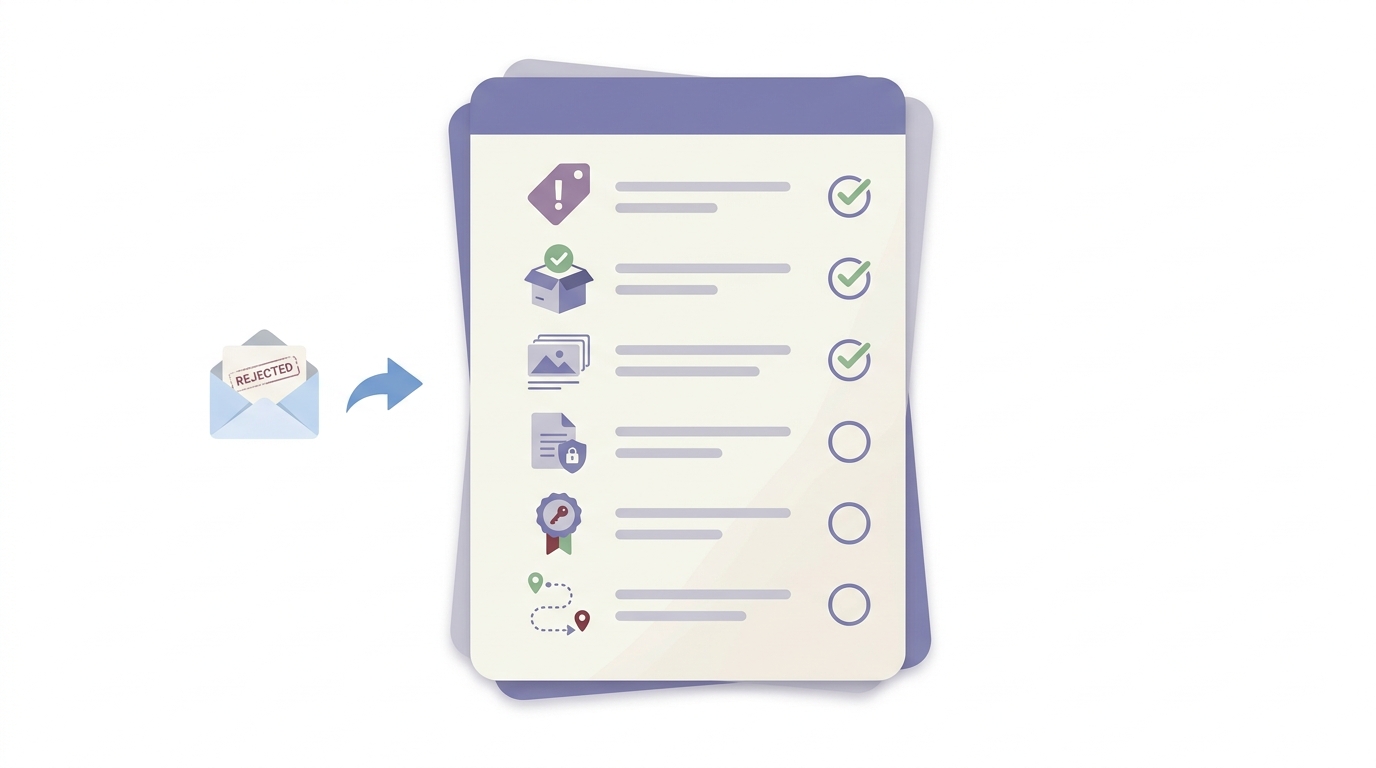
A compact checklist visual covering final pre-send checks for rejection responses: exact issue named, fix verified in the new build, screenshots and descriptions aligned, privacy disclosures updated, reviewer credentials included, and navigation steps provided.
Most teams do not get stuck because they failed to write enough. They get stuck because the reply leaves room for doubt.
Arguing with the reviewer
- Even if the rejection feels unfair, debate rarely helps in the first reply.
- Start with what changed and how to verify it.
Saying "fixed" without specifics
- Name the exact screen, permission, disclosure, or metadata item updated.
- "Fixed in latest build" is usually too thin.
Skipping access details
- If a feature needs login, region access, or setup, provide it.
- Do not assume the reviewer will find the working path.
Forgetting metadata alignment
- A corrected app can still fail if screenshots, descriptions, or privacy answers tell a different story.
What this means in practice is consistency. Your build, your reply, and your store metadata should all match.
There is a tradeoff here. Thorough verification takes time, especially when issues appear only on certain devices, accounts, or network conditions. That extra time is often worth it because a rushed resubmission can create another review loop.
How App Store Review Actually Works - A Step-by-Step Breakdown reframes the same problem with a slightly different lens - useful before you finalize.
Keep platform guidance in view
One thing worth noting is that Apple and Google do not run as a single review system. If you reference policy expectations, tie your reply to the actual message you received and the platform's own guidance.
For Apple, use the App Review message thread in App Store Connect and answer the reviewer's stated concern directly. For Google, match your response and listing behavior to the Play policy or disclosure requirement involved. Avoid assuming that a fix accepted on one platform will automatically satisfy the other.
A practical wrap-up: the best rejection replies are short, specific, and easy to retest. They do not promise more than the build actually does, and they account for the operational details that reviewers need to validate the fix.
Category: Outcomes
Statistic: 38%
Label: First-pass approval rate
Context: When metadata is complete upfront
Category: Resolution
Statistic: 1 fix
Label: Name the change made
Context: Describe the specific update in the new build, not a broad promise to investigate
Category: Speed
Statistic: 4 hrs
Label: Median fix time
Context: After a store rejection notice
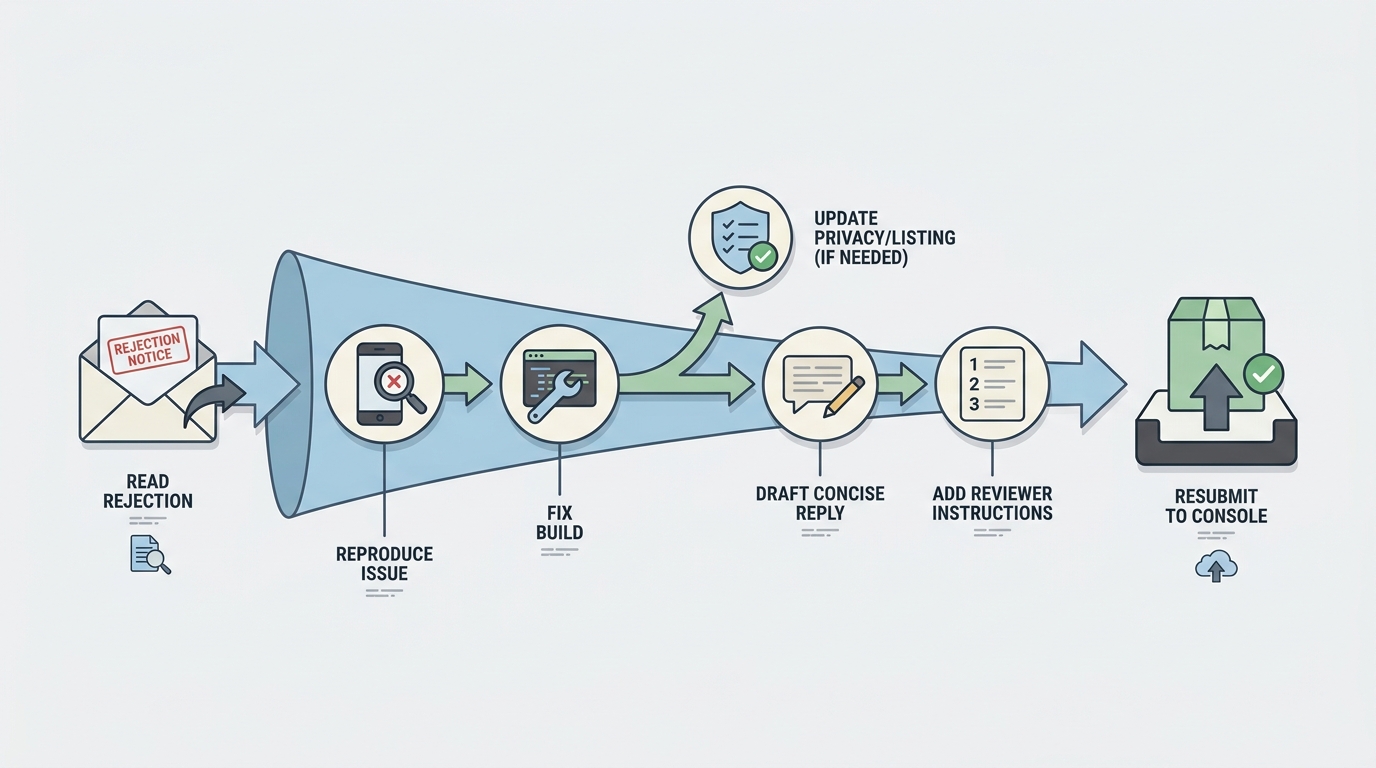
A process diagram mapping the path from rejection email to approval-ready reply: read rejection, reproduce issue, fix build, update privacy or listing if needed, draft concise response, add reviewer instructions, and resubmit through App Store Connect or Play Console.
