
If you have ever stared at App Store privacy questions or the Google Play Data Safety form and thought, "I know what our app does, but I cannot explain it cleanly," you are not alone. I went through this as a founder shipping fast with a small team, and the fix was not a legal marathon. It was a focused data-flow mapping pass that gave us one reusable document for reviews, updates, and deletion requests.
The Invisible Rules That Determine Whether Your App Goes Live goes deeper on the ideas above and adds concrete next steps.
Early proof: what changed once the team mapped the app in plain language
Category: Outcomes
Statistic: 38%
Label: First-pass approval rate
Context: When metadata is complete upfront
Category: Speed
Statistic: 30 min
Label: Plain-language flow map
Context: Shifted privacy answers from memory to a quick documented review of live app flows
Category: Speed
Statistic: 4 hrs
Label: Median fix time
Context: After a store rejection notice
We did not become "more compliant" overnight in some abstract sense. What changed was operational: we stopped answering privacy questions from memory and started answering from a single source of truth.
| Submission workflow area | Guessed during submission | Mapped before submission |
|---|---|---|
| App Store privacy answers | Filled from memory, then second-guessed | Pulled from one worksheet tied to live flows |
| Google Play Data Safety | Rewritten separately, easy to drift | Reused the same map with platform-specific wording |
| Account deletion readiness | Assumed support could handle it | Checked the actual path before submission |
| Reviewer follow-up risk | Higher if answers contradicted app behavior | Lower because destinations and purposes were documented |
| Resubmission effort | Slow, scattered, stressful | Faster, because the core facts were already organized |
This is a directional improvement, not a guarantee of approval. Review outcomes still depend on the current build, store policy, SDK behavior, and whether your documented flows actually match what ships.
What this means for a small team is simple: less back-and-forth, faster answers when a reviewer asks questions, and fewer last-minute scrambles to reconstruct how data moves through the app. The business impact is not magic. It is a steadier submission process with fewer avoidable surprises.
When you move from outline to execution, How to Publish Your Vibe-Coded App (Without Getting Rejected) helps close common gaps teams hit here.
Why do app teams miss privacy disclosures?
Most disclosure gaps come from systems teams barely think about during product work:
- Authentication identifiers like email, phone number, or user ID
- Analytics events from screen views, clicks, and onboarding steps
- Crash reporting payloads with device or session details
- Payment processor handoffs during checkout or subscription setup
- Push notification tokens created after opt-in
- AI prompts sent to an external model or API
- Support messages, attachments, or logs shared through help tools
The pattern is familiar for early teams. These touchpoints often go live long before anyone sits down to complete store forms or update the privacy policy.
When privacy documentation starts only after a reviewer asks questions, cleanup gets expensive. You end up searching code for SDK names, asking contractors what is still active, testing whether account deletion really works, and updating the app listing, privacy policy, and store forms in parallel.
Here is the tradeoff: a quick mapping pass saves time later, but only if you include the messy parts. If your app has multiple environments, older SDKs, white-label variants, or contractor-built features, the first pass may take 60 to 90 minutes and still require engineering follow-up.
A complementary angle worth comparing lives in Map App Data Flows and Release Strategy for First Submission.
How do you map app data flows in 30 minutes?
Prerequisites
Before you start, gather:
- A current test build
- A list of installed SDKs and key APIs
- Access to settings, support, and deletion flows
- One person from product or ops, with engineering on standby if possible
- A shared worksheet in Google Sheets or Notion
Expected outcome
By the end, you want one simple sheet with:
- Data type
- Source screen or trigger
- Destination system
- Purpose of use
- First-party or third-party handler
- Retention or deletion path
- Owner for follow-up if something is unclear
A practical starter column set is: Data type | Trigger | Screen | Sent to | Purpose | Third party? | User can delete? | Notes | Owner.
Step 1: walk the app like a user and log touchpoints
Open the app from install to first use
Start at install, sign-up, onboarding, permissions, first key action, settings, support, and deletion if it exists. Log what the user enters and what the app creates automatically.
Capture observable touchpoints
Record things like email, device identifiers, uploaded photos, payment details, AI prompts, and support messages. Do not try to document every schema yet.
Include failure states
Fail a login, deny a permission, send a support request, and trigger a crash if practical. These paths often activate logging or third-party tools that never make it into privacy answers.
For a straightforward app, this walk-through often takes 20 to 30 minutes. If onboarding branches heavily or depends on permissions, budget longer.
Step 2: map where the data goes
Attach each touchpoint to a destination
Note whether data goes to your backend, database, analytics provider, crash tool, payment processor, push service, support desk, or AI endpoint.
Flag third-party handling
Mark whether data stays first-party or leaves to a processor or service provider. This field catches a surprising number of omissions.
Pause on unclear SDK behavior
If nobody can confirm what an SDK sends, assign engineering follow-up instead of guessing. That follow-up usually sits with engineering, while product or ops keeps the worksheet current.
This is where the quick pass sometimes breaks down. If you discover an old integration or undocumented API, expect another 30 to 60 minutes of investigation, and sometimes a legal check if your disclosures or deletion promises might change.
Step 3: add purpose, deletion, and ownership
Label the business purpose
Add a plain-language reason for each flow: authentication, product functionality, analytics, fraud prevention, crash diagnostics, billing, personalization, or AI processing.
Document the deletion path
Note whether users can delete data in-app, by email, through support, or not yet at all. If the process is manual, test it and write down which system actually gets updated.
Assign an owner
Put a name next to unclear rows. In small teams, product or ops usually owns the document, engineering validates SDK and backend behavior, and legal reviews edge cases when needed.
Here is the practical takeaway: reviewers do not need your architecture diagram. They need consistent answers about what data is touched, where it goes, why it is needed, and how users can act on it.
For tradeoffs, checklists, and edge cases, Common App Store Rejection Reasons (And How to Fix Them Fast) rounds out this section.
How does a data-flow map reduce app store rejection risk?
Once the worksheet exists, store submission gets much simpler:
- Use the same sheet for App Store privacy answers, Google Play Data Safety responses, and privacy policy updates
- Match every disclosed category to actual in-app behavior in the current build
- Check whether the data is collected, shared, required for core functionality, or deletable
- Cross-check permissions against what the app currently requests
- Review SDK documentation after version updates
- Run a final build-level check so forms match what is actually live
Apple makes privacy and data handling expectations explicit in its App Store Review Guidelines, including the expectation that metadata and app information be accurate and that apps provide required account deletion functionality where applicable. That does not mean every mismatch leads to rejection, but inaccurate or incomplete disclosures can create review issues and follow-up questions.
There is also evidence that app privacy labels do not always match observed behavior. The study "Honesty is the Best Policy?" found measurable gaps in some cases between disclosed labels and behavior observed by researchers. I would treat that as broader context, not proof about your specific app. The useful takeaway is operational: an internal map helps reduce the chance that your disclosures drift away from reality.
One thing worth noting is that a clean worksheet does not remove judgment calls. Some categories are still ambiguous, store guidance changes over time, and edge cases may need legal or policy review.
How to Publish Your Bubble Mobile App: Launch Without Review Loops reframes the same problem with a slightly different lens - useful before you finalize.
Decision points, pitfalls, and edge cases
When the quick pass is enough
A short pass is usually enough when:
- The app has one main product flow
- SDK usage is limited and well known
- Deletion handling already exists
- The team can test the latest build directly
When you need a second pass
Plan a deeper review when:
- You added payments, AI, notifications, or new analytics recently
- Multiple SDKs were installed by past contractors
- Different app versions behave differently
- Deletion requires manual ops work across several systems
- Engineering cannot confirm what an SDK or API is sending
Common pitfalls
- SDK amnesia - An analytics or crash tool is still live, but nobody included it in disclosures.
- Purpose inflation - The policy claims broad future uses instead of the feature's real current purpose.
- Phantom deletion - The app promises deletion, but support cannot execute it consistently.
- Stale disclosures - A new feature shipped, but the forms and policy stayed the same.
Manual deletion deserves special attention. It can be workable for an early team, but it creates support load, slower turnaround, and more room for inconsistency. If requests are rare, the real risk is that nobody has practiced the process recently.
Final pre-submit checklist
Before any major release, we now run the same short checklist:
- All live SDKs identified
- Every data category mapped to a destination and purpose
- First-party versus third-party handling confirmed
- Deletion path tested in reality, not assumed
- Privacy policy updated to match the current build
- App Store and Google Play forms checked against the latest release
If you recently added payments, AI, notifications, or new analytics, run this again. Those changes are exactly where privacy drift tends to appear.
The point of this process is not perfect paperwork. It is to make sure your app, your disclosures, and your support reality tell the same story before a reviewer has to point out the gaps.
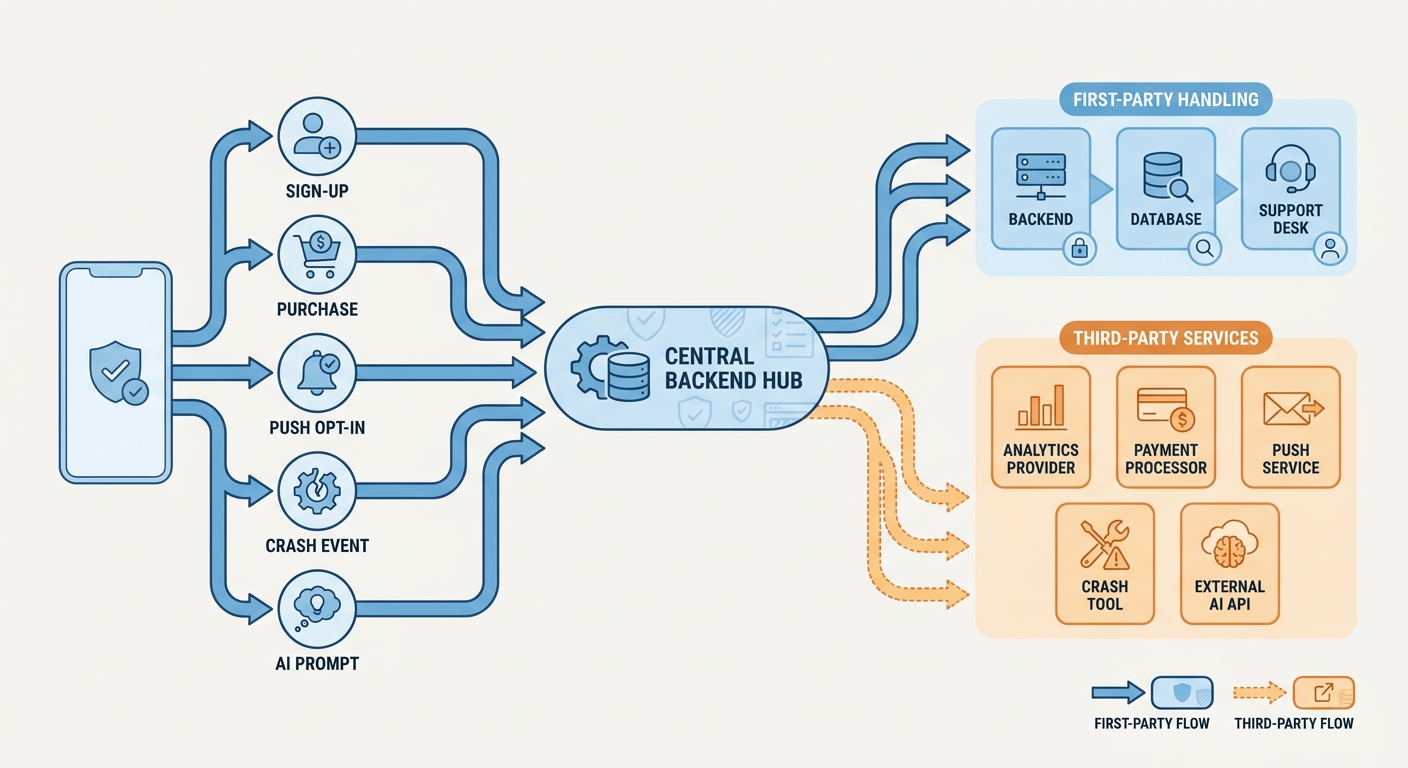
A simple process diagram tracing app data from user actions such as sign-up, purchase, push opt-in, crash event, and AI prompt to destinations including backend, database, analytics provider, payment processor, push service, crash tool, support desk, and external AI API, with arrows marking first-party versus third-party handling.


