
If your app store screenshots look polished but people still do not understand why they should install, the issue may be sequence, not design quality. This walkthrough uses Maya, a composite example based on early-stage app founders, to show how eight decorative screenshots can become a simple conversion funnel that explains the promise, shows the first action, reveals the reward, and closes with trust.
App Store Optimization in 2026: What Actually Moves the Needle goes deeper on the ideas above and adds concrete next steps.
Why Should App Store Screenshots Behave Like a Funnel?
Maya's starting point was common: a habit-tracking app, one contract designer, a small budget, and about a week before the next App Store and Google Play submission window. The screenshots looked clean, but they behaved like a UI gallery.
This is an internal workflow example, not a universal performance claim. The useful lesson is how each screenshot was given a job.
| Area | Before | After | What to check |
|---|---|---|---|
| Screenshot order | Dashboard, calendar, settings, reminders, stats, profile, paywall | Hook, first action, loop, reward, reminder, differentiator, fit, trust | Does each frame answer a different question? |
| First screen | Clean dashboard | "Build one habit at a time" plus product context | Can a stranger explain the promise in 10 seconds? |
| Middle screens | Repeated app surfaces | Check-in, streak, weekly progress, reminder loop | Is the daily behavior obvious? |
| Final screen | Settings page | Privacy, support, calm routine controls | Does the ending reduce risk? |
| Measurement | Conversion rate only | Conversion rate plus 5-person clarity test | Are source, country, and device mix visible? |
The interpretation was simple: the screenshots stopped acting like a product tour and started acting like a silent sales conversation. The strongest early signal was not a guaranteed lift. It was fewer confused reactions from people seeing the listing cold.
The business impact is practical. Clearer screenshots can reduce wasted store visits, improve paid traffic efficiency, and help visitors understand value before reviews, pricing, or the paywall become deciding factors. Results still depend on category, traffic quality, localization, ratings, product-market fit, and seasonality.
Before redesigning, create a baseline:
- Pull product page conversion rate from App Store Connect.
- Pull Store Listing Conversion from Google Play Console.
- Segment by source, country, and device where possible.
- Note paid campaigns, release timing, pricing, and review changes.
- Show the first three screenshots to 5 people for 10 seconds and ask: "Who is this for, what does it do, and why would you install it?"
- Save the old set so you can compare story quality, not just metrics.
When you move from outline to execution, App Store and Google Play Submission Checklist: How to Avoid Rejection Before Review helps close common gaps teams hit here.
Why Do Good App Screenshots Fail to Convert?
Maya's app helped people build daily habits without feeling overwhelmed. The original workflow was familiar: export the onboarding screen, dashboard, calendar, settings, reminders, stats, profile, and paywall. Add captions. Upload.
The constraint was realistic. Maya could not redesign the app, rebuild onboarding, or change pricing before release. The screenshot sequence had to do more of the marketing work within a few focused days.
The issue was not polish. It was that the screenshots did not build understanding.
- The first frame showed a dashboard, but not the audience or outcome.
- Screens 2 to 6 repeated surfaces without showing the action, loop, or payoff.
- The paywall appeared before the value felt obvious.
- The final frame showed settings instead of reducing buyer anxiety.
- Captions described UI elements instead of explaining user value.
The old lane moved from screen to screen. The rebuilt lane moved from hook to action, loop, reward, reinforcement, differentiation, fit, and trust.
A complementary angle worth comparing lives in How to Publish Your Lovable App: From Export to Approval.
How Do You Build an 8-Frame Screenshot Funnel?
The rebuild started with decisions, not decoration. Each frame answered one objection a visitor might have before installing.
Hook
Name the audience and outcome in one short sentence. For Maya, the working caption was "Build one habit at a time."
First action
Show the first meaningful thing the user does. Maya used a daily check-in instead of a full dashboard.
Core loop
Show the repeated behavior that creates value: choose a habit, check in, see progress, return tomorrow.
Reward state
Show the payoff. A weekly progress view made consistency visible without heavy explanation.
Habit reinforcement
Show how the app brings the user back. This focused on gentle reminders, not technical notification settings.
Differentiator
Show what makes the product memorable. Maya emphasized a low-pressure system for people who dislike streak guilt.
Personalization or fit
Help different users see themselves in the product. Adjustable routines and goals worked better than another generic dashboard.
Trust closer
End with risk reduction. Privacy clarity, support access, and calm controls were stronger than a plain settings export.
This order is not mandatory. A finance app may need trust earlier. A photo app may need visual payoff faster. The practical rule is that each frame should earn its place.
For tradeoffs, checklists, and edge cases, How to Write an App Description Reviewers Understand in 10 Seconds rounds out this section.
Caption and Testing Rules for Skimmers
For fast store browsing, captions need to behave like billboards. Several screenshot guides, including AppFollow's ASO screenshot best practices, treat screenshots as a major conversion asset, but the real work is making value easy to understand quickly.
Use this checklist before exporting:
- Keep captions around 3 to 6 words.
- Pair each caption with a visible product action.
- Avoid explaining every button.
- Test images at small gallery size.
- Use contrast so the set feels like forward motion.
- Avoid eight similar dashboard views.
- Prepare platform-specific sizes and safe areas before upload.
A focused rewrite can often be planned in half a day, designed in one to three days, and reviewed in another day. More complex apps, regulated categories, localization, or stakeholder review can stretch that timeline.
Testing has limits. If traffic is low, A/B tests may take too long to read confidently. In that case, combine directional metrics with clarity testing, support questions, review language, and paid traffic performance.
Category: Outcomes
Statistic: 38%
Label: First-pass approval rate
Context: When metadata is complete upfront
Category: Speed
Statistic: 4 hrs
Label: Median fix time
Context: After a store rejection notice
Category: Before → After
Statistic: 8 frames
Label: From gallery to funnel
Context: Rebuild random UI shots into a hook - build - proof sequence across the full screenshot set
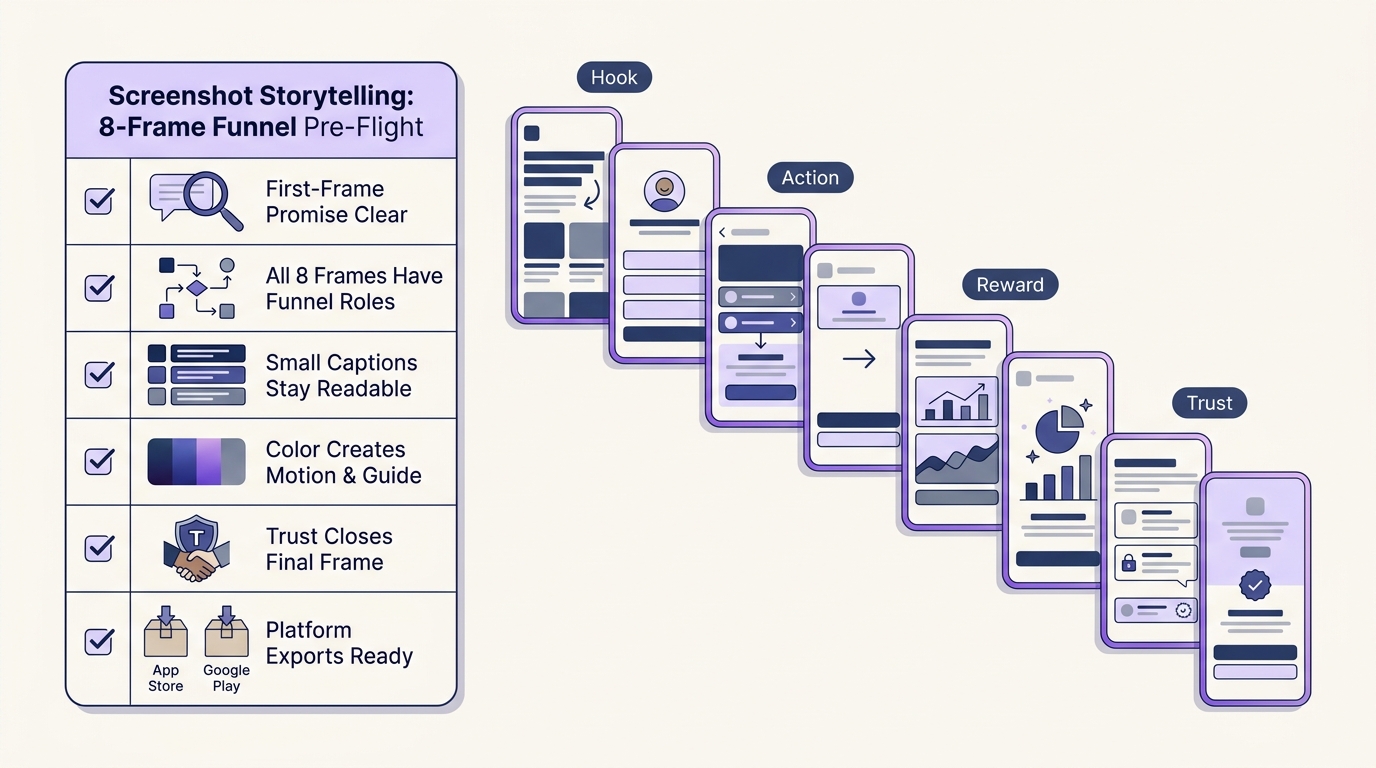
A compact pre-flight checklist for App Store and Google Play screenshot assets: first-frame promise is clear, each of eight frames has a funnel role, captions are readable at small size, colors create motion, trust appears in the final frame, and platform-specific exports are ready.


