
A messy beta usually does not fail because the team lacks testers. It fails because too many people see the build before the basic release questions are answered. Here is a practical beta process for TestFlight and Google Play that keeps feedback useful, reduces noisy rebuilds, and makes the handoff into store review and app store optimization less frantic.
TestFlight and Google Play Testing: Using Beta Tracks goes deeper on the ideas above and adds concrete next steps.
Early Proof: A Cleaner Beta Track Map
Beta testing works best as a staged operating system, not one big invite blast. Apple supports internal and external TestFlight testing, while Google Play supports internal, closed, and open testing tracks. Sources: Apple TestFlight overview and Google Play testing tracks.
The practical interpretation: choose the smallest track that can answer the next release question.
| Rank | Method | Best tester size | Main signal | Risk if skipped |
|---|---|---|---|---|
| 1 | Internal build gates | Team only | Fresh install, login, onboarding, core action | Obvious blockers reach testers |
| 2 | Quiet group | 3-5 testers | New users understand the first session | Feedback gets noisy too early |
| 3 | Edge-case testing | Focused testers | App recovers from real-world friction | Dead ends look like product failure |
| 4 | Larger external or open test | Larger audience | Strangers understand the promise | Public feedback arrives before stability |
| 5 | Batched build cadence | Any size | Feedback stays tied to builds | Tester burnout and unclear reports |
This ranking is based on operational signal, not reach. A larger group is useful later, but it can hide basic problems if the first session still breaks.
The business impact is practical: fewer emergency fixes, cleaner release notes, and less rework when screenshots, listing copy, and onboarding need to match the real product. It does not remove review risk, but it gives your team a calmer path into submission.
When you move from outline to execution, How to Publish an Emergent-Built Mobile App Successfully helps close common gaps teams hit here.
How Do You Run a Clean Beta Before App Store Optimization?
These methods are ranked for a small team trying to get review-ready without pretending the work is effortless. Expect a few focused days for a simple app, and one to two weeks if onboarding, payments, permissions, or backend flows are changing.
Internal build gates
Start with TestFlight Internal Testing and the Google Play internal track. Require the team to complete a clean install, cold start, login, onboarding, and the core action on real devices before inviting anyone else.
This catches missing API keys, crash loops, broken auth, frozen loading states, and flows that only worked locally. The tradeoff is that it feels slow, but it prevents avoidable tester sessions.
Three-to-five-person quiet group
Invite a small group that looks like your early user profile. Give them one focused task: complete the first real session without help.
Plan for a few hours to prepare instructions and at least half a day to review feedback. This stage shows whether users understand the value loop, trust permission prompts, and know what to do next.
Edge-case testing
Test slow networks, denied permissions, expired sessions, app kill during onboarding, empty states, backend errors, and background resume.
You probably cannot test every device and OS version. Prioritize flows that block activation, payment, or the core outcome.
Larger external or open testing
Use TestFlight External Testing or Google Play open testing after the first session is stable. At this point, the question changes from "does it work?" to "do strangers understand it?"
This can surface positioning issues and trust gaps. It can also create support load, and Apple external testing may involve beta app review, so leave time for process overhead.
Batched build cadence
Ship fixes in planned windows with short release notes. Keep each build tied to a clear testing goal.
Rapid-fire builds feel productive, but they burn out testers and make bug reports harder to interpret. Two builds per week during active beta is often enough for a small team.
A complementary angle worth comparing lives in Publishing at Every Stage: How App Store Strategy Changes as You Grow.
Which TestFlight or Google Play Track Should You Use?
"We need more feedback" is too vague. A better release question is: "Can a fresh user complete the core action without help?"
| Track | Best question | Go/no-go signal |
|---|---|---|
| TestFlight Internal Testing | Does the iOS build work from a fresh install? | Team completes the main flow unaided |
| Google Play Internal Track | Does Android install, launch, authenticate, and complete the main action? | No fresh-install blockers |
| Small TestFlight group | Can new iOS testers understand the value loop? | 3-5 testers reach the core action |
| Google Play Closed Testing | Can selected Android testers complete the first session? | Feedback is specific, not just "I got stuck" |
| TestFlight External Testing | Do broader iOS testers trust the flow? | Feedback shifts from blockers to expectations |
| Google Play Open Testing | Does a wider Android audience understand the product? | Issues are usability and positioning, not crashes |
One thing worth noting: Google Play requirements can vary by account type, region, and release path. Some developers may need to satisfy closed testing requirements before production access, so confirm the current Play Console rules before committing to a launch date.
For tradeoffs, checklists, and edge cases, How to Publish Your Bolt-Generated Mobile App rounds out this section.
When Is a Beta Build Ready for App Store Review?
A beta is close to review-ready when feedback gets boring. Testers stop asking where to tap, why permissions matter, what happens after signup, or whether the app is broken.
Use this checklist before submission:
- Fresh install works on real iOS and Android devices.
- Login, account creation, and session recovery have no known blockers.
- Onboarding explains the payoff before asking for too much.
- Permission prompts include context and recovery paths.
- Slow networks and backend errors show useful states.
- Empty states explain what to do next.
- Background resume does not break the active flow.
- Release notes match the final build.
- No known blocker prevents the core action.
This is also the right time to connect beta learning to your store listing. Screenshots, preview videos, description copy, and keywords should reflect what testers actually experienced, not what the roadmap promises later.
The tradeoff is timing. Polishing the listing too early can waste effort if the flow changes, but waiting too long can delay launch assets. A practical middle ground is to draft the store page after the quiet group, then finalize it after the larger test confirms the promise.
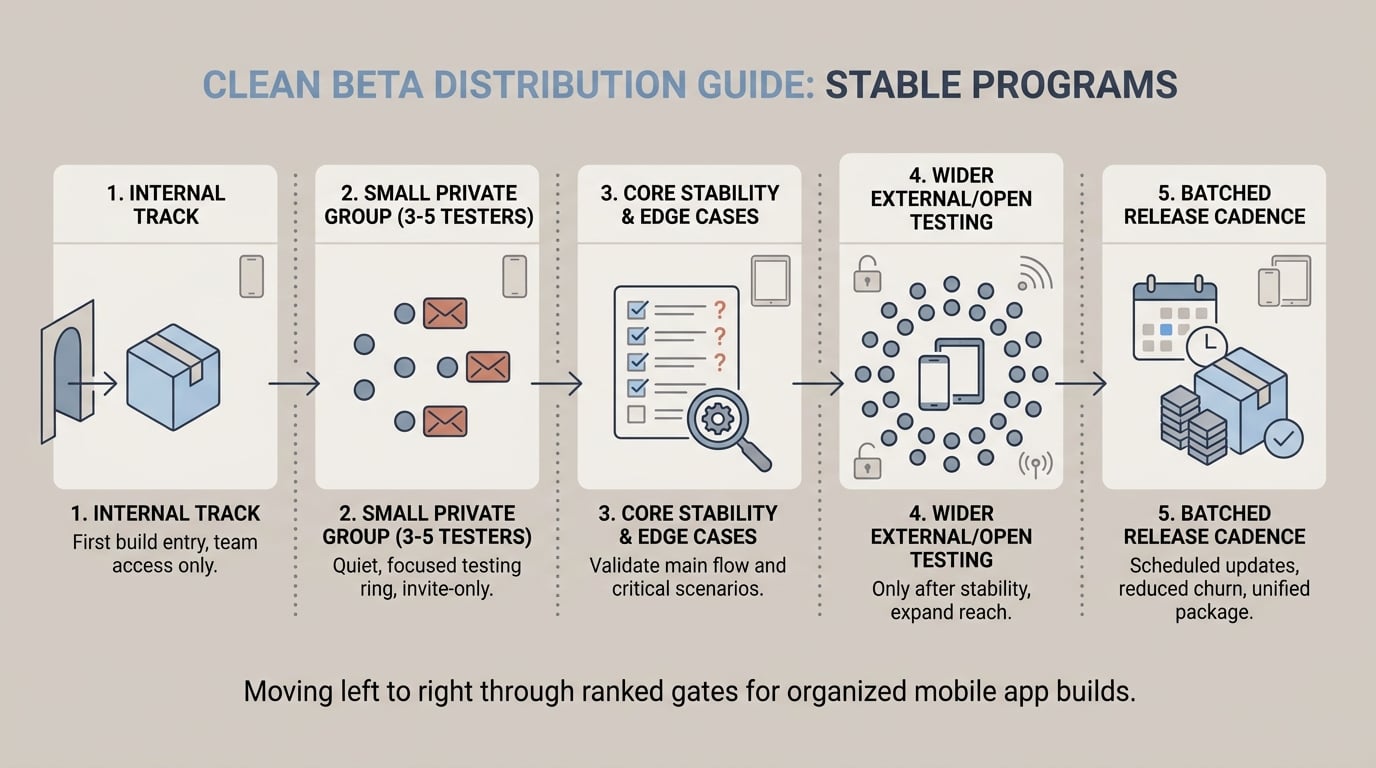
A left-to-right process diagram showing a mobile app build moving from TestFlight Internal Testing and Google Play Internal Track to a three-to-five-person tester group, then to TestFlight External Testing or Google Play Open Testing only after the main flow is stable.


