
Onboarding is where reviewers decide whether your app is functional, understandable, and complete, not whether it is clever or beautifully animated. If a first-time reviewer cannot get from install to meaningful value quickly and predictably, they may flag it as a minimum functionality or completeness issue. This audit breaks onboarding into seven moments where reviewers most often get stuck, plus practical fixes you can ship before submission.
Why Most First App Submissions Fail - and How to Be the Exception goes deeper on the ideas above and adds concrete next steps.
What are the early warning signs of onboarding failure?
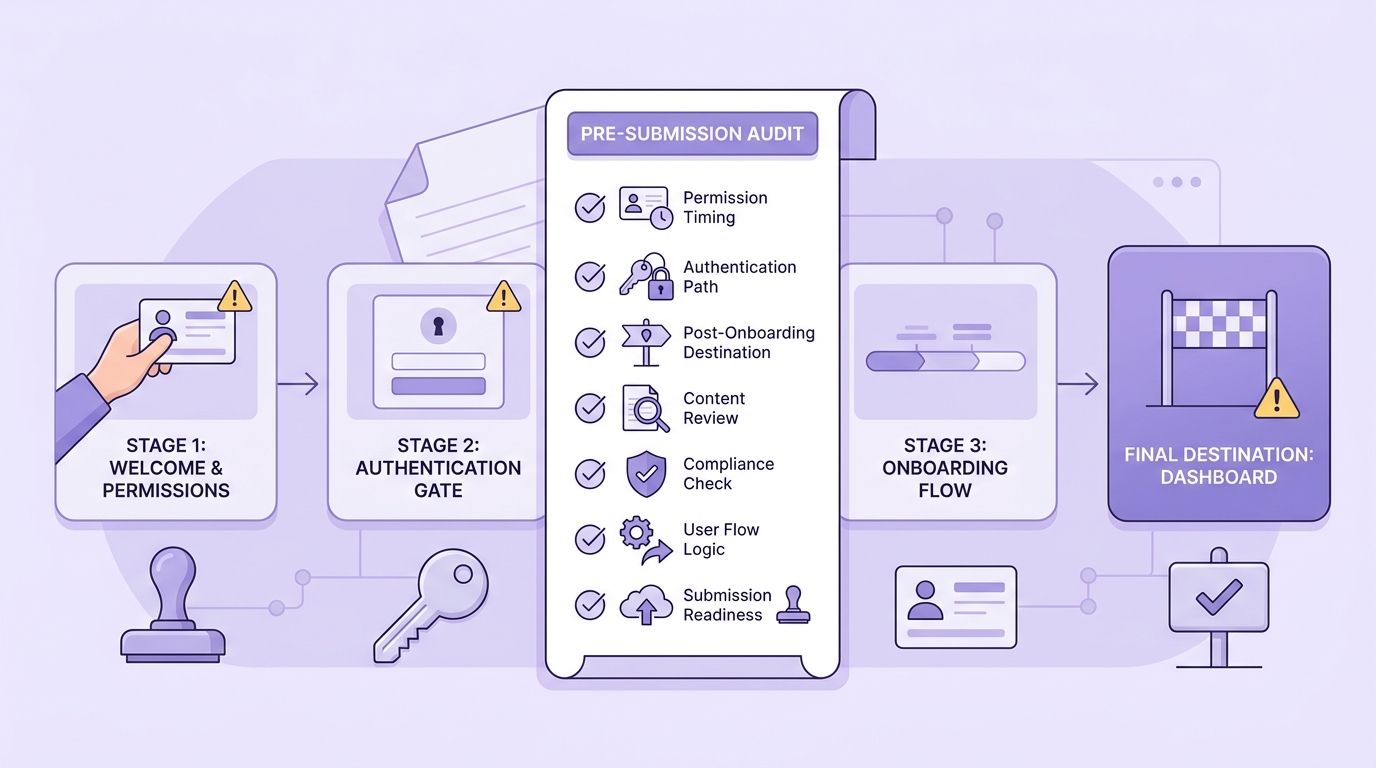
A concise submission checklist that helps founders verify permission timing, authentication paths, and the post-onboarding destination before sending the app to review.

A compact reviewer journey timeline showing the seven onboarding checkpoints compressed into a fast App Store or Google Play review pass, with friction points highlighted at launch, purpose clarity, login, permissions, and finish state.
Onboarding problems are often masked by warm devices, cached sessions, stable office Wi-Fi, and internal accounts. Reviewers are closer to "fresh install under time pressure," and that is where early funnel failures show up as delays, requests for clarification, or rejections (see Real App Review and AppBuilder24). Apple also emphasizes app completeness and performance in the App Review Guidelines, so onboarding issues can read as readiness problems, not just UX.
| Proof signal you can verify | Interpretation at review time | Likely impact if unresolved |
|---|---|---|
| Fresh install shows a blank screen, long splash, or crash before first UI | "App may be unstable or not ready" | Early stop, request for clarification, or rejection tied to performance/completeness |
| First screen does not explain purpose or next action in plain language | "Feature is unclear or metadata may mislead" | Reviewer may not reach core functionality and may treat the app as incomplete |
| Tap leads to spinner with no timeout, unclear failure, or no alternate path | "Core flow is unreliable" | Reviewer abandons instead of retrying, causing delay or resubmission |
| Empty states look like missing features on new accounts | "Placeholder content" | Minimum functionality concerns, especially for content-driven apps |
How to read this: each row is a reviewer stopping point you can reproduce on a clean install.
- How to verify quickly (15-30 minutes): fresh install, create a new account, test on slow or flaky network, and watch for blank UI, infinite spinners, unclear copy, and empty screens with no next step.
- How Apple/Google interpret the signals: not as "conversion issues," but as signs of instability, unclear purpose, or incomplete functionality relative to the listing and guidelines.
- Business impact: more back-and-forth, review delays, and engineering churn from resubmissions (especially when the issue is intermittent).
- What to fix first: anything that prevents reaching real value on a new install (crash, blank screen, login loop, infinite spinner) before copy polish or cosmetic UI.
When you move from outline to execution, We Analyzed App Store Rejection Patterns: What Most Founders Miss Before Submission helps close common gaps teams hit here.
What do reviewers judge during onboarding?
Reviewers use onboarding as a fast reliability check: does the app do what the listing implies, without hidden steps, broken paths, or unexplained gates. They are not optimizing your conversion rate; they are validating that a typical user can reach real functionality. When something looks blocked or incomplete, it can map to performance, completeness, or minimum functionality concerns in the App Review Guidelines.
Here is the thing: review-time onboarding is harsher than real users because it is cold, fast, and literal.
- Reviewers arrive with no internal context and follow the most obvious path.
- Warm state hides defects (cached sessions, seeded data, privileged accounts, stable networks).
- If onboarding requires interpretation or multiple retries, it is a review risk.
A reviewer-friendly flow launches reasonably fast, explains the product immediately, and always gives a clear next step. This does not guarantee approval, and it will not help with unrelated policy issues (for example, misleading metadata, IP violations, or restricted content), but it reduces avoidable friction that commonly triggers early stops.
A complementary angle worth comparing lives in What the App Store Review Team Actually Tests.
The seven onboarding moments reviewers get stuck on most often
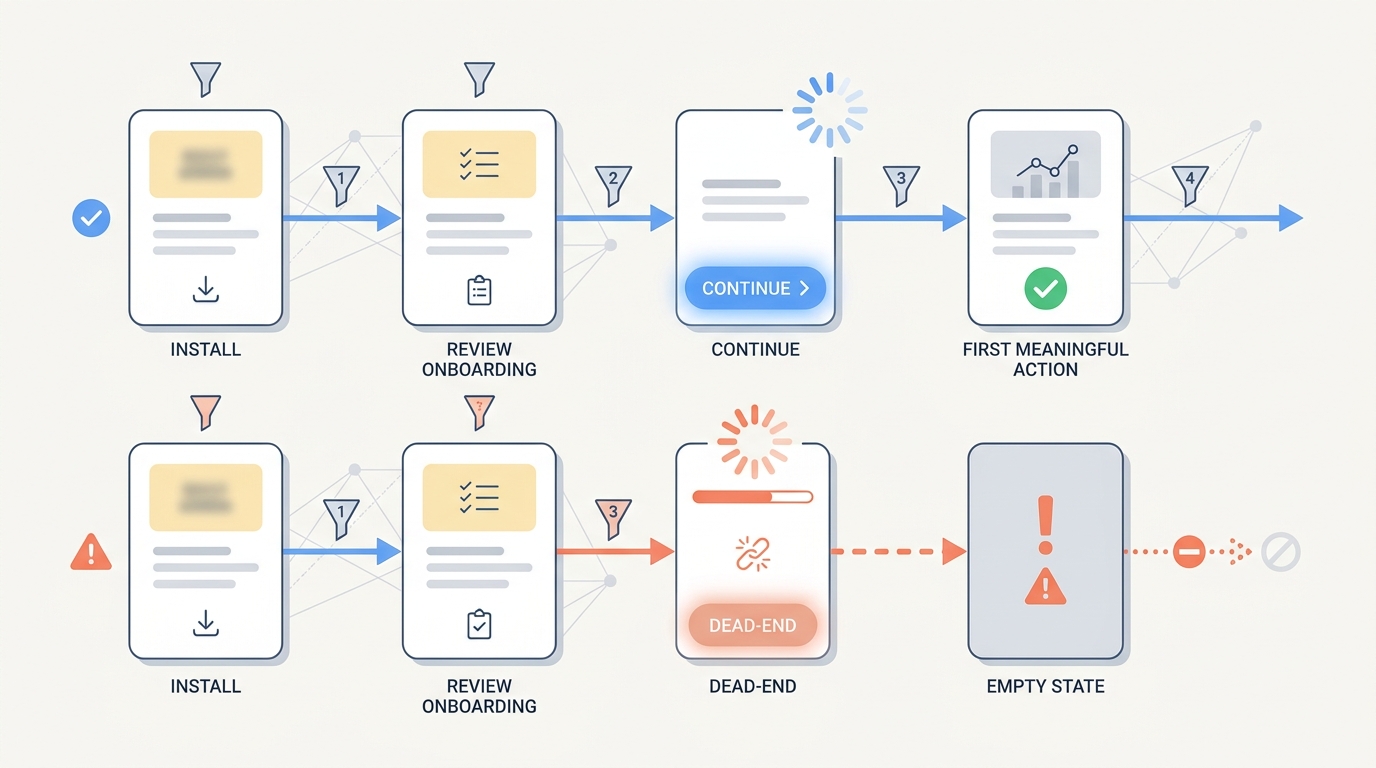
A process diagram comparing a healthy onboarding path versus a broken path where a tappable Continue button, unresolved spinner, or empty state blocks the reviewer from reaching the next screen.
This is a ranked checklist. Each moment includes why it matters in review, realistic effort, and a failure mode to watch for.
| Rank | Moment | Review risk signal | Quick fix to ship | Effort (typical) | Failure mode even after fixing |
|---|---|---|---|---|---|
| 1 | Cold start and first render | "This might be broken" | Render a real first screen before network; show progress and error states | 1-3 eng days + 0.5-1 day QA | Backend outages still break first-run if you have no offline or degraded mode |
| 2 | First-screen purpose clarity | "I do not know what this does" | One sentence: audience + outcome; one obvious primary action | 0.5-1 day product/design + 0.5-1 day build | If metadata promises something else, clearer copy can highlight the mismatch |
| 3 | Taps that go nowhere | "Core flow is unreliable" | Immediate feedback (<300ms), timeout (10-15s), retry and alternate path | 2-5 eng days + 1-2 QA days | Some third-party SDKs fail silently unless you instrument and handle errors |
| 4 | Empty states on new accounts | "Placeholder content" | Labeled examples, templates, and a first task CTA | 1-3 days + QA + content review | Demo content can trigger compliance or claims scrutiny if it looks real |
| 5 | Authentication blocks evaluation | "I cannot access the app" | Reviewer-ready login, fast recovery (reset, unlock), clear error messages | 1-4 eng days + 1-2 QA days | Email/SMS delivery or SSO config issues can still fail outside your control |
| 6 | Permissions asked too early | "Why do you need this?" | Prime with benefit, defer prompt until feature use, support "Not now" | 0.5-2 days + QA | If the app hard-requires a permission for core value, denial flows still look broken |
| 7 | Finish screen dumps into nowhere | "No usable product yet" | Land into a meaningful first task or populated starter view | 2-5 days + 1-2 QA days | If value depends on external integrations, the first-run can still feel empty without them |
For tradeoffs, checklists, and edge cases, Top App Store Rejection Reasons and What to Do About Them rounds out this section.
What should you audit before app submission?
Plan for 45-90 minutes for the first clean-install pass, then 15-30 minutes per iteration once fixes land. Use at least one physical device because simulators can hide real startup cost, permission behavior, and push-notification edge cases. If onboarding depends on backend readiness, run the audit when staging is stable and logs are available, otherwise you risk chasing noise.
Use this preflight (optimize for "can a stranger reach value without help"):
| Check | Target | Pitfall to catch | Decision point |
|---|---|---|---|
| Cold launch | First meaningful screen in ~2-3s; clear error state if down | Splash waits on network, blank UI | If you cannot speed it up this cycle, ship a resilient degraded first screen |
| Tap reliability | Feedback in <300ms; timeout at ~10-15s | Infinite spinner, dead button | If retry cannot succeed, provide an alternate path (browse, demo, later) |
| Fresh account empty states | Example + next action on every empty view | "No data" that looks unfinished | If examples are risky, use templates with explicit labels instead |
| Auth flow | Sign up, sign in, reset, lockout recovery | Email delay, SSO misconfig, rate limits | If auth is mandatory, provide reviewer instructions and stable test accounts |
| Permissions | Prompt only when needed; denial path works | Hard block after denial | If permission is required, explain why and show a safe fallback view |
| Post-onboarding landing | Immediate first task or meaningful content | Finished tutorial but no product | If integrations are required, guide setup and show progress clearly |
Common ways this still fails even with good onboarding:
- Policy or metadata mismatch: onboarding clarity cannot fix a listing that promises features you do not ship.
- Non-onboarding compliance issues: privacy disclosures, paywall rules, or restricted content can still drive rejection.
Top 5 Things Every Founder Must Do Before Submitting an App reframes the same problem with a slightly different lens - useful before you finalize.


