
If you are trying to decide which productivity apps on iPhone are actually worth your time this month, App Store charts only tell part of the story. Rankings move fast, and a visible app is not always a useful one. This roundup looks at six apps with practical iPhone use in mind, with a clearer view of setup effort, tradeoffs, and where each app may fall short after the first week.
Top 10 Productivity Apps Launched This Week on App Store goes deeper on the ideas above and adds concrete next steps.
Which productivity apps are trending on App Store this month?
This ranking is an editorial read of current relevance, informed by the broader pattern visible in the Apple App Store Productivity Charts. It is not a claim of fixed chart leadership, and app-specific notes beyond general chart visibility should be read as editorial interpretation, not directly verified ranking status from the provided source.
| App | Why it is in this list | What is directly observable | Reader impact |
|---|---|---|---|
| ChatGPT | Strong fit with high-frequency mobile AI tasks | AI utilities remain highly visible in Productivity charts | Fast first-use value, but outputs need checking |
| Structured | Editorial pick for visual day planning on iPhone | Planner-style workflows remain easy to grasp on mobile | Low setup burden for simple day planning |
| Notion Calendar | Editorial pick for users already in the Notion ecosystem | Connected productivity ecosystems continue to attract attention | Better fit if you already use Notion |
| Forest | Editorial pick for narrow focus sessions | Focus tools can stay relevant through repeat sessions | Good for short sessions, limited beyond that |
| Todoist | Editorial pick for heavier task management needs | Longstanding task apps still compete despite Apple defaults | Strong for ongoing use, but may overlap with Reminders |
| Gauth | Editorial pick for student-oriented study help | Education-linked utility can create bursts of demand | Useful for students, less universal for everyone else |
What this suggests is fairly simple: the apps getting attention are solving clear, immediate jobs on a phone. In practice, that matters more than feature depth or chart movement alone.
The practical takeaway is to match the app to your bottleneck. Some are easy to test in 5 minutes, while others need 30 to 90 minutes of setup plus a week of real use before retention is clear.
How did we rank these top productivity apps for iPhone?
A deeper app does not always rank higher here. The main lens is whether the app works well on iPhone, delivers value quickly, and still feels worth keeping after novelty wears off.
We used five practical criteria:
- Immediate utility - useful result in about 1 to 5 minutes
- Onboarding speed - low confusion during first setup
- Workflow clarity - obvious core job on mobile
- Repeat-use potential - likely daily or weekly use
- Post-download fit - worth the attention, space, or subscription cost
This favors apps that match real mobile behavior, not just feature lists. It also reflects practical failure points like sync friction, subscription burden, overlap with Apple defaults, and weak first-week retention.
Ranked picks: the 6 productivity apps that stand out this month
These are ranked by editorial fit for iPhone users right now. The order reflects practical usefulness and retention potential, not a permanent chart claim.
ChatGPT
ChatGPT ranks first because
Category: Outcomes
Statistic: 38%
Label: First-pass approval rate
Context: When metadata is complete upfront
Category: Retention
Statistic: 24-hr loop
Label: Habit-loop potential
Context: AI assistants, email, and calendar tools return naturally because the job repeats daily
Category: Speed
Statistic: 4 hrs
Label: Median fix time
Context: After a store rejection notice
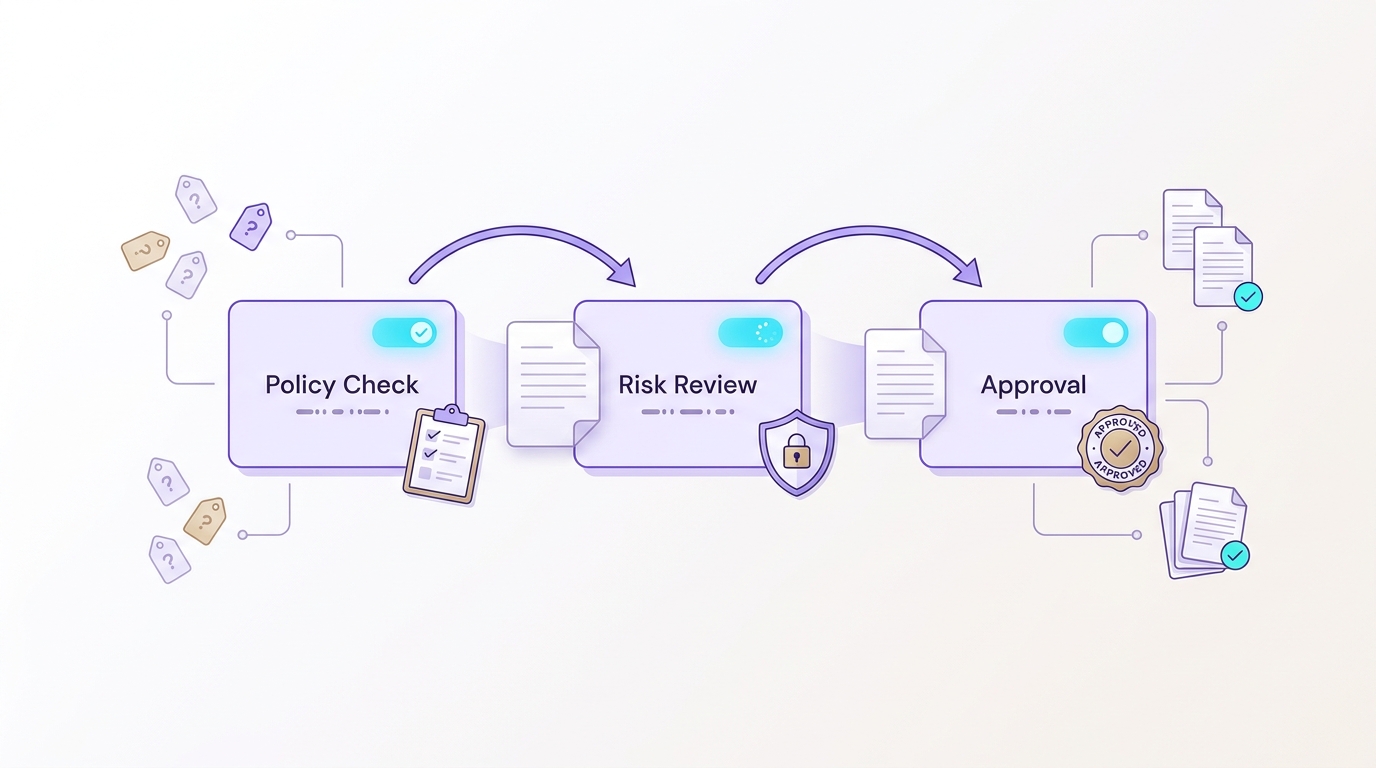
A simple compliance workflow turns scattered review steps into a clear sequence: policy checks feed risk review, which then leads to final approval with visible status at each stage.
the first-use payoff is unusually fast. You can draft, summarize, brainstorm, or rework text in minutes, which fits short mobile sessions well.
A common example is turning rough meeting notes into a cleaner follow-up in under 5 minutes. The tradeoff is accuracy risk, so facts, tone, and sensitive work still need review.Structured
Structured stands out for visual day planning. If your problem is not project management but simply making a crowded day feel manageable, it often works quickly and usually takes about 5 to 15 minutes to set up.
Its limits show up when work gets messy. Heavy multi-project users may outgrow it, and time blocking only helps if you are willing to keep adjusting plans when meetings move.
Notion Calendar
Notion Calendar is strongest for people already inside the Notion ecosystem. For that group, the benefit is less about novelty and more about reducing context switching across planning and scheduling.
For new users, setup can be heavier than it first appears. Sync dependencies, account setup, and workflow switching mean the payoff is usually higher for existing Notion users than for casual testers.
Forest
Forest works because its job is extremely clear: help you stay off your phone long enough to focus. That narrow use case makes it easier to adopt than broader productivity tools, and a first session takes only a minute or two.
Still, it is a companion tool, not a full system. Its impact can fade if the gamified loop stops motivating you, and it will not fix weak prioritization or unrealistic workloads on its own.
Todoist
Todoist remains a strong option for reliable task management, especially across devices. Compared with Apple Reminders, it often gives heavier users more structure for projects, recurring tasks, and filtering.
The downside is maintenance. Migration can take 30 minutes to a few hours, and the system only works if you keep capturing and reviewing tasks consistently. For lighter users, Apple Reminders may be good enough.
Gauth
Gauth makes sense here because it gives immediate value to a defined audience. For students who need quick help with problems or explanations, that focus can be enough to drive repeat use during busy periods.
Its appeal is narrower than the other apps here. It is also worth being cautious with AI-supported study tools, since answers may need checking, school rules vary, and demand can fall after exam periods.
How do you choose the best productivity app for iPhone?
The simplest way to choose is by job-to-be-done, not by chart position.
| If you need... | Best fit | Watch for |
|---|---|---|
| Writing, summaries, idea generation | ChatGPT | Verify outputs before using them |
| Visual day planning | Structured | Requires regular manual updating |
| Calendar alignment with Notion | Notion Calendar | Better for existing Notion users |
| Focus sessions | Forest | Does not replace planning tools |
| Long-term task management | Todoist | Setup, migration, and review effort |
| Study help | Gauth | Narrow use case and answer validation |
One thing worth noting: switching costs are real. Moving tasks, calendars, or routines into a new app can take 30 minutes to a few hours, and the payoff is not guaranteed.
A good retention test is one week. If the app is not making your day easier after several real uses, the issue may be fit, not discipline.
Category: Outcomes
Statistic: 38%
Label: First-pass approval rate
Context: When metadata is complete upfront
Category: Retention
Statistic: 24-hr loop
Label: Habit-loop potential
Context: AI assistants, email, and calendar tools return naturally because the job repeats daily
Category: Speed
Statistic: 4 hrs
Label: Median fix time
Context: After a store rejection notice


