
An app rejection is not just a delay. The bigger cost is adding another App Store or Google Play review cycle because the team resubmitted before understanding the real issue. The goal is to turn the rejection note into a prioritized recovery plan, fix the root cause, and only then send the app back for review.
Why do app rejections take so long to fix?
Rejections move faster when the issue is narrow. They drag when privacy declarations, SDK behavior, permissions, subscriptions, reviewer access, or store listing claims do not match the submitted app.
| Recovery behavior | Risky approach | Better approach | Practical impact |
|---|---|---|---|
| Reading the notice | Treat it like one email | Split it into separate issues | Fewer missed secondary problems |
| Testing the build | Use a developer device | Test the submitted build on a clean device | Closer to reviewer experience |
| Updating compliance fields | Patch the visible field | Compare app behavior, listing, forms, and policy | Lower repeat rejection risk |
| Responding to Apple | Resubmit silently | Ask one focused question when unclear | Better reviewer context |
| Handling Google Play | Appeal immediately | Fix clear policy issues before appealing | Less time lost in queues |
The interpretation is simple: rejection recovery is a workflow problem, not only a coding problem. A focused 30-minute triage pass can save days if it prevents a second review loop.
The business impact is real. A delayed release can affect launch timing, paid campaigns, stakeholder commitments, and support planning. It is usually better to move slightly slower for one cycle than to rush into another rejection.
When you move from outline to execution, We Analyzed App Store Rejection Patterns: What Most Founders Miss Before Submission helps close common gaps teams hit here.
How should you triage an app rejection first?
Rank fixes by review-cycle risk, not developer effort. A same-day screenshot update may help, but it is lower priority than a subscription, privacy, permission, or crash issue that can keep failing until the root cause is fixed.
Before changing the build, listing, Data Safety form, privacy policy, or screenshots, create a short fix list. Apple documents App Review issue handling through App Store Connect and Resolution Center, including how developers can respond to review issues. Google documents policy status, issue details, and appeal paths through Play Console support. Sources: Apple App Store Connect: resolve App Review issues, Apple App Store Connect: app statuses, Google Play Console: monitor app status and policy compliance, and Google Play Console: appeals.
| Rejection type | What to check first | Typical effort | Main risk |
|---|---|---|---|
| Build stability | Crashes, freezes, login, onboarding | Hours to days | Reviewer still cannot use the app |
| Metadata mismatch | Screenshots, claims, age rating, description | 1 to 4 hours | Listing still overpromises |
| Privacy issue | Privacy policy, SDKs, data forms | Hours to days | Disclosures do not match behavior |
| Permission issue | Sensitive access, background use, declarations | Hours to days | Permission use is not justified |
| Payment or subscription issue | In-app purchase, pricing, account deletion | Days | Monetization flow violates policy |
| Content policy issue | Restricted, misleading, unsafe, or regulated content | Days | Cosmetic edits do not fix the feature |
Here is the thing: the smallest fix is not always the safest fix. If the rejection touches policy, payments, privacy, or permissions, expect coordination between product, engineering, legal or compliance, and release management.
What should you do after your app gets rejected?
Use these five responses in order. They are ranked by practical recovery value, not because every rejection follows the same pattern.
Parse the rejection into distinct issues
Copy the Apple guideline reference or Google Play policy code into a checklist. Split every issue into its own line item, including login access, screenshots, privacy links, permission declarations, or subscription wording. This usually takes 15 to 30 minutes.
Reproduce the reviewer experience
Test the exact submitted build on a clean device or with a fresh account. Avoid relying on cached sessions, admin accounts, feature flags, or newer internal builds. Budget a few hours if the issue is easy to reproduce, and longer if it depends on device, region, account state, backend content, or network conditions.
Fix the root cause, not just the visible field
If the issue is metadata, privacy, permissions, or payments, compare the app, store listing, policy forms, SDK behavior, and privacy policy together. A screenshot edit will not help if actual app behavior still conflicts with the declaration.
Respond to Apple when the issue is unclear
Apple says developers can use Resolution Center to communicate about App Review issues in App Store Connect. Use it when the reviewer mentions a flow you cannot find, a guideline number without enough context, or behavior that depends on account state, region, permissions, or backend data.
Fix Google Play policy issues before appealing
Google Play provides policy status and appeal options through Play Console support. Appeal when the rejection looks like a credible false positive and you have evidence. If the issue is real and fixable, a direct correction is often faster than waiting through an appeal queue.
For tradeoffs, checklists, and edge cases, Common App Store Rejection Reasons and How Froxi AI Helps rounds out this section.
How do Apple and Google Play response paths differ?
Apple gives more room for reviewer dialogue through Resolution Center. A good reply should include the guideline number, what you tested, what changed if anything, and one focused clarification question.
For example: "We tested the submitted build with a fresh account and could not reproduce the blocked onboarding behavior. Can you confirm which screen triggered guideline 2.1 so we can address the issue?"
Google Play recovery is usually more structured around policy codes, declarations, and compliance status in Play Console. The tradeoff is that the process can feel less conversational, but it may be clearer when the cited policy maps directly to a permission, content issue, Data Safety field, or listing claim.
Do not appeal by default. Appeals can be useful, but they need evidence and may take time. If your own review confirms the issue, fix the build, listing, declaration, or policy gap first.
When should you get a second review before resubmitting?
Stop after two or three similar rejections. At that point, the issue is rarely just wording in the response note.
Run a second-pass review across:
- The submitted build and reviewer test path
- Store listing claims and screenshots
- Privacy policy and data declarations
- SDK behavior and permissions
- Subscription, account deletion, and payment flows
- Apple or Google policy interpretation
The practical takeaway: repeated rejection usually means the team is fixing symptoms in separate places. Put release, product, engineering, and compliance context in one view before the next submission.
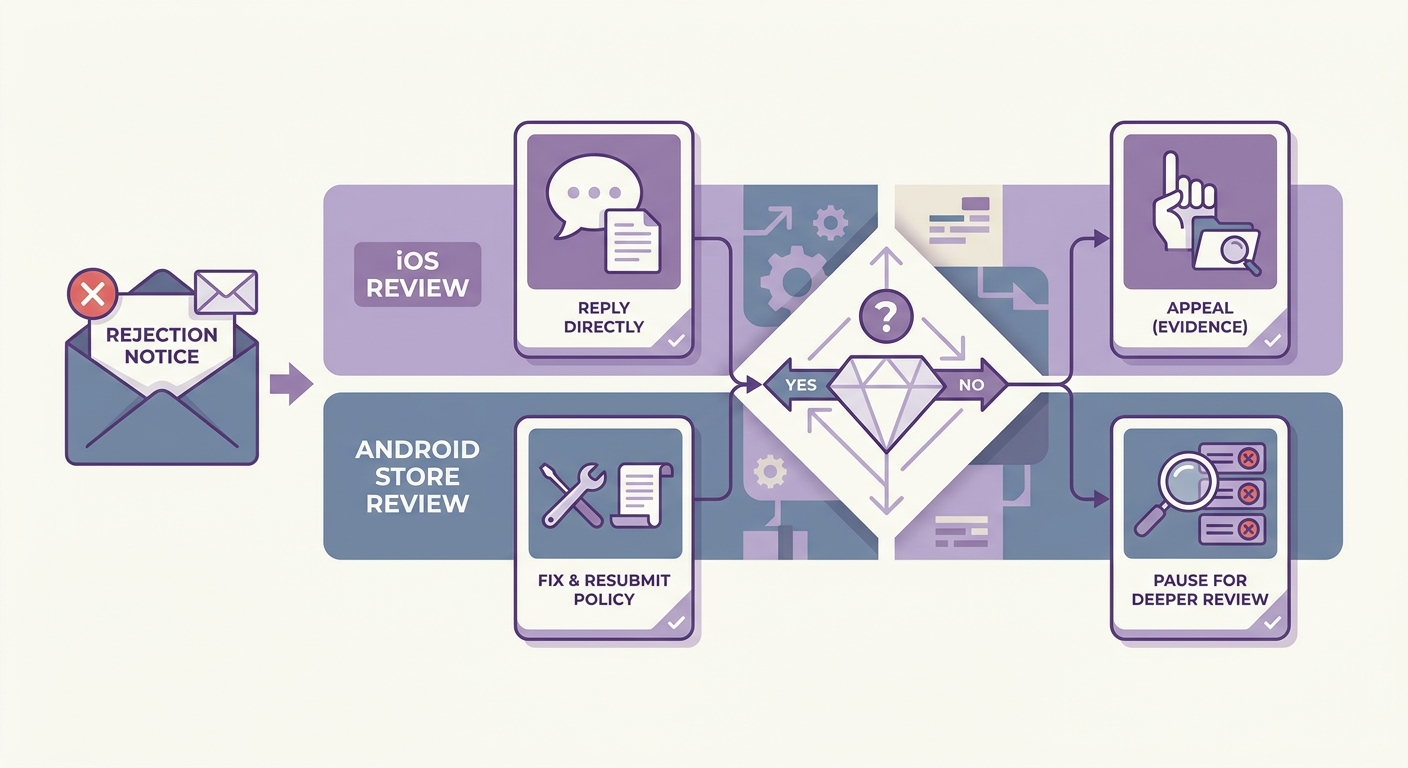
A decision checklist that helps app teams choose between Apple Resolution Center reply, Google Play policy resubmission, Google Play appeal, or a full second-pass review after repeated rejection.


