
Shipping a stable app is only half the launch job. For many teams, the real delay starts after the build is done, when someone still has to fill store fields, confirm privacy answers, upload screenshots, explain subscriptions, and gather review notes across App Store Connect and Google Play Console.
Automated publishing tools can help, but mostly by making submission prep more structured. They do not guarantee approval, and they will not fix missing inputs on their own. What they can do is reduce coordination friction, surface blockers earlier, and make the path from release candidate to submission less chaotic.
Early proof block: where organized launch prep usually changes day-to-day execution
| Launch prep area | Manual submission workflow | Organized automation-assisted workflow |
|---|---|---|
| Required store fields | Collected from Slack, docs, and memory | Pulled into one launch checklist early |
| Privacy links and answers | Chased down near submission day | Flagged as blockers before release week |
| Screenshots and assets | Uploaded late, version mismatch risk | Assigned to design with tracked ownership |
| Subscription wording | Reused from old releases | Revalidated against current app behavior |
| Review notes and test access | Added quickly at the end | Prepared alongside the release plan |
| Ownership | Unclear who provides what | Engineering, marketing, design, and legal each own inputs |
This is operational proof, not a claim that automation alone improves outcomes. The pattern is simple: structured workflows surface missing information earlier, which usually means less avoidable rework once the build is ready. For a reader planning releases, the practical impact is fewer last-minute handoff problems, not guaranteed faster approvals.
Tools such as AppDrift and AppSurge focus on repetitive publishing work, while mobile CI/CD tools like ExpoDeploy and Capgo Build reduce friction earlier in the pipeline. In practice, CI/CD helps most when it cuts handoff time before store prep starts, for example by moving teams from "engineering uploads a build manually when asked" to "every tagged release generates a testable candidate with notes attached." That is useful directional evidence for systematizing releases, but not proof that every team will ship faster.
Why Publishing Requires Structured Execution, Not Guesswork goes deeper on the ideas above and adds concrete next steps.
Where does launch time really get lost?
Many teams treat launch speed as mainly an engineering problem. In practice, once the app is stable, the next bottleneck is often store readiness.
A finished build is not a finished submission. Apple and Google still need metadata, privacy answers, screenshots, support links, subscription wording, and review notes that match the current app behavior.
This is where delays stack up. One unclear SDK data practice, one outdated screenshot set, or one missing support URL can trigger follow-up and sometimes another review cycle.
| Submission task | Manual approach | Organized approach |
|---|---|---|
| Metadata | Written in fragments across teams | Centralized and reusable |
| Privacy responses | Answered from memory | Based on documented app behavior |
| Screenshots | Requested late | Planned with release assets |
| Ownership | Unclear until blocked | Named owners before submission |
| Review context | Reactive | Prepared with test access and notes |
The gain is not magic approval. It is earlier visibility into missing inputs, which usually reduces rework between product, marketing, design, and engineering.
When you move from outline to execution, Why Mobile Apps Don’t Go Live on Time helps close common gaps teams hit here.
How do you build an automation-assisted publishing workflow?
If you want smoother launches, treat publishing as an operational workflow. The goal is to turn real app behavior into platform-specific submission tasks before release week starts.
Gather the inputs automation actually needs
Before any tool can help, collect:
- Current app behavior: login, account deletion, permissions, subscriptions, purchases, user content, and data collection
- Store assets and links: descriptions, screenshots, release notes, privacy policy, support page, and account deletion URL where required
- Owners: engineering for SDKs and permissions, marketing or product for metadata, design for assets, legal, privacy, or operations for sensitive claims
- Access details: demo account, test credentials, reviewer instructions, and feature flags if needed
If these inputs are missing, automation will not save much time. It will mostly expose the confusion earlier, which is still useful if someone owns the fix.
A realistic submission checklist example
Run a store readiness review 5-7 days before submission
One owner checks metadata, links, privacy answers, screenshots, subscription copy, and reviewer access in one pass. For a small app, this may take 1-2 hours. For a subscription app with multiple SDKs, locales, or compliance questions, it can take half a day or more across teams.
Assign blockers to named owners
Engineering confirms SDK and permission behavior, design updates screenshots, and product or marketing rewrites store text. Privacy or legal review often sits with an ops lead, founder, or product manager in smaller teams, which is exactly where delays appear if nobody has clear authority.
Do a final mismatch check against the release candidate
Compare the actual build with the store copy and privacy answers before submission. This is often where teams catch outdated trial language, missing account deletion instructions, or screenshots from the wrong version.
In practice, screenshot work is a common hidden time cost. Even a "small update" can take a few hours once device captures, app state setup, localization, and approvals are included. Subscription review can also stretch if pricing, trial wording, or billing flows changed late in the sprint.
A complementary angle worth comparing lives in Why Publishing Certainty Is More Valuable Than Faster Builds.
What automation mistakes still delay launch?
Automation works best with accurate inputs and clear ownership. The common mistake is assuming a tool can replace judgment or policy review.
Reusing approved wording after the app has changed
Reusing old submission text is one of the fastest ways to create slow reviews. The risky areas are subscriptions, trials, privacy explanations, permissions, account deletion, third-party SDKs, and reviewer notes.
A safer rule is to reuse structure, not claims. Keep the template, but re-check every statement against the current build before submitting.
Failure modes and dependencies to plan for
A structured workflow can reduce avoidable churn, but some delays remain outside your control:
- Store review timing is still unpredictable
- Localization adds real overhead for screenshots and metadata
- SDK privacy details can be ambiguous, which may force rework
- Last-minute product changes can invalidate already prepared copy
- Cross-functional approvals often stall when design, legal, or founders review too late
The practical takeaway is that process helps most when it starts early. It improves readiness, not certainty.
For tradeoffs, checklists, and edge cases, CI/CD Pipelines Are Overkill for Most Mobile App Publishers rounds out this section.
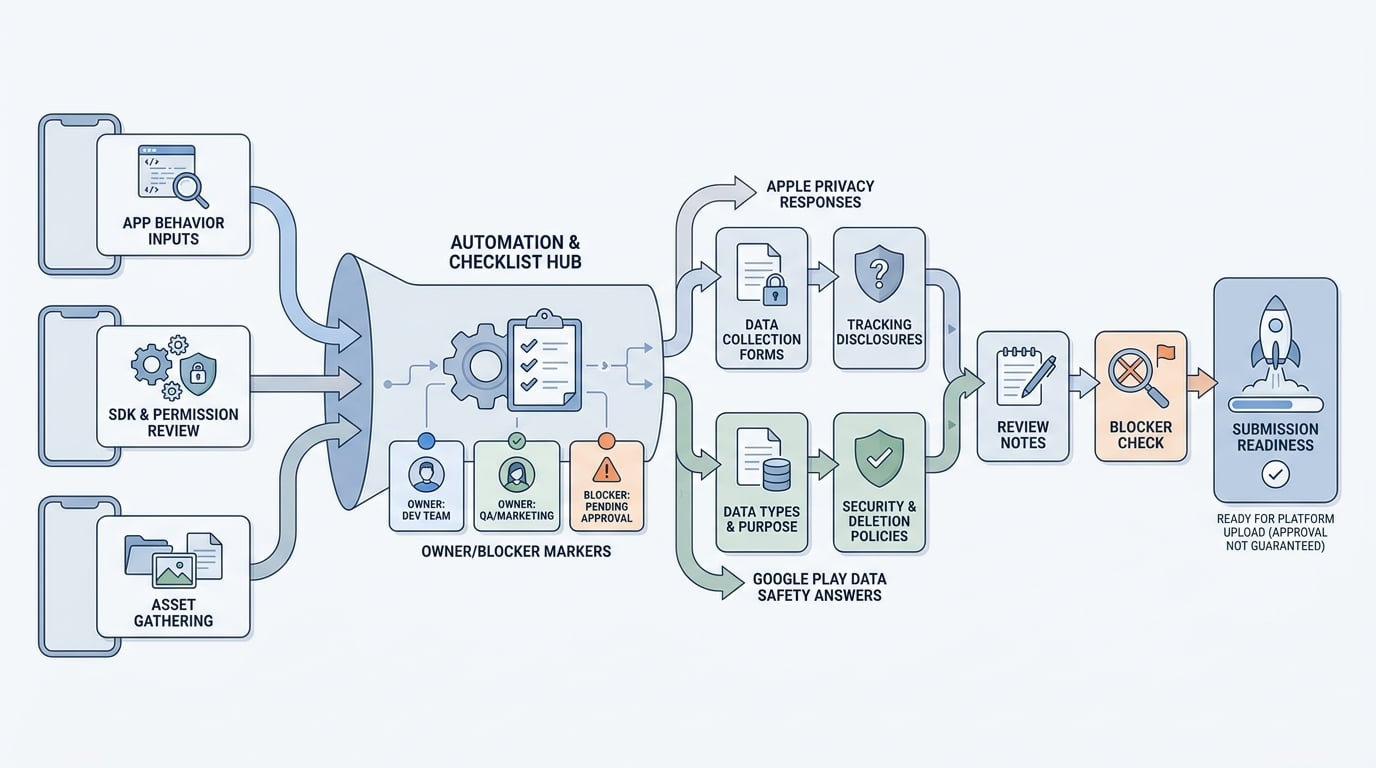
A step-by-step process diagram that starts with app behavior inputs, SDK and permission review, and asset gathering, then branches into Apple privacy responses and Google Play Data safety answers before ending in review notes, blocker checks, and submission readiness.


