
Publishing a game on the App Store looks similar to shipping a regular app until you hit the parts Apple tends to review more carefully: age ratings, in-game monetization behavior, random rewards, and whether your App Store page matches real gameplay. Those gaps are where reviews get delayed, builds get rejected, and launch plans get disrupted.
This guide gives you a game-specific pre-submission workflow you can run before you click Submit for Review. It will not guarantee approval or review speed, but it can lower the number of preventable back-and-forths when your build, metadata, and disclosures stay aligned.
Early proof: internal game submission checklist (not Apple-endorsed)
| Submission area | What reviewers commonly validate for games | Typical failure mode |
|---|---|---|
| Age rating and disclosures | Answers reflect actual gameplay, chat, and UGC | Rating mismatch vs in-game content |
| Monetization and random rewards | IAP type is correct; randomness is explained clearly | Random reward mechanic under-disclosed |
| Purchase reliability | Delivery and restore work on a clean device | Restore edge cases, missing entitlements |
| First-session playability | Reviewer can reach gameplay quickly | Crash, login wall, blocked tutorial loop |
| Store page accuracy | Screenshots and text match the build | Metadata promises features not present |
Explanation: internal checklist based on team experience and how Apple guidelines are commonly applied in review, not Apple data.
Interpretation: delays often come from cross-surface inconsistencies (build, disclosures, IAP setup, metadata), not a single rule.
Reader impact: running this gate can cut avoidable resubmits, but outcomes still vary with reviewer context, build stability, and late changes.
Planned visual placement here (described in prose only): a compact comparison card set showing Regular app submission versus Game submission with callouts for age rating, random reward disclosure, Game Center setup, and gameplay screenshots.
App Store Connect vs Google Play Console: Key Differences goes deeper on the ideas above and adds concrete next steps.
What is different when you publish a game on the App Store?
Category: Outcomes
Statistic: 42%
Label: Teams reporting faster reviews
Context: After tightening pre-submit checks
Category: Compliance
Statistic: 1 extra disclosure
Label: Loot box odds required
Context: If your game includes randomized items for sale, disclose odds per Apple guidelines
Category: Submission
Statistic: 4 game-specific checks
Label: Age rating, loot boxes, Game Center, gameplay shots
Context: Common differentiators that affect review readiness and storefront presentation
Games have more review surface area than many utility apps. Apple applies the same baseline rules as any app, plus focused attention on minors, spending behavior, and user safety. The best reference is Apple’s App Review Guidelines, interpreted at build and metadata level during review.
Why games get more scrutiny than utility apps
Games often combine three risk multipliers: expressive content (violence, fear, suggestive themes), social surfaces (chat, UGC, multiplayer), and monetization (IAP, subscriptions, random rewards). Each area has policy expectations, and the combinations create edge cases that need extra QA and clearer disclosures.
What this means in practice: a rejection costs more than time. It can force you to move marketing beats, refresh screenshots, or pause UA while you wait for another review cycle, and timelines can vary by region and reviewer.
What this guide will help you ship
- An age rating and disclosure setup that matches actual gameplay and social features
- Monetization configuration that stays consistent across the build and App Store Connect
- A clear decision on Game Center features and the testing scope they add
- A performance readiness pass to reduce obvious first-session failures
- Store metadata that makes your genre and core loop obvious fast
Expected effort: first run is usually 3 to 8 hours for a simple offline game, and 1 to 3 days if you have IAP, online-only gameplay, multiple locales, or many device screenshot sets. After you have a stable checklist, many teams get it down to 60 to 120 minutes per release, assuming no major feature changes.
When you move from outline to execution, Submitting vs Publishing an App: What's Different helps close common gaps teams hit here.
How do you publish a game on the App Store?
This sequence prioritizes decisions before asset work. It assumes you have an Apple Developer Program account and ship builds via Xcode and App Store Connect. If you are new to the pipeline, Apple’s Get Started is the prerequisite.
Start with the game-specific prerequisites
Stabilize the first session
App Review needs to reach meaningful gameplay quickly. Make sure first launch does not crash, soft lock, or require a long account flow before the player can do anything.
Dependency caveat: if your game is online-only, review networks vary and backend downtime can happen. Test weak-network behavior (timeouts, retries, maintenance messaging) and avoid hard failures that trap the reviewer.
Prepare your age rating and disclosures
Answer the rating questionnaire based on what a new player can actually see: combat animations, blood, horror elements, suggestive themes, chat, and UGC. If you have user interaction, be ready to describe moderation and reporting at a high level, since reviewers may compare those surfaces to the App Review Guidelines.
Pitfall: teams sometimes update content (new enemies, new chat, new cutscenes) after assets are finalized. If content changes late, plan 30 to 90 minutes to re-check disclosures and screenshots before submission.
Decide on Game Center features early
Decide whether you will ship with leaderboards, achievements, or other social features now or later. These choices affect testing burden, privacy considerations, and sometimes your screenshots if the feature is part of what you are selling.
Failure mode to plan for: reviewer accounts and test users may not have the same progression state as your internal testers. If a feature requires an account level or an invite, add a review note and provide a test path that works from a clean install.
Effort note: for a small team, this pass is often 0.5 to 2 days the first time. If your game depends on backend services, budget extra time for failure testing and for updating review notes when behavior differs by region, account state, or network.
Configure the monetization model correctly
Map every monetized item to the right IAP type
Label each item correctly: consumables (currency, boosts), non-consumables (permanent unlocks), subscriptions (battle pass access), and account-level entitlements. Misclassification is not always an instant rejection, but it can trigger questions in review and create customer support load later.
Mini example mapping:
- 500 Gems pack - consumable
- Remove Ads - non-consumable
- Monthly Pass - subscription
Make random rewards reviewable and explainable
If you have loot boxes or any random-reward mechanic sold for money (or bought with purchased currency), assume it will be reviewed closely. Keep disclosures and in-game UX consistent and understandable, aligned with the App Review Guidelines.
Tradeoff: clearer disclosures can reduce short-term conversion for some designs, but they usually reduce complaints, refund pressure, and policy back-and-forth. If you tune disclosures late, expect iteration time on copy and UI plus another QA pass.
Test restore and delivery like a reviewer would
Test on a clean device and a real sandbox account: buy, receive items, relaunch, restore purchases, and verify inventory state. Keep a written "expected state" checklist so you can tell the difference between a test setup issue and a real entitlement bug.
Common failure modes:
- IAP not in the right App Store Connect state when the build is submitted (for example, products not yet approved or missing required metadata)
- Restore works only after a second attempt or only for some SKUs
- Server-side receipt validation fails under load or during maintenance, causing "paid but not delivered"
Dependency note: third-party SDK updates (ads, attribution, analytics) can introduce instability close to launch. Freezing versions reduces change risk, but it can conflict with security updates and policy changes, so plan at least one re-test window after any SDK change.
Package the metadata that helps games get found
- Make genre and core loop obvious fast: title, subtitle, and first screenshots should communicate what players do. See Discovery on the App Store.
- Lead with gameplay in screenshot 1: avoid logo splashes or generic menus. Even if review passes, weak first impressions typically reduce conversion.
- Validate your page against reality: if screenshots imply features not available at launch, you create review risk and user churn risk.
- Double-check regional differences: ratings, content norms, and monetization availability can vary. If something changes by region, align availability and disclosures before submission.
Effort note: metadata work is often 2 to 6 hours for a simple game. Localization, multiple device screenshot sets, and iterations after playtesting can add 1 to 3 days.
A complementary angle worth comparing lives in How to Publish Your Lovable App: From Export to Approval.
What mistakes cause App Store rejections for games?
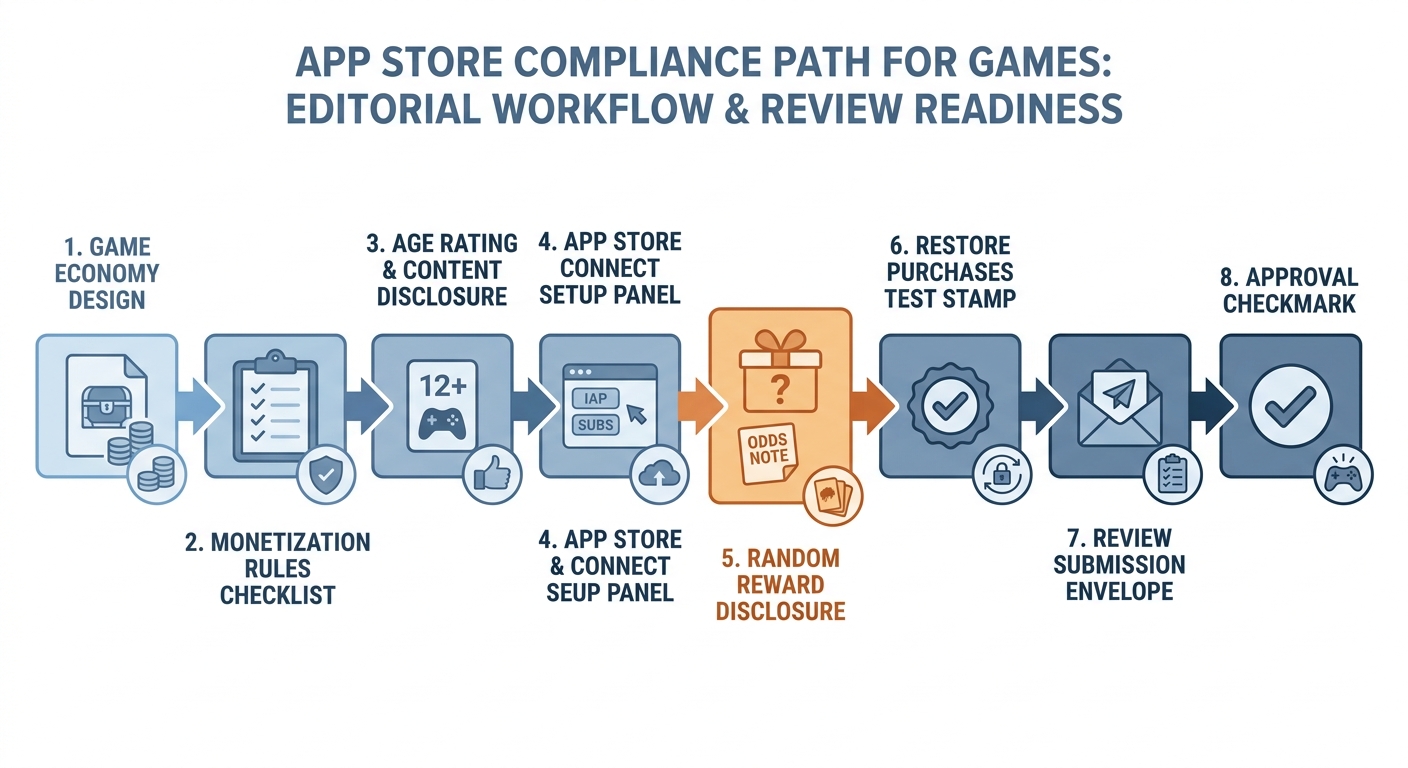
A workflow diagram showing the path from game economy design to App Store Connect setup: consumables, subscriptions, random rewards, and purchase restoration checks before review submission.
These issues sit between design, engineering, and marketing. The fixes are usually straightforward, but they require clear ownership and a little time to reconcile "what we meant" with "what the reviewer sees."
| Issue pattern | What it looks like in review | Practical fix |
|---|---|---|
| Disclosure mismatch | Rating answers do not match actual content or chat/UGC surfaces | Re-check questionnaire after content lock; update review notes if needed |
| Random reward ambiguity | Paid randomness exists but odds/explanation is unclear | Align in-game UX and disclosures; be explicit and consistent |
| Login wall | Reviewer cannot reach gameplay without account setup | Provide guest path or a working test account and short instructions |
| IAP state timing | Products not ready or inconsistent when review starts | Verify IAP metadata and status before build submission; avoid last-minute SKU churn |
| Store page overpromises | Screenshots or description imply features not present | Remove or qualify claims; ship the feature first, market it later |
One thing worth noting: App Review outcomes can vary with reviewer context, device state, and regional settings. If your game behaves differently by locale, age, or account progression, that is where detailed review notes can save a cycle.
Planned visual placement here (described in prose only): a one-screen mismatch map linking each common failure mode to the exact artifact to fix (build behavior, App Store Connect field, or screenshot/description).
For tradeoffs, checklists, and edge cases, How to Publish an Emergent-Built Mobile App Successfully rounds out this section.
Execution checklist before you submit
This is a pre-flight list to run right before uploading your build and submitting for review. It is intentionally biased toward game-specific failure modes.
Pre-submission checks for App Store Connect
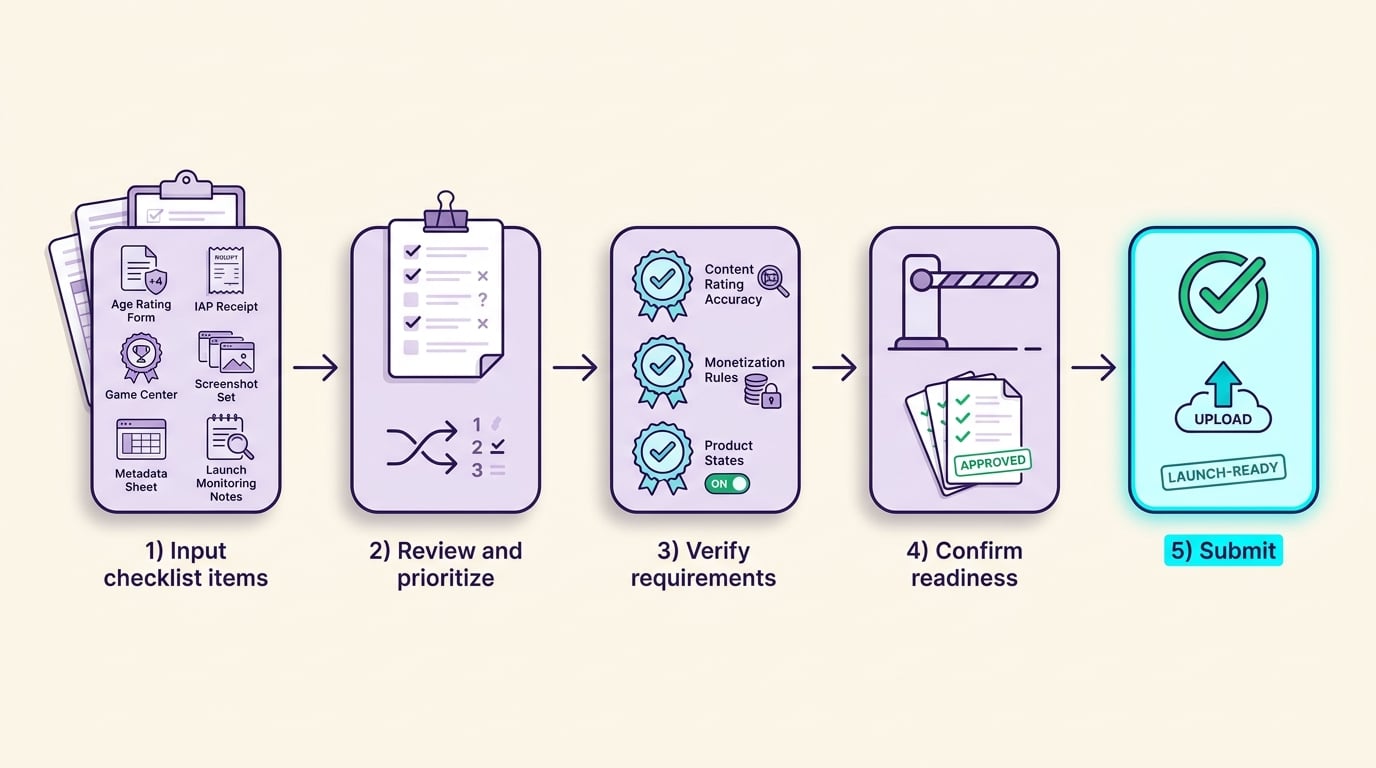
The diagram shows how checklist items move through review, verification, and readiness checks before final submission, emphasizing a clear gated workflow from input to outcome.
- Age rating and disclosures
- Questionnaire answers match current gameplay, cutscenes, chat, and UGC
- Any random reward monetization is described clearly and consistently with in-game UX
- Regional availability matches content and monetization realities
- In-app purchases
- Every product is the correct type (consumable, non-consumable, subscription)
- Pricing is set and products are in the correct state for submission
- Restore purchases works on a clean device and restores entitlements correctly
- Product page assets
- Screenshot 1 shows real gameplay and the core loop
- Screenshots and description do not promise features not available at launch
- Metadata aligns with your intended audience and age rating
- Final build sanity checks
- No crash loops, no blocked onboarding, no broken offline behavior (if applicable)
- Support links and privacy details are accurate and reachable
Planned visual placement here (described in prose only): a mobile-friendly checklist block with the final App Store game submission items, including content rating accuracy, in-app purchases, Game Center, screenshots, metadata, and launch-day monitoring.
Launch-day checks after approval
- Watch stability first: crash rate, freezes, loading failures in the first 24 to 72 hours (expect noisy data at low volume).
- Monitor monetization health: purchase failures, restore-related complaints, refund signals, and conversion directionally.
- Track retention signals: tutorial completion and day 1 retention directionally, then refine once cohorts stabilize.
- Read reviews like bug reports: look for patterns like broken login, missing currency, or confusion about content suitability.
- Be ready to patch: fast-follow updates are common in games, but big economy changes can require re-testing disclosures and purchase edge cases.
Everything You Need to Know About Apple and Google Developer Accounts reframes the same problem with a slightly different lens - useful before you finalize.


