
Most teams treat App Store privacy nutrition labels like compliance copy, then wonder why conversion dips or review cycles get slower. Apple turned disclosure into a visible product surface: a public, structured summary of your data posture that users and some enterprise buyers scan before they trust you. This guide helps you decode what the label actually signals, spot common misreads, and run a practical audit that reduces avoidable review risk without accidentally breaking analytics or monetization.
Early proof: the label often sits in the same decision path as screenshots and ratings (illustrative scan pattern)
| Typical shopper scan order (often) | What it answers fast |
|---|---|
| Icon + name | Is this relevant? |
| Screenshots | Does it look usable? |
| Ratings | Is it credible? |
| Privacy label | Is it safe or creepy? |
| Install | Do I commit? |
What this shows (explanation): The privacy label acts like a first-page trust checkpoint, not buried policy text. This is a common scan pattern, not a universal funnel across all categories.
How to read it (interpretation): If your label expands, you are asking for more trust at the install decision. The conversion impact is category and brand dependent, and it is usually most noticeable when competitors look meaningfully "lighter."
Concrete checkpoint (operational): Track App Store page conversion in App Analytics (Product Page Views - First-Time Downloads) before and after a disclosure change, using the same date range length (often 7-14 days) to reduce noise. Do not expect clean causality if you also changed screenshots, pricing, or traffic mix.
Why it matters (impact): A cleaner, defensible label can reduce hesitation and review back-and-forth, but only if it reflects real behavior and does not remove data your product depends on (attribution, fraud defense, personalization).
Where Founders Make Mistakes Before Launch goes deeper on the ideas above and adds concrete next steps.
Why did App Store privacy labels become a product decision?
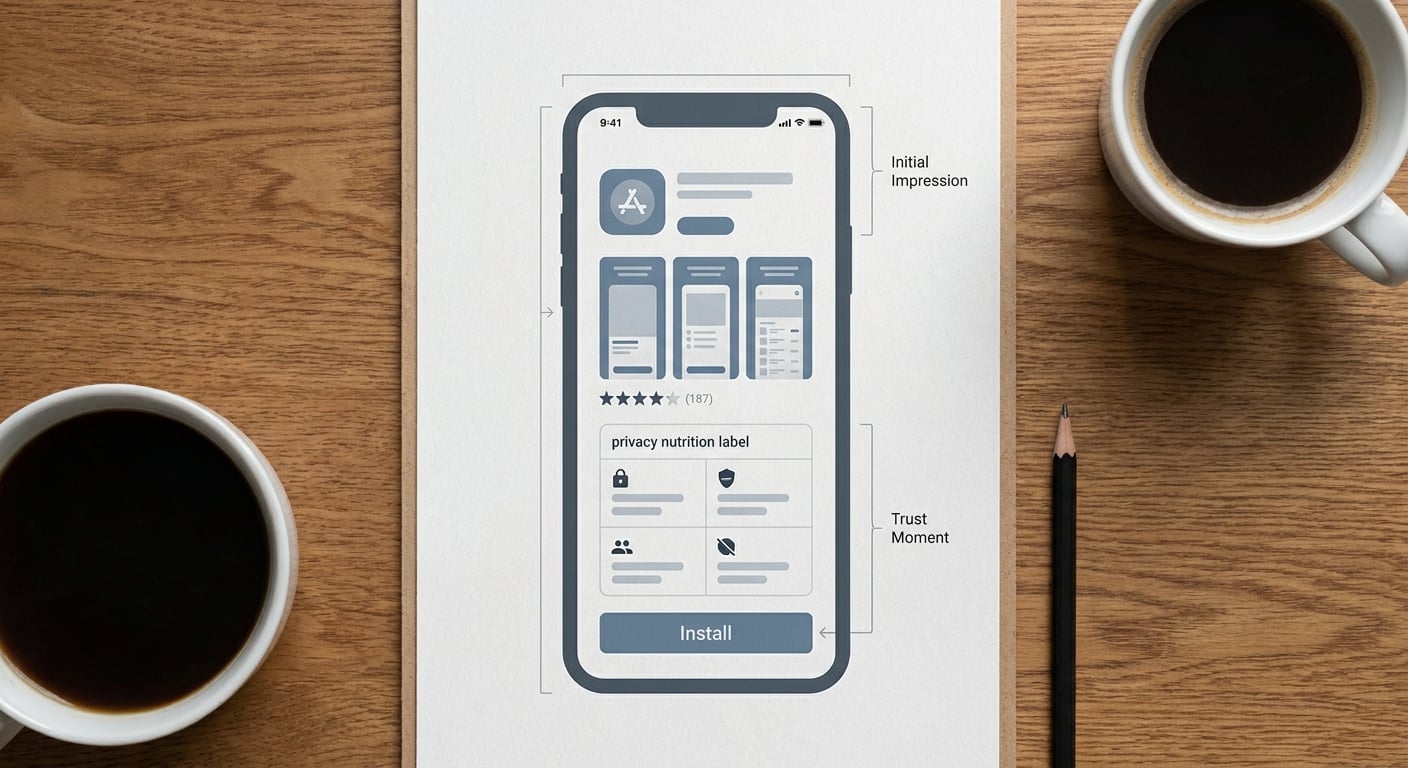
A compact proof block showing the App Store product page decision sequence: icon, screenshots, ratings, privacy nutrition label, install button. The visual emphasizes that privacy disclosure is part of the first-screen trust moment, not buried legal text.
App Store privacy nutrition labels are no longer back-office compliance. They are a public product promise users can compare across apps in seconds, based on your self-reported disclosures in App Store Connect (Apple Developer).
Here is the thing: "smaller" is not automatically "better." In some categories, fewer disclosures can help first-touch trust. In others, cutting collection creates downstream costs like weaker attribution, higher fraud, worse recommendations, or revenue pressure from ads and measurement.
When you move from outline to execution, Writing a Privacy Policy That Actually Passes App Store Review helps close common gaps teams hit here.
How does the App Store privacy label work?
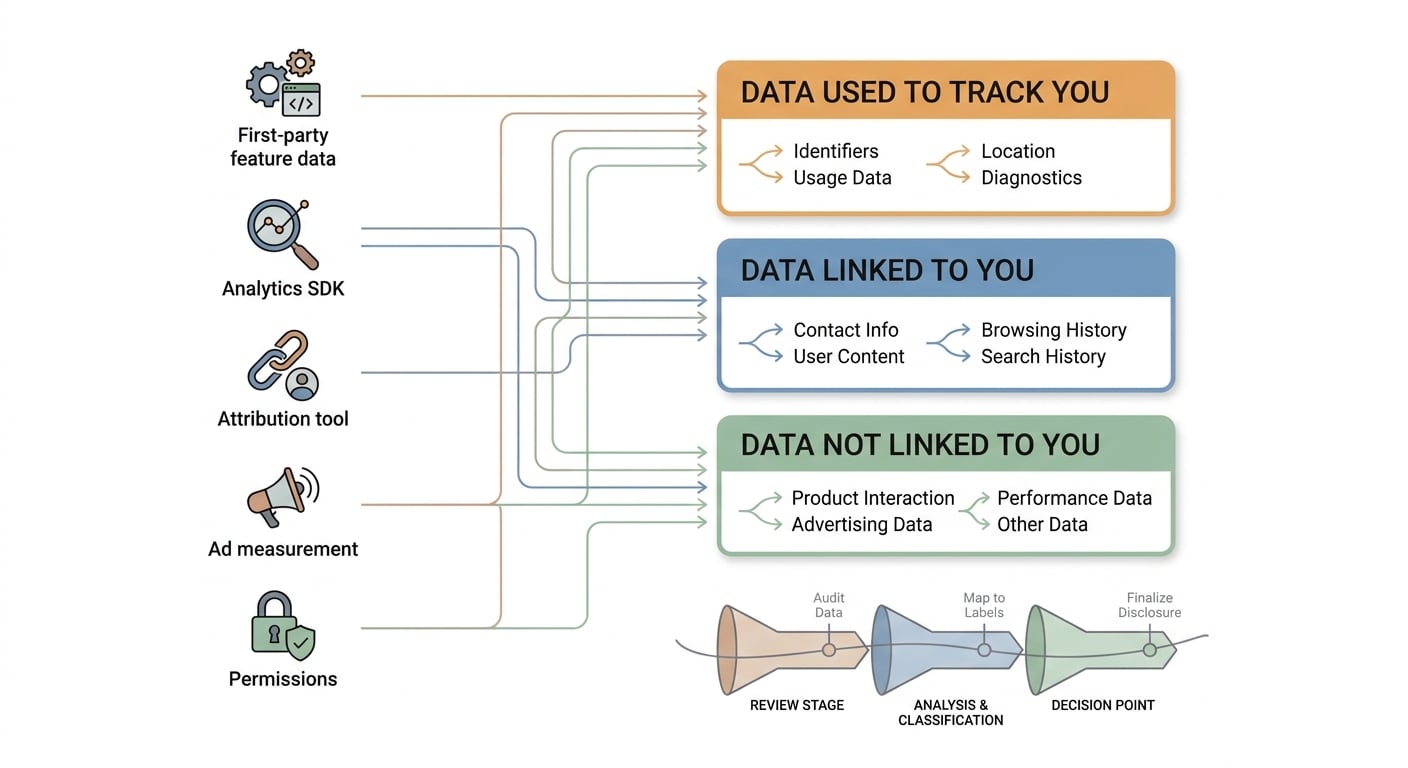
A simple process diagram mapping app data sources to App Store privacy label categories: first-party features, analytics SDKs, attribution tools, ad measurement, and permissions. The diagram shows how each source influences whether data is linked, tracked, or shared.
Start with the three buckets users actually see
Apple frames disclosures as Data Used to Track You, Data Linked to You, and Data Not Linked to You, organized by data types like contact info, location, identifiers, usage data, and diagnostics (Apple Developer). Treat it like a map of data flows, not a legal narrative.
Map common behaviors to label outcomes
Login can push identifiers into "linked." Analytics and crash reporting often add "usage data" and "diagnostics." Ad measurement can trigger "tracking" when data is used across apps or services.
Assume SDK defaults are part of your product behavior
The label is self-reported, but behavior includes third-party SDK collection. If an SDK updates its manifests or defaults (or Apple expands required disclosures), your label may need updates even if your UI did not change.
Common change patterns that expand the label (and what to check)
| Change or SDK | Likely label impact | Check to run (practical) |
|---|---|---|
| Add attribution or ads SDK | Identifiers and possible "tracking" | Review SDK docs and privacy manifest; verify IDFA access and cross-app linking behavior |
| Add login or "continue with email" | More "data linked to you" | Confirm what user ID, email, and purchase history you store and transmit |
| Turn on location (even coarse) | Location disclosure expands | Validate when location is collected (foreground/background) and whether it is optional |
| Add "session replay" or heatmaps | More usage data, sometimes sensitive | Confirm payload contents and masking; review vendor defaults |
| Expand analytics events | More usage data and linked IDs | Spot-check event payloads and server logs for identifiers you did not intend to send |
One practical failure mode: teams audit only first-party code. An SDK update can start collecting more than you expect, forcing a label change and prompting App Review questions.
A complementary angle worth comparing lives in How to Fix App Store Guideline 5.1.1 Privacy Rejection.
A realistic operator workflow (effort, dependencies, and risks)
A first pass is usually 4-12 hours for a small app and 1-3 days for a multi-SDK app, depending on documentation quality, how many flows you need to test, and whether you can get quick answers from vendors and internal owners. Expect more time if you ship across multiple regions, have different cohorts (free vs paid), or rely on server-side enrichment.
Workflow checklist with effort, decision points, and pitfalls
| Step | Typical effort | Decision point | Pitfall to avoid |
|---|---|---|---|
| Pull current label + list SDKs and versions | 30-90 min | Is the SDK inventory complete (including transitive deps)? | Missing an embedded SDK that changes the label later |
| Review SDK privacy manifests and defaults | 1-4 hours | Is any collection optional or configurable? | Assuming "we do not use it" means it is not collected |
| Test core flows with a proxy capture | 1-3 hours | Do payloads include identifiers, location, or sensitive fields? | TLS pinning, encrypted payloads, or incomplete user states hide traffic |
| Validate server-side joins and sharing | 1-6 hours | Are events enriched or shared after ingestion? | Assuming device-only testing covers warehouse and partner behavior |
| Update disclosures + get sign-off | 30-120 min | Do product and growth accept tradeoffs (measurement, fraud, personalization)? | Editing disclosures to look smaller without changing behavior |
Limitations to plan for:
- Proxy captures can miss pinned traffic, and they will not reveal server-side joins or partner transfers that happen after the device sends an event.
- A thorough audit often needs coordination (test accounts, vendor consoles, DPAs, retention settings). Budget calendar time for scheduling, not just execution time.
- "Minimize" is a product decision with measurement. Cutting data can cause attribution gaps, fraud spikes, or worse personalization.
For tradeoffs, checklists, and edge cases, Why Publishing Certainty Is More Valuable Than Faster Builds rounds out this section.
What should you audit before changing your App Store listing?
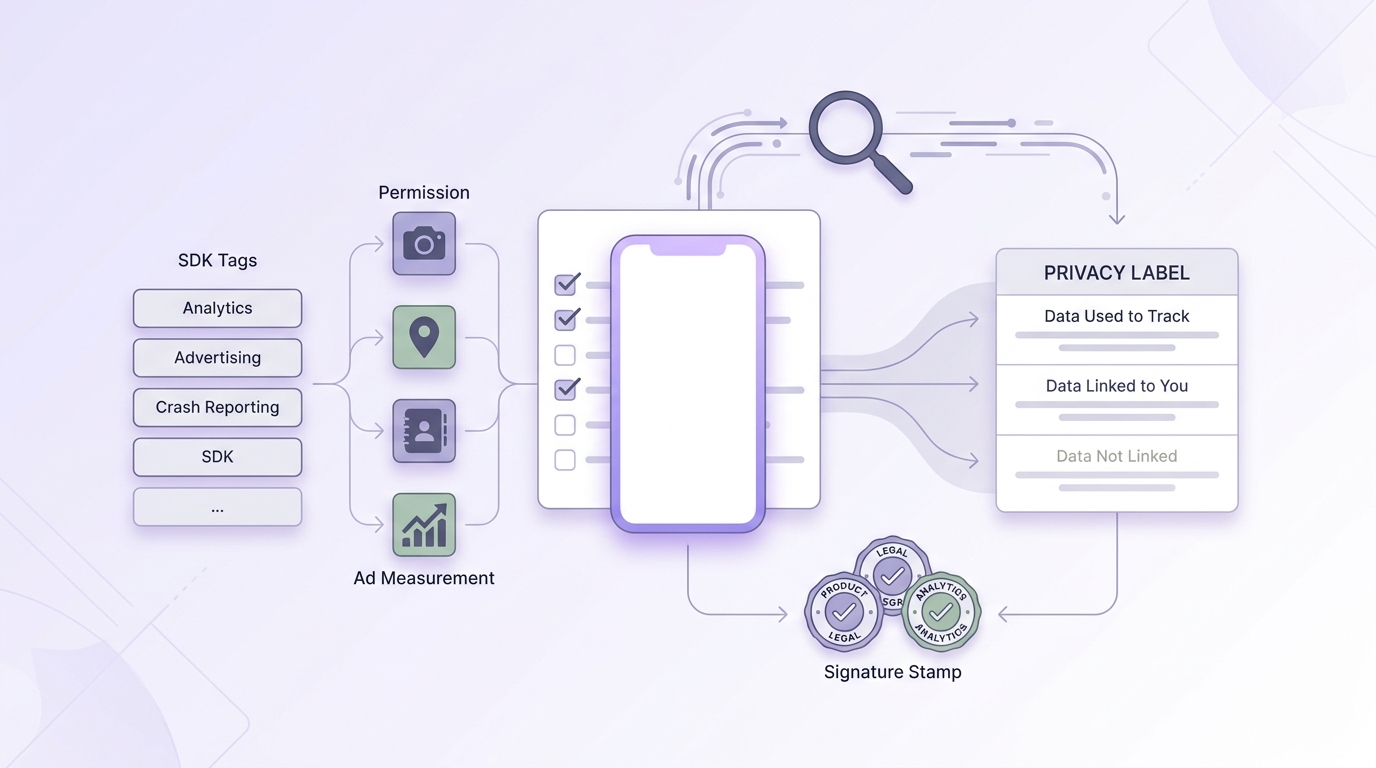
A mobile-friendly checklist for release readiness covering SDK inventory, permission review, label category mapping, cross-team sign-off, and a final App Store submission check. The visual reinforces that the privacy label should be handled as part of launch operations.
Inventory data touchpoints
List every SDK, API, permission, and server-side pipeline that can collect personal or device data, including attribution and ad measurement tools.
Map disclosures to label categories
For each data type, confirm whether it is linked to the user, used for tracking, or shared with third parties per Apple’s App Privacy details fields (Apple Developer). When ambiguous, document assumptions and validate with the vendor or your own logging.
Run cross-team sign-off before submission
Have engineering verify what ships, product confirm what is essential, and legal validate the disclosure language. If your inventory is ready, sign-off can be 30-60 minutes; it takes longer when monetization and identity differ by region or cohort.
CTA: Add the privacy label check to your release process
Description: Use a lightweight checklist so label drift is caught alongside screenshots and metadata, not after App Review asks questions.
Add the checklist
Metrics worth watching after any disclosure change
- App Store page conversion (Product Page Views - First-Time Downloads). Expect week-to-week noise; look for directional shifts over 1-2 weeks.
- Support volume and review sentiment related to tracking, login, or permissions.
- Opt-in rates (ATT, notifications, location), since stricter prompts can reduce data even if the label stays the same.
The Privacy Policy URL Trap: What It Must Include to Pass Review reframes the same problem with a slightly different lens - useful before you finalize.
The tradeoff: not every app benefits from smaller disclosures
Some products should disclose more, not less. Ride hailing needs precise location, marketplaces need identity and purchase signals, ad-supported apps may rely on identifiers, and fintech may require device signals for fraud defense. That can be compatible with Apple’s model if the label reflects reality and users can connect each data type to a clear benefit (Apple Developer).
One thing worth noting: review outcomes and enforcement pressure can vary. Mismatches that are material (tracking claims, sensitive data types, undisclosed third-party collection) are more likely to trigger review questions, rejection, or later action than minor classification differences. SDK changes, category sensitivity, and user complaints can all increase scrutiny, so treat accuracy as ongoing operational work, not a one-time form fill.
Final position: treat the privacy nutrition label as a maintained product surface
What companies should do next week
Audit the label against the build
Compare App Store Connect disclosures with shipped SDK behavior, permissions, and a basic traffic review in the current release. Plan extra time if you use TLS pinning or rely on server-side event joins.
Name one owner
Assign a single operator to coordinate product, engineering, growth, and legal so updates do not fall between teams.
Pre-review high-risk changes
Before any release touching analytics, ads, login, location, or payments, re-check SDK manifests and event payloads. Expect extra cycles when upgrading major SDKs because disclosures can change even if your app code does not.
The final recommendation in one sentence
Treat the App Store privacy nutrition label as positioning plus operational hygiene: keep it accurate, understand the tradeoffs, and fix drift early before Apple or users force a rushed change.
CTA: Re-verify your public label before major submissions
Description: Before releases that touch analytics, ads, login, location, or payments, confirm the label still matches shipped behavior and your vendors' current defaults.
Add it to your checklist


