
App Store Guideline 5.1.1 rejections are rarely a paperwork glitch. They usually mean Apple is seeing real data behavior that does not match what you claimed in the privacy policy, App Privacy answers, or permission flow. Teams often lose days debating wording while the reviewer is simply observing a mismatch in SDK calls, login requirements, or data collection timing. A reliable path back to approval is a tight consistency audit that aligns product behavior, disclosures, and reviewer instructions, then ships only what you can reasonably defend from a cold install.
How to Fix App Store Guideline 2.1 Rejection goes deeper on the ideas above and adds concrete next steps.
Why is App Store Guideline 5.1.1 usually a product issue?
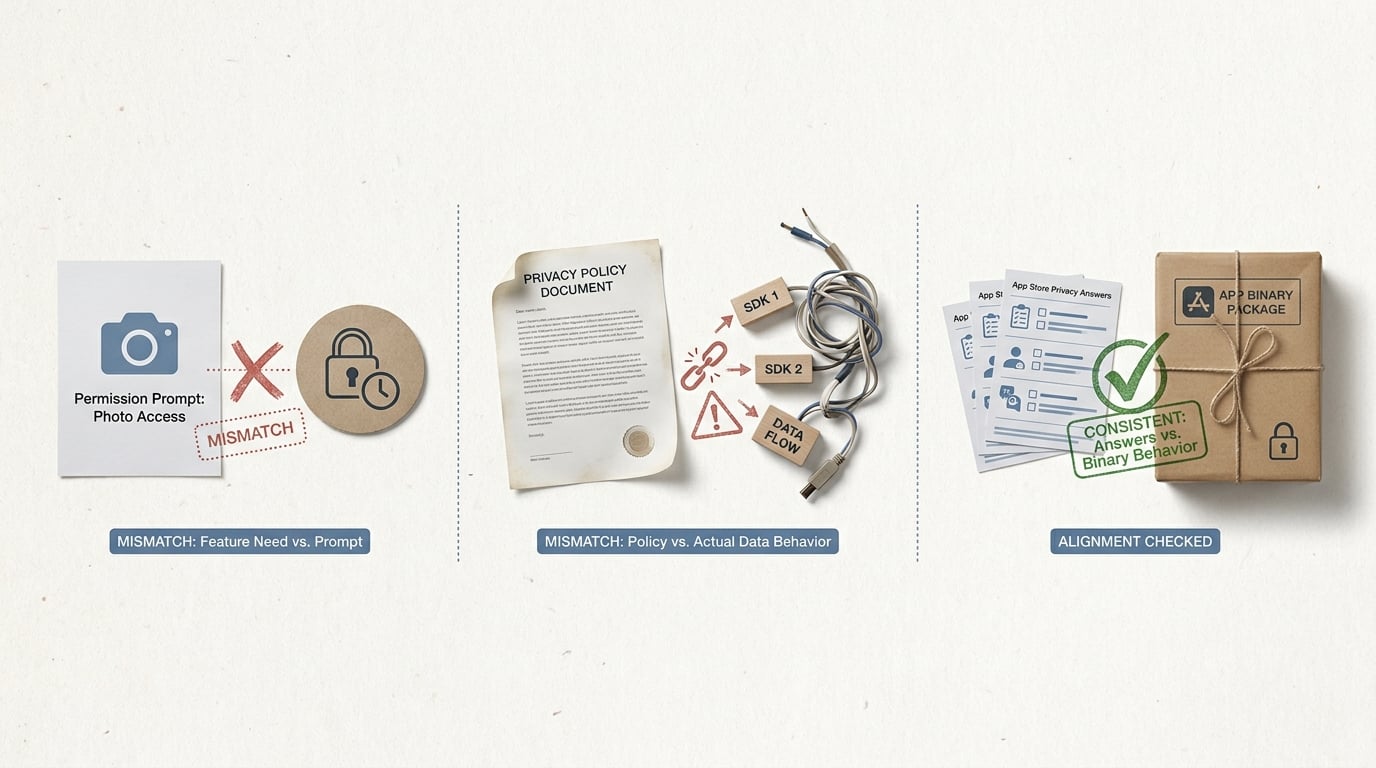
A compact visual callout showing three side-by-side mismatch checks for an App Store Guideline 5.1.1 rejection: permission prompt vs feature need, privacy policy vs actual SDK behavior, and App Store privacy answers vs the binary. The emphasis is on finding inconsistencies before resubmission.
The core claim: fix the app, the policy, and the review narrative together
Guideline 5.1.1 is not primarily about having a privacy policy link somewhere in the footer. It is about whether your app’s real behavior around personal data matches what you disclose, when you ask for permissions, and what a reviewer can verify in a fresh install. Apple’s own App Review Guidelines frame privacy as a product obligation, not a marketing artifact (Apple).
The operator takeaway: you get through 5.1.1 by aligning three layers at once:
- In-app experience: what data flows actually happen (including third-party SDK defaults)
- Legal and metadata: privacy policy + App Privacy answers
- Reviewer narrative: notes, test account, and steps to reproduce
Resources that focus on 5.1.1 remediation point to the same failure mode: discrepancies between SDK behavior, data collection claims, and what is visible during review (PTKD, ShopApper). When those three layers are consistent, the reviewer has less reason to dig. It is still not guaranteed because reviewer conditions vary by region, device state, locale, and what they choose to test, but it is the most controllable lever you have.
What this rejection usually means in practice
Many 5.1.1 rejections map to a handful of patterns:
- Requesting location, contacts, camera, photos, or tracking access on launch, or before explaining the user benefit and data use
- A mismatch between your privacy policy, your App Store privacy nutrition label answers, and what third-party SDKs actually collect or transmit
- Login, account deletion, or data export flows that are unclear in review, making it look like users cannot control their data
- Collecting identifiers or analytics before consent gates (or without an in-app disclosure that matches your policy)
- A privacy policy URL that is missing, broken, geo-blocked, blocked by a cookie banner, or not accessible without authentication (PTKD)
One thing worth noting: sometimes the rejection is triggered by a reviewer path you did not think was common, like opening the app in airplane mode, using a different locale, or denying a permission and continuing. You do not have to handle every edge case perfectly, but you do need a coherent, reviewable story for the main path.
When you move from outline to execution, Writing a Privacy Policy That Actually Passes App Store Review helps close common gaps teams hit here.
What is the fastest way to fix a 5.1.1 rejection?
Many 5.1.1 rejections are not mysteries. They are consistency failures between what your app says, what App Store metadata claims, and what the binary actually does during review. Multiple remediation guides converge on this point: reviewers validate observable behavior against disclosures, not intent (Apple, PTKD). This is directional evidence based on repeated patterns in remediation write-ups, not Apple-published statistics.
| What reviewers compare | Common mismatch | Why it triggers 5.1.1 |
|---|---|---|
| Permission prompt vs feature need | Tracking, contacts, photos, or location requested on first launch with no clear feature payoff | Looks like over-collection or unclear purpose limitation |
| Privacy policy wording vs SDK behavior | Policy says "we do not collect" but analytics, attribution, or crash SDKs still transmit identifiers | Policy is contradicted by network activity and embedded SDK defaults (PTKD) |
| App Privacy answers vs first run behavior | You mark "data not collected" but the app phones home before consent or before login | App Privacy questionnaire appears inaccurate, so trust breaks |
Explanation: the reviewer is cross-checking what they can observe (prompts, screens, and network behavior) against what you disclosed in App Store Connect and your policy.
Interpretation: treat the table as a cold-start checklist. If any row does not line up across app behavior, App Privacy answers, and the policy, assume it can trigger a rejection.
Reader impact: fixing the obvious mismatches usually reduces re-review cycles and clarifying questions, which can save a few days of calendar time. It does not guarantee approval, but it improves your odds and makes it easier to respond if Apple asks follow-ups. The next practical step is to reproduce the reviewer path on a clean device install and document what actually happens.
A compact consistency check you can run in 30-60 minutes
This is typically one person from engineering plus a PM or QA running the app from a cold install, while someone watches network traffic. Plan for 30-60 minutes if you already have proxy tooling in your workflow, and 1-3 hours if you need to set it up, route certificates, or coordinate with IT.
| Check | What to verify on a cold start | What to fix if it fails |
|---|---|---|
| Prompt vs need | No sensitive permission dialog appears until a feature needs it | Add a pre-prompt and move the request to point-of-use |
| Policy vs SDKs | Policy describes the data types your SDKs actually send | Update policy and/or change SDK settings to reduce collection |
| Labels vs behavior | App Privacy answers match what the app transmits before consent/login | Update answers, delay collection, or both |
One practical workflow: run the app on a real device and inspect first-launch calls using Proxyman or Charles Proxy. Engineering setup time is often 20-60 minutes if you already do debugging proxies, but it can be longer if your app uses certificate pinning or if your backend enforces strict TLS policies.
A simple metric to capture is cold-start network calls count plus "which domains were contacted before the first user action." If you can, also capture the first-run timeline (launch -> first screen -> first tap -> first permission prompt) so your changes are measurable.
Mini-example of what to document (keep it simple and copyable):
| Domain (cold start) | Likely owner | Data type observed (best guess) | Disclosure surface to check |
|---|---|---|---|
api.segment.io | Analytics SDK | Device identifiers, events | App Privacy answers + policy analytics section |
app-measurement.com | Attribution/analytics | Advertising identifiers, install attribution | ATT flow + App Privacy "Tracking" answers |
crashlyticsreports-pa.googleapis.com | Crash reporting | Crash logs, device info | Policy diagnostics section + labels diagnostics |
What a cleaner resubmission changes
The goal is to remove reviewer ambiguity. In some cases, the same build that was rejected can be approved after you update disclosures and reviewer notes, but do not assume that will happen if the binary still behaves the same way.
Tighten the permission flow
Ask only when the feature is invoked, and add a clear pre-prompt explaining why.
Make review reproducible
Add reviewer notes, demo credentials, and exact steps to reach consent gates and privacy controls.
Align every disclosure surface
Update the privacy policy URL, App Privacy answers, and in-app copy so they describe the same categories and purposes (a common failure mode in 5.1.1 write-ups: PTKD).
The implication is fewer avoidable loops, which reduces launch risk and opportunity cost. It also lowers the chance of a second rejection for a different mismatch that was hidden behind the first one.
A complementary angle worth comparing lives in What to Do If Your App Gets Rejected by Apple.
How do you fix the rejection before resubmitting?
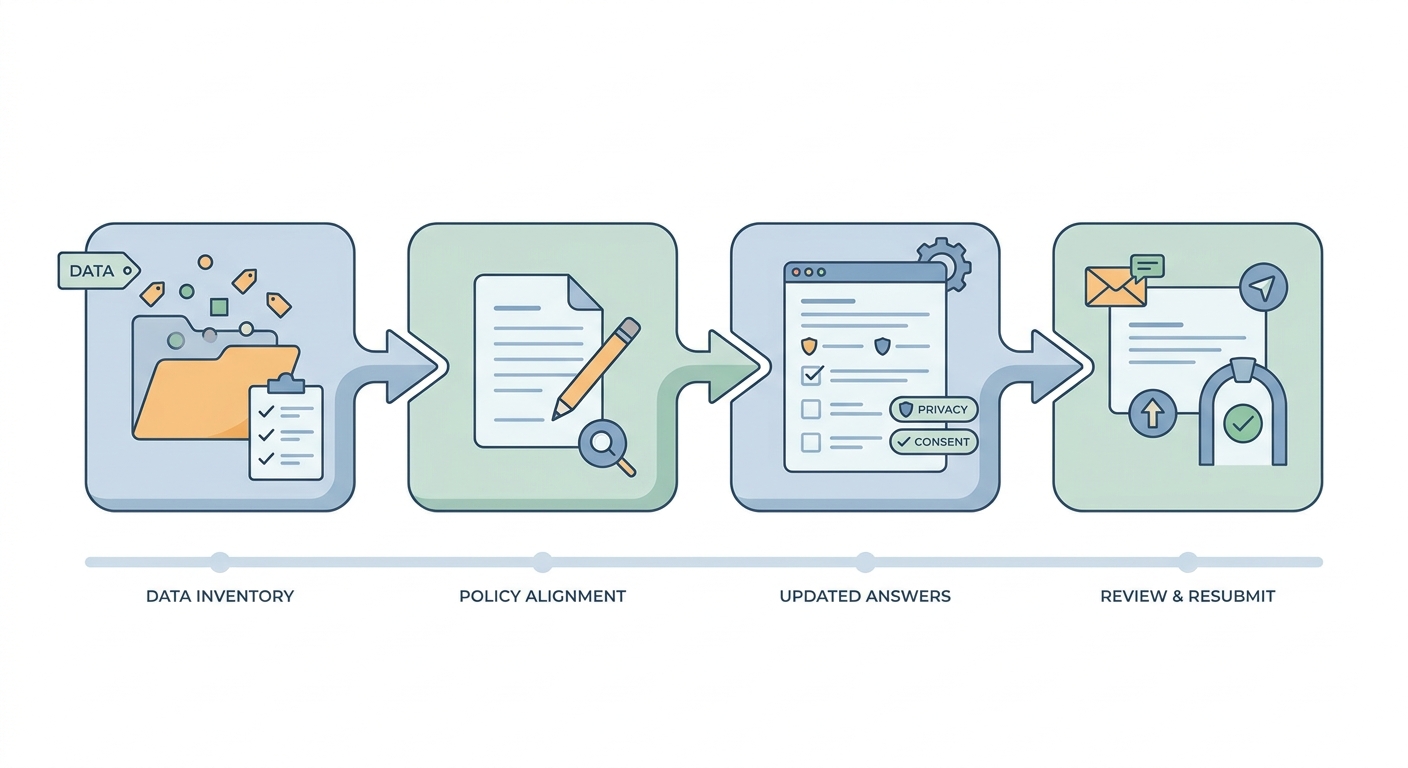
A process diagram for fixing a 5.1.1 rejection that moves from data inventory to policy alignment, then to updated App Store Connect privacy answers, then to reviewer notes and resubmission. The visual should feel like an operator workflow for a mobile app launch team.
This is the operational part. Expect coordination across engineering, product, and whoever owns your policy and App Store Connect metadata. If your team is small and one person wears multiple hats, it is still doable, but plan for focused work time and at least one full cold-start test pass.
Two common dependencies that slow teams down:
- Legal review lead time: even a small policy update can take days if counsel is involved.
- SDK and build changes: if you need to change when data is collected (not just how it is described), you are likely doing a rebuild and another QA pass.
Two failure modes to watch for:
- Certificate pinning blocks proxying: you might not be able to inspect traffic without engineering work or a special debug build.
- SDK behavior changes across versions: an SDK update can introduce new endpoints or collection defaults, so re-run the cold-start check after any dependency bump.
1. Map every data touchpoint the app actually uses
Treat the rejection like a debugging ticket: you need an inventory of what the binary does, not what the team intended. For many apps, a first pass takes 0.5-2 days depending on how many SDKs you have and how clean your dependency list is.
List first-party collection
Write down every field you collect or derive: email, phone, name, location, contacts, photos, user-generated content, crash logs, support messages, and payment metadata.
Enumerate third-party SDKs
Pull the dependency list (analytics, attribution, ads, crash reporting, paywalls) and note what each SDK can collect by default. If SDK ownership is split across teams, budget extra time to confirm settings.
Trace the first-launch journey
Document exactly when permissions appear (ATT, location, contacts, photos, notifications) and what screens happen before the system dialog. Test on a real device after deleting the app to mimic reviewer conditions.
Mark sharing and tracking edges
Flag anything that looks like tracking or sharing: device identifiers, cross-app measurement, third-party pixels, sign-in walls, and account creation.
One thing worth noting: the most common surprise is "SDK collects on cold start" even if you planned to gate collection later. The behavior can change after an SDK update, so re-check it when you bump versions.
2. Align the privacy policy, App Store answers, and in-app prompts
Apple is checking for consistency across surfaces, not reading your policy as literature. Your privacy policy should name the actual categories you collect and why, instead of generic boilerplate, especially around analytics and identifiers (PTKD).
Typical effort: 1-3 days for product and engineering to update flows plus ops/legal to update the policy and App Privacy answers. Add more time if you need a formal legal review or translations.
Here is the constraint: some fixes are metadata-only (for example, correcting an inaccurate App Privacy answer), but others require a new build (for example, delaying analytics until after consent). If Apple rejected you based on runtime behavior, assume you may need to ship a binary change, not just edit text.
3. Write reviewer notes that reduce back-and-forth
Reviewer notes should help the reviewer confirm your claims quickly, without guessing. This takes 20-45 minutes if you already have the info, and longer if you need to create test accounts or verify flows on a clean device.
Include:
- Test account credentials (and if there are regional constraints, specify the supported region)
- Step-by-step path to permissions, data controls, and account deletion
- Where the privacy policy is reachable in-app and on the web
- Any important edge behavior (for example, "analytics starts after consent screen X")
This is not about persuasion. It is about making the review reproducible.
Get your resubmission packet review-ready
If you want a second set of eyes, share your reviewer notes draft, App Privacy answers, and a cold-start network trace summary. I will help you spot inconsistencies before you resubmit.
Request a review checklist
For tradeoffs, checklists, and edge cases, The Privacy Policy URL Trap: What It Must Include to Pass Review rounds out this section.
What founders should change in their App Store launch process after this rejection
Build a pre-submit privacy checklist into release gates
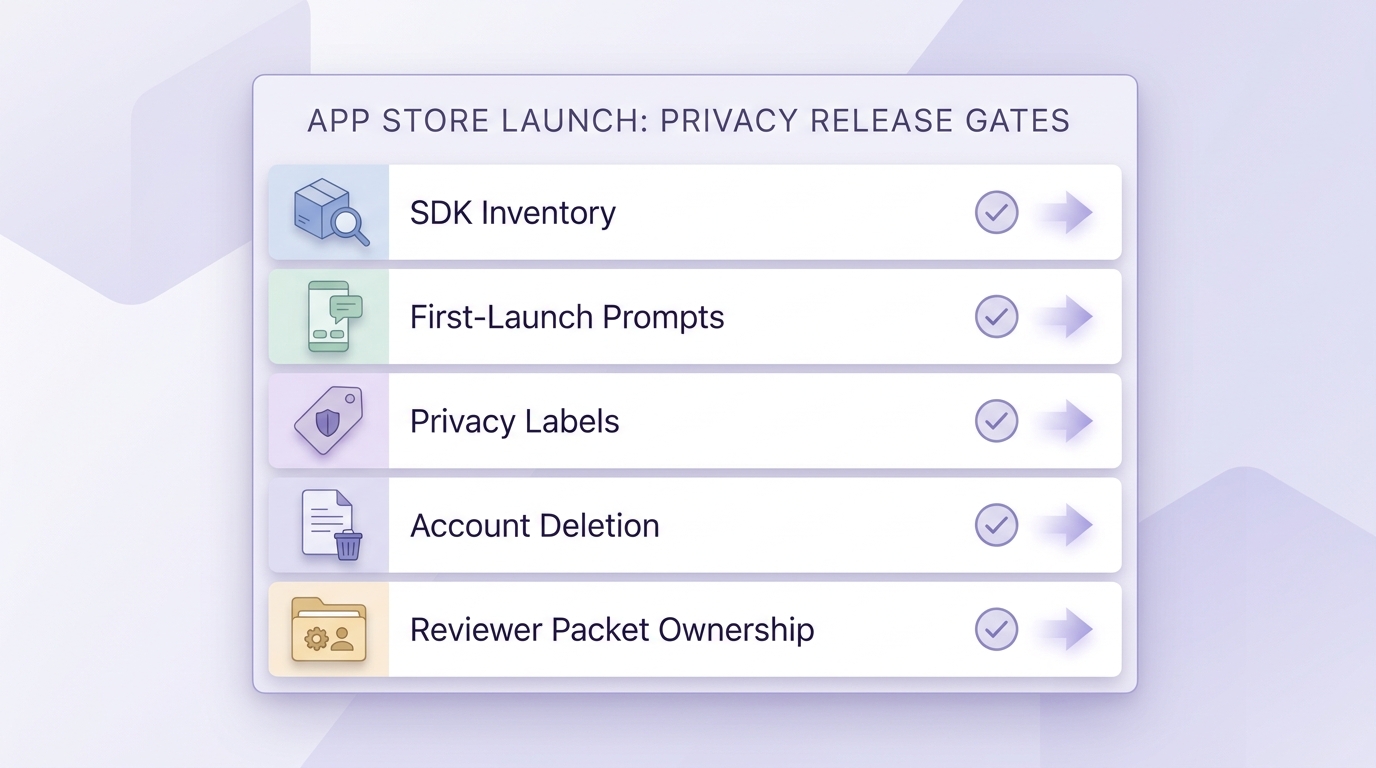
A clean checklist block for pre-submit privacy release gates covering SDK inventory, first-launch prompts, privacy labels, account deletion, and reviewer packet ownership. The purpose is to show the operational controls that prevent repeat App Store privacy rejections.
Stop treating 5.1.1 as a one-off fire drill. Make privacy a release gate, the same way you gate crashes or payment flows, because Apple is checking for consistency between runtime behavior and what you disclosed.
- Review permissions timing: no tracking, contacts, photos, or location prompts before the feature need is obvious
- Maintain an SDK inventory: analytics, ads, attribution, and support SDKs mapped to what data they collect (per common 5.1.1 fix guidance from PTKD and ShopApper)
- Verify App Privacy labels and the privacy policy URL match actual app behavior (see Apple App Review Guidelines)
- Run a first-launch audit: consent text, data sharing disclosures, and account deletion are easy to find and test
- Assign one owner for the reviewer packet: repro steps, test account, screenshots, and resubmission notes
Pre-submit privacy release gate checklist (copy into your launch doc)
| Gate item | Owner | Pass criteria |
|---|---|---|
| Permissions and prompts | PM | Asked only at point of use |
| SDK inventory and data map | Eng | Matches labels and policy |
| Privacy labels and policy link | Ops or Legal | Accurate, reachable, current |
| Account deletion and data controls | PM or Eng | Discoverable in-app, works |
| Reviewer packet | Single DRI | Clear steps and test access |
Treat privacy claims like product claims
The bigger shift is that privacy language is now a product promise Apple can test. If you claim data is used only after consent, the flow must prove it from a cold start. If you claim users can delete accounts or data, that path should be reasonably discoverable and functional during review.
If ads or analytics fund the business model, disclose it plainly so the reviewer does not have to infer it from network calls. You might not love the optics, but it is usually better than triggering a "misleading" interpretation.
One practical takeaway: budget time for this in every release that changes onboarding, permissions, or SDK versions. For many teams, a consistent 20-30 minute check per release is cheaper than a multi-day review delay.
Turn this fix into a repeatable release gate
After you get through review, convert your remediation into a 20-minute pre-submit check (cold-start network trace, prompt timing, policy link test) so you catch regressions when SDKs change.
Harden your launch process
Top App Store Rejection Reasons and What to Do About Them reframes the same problem with a slightly different lens - useful before you finalize.


