
App Store Guideline 2.1 rejections are rarely about policy nuance. Most of the time, Apple could not reliably use your build in review because something crashed, blocked access, or made the core flow feel unfinished. This write-up shows how to read the reviewer signal, reproduce the failure conditions, and ship a reviewer-verifiable fix so you can reduce repeat cycles (not guarantee first-pass approval).
| Early proof: what reviewers fast-fail on | What it usually indicates | Reader impact |
|---|---|---|
| Launch crash or freeze | Startup crash, permission prompt deadlock, backend call timing out on splash | You will likely keep getting 2.1 until the app reliably cold-starts on a clean device |
| Cannot log in or access core features | Missing demo creds, SSO gate, MFA loop, region lock, expired test accounts | A polished app can still be "unreviewable" if the reviewer cannot get in |
| Empty primary tabs, dead buttons, placeholder screens | Feature flags off in prod, incomplete navigation, unfinished screens shipped | Review often stops early, so other fixes do not matter yet |
Explanation: This table is a directional summary of common 2.1 patterns from Apple guidance and operator write-ups like Apple, PTKD, and Precheck.
Interpretation: If the reviewer hits any first-session blocker, they cannot verify completeness and will default to 2.1.
Impact: Your fastest path out is to remove the first blocker and make verification easy, while accepting that reviewer paths and backend conditions can still vary.
Top App Store Rejection Reasons and What to Do About Them goes deeper on the ideas above and adds concrete next steps.
What does App Store Guideline 2.1 rejection mean?
Category: Outcomes
Statistic: 38%
Label: First-pass approval rate
Context: When metadata is complete upfront
Category: Stability
Statistic: 0 min
Label: Allowed time stuck on launch
Context: If it won’t open reliably, it’s unreviewable
Category: Early Proof
Statistic: 4
Label: Common 2.1 failure signals
Context: Crash on launch, blocked login, no demo access, placeholder content
Guideline 2.1 (App Completeness) is Apple signaling "we could not use this build end to end" more than a privacy, metadata, or payments dispute (Apple). In practice it clusters around reviewer-visible blockers:
- Crash on launch or during first-run
- Broken login or signup, including MFA loops
- Missing demo content or dead-end navigation
- Placeholder screens, empty primary tabs, or nonfunctional buttons
- Core features gated behind inaccessible services, regions, or entitlements
One thing worth noting: reviewer paths vary. Two reviewers can hit different screens first, and dependencies like backend uptime, region rules, or third-party auth can shift within the same day. Your goal is not perfection, it is a robust first session under "cold, new, anonymous" conditions.
When you move from outline to execution, We Analyzed App Store Rejection Patterns: What Most Founders Miss Before Submission helps close common gaps teams hit here.
Which rejection clues reveal the root cause?
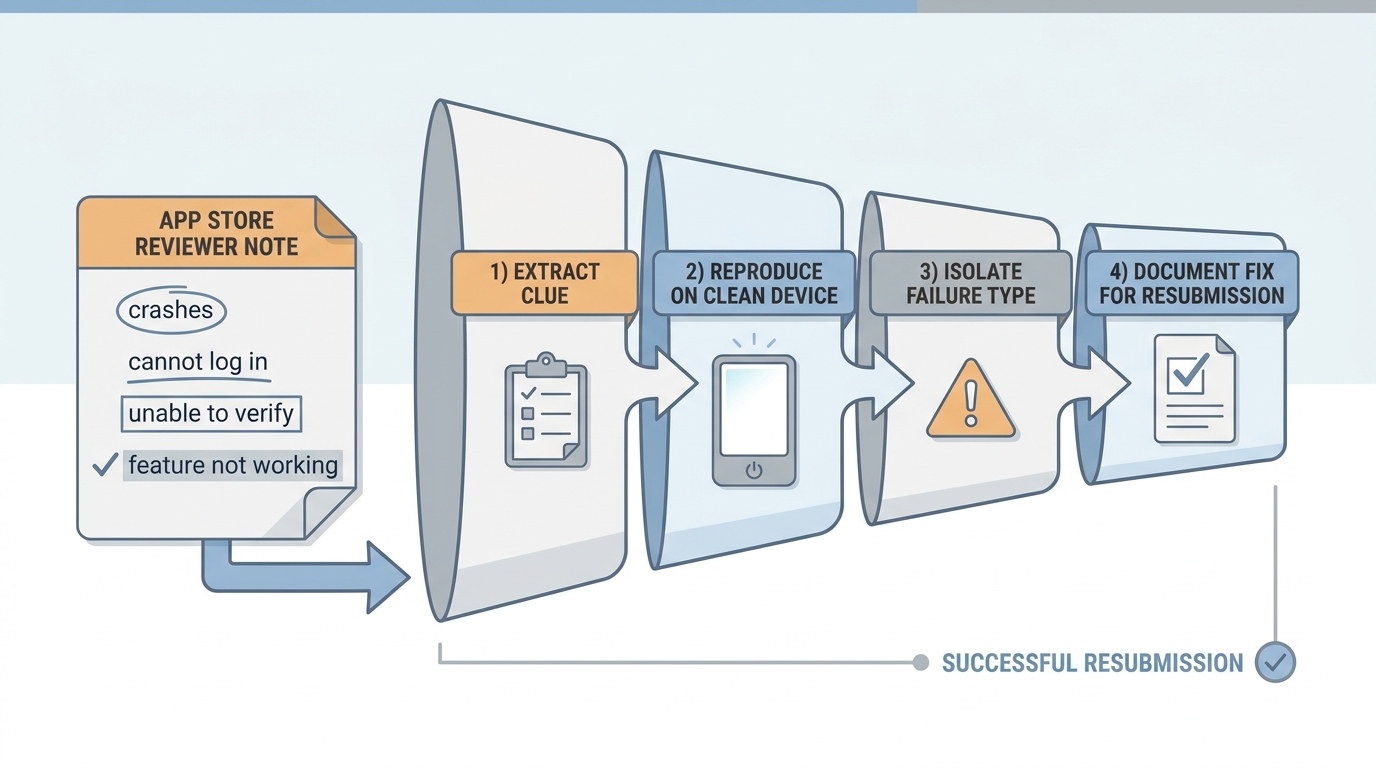
A process diagram that shows how to move from App Review’s rejection note to the actual root cause: extract the clue, reproduce on a clean device, isolate crash/access/content failure, and log the fix for resubmission.
Start by treating the rejection note like a bug report, even when it is vague.
- Copy the reviewer’s exact wording and highlight verbs like "crashes," "cannot log in," "unable to verify," or "feature not working" (Apple).
- Record any test context Apple provides: device model (iPad is a common gap), iOS version, build number, storefront, region.
- Split the note into two buckets: concrete steps vs generic policy text. Fix the blocker behind the steps first, and treat the policy paragraph as labeling, not diagnosis (Precheck).
A constraint you should plan for: Apple does not always include full steps. When the report is thin, assume the most brittle path (cold start, permissions, login, first core action) and try to break it yourself.
| Reviewer-visible pattern | Most likely root causes to check first |
|---|---|
| Dies on first launch | Startup crash, permission prompt deadlock, API timeout on splash |
| Cannot enter app | Missing demo account, SSO gate, region lock, expired credentials |
| Opens but key actions fail | Broken onboarding, paywall stub, feature flags, placeholder screens |
A complementary angle worth comparing lives in What Happens When Your App Gets Rejected - and How to Respond.
How do you fix App Store Guideline 2.1 rejection?
Classify the blocker (crash, access, core action)
This usually takes 5 to 10 minutes and prevents you from chasing generic policy text.
Reproduce on a clean install in the same context
Expect 30 to 90 minutes depending on device access, region setup, and account state.
Fix the smallest thing that unblocks review
Minimal fixes validate faster, but they can be less "ideal" product-wise.
Resubmit with steps and access that make verification easy
Assume the reviewer will spend a short session. Remove guesswork.
For tradeoffs, checklists, and edge cases, How a Founder Fixed an App Store Rejection in 4 Hours rounds out this section.
How do you reproduce the reviewer environment without wasting a full day?
The time sink is usually not coding. It is recreating first-run state and catching the one thing that fails only on clean installs.
Start from true first run
Plan 45 to 90 minutes if you do it carefully. Install the exact rejected build fresh on a spare iPhone, a wiped simulator, and ideally one iPad if you support it. Match likely reviewer conditions like region and language because 2.1 issues often hide behind configuration differences (Apple).
Capture evidence before changing anything
Budget 20 to 45 minutes to collect clean artifacts. Record the screen, note timestamps, and pull crash logs from Xcode Organizer (Crashes) or a tool like Firebase Crashlytics. If you track metrics, focus on cold-start crash-free sessions for the submitted build, not your dev build.
Validate under review-like constraints
Set aside 45 to 120 minutes for a quick matrix: cold install, weak network simulation (if relevant), fresh account creation or demo login, and the first core action that proves completeness. If you rely on backend services, have basic monitoring and one on-call owner for 24 to 48 hours, because review timing can land outside your workday.
One concrete failure mode I have seen repeatedly: SMS-based MFA works for US numbers, but fails for non-US numbers or specific carriers, so the reviewer never receives the code. Another is a feature flag that is accidentally off for Apple review traffic, or an SSO sandbox outage that blocks first login. If any of those are possible in your stack, add an alert on auth error rate and a simple fallback path (demo account or skip option) so review does not depend on perfect third-party uptime.
How App Store Review Actually Works - A Step-by-Step Breakdown reframes the same problem with a slightly different lens - useful before you finalize.
What should you write in the resubmission note so the reviewer can verify fast?
Keep it verifiable, not persuasive:
- What was broken (one sentence)
- What changed (one sentence)
- Exact steps to verify (numbered)
- Demo credentials (and what role they have)
- Any regional requirement or feature flag assumption
- Build number that contains the fix
Tradeoff: adding a demo path or making onboarding skippable may not be your long-term product choice, but it is often the quickest way to get a fair review of the rest of the app.
What mistakes cause repeat 2.1 rejections?
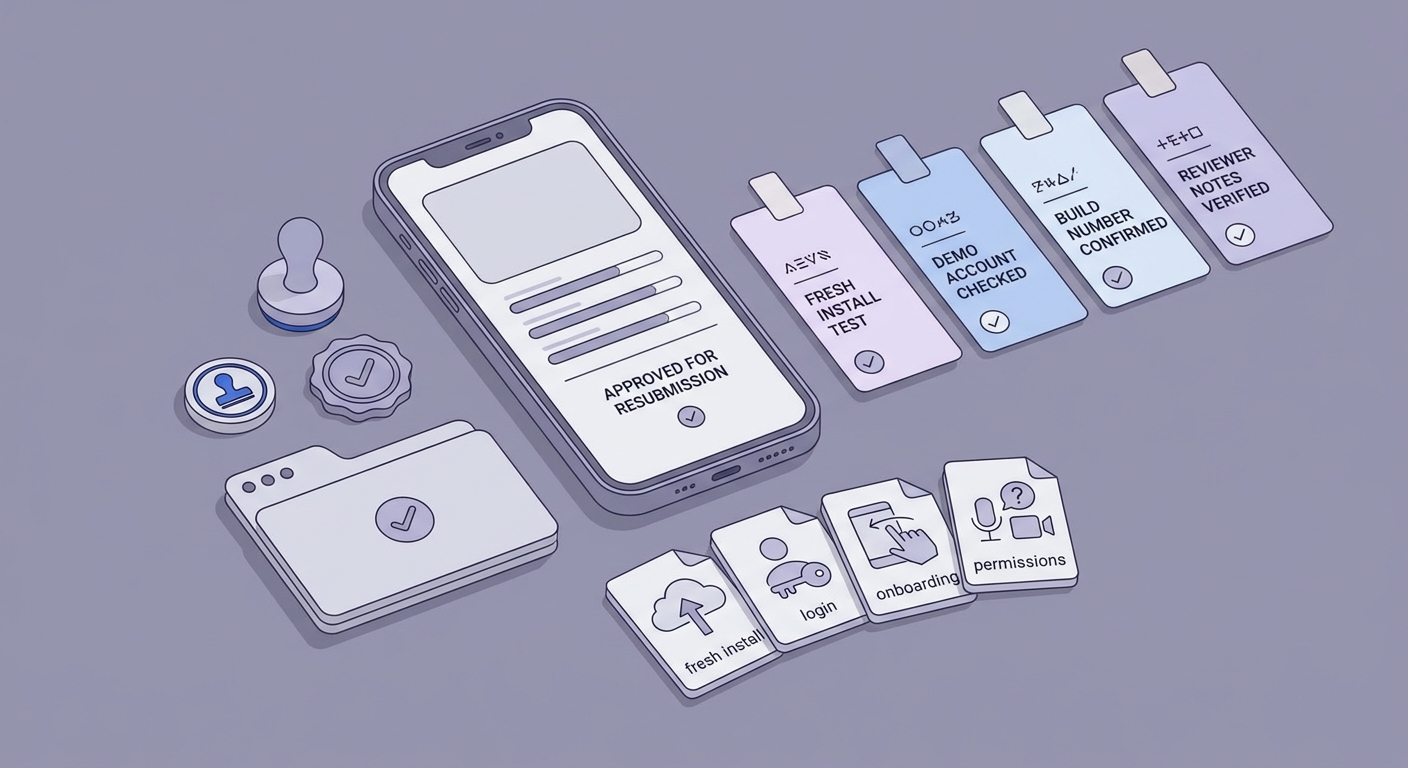
A mobile-friendly checklist block for a final App Store resubmission gate, covering fresh-install testing, demo account verification, build number confirmation, and reviewer-note clarity.
These are the patterns that keep teams stuck:
- Resubmitting before reproducing on a true clean install, so you fix the wrong state.
- Testing only happy paths and skipping first run, login, password reset, onboarding, and permission prompts reviewers must pass (Apple).
- Assuming backend availability, feature flags, or region rules match review conditions, then shipping a build that works internally but is unreviewable externally.
- Writing review notes that omit what changed, where to verify it, and which build contains the fix.
A quick pre-flight usually takes 2 to 4 hours depending on whether you have devices handy, need to create demo accounts, or are adding basic monitoring:
- Cold-open on clean install without crashing
- Working demo creds (tested right before submission)
- Core loop completes without hidden gates (plan for reviewer variability, not a single perfect path)
- iPad pass if you declare iPad support (or restrict device families if you are not ready)
- Reviewer notes include steps, creds, and build number


