
A mobile app launch rarely fails in one dramatic moment. More often, it gets stuck in a short App Store rejection message that leaves a founder wondering what Apple actually wants fixed. This is a practical walkthrough of how one founder moved from an ambiguous iOS app rejection to a clearer resubmission plan in 4 hours using Froxi as an app rejection analysis and mobile app publishing assistant.
How to Publish an Emergent-Built Mobile App Successfully goes deeper on the ideas above and adds concrete next steps.
Early proof: before and after the rejection workflow
This snapshot is based on the use case below, not a broad industry benchmark. Maya's story is an illustrative composite based on common founder workflows, and the 4-hour result is case-specific. Some rejections take longer, especially when code, privacy, legal, or subscription changes are required.
The practical point is simple: the founder did not need more panic, more tabs, or more guessing. She needed a structured way to move from Apple App Review feedback to a cleaner resubmission package.
| Stage | Before Froxi | After using Froxi |
|---|---|---|
| Rejection received | One formal message from Apple App Review with guideline references | Rejection broken into likely issue categories |
| Message interpretation | Unclear whether the issue was metadata, privacy, reviewer notes, or app behavior | Priority areas identified and mapped to specific checks |
| Founder workflow | Searching forums, rereading App Store guidelines, considering broad changes | Focused app store rejection fix plan |
| Reviewer notes | Short and generic | Rewritten with clearer test steps, account details, and context |
| Metadata | Assumed to be fine | Reviewed for claims, feature descriptions, and alignment with app behavior |
| Privacy checks | Treated as a possible but uncertain issue | Checked against App Store Connect information and in-app flows |
| Resubmission readiness | Multiple open loops | App resubmission checklist completed in 4 hours for this specific case |
The business impact was not guaranteed App Store approval. It was a faster return to the review process, fewer unnecessary changes, and a founder who could keep launch momentum instead of losing days to uncertainty.
When you move from outline to execution, How to Publish a Replit-Built Mobile App helps close common gaps teams hit here.
The rejection that stopped launch day cold
Maya Chen had planned the launch of her iOS app for a Thursday morning.
The app, a lightweight habit and accountability tool for solo creators, had been in private TestFlight for three weeks. Her landing page was live, email subscribers had been warmed up, and a small group of creator friends were ready to share it when the App Store listing went public.
Then the App Store Connect notification arrived: rejected.
The message was formal, polite, and not especially long. It referenced App Store guidelines, mentioned missing clarity for the reviewer, and appeared to point toward a mismatch between what the app said it did and what the reviewer could verify during app review.
That was the hard part. Maya did not just need to know that the app store submission had failed. She needed to know what to fix, in what order, and how to avoid making the next submission worse.
A complementary angle worth comparing lives in What Happens When Your App Gets Rejected - and How to Respond.
The founder, the app, and the constraints
Maya was not a large team with an internal app compliance function.
She was the founder, product owner, launch marketer, customer support lead, and the person managing App Store Connect. A freelance iOS developer helped with build work, but Maya owned the submission package: app metadata, screenshots, reviewer notes, privacy details, and the written response to Apple.
Her constraints were familiar to anyone handling app publishing inside a small company:
- No dedicated compliance team
- A planned launch window already in motion
- Limited developer availability that week
- Unclear app store guidelines language
- Concern that changing too much could trigger another app rejection
- Pressure to preserve early user excitement
The rejection was not catastrophic. The app still existed, the product still worked, and there was no public failure yet.
But the rejection created a very specific operational problem: Maya had feedback, but not a prioritized fix plan.
For tradeoffs, checklists, and edge cases, Common App Store Rejection Reasons and How Froxi AI Helps rounds out this section.
What Apple rejected and why it was hard to understand
The Apple App Review message did not say, in plain language, "Change this exact sentence" or "Update this exact screen."
Instead, it referenced app store guidelines and included a short explanation that left room for interpretation. Maya could see several possible causes, but none felt certain.
The issue might have been:
- An app metadata rejection because the App Store description promised something the reviewer could not verify
- A reviewer access problem because the test account did not expose the right onboarding path
- A privacy policy app store rejection because data use was not explained clearly enough
- A functionality issue because a key feature depended on a server-side configuration
- A reviewer notes issue because the instructions were too brief
- A mismatch between screenshots, in-app behavior, and App Store Connect information
This is where an app store rejection becomes stressful for founders.
Apple's note may be technically accurate, but the founder still has to translate it into work. If that translation is wrong, the next app resubmission can repeat the same issue or introduce a new one.
In practice, Maya had to answer one question before touching anything: "What is the smallest set of changes that directly addresses the reviewer concern?"
The Last Step AI App Builders Don't Solve: Publishing reframes the same problem with a slightly different lens - useful before you finalize.
The first instinct: guessing, searching, and over-fixing
Maya's first reaction was normal.
She reread the rejection message several times, opened the relevant app store guidelines, searched founder forums, and looked for an app store rejection example that sounded similar. Within 30 minutes, she had found five different interpretations of the same general review issue.
One person said to update metadata. Another said to add a demo video in reviewer notes. A third warned that privacy wording could be the real issue. Someone else recommended changing the onboarding flow before resubmission.
That advice was not useless, but it was not specific enough.
The risk was over-fixing. In app publishing, changing too many things at once can slow down app store approval and make it harder to understand what actually solved the problem.
Maya almost rewrote the entire App Store description, changed screenshots, asked her developer for UI changes, and updated the privacy policy in one pass. That would have turned a focused app rejection into a multi-day project.
The practical takeaway: when you are under launch pressure, the first job is not to work harder. It is to separate the reviewer's actual concern from your assumptions.
The turning point: turning the rejection into action items
The turning point came when Maya stopped treating the Apple message like a riddle and started treating it like an input.
She used Froxi to parse the rejection message, identify likely issue categories, and convert the feedback into a step-by-step app store rejection fix plan. Froxi did not replace her judgment, her developer, or Apple's review process. It gave her a working structure so she could make decisions faster.
Instead of asking, "What does this mean?", the workflow became:
Identify the likely rejection category
Froxi helped classify the issue into areas such as metadata, reviewer access, privacy disclosure, app functionality, or App Store Connect configuration. This narrowed the field from "everything might be wrong" to a few areas worth checking.
Map the category to evidence
Maya compared the rejection message against the actual app screens, App Store listing, privacy answers, and reviewer notes. This kept the review grounded in what Apple could see.
Prioritize the lowest-risk fixes
She focused on changes that clarified the submission package before asking for code changes. This mattered because developer time was limited and the rejection did not clearly require a new build.
Prepare a cleaner reviewer response
The final step was not just fixing the materials. It was explaining the changes clearly enough that the next reviewer had less ambiguity.
This is where Froxi worked best as an app store rejection assistant. It did not promise a shortcut around Apple App Review. It helped Maya create a better operating rhythm inside the process.
Deep dive: the 4-hour fix workflow
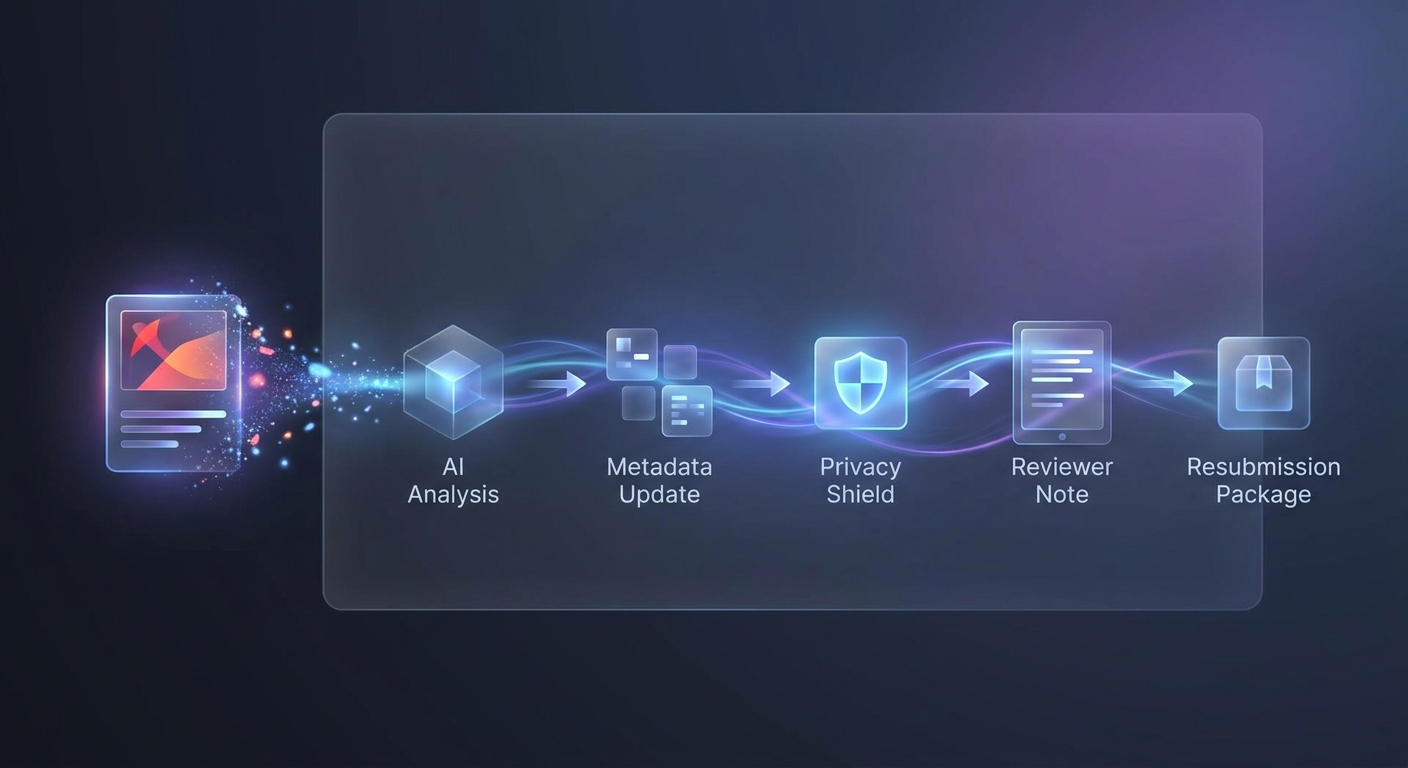
Deep dive: the 4-hour fix workflow: sequence map highlighting the key execution steps.
The work took 4 hours from rejection analysis to resubmission preparation in this specific case.
That does not mean every iOS app rejection can be fixed in one sitting. Some require code changes, legal review, data handling updates, subscription corrections, new screenshots, or deeper product changes.
In Maya's case, the issue was fixable because the app behavior was mostly aligned with Apple's expectations. The main problem was that the submission package did not make that alignment easy for the reviewer to confirm.
Hour 1: rejection analysis and issue mapping
Maya started by pasting the Apple App Review message into Froxi and reviewing the suggested issue map.
The output grouped the rejection into likely causes:
- Reviewer could not verify a feature described in metadata
- Reviewer notes did not explain the correct test path
- App Store Connect information might not fully match the in-app experience
- Privacy wording needed a quick consistency check
This gave Maya a practical first move. Instead of editing everything, she opened the app, App Store Connect, and the rejection message side by side.
The goal of hour 1 was not to fix the app. It was to understand what the reviewer likely experienced.
Hour 2: checking screens, flows, and privacy requirements
In the second hour, Maya tested the app the way a reviewer might.
She created a fresh account, followed onboarding, checked the feature mentioned in the App Store description, and confirmed whether the reviewer could reach it without hidden setup. This exposed the first real issue: the feature existed, but the reviewer notes did not explain that it required completing a sample habit setup.
She also checked privacy-related requirements.
The app collected account email addresses and optional progress notes. The privacy policy described this, but the App Store Connect privacy answers and the in-app language were not as clearly aligned as they could be.
This was not necessarily a full privacy policy app store rejection. But it was enough ambiguity to clean up before resubmission.
Hour 3: updating metadata and reviewer notes
In the third hour, Maya updated the submission package.
She made the App Store description more precise by removing a broad phrase that could be read as a promise of automated coaching. The app offered accountability prompts, not professional coaching, and the metadata needed to reflect that.
She also rewrote the reviewer notes.
A simple app reviewer notes example for her situation looked like this:
- Test account email and password
- Exact onboarding steps to access the reviewed feature
- Explanation of what the feature does and does not do
- Note that optional progress entries are user-created
- Link to the privacy policy
- Short clarification of the change made after rejection
The key was operational clarity. Reviewer notes should reduce the reviewer's workload, not defend the app in vague terms.
Hour 4: final review and app resubmission preparation
In the final hour, Maya used the app store resubmission checklist she had built from the Froxi analysis.
She checked:
- App Store description and subtitle
- Screenshots against actual app behavior
- App privacy details in App Store Connect
- Reviewer notes and test account access
- The response to Apple's rejection message
- Whether a new build was required
In this case, no new build was needed. The fixes were in metadata, reviewer instructions, and clarity around privacy and feature access.
That saved time, but it was also a reminder of an important limit. If a rejection points to broken functionality, hidden paywalls, missing permissions, unsafe content, incorrect data handling, or misleading subscription behavior, founders should involve developers, legal counsel, payment experts, or privacy support before resubmitting.
What changed in the resubmission package
The biggest change was not volume. Maya did not create a massive response or rewrite the product.
She made the app store submission easier to review.
| Part of submission | Original version | Updated version |
|---|---|---|
| Reviewer notes | Generic note: "Please log in with test account to review features" | Step-by-step instructions with account credentials, onboarding path, and feature location |
| App metadata | Broad description that could be interpreted as automated coaching | More precise language describing accountability prompts and habit tracking |
| Screenshots | Accurate, but not clearly tied to the reviewed feature | Checked for alignment with the core feature and updated captions where needed |
| Privacy explanation | Policy existed, but App Store Connect answers were reviewed quickly before launch | Privacy details checked against actual data collection and in-app flows |
| Response to Apple | Drafted defensively at first | Concise explanation of what was clarified and where the reviewer could verify it |
| Resubmission checklist | Informal mental list | Written checklist covering metadata, privacy, reviewer notes, test path, and build status |
The practical improvement was clarity.
Apple still controlled the app review process. Maya could not force app store approval. But she could remove unnecessary ambiguity from the next review.
The outcome: faster resubmission, lower stress, cleaner review context
Maya moved from app store rejection to resubmission-ready in 4 hours for this illustrative case.
The measurable outcome was speed. Instead of losing one to three days searching, guessing, and coordinating avoidable changes, she prepared a focused app resubmission package the same afternoon.
The operational outcome mattered just as much. She knew what had changed, why it had changed, and what evidence the reviewer could use to verify the app.
That reduced the emotional load of the rejection. It also made communication with her freelance developer easier because she did not ask for speculative code changes before confirming whether a new build was actually needed.
There was still uncertainty. App Review decisions depend on the specific app, reviewer context, guideline interpretation, account configuration, and the completeness of the resubmission. Froxi helped Maya improve the submission package, but Apple remained the final decision-maker.
How to use this workflow on your own app rejection
If you are dealing with an app rejection, start by slowing the process down just enough to avoid reactive changes.
A practical workflow looks like this:
Save the original rejection message
Keep the exact Apple wording before editing anything. It becomes the anchor for your analysis and your response.
Identify the likely issue category
Separate metadata, reviewer access, privacy, functionality, payment, subscription, and policy issues. Different categories require different owners and timelines.
Compare the rejection against what the reviewer saw
Test with a fresh account, fresh install, and the same path you gave Apple. If your feature requires setup, credentials, permissions, or sample data, make that obvious.
Fix clarity before rebuilding
If the app works but the submission package is vague, start with reviewer notes, metadata, screenshots, App Store Connect fields, and the response to Apple. If the app itself is broken, involve your developer before resubmitting.
Write a concise resubmission response
Explain what changed, where Apple can verify it, and any steps needed to reproduce the experience. Avoid defensive language or long arguments.
This approach does not remove the need to understand Apple's rules. It makes the work more manageable when you are under launch pressure.
When Froxi helps most
Froxi is most useful when the rejection message is understandable enough to analyze but ambiguous enough to slow you down.
Good use cases include:
- App metadata rejection analysis
- Reviewer notes cleanup
- App Store Connect checklist review
- Privacy wording consistency checks
- Resubmission planning after a first rejection
- Founder workflows where one person owns publishing
It is less likely to be enough on its own when the rejection involves legal interpretation, regulated content, financial products, medical claims, intellectual property disputes, complex subscriptions, or major product behavior changes.
Here is the thing: an app rejection is not just a compliance event. It is also an operations problem. The faster you can turn vague feedback into assigned work, the less launch momentum you lose.
The practical takeaway
The best app store rejection fix is not always the biggest change.
In Maya's case, the right move was to clarify the submission package, tighten the metadata, improve reviewer notes, and verify privacy alignment before touching the build. That took 4 focused hours because the underlying app did not require engineering changes.
Your rejection may be different. If Apple is pointing to broken functionality, misleading claims, unsafe content, or incomplete data disclosures, the honest answer may be a longer fix with more people involved.
The goal is not to rush blindly back into review. The goal is to resubmit with fewer assumptions, clearer evidence, and a package that makes the reviewer's job easier.


