
A missing or broken demo account is one of the fastest ways to turn an otherwise shippable build into a stalled release. Reviewers cannot verify core flows on a clean device, and you can be rejected under app completeness expectations when access is blocked. The costly part is rarely the code change; it is the extra review cycle plus coordination time when credentials, onboarding steps, or paywalled screens prevent validation. This short, evidence-led analysis explains why it happens, what it can realistically cost in timing, and a submission-ready checklist to reduce repeat back-and-forth.
| Early proof: access-readiness snapshot | What reviewers need | What teams often ship | Business impact |
|---|---|---|---|
| Demo account present | Working login that reaches core features | Missing, expired, or wrong role | Higher rejection risk for "cannot access" |
| Credentials documented | In the store fields plus review notes | Ambiguous or buried in notes | Slower reviews and more follow-ups |
| Review path tested | Fresh install, clean device, no saved sessions | Only tested on a dev device | "Cannot reproduce" loops |
| Fallback contact included | Monitored email with fast response | No contact or slow response | Longer time blocked if edge cases hit |
Interpretation: the delta is process, not product. One missing detail can turn a single review attempt into multiple attempts, and each attempt can add days depending on queue time, region, and how quickly you respond. This is a process-readiness snapshot, not platform-reported metrics.
Reader impact: treat reviewer access as a release artifact (like signing, build number, and privacy answers) and you usually reduce avoidable schedule slip. It will not eliminate rejections because review routing, reviewer device constraints, and upstream outages still happen.
Operational example (what "clear credentials" looks like in practice):
| Where | What to paste (example) |
|---|---|
| Apple App Store Connect - App Review Information - Sign-in required | Email: reviewer+ios@yourdomain.com Password: TempPass!234 Notes: Tap Sign in - select Demo tenant - land on Dashboard |
| Google Play Console - App content - App access | Paste the same credentials + any selector steps, and include a monitored fallback contact email |
How to Publish Your Dreamflow App: Store Submission Done Right goes deeper on the ideas above and adds concrete next steps.
Why do apps get rejected for missing demo accounts?
Category: Outcomes
Statistic: 38%
Label: First-pass approval rate
Context: When metadata is complete upfront
Category: Speed
Statistic: 1-2 mins
Label: Time to reach gated feature
Context: Fast path with documented login steps
Category: Early Proof
Statistic: 4/4
Label: Review access proof complete
Context: Demo access, steps, clean-device path, fallback contact
Reviewers need to reach the core user journey on a clean install. If they hit a login wall and cannot proceed, Apple often treats it as app completeness (commonly tied to Guideline 2.1 patterns), and Google Play similarly expects a clear path to gated functionality using the instructions you provide (Apple, Google Play).
The engineering fix can be small (minutes to a few hours). The hidden cost is operational: provisioning a stable demo user, keeping it active across environments, keeping credentials aligned with the submitted build, then responding quickly if the reviewer hits an edge case. In practice, that is often 1 to 2 hours of coordination across engineering, QA, and release owners, plus whatever the review queue adds.
Tradeoff: making access easier for reviewers can increase risk if handled casually (shared credentials, broad permissions, production data exposure). The goal is not "no gates," it is "predictable, reviewer-safe gates" with the smallest acceptable blast radius.
What the reviewer actually needs to reach
- Access to the core user journey, not just a landing screen (paywall flows, dashboards, primary workflows).
- A working path for subscriptions, account-only utilities, creator/admin tools, invitation-only products, and regulated experiences.
- Instructions that match the store fields and notes (Apple App Review notes, Google Play App access).
Where this analysis is intentionally limited
This is based on documented platform guidance and common operational patterns, not a proprietary rejection dataset. Outcomes vary by app category, region, reviewer, and whether your login stack depends on third parties (SSO, SMS, CAPTCHA). Enterprise distribution, geo restrictions, and strict 2FA policies can require additional steps beyond a simple demo login (PTKD).
When you move from outline to execution, App Store Connect vs Google Play Console: Key Differences helps close common gaps teams hit here.
How can you fix a missing demo account before resubmitting?
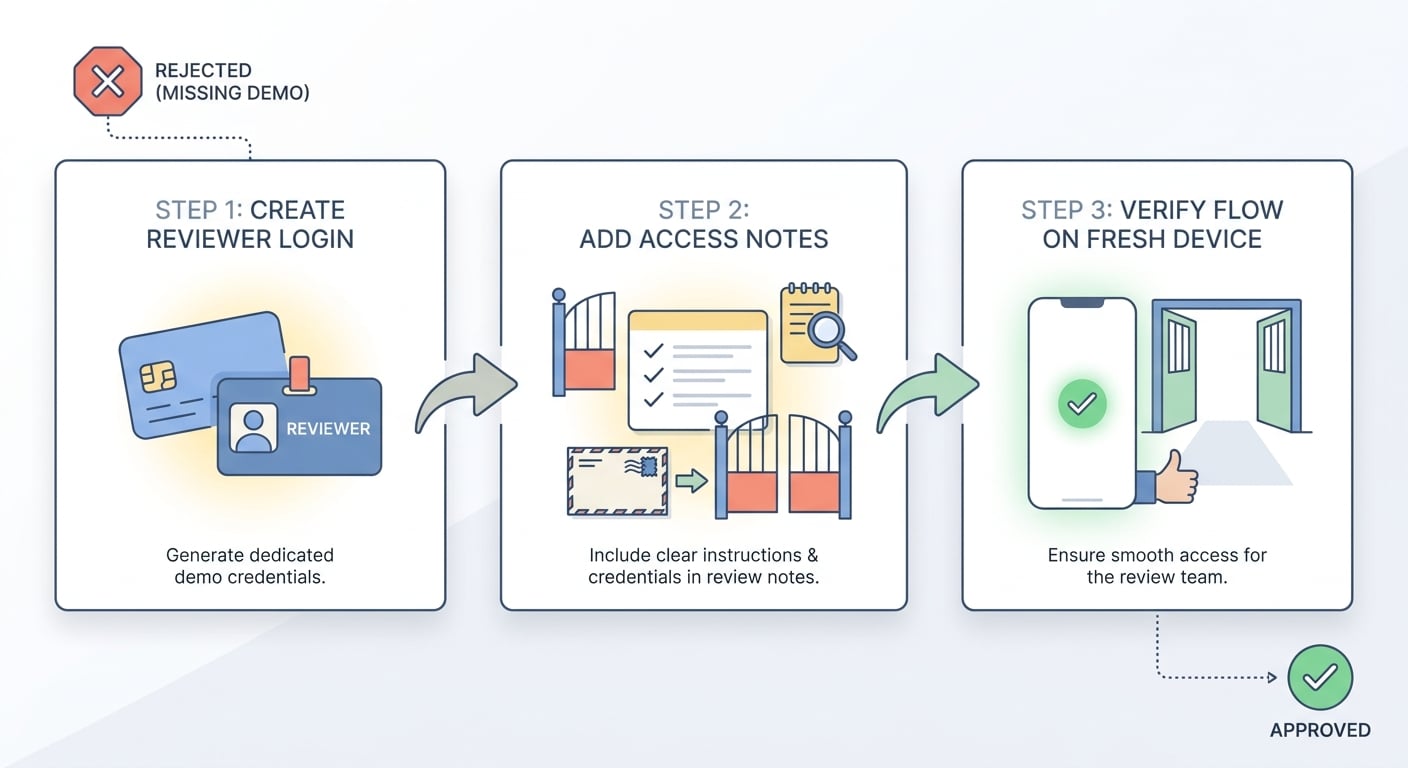
A three-step process diagram for fixing a missing demo account rejection: create a dedicated reviewer login, add exact access notes for App Store or Google Play review, then validate the flow on a fresh device before resubmission. The diagram should emphasize the practical sequence, not abstract policy.
Expect 30 to 90 minutes for a simple app, and up to half a day if you need seeded data, role setup, a safe 2FA workaround, or a separate environment. Ongoing maintenance is usually 10 to 20 minutes per release to re-validate, plus occasional credential resets and policy-driven updates.
Create a dedicated reviewer login
Provision a demo or sandbox account that reaches the core value quickly (aim for under a minute after install). Keep permissions narrow: enough to demonstrate key flows, not enough to access sensitive data or irreversible actions. If you must use production, use a restricted role and monitor it.
Failure modes to plan for: fraud detection can lock a brand-new demo account, password rotation can silently invalidate stored credentials, and device or network rules can block a reviewer on a clean device. Also plan for non-product causes: reviewer networks can be restrictive, and your auth backend or IdP can be temporarily degraded. Include a monitored contact and be ready to reset credentials quickly if you get a "cannot access" message.
Write reviewer-ready access instructions
Provide exact credentials, any tenant or role selector steps, and the expected landing screen after login. If you use 2FA, add a reviewer-safe option (demo user with 2FA disabled, deterministic test codes, or demo mode) and document it clearly.
This is a dependency: if security or compliance policies prohibit bypasses, plan time to design an allowed alternative and get approval. That can take longer than the code change (PTKD).
Validate on a clean environment, then resubmit
Test the full path on a fresh device or simulator with no prior sessions, keychain entries, or cached entitlements. Confirm the build you are submitting matches the notes you wrote. If you change credentials after submission, update notes immediately or you risk another review loop.
A complementary angle worth comparing lives in How to Fix App Store Guideline 2.1 Rejection.
How do you prevent repeat demo account rejections?
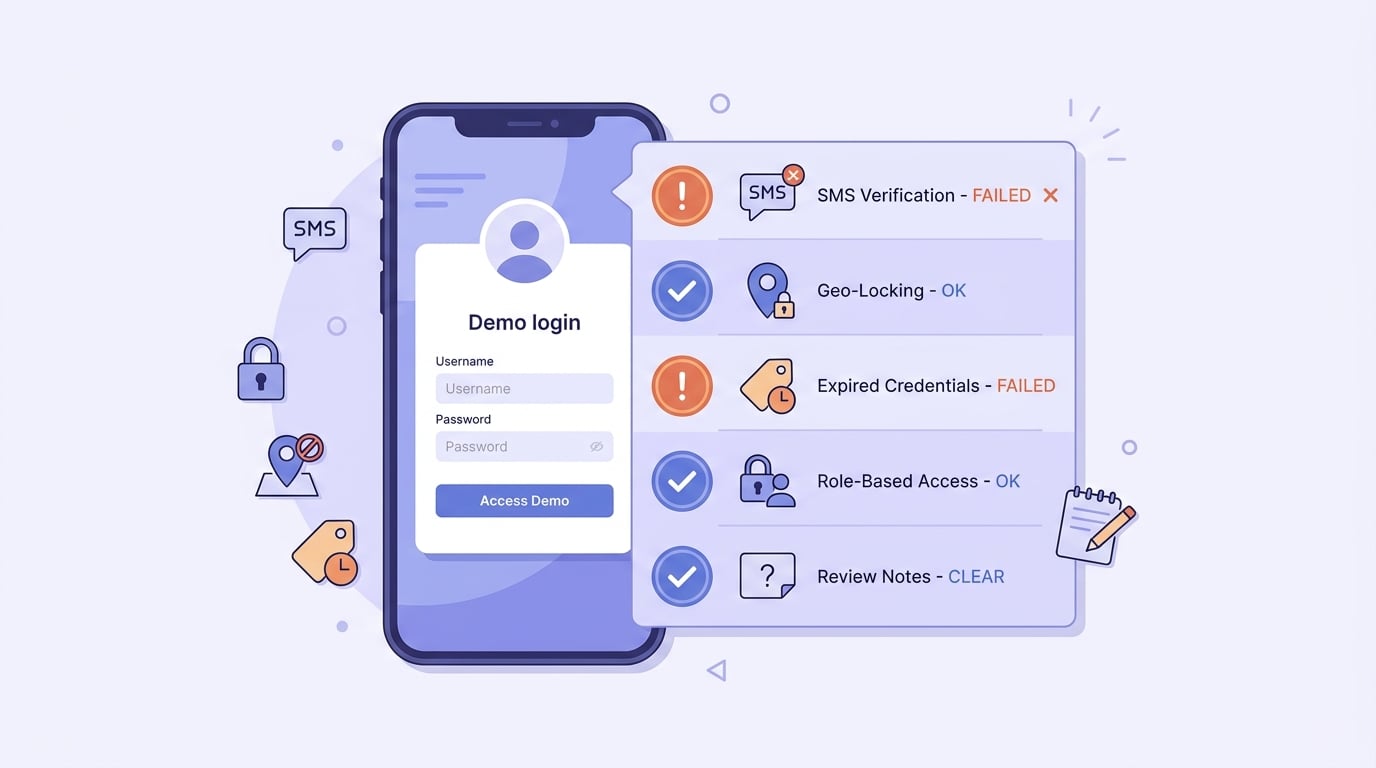
A mobile-friendly checklist of repeat-rejection triggers specific to missing demo account issues: SMS verification, geo-locking, expired credentials, role-based access, and vague review notes. The visual should read like a preflight checklist for founders and release managers.
Most repeat rejections are not "forgot to add creds." They come from dependencies that drift between builds or fail only under review conditions (clean device, different locale, different network, different time of day).
The repeat-rejection patterns to audit first
- Verification gates before the app loads: SMS codes, corporate email SSO, invite-only enrollment, or CAPTCHA can block reviewers even when a demo login exists. CAPTCHA vendors and challenge rules can change without your release changing.
- Geo, locale, and device binding: country allowlists, unsupported language defaults, IP checks, or account-to-device rules can route reviewers into an unsupported path that looks like a broken login.
- Credential drift across builds: demo passwords expiring, roles changing, seeded content disappearing, or staging and production getting mixed.
One thing worth noting: you need an owner. In practice, this is usually release management, QA, or the on-call engineer for the release window. Someone should verify access before submission and check for reviewer messages at least daily until approval.
A pre-submit checklist that matches reviewer reality
Use this as a preflight each release (10 to 20 minutes if your setup is stable, longer if you must re-seed data or re-approve a 2FA exception):
- Confirm the demo account will stay active through the likely review window (no auto-expiry, no forced rotation mid-week).
- Verify the role can reach the key screens you claim reviewers can test.
- Test on a clean device and a clean install (including first-run permission prompts).
- Reconcile the triangle: build, credentials, and review notes point to the same path.
- Confirm the fallback contact is monitored and can respond quickly if the reviewer hits an edge case.
Decision points and pitfalls
- Demo mode vs demo account: demo mode reduces credential risk but increases build complexity and testing scope.
- 2FA workarounds: security teams may require approval for bypasses or test codes; do not assume it is a same-day change.
- SSO outages and third-party dependencies: if your login depends on an IdP or SMS provider, reviewers can be blocked by issues outside your control. If you have no fallback, accept that occasional resubmissions can still happen even with perfect instructions.
For tradeoffs, checklists, and edge cases, Top App Store Rejection Reasons and What to Do About Them rounds out this section.


