
Subscriptions look simple until you are juggling App Store and Google Play products, entitlement logic, and renewal events that do not line up across platforms. The edge cases are where teams lose time: broken restore flows, inconsistent access across devices, and analytics that do not match what support sees. This RevenueCat subscription review is a practical guide for product and mobile teams deciding whether to outsource that plumbing, plus how to validate the decision with realistic setup and launch checks.
Early proof: what you can validate in 1-2 working days (assuming store products already exist and you can run sandbox tests).
| Early proof (workflow + validation signals) | What you can usually demonstrate quickly | How to interpret it | Reader impact |
|---|---|---|---|
| One access check | Your app decides premium access from a single source (RevenueCat CustomerInfo entitlement, not local flags) | Centralized access logic reduces drift between devices and sessions, but you still need to handle delays and offline states | Often fewer "I paid but I am locked out" tickets, depending on your identity and support workflow |
| One entitlement across stores | A single entitlement (example: pro) is unlocked by both iOS and Android SKUs | If you keep one entitlement model, you avoid reintroducing store-specific code paths | Cleaner paywall iteration and more consistent reporting across platforms |
| Event coverage | You can observe at least: initial purchase, renewal, cancellation, refund, grace period changes (in sandbox) | If you only test purchase and restore, post-launch churn and refund states tend to surprise teams | More trustworthy retention and billing metrics, with fewer avoidable surprises |
Explanation: RevenueCat’s core chain is store products - entitlements - customer status. Interpretation: if that chain is configured and testable end to end, you can move faster without guessing at subscription state. Impact: you lower the odds that billing edge cases become revenue leakage or preventable support escalations, but expect some ongoing ops work because stores and webhooks can be delayed, duplicated, or reordered (especially in sandbox).
Subscriptions That Pass Review: Trials, Restore, Pricing goes deeper on the ideas above and adds concrete next steps.
What problem does RevenueCat solve for mobile subscription teams?

Editorial visual supporting What early proof should you look for in a RevenueCat review?.
A RevenueCat subscription review answers a go or no-go question: should your team centralize subscriptions, entitlements, and lifecycle events in one layer, or keep building and maintaining separate logic for App Store and Google Play. The goal is not "set and forget" billing. It is a simpler operating model where access state is consistent across app, backend, analytics, and support.
This matters most before your first paid launch or before you expand pricing, offers, and experiments. Migrating later is doable, but plan on a few engineer-days plus QA because receipts, identifiers, and reporting assumptions usually end up embedded in the product.
Who needs this review before shipping paid features?
- Indie founders shipping their first subscription and needing restore and cross-device access to work reliably
- Product managers planning trials, intro offers, or paywall experiments who need clean lifecycle signals
- Mobile engineers tired of receipt validation and store-specific status quirks
- Teams comparing RevenueCat versus a custom stack for receipt validation, entitlement mapping, and event ingestion
What breaks when subscription ops are improvised?
- State drift: device A shows premium, device B does not, often due to local flags or inconsistent restores.
- Event confusion: renewals, cancellations, grace periods, and refunds arrive late or out of order, which breaks analytics and access.
- Support ambiguity: agents cannot confidently tell whether a user should have access, so cases turn into manual investigation.
One thing worth noting: even with RevenueCat, you still own the product decisions and QA. The SDK reduces complexity, but it does not remove the need for a clear entitlement model, basic monitoring, and an explicit release gate for billing flows.
When you move from outline to execution, In-App Purchases and Subscriptions: The Complete Publishing Guide helps close common gaps teams hit here.
What should you look for in a trustworthy RevenueCat review?
Category: Speed
Statistic: 4 hrs
Label: Median fix time
Context: After a store rejection notice
Category: Efficiency
Statistic: 5.1x
Label: Faster resubmission
Context: With a structured pre-review checklist
Category: Reliability
Statistic: Offline supported
Label: Subscription status works without network
Context: Confirms resilient access checks via cached CustomerInfo/entitlements behavior
A credible review shows setup reality: prerequisite work, testing time, and the ongoing monitoring burden after launch. The gaps that hurt in production are rarely the happy-path purchase call, they are refunds, grace periods, identity changes, and "it worked yesterday" environment differences.
| Comparison point | What a credible review includes | Tradeoffs and constraints |
|---|---|---|
| Setup effort | Store product creation, dashboard mapping, entitlement naming, SDK wiring | Often 0.5-2 days for a basic app after products exist; longer with complex paywalls, existing backend rules, or multiple login types |
| Paywalls and offers | How you will run experiments and keep variants measurable | More variants means more QA and more chances for mis-mapped products |
| Lifecycle events | Renewals, cancellations, refunds, retries, grace periods | Events can be delayed or out of order; you need idempotency and occasional reconciliation |
| Restore flows | Restore UX, logged-out cases, device switching | Restore is a product flow, not just an API call, and it needs real device testing time |
| Ongoing ops | Monitoring, dashboards, ownership for incident response | Someone needs to be on point when metrics spike, otherwise small issues become recurring support load |
A complementary angle worth comparing lives in Freemium vs Subscription: Which Makes More Money for Mobile Apps.
How do you evaluate RevenueCat step by step?
What should be ready before you touch the SDK?
| Checklist item | Why it matters | Time and ownership (typical) | Key risks and dependencies |
|---|---|---|---|
| Approved store products (SKUs, pricing, trial rules) | RevenueCat can only mirror what the stores publish | 1-3 hours to define and create, plus store review/propagation that can add 1-3+ days | SKU changes later can fragment analytics and confuse support |
Stable entitlement naming (example: pro) | Keeps access logic consistent even as pricing changes | 30-60 minutes of PM + eng alignment | Too many entitlements increases mapping errors and QA surface area |
Identity strategy for appUserID | Prevents "paid on one device but not the other" | 1-2 hours to decide and document | Sandbox behavior can differ from production, and identity merges are a common failure mode |
| Event destinations (backend, analytics, support) | Avoids discovering missing signals after launch | 1-2 hours to agree on minimum events | Webhook delivery, retries, and downstream outages are operational dependencies |
| Launch validation owner and gate | Makes billing shippable, not best-effort | 30 minutes to assign owners | Without ownership, monitoring becomes ad hoc and slower than it needs to be |
Docs: Entitlements https://www.revenuecat.com/docs/getting-started/entitlements
How do you connect products, entitlements, and events?
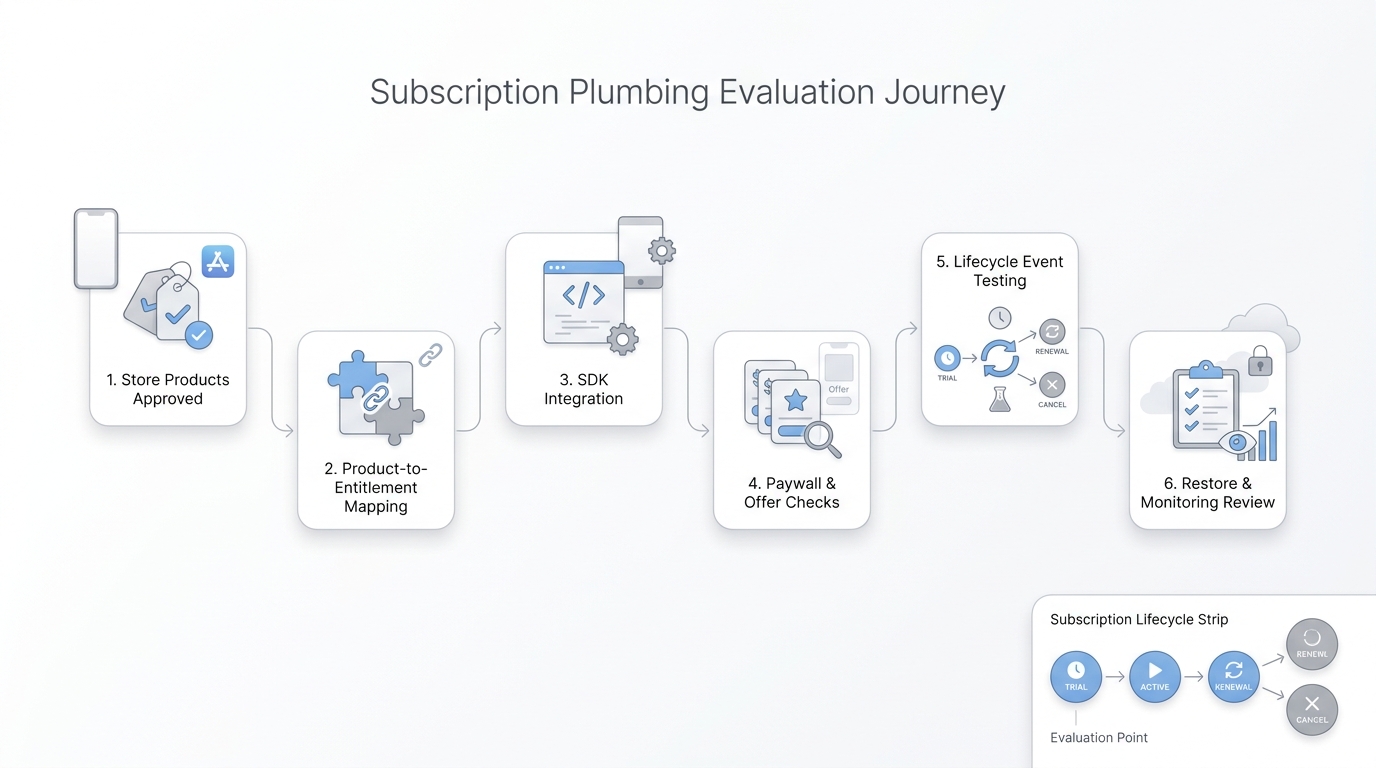
Editorial visual supporting How do you evaluate and set up RevenueCat step by step?.
Map store products to entitlements
Attach each iOS and Android SKU to the same entitlement (example: map
ios.pro.monthlyandandroid.pro.monthlytopro). This keeps access logic from splitting into two platform code paths.Install the SDK and verify purchase and restore
Implement purchase, restore, and access checks using
CustomerInfo. Budget a half-day for sandbox QA across: logged-out users, switching accounts, airplane mode, and reinstall scenarios, plus extra time if you support family sharing, multiple devices, or multiple login providers. Reference: https://www.revenuecat.com/docs/customers/customer-infoWire lifecycle events to your stack
Decide how you will consume events (webhooks, analytics integrations, or both). Track at minimum: initial purchase, renewal, cancellation, refund, and billing issues or grace period transitions. Build for retries and idempotency because webhooks can be delivered more than once and sometimes out of order.
Operational dependency: if your backend enforces access, define a practical default for pipeline outages. Many teams choose fail-open for short windows (to avoid locking out paying users) and then reconcile, but your choice depends on fraud risk, compliance, and the value of the gated feature.
How do you validate the setup before launch?
Treat validation like a release gate, but keep it timeboxed. RevenueCat’s launch checklist is a good baseline: https://www.revenuecat.com/docs/test-and-launch/launch-checklist
| Timebox | Owner | Check | Expected signal (with realism) |
|---|---|---|---|
| Day 0 (pre-release) | Mobile engineer | Purchase and restore unlock pro on iOS and Android | Entitlement updates quickly most of the time, but allow for store and sandbox propagation delays |
| Day 0-1 | Backend or analytics | Webhook or analytics events arrive and can be deduped | No missing events for test users; duplicates handled; late delivery does not corrupt state |
| Day 0-7 | PM + support | Monitor mismatch rate and refund-to-access latency | Mismatch stays low; refunds and cancellations reflect in access within your defined window, not necessarily instantly |
Risk caveats to plan for:
- Delays and out-of-order events happen. Avoid "instant revoke" assumptions without reconciliation (for example, refresh on app start plus periodic background checks).
- Sandbox is not production. Timing and edge cases can behave differently, so plan a short post-launch validation cycle.
- Incident ownership matters. Decide who investigates when refunds spike, renewals dip, or webhook delivery degrades, and what the escalation path is.
For tradeoffs, checklists, and edge cases, No-Code Tools for Adjusting Pricing, Upsell Timing and Upgrade Flows Without Engineering Space Technologies rounds out this section.


