
If you are still routing every price tweak, upsell trigger, and upgrade-flow change through engineering and app review, you are paying a hidden tax in delay and missed learning. No-code monetization tools can help operators adjust paywalls, timing, and packaging faster, but only within real store rules and your app's entitlement setup. This guide maps what you can change reliably, what still needs engineering, and the guardrails that keep faster iteration from turning into noisy data or broken access.
How Much Should You Charge for Your App in 2026? goes deeper on the ideas above and adds concrete next steps.
How do no-code monetization tools save time?
Category: Outcomes
Statistic: 38%
Label: First-pass approval rate
Context: When metadata is complete upfront
Category: Test velocity
Statistic: Minutes
Label: Paywall edits & A/B tests
Context: Superwall positions setup and iteration as “in minutes,” not release cycles
Category: Reach
Statistic: 190+ markets
Label: Pricing coverage at scale
Context: BasePrice highlights App Store + Google Play pricing for 190+ markets
| Workflow metric (illustrative ranges) | Engineering ticket + release | No-code dashboard change | Operational burden / risk |
|---|---|---|---|
| Time from idea to live test | 3-14 days | 30-180 minutes (best case) | Faster changes require tighter QA and monitoring |
| Variants shipped per week | 1-2 | 3-10 | More tests also means more support and analysis work |
| Manual handoffs per change | 3-6 | 0-2 | Fewer handoffs, but more operator ownership and on-call planning |
Explanation: these are directional ranges from operator experience and internal benchmarks, not industry-wide statistics. Your numbers will vary with release cadence, app-review timing, QA rigor, SDK setup, analytics maturity, and whether paywall logic is actually remote-configurable.
Interpretation: the main win is usually cycle time, not a guaranteed revenue lift. Tools that support no-code paywalls and experiments (for example Superwall, Qonversion, Nami, and ZeroSettle) can reduce how often you need a new binary for paywall changes when your instrumentation and entitlements are solid.
Reader impact: use these ranges to set realistic internal expectations and SLAs (for example, "same-day tests are possible, but only after 1-3 days of setup and a repeatable QA checklist").
When you move from outline to execution, How to Set Up Pricing in Different Currencies on App Store helps close common gaps teams hit here.
What can no-code pricing control actually change?
Most subscription apps run a simple loop: start a trial, convert to paid, then upsell when users hit a new need. The levers that shape that loop often sit behind release queues and store review, which turns basic questions into multi-week bets.
The practical takeaway: no-code control is worth it when you need more test throughput and you can run it safely. It is a poor fit when you have complex entitlements, heavy localization requirements, regulated pricing constraints, or low traffic where tests take weeks to read.
Scope, assumptions, and measurement limits
- Focus: tools that adjust pricing presentation, upsell timing, and upgrade-flow configuration (not a full billing rewrite).
- Platform reality: Apple and Google rules still apply; third-party layers add flexibility but not unlimited control.
- Measurement limits: results depend on sample size, traffic mix, and instrumentation quality (clean events, stable experiment IDs, correct revenue attribution).
- Effort note: budget 1-3 days for initial SDK integration and analytics wiring in a mature app, and longer if you have legacy paywalls, multiple locales, or messy entitlement logic. Plan ongoing time for QA per change, monitoring, and support follow-up when users are confused or refunds spike.
What counts as a no-code change in this context
- Paywall edits: messaging, layout, ordering, and eligibility rules (when supported).
- Timing and triggers: show an upsell after onboarding, after a usage threshold, or at a cap.
- Audience rules: target by tenure, plan, region, or acquisition channel to reduce noise.
- Flow sequencing: add a save-the-sale step or hide an upgrade card until it is relevant.
No-code usually means "no new binary," not "no work." The tradeoff is that some responsibility shifts from engineering queues to operator rigor.
A complementary angle worth comparing lives in Breakout Food Delivery Apps That Just Launched in 2026.
The controls that matter most (and what they cost to operate)
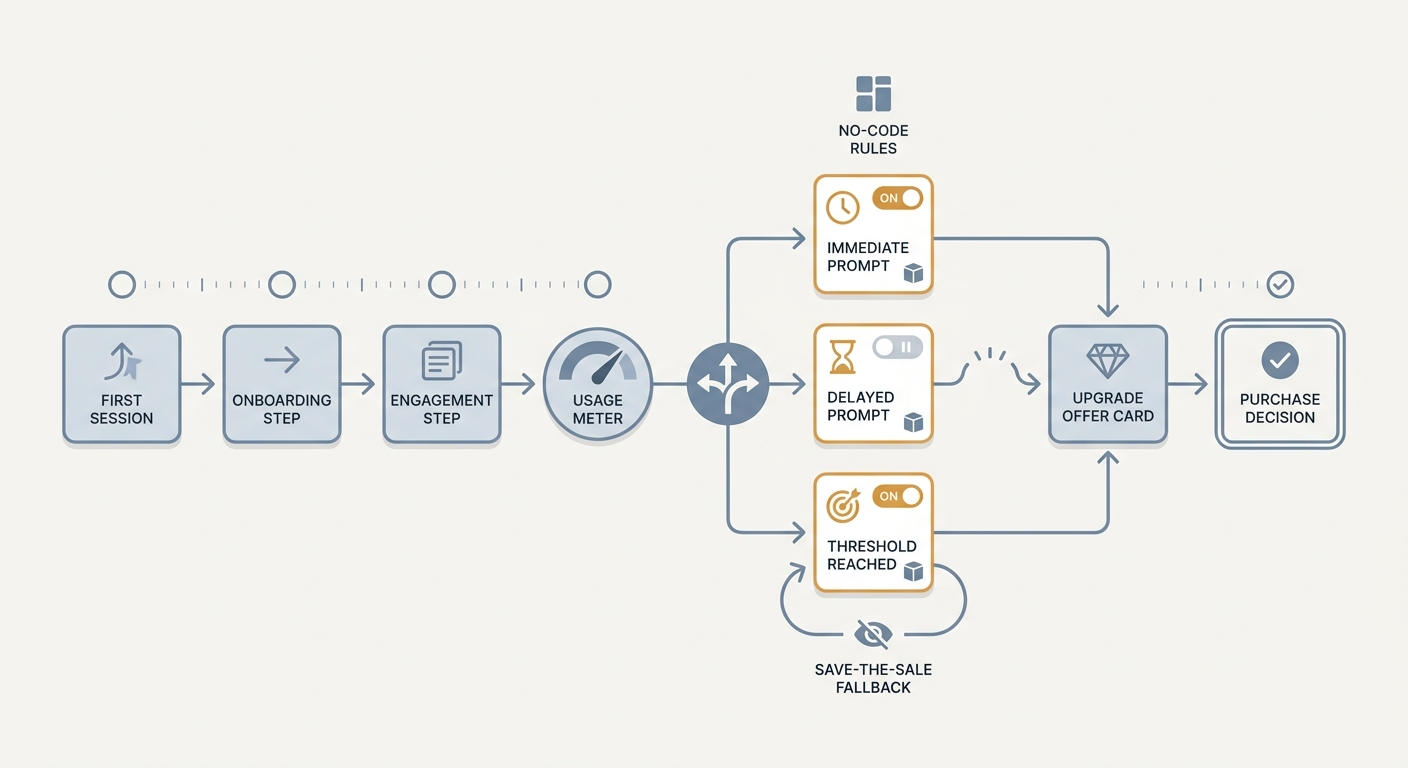
A process diagram showing a user path from first app session to usage trigger, to upsell prompt timing, to purchase decision, with no-code rule branches for immediate, delayed, or threshold-based upgrade prompts.
Pricing levers worth testing first
Base price and regional tiers
Tools like BasePrice can make regional price tier management less painful. Start with a small set of high-volume countries; expanding globally can increase support load (refund questions, price confusion, tax/VAT expectations) if your help docs and agents are not ready.
Intro offer length, trial length, and cadence
Change one variable at a time. A longer trial can lift starts but reduce paid conversion, and shifting monthly vs annual positioning can change user expectations and cancellation patterns.
Minimum instrumentation to trust the result: revenue per visitor, trial-to-paid conversion, refund rate, and 7- or 14-day retention by cohort. If you cannot measure at least a subset reliably, run fewer tests and keep changes smaller.
Upsell timing signals that shift conversion
- Trigger on behavior: completes onboarding, repeats the core action 2-3 times, or hits a usage cap.
- Tradeoff: earlier prompts can lift short-term upgrades but may increase annoyance, refunds, or uninstall; later prompts may preserve retention but reduce conversion.
- Watch segmented metrics: prompt view rate, click-through rate, purchase completion, and cancellation/refund behavior by cohort (new vs returning, paid vs organic).
One thing worth noting: with small samples, timing tests can look like "wins" that disappear the next week. If results swing wildly day to day, extend the run, narrow the audience, or stop testing until tracking is stable.
Upgrade-flow data points that reveal friction
- Measure step fallout: paywall view - plan selection - payment start - purchase confirmation.
- Audit edge cases early: returning subscribers, canceled trials, account restores, and legacy plans are common failure points.
- Compare against a baseline week and keep notes on promotions and traffic shifts so you do not misattribute seasonality to a UI tweak.
For tradeoffs, checklists, and edge cases, Subscriptions That Pass Review: Trials, Restore, Pricing rounds out this section.
How do you choose and govern no-code pricing tools?
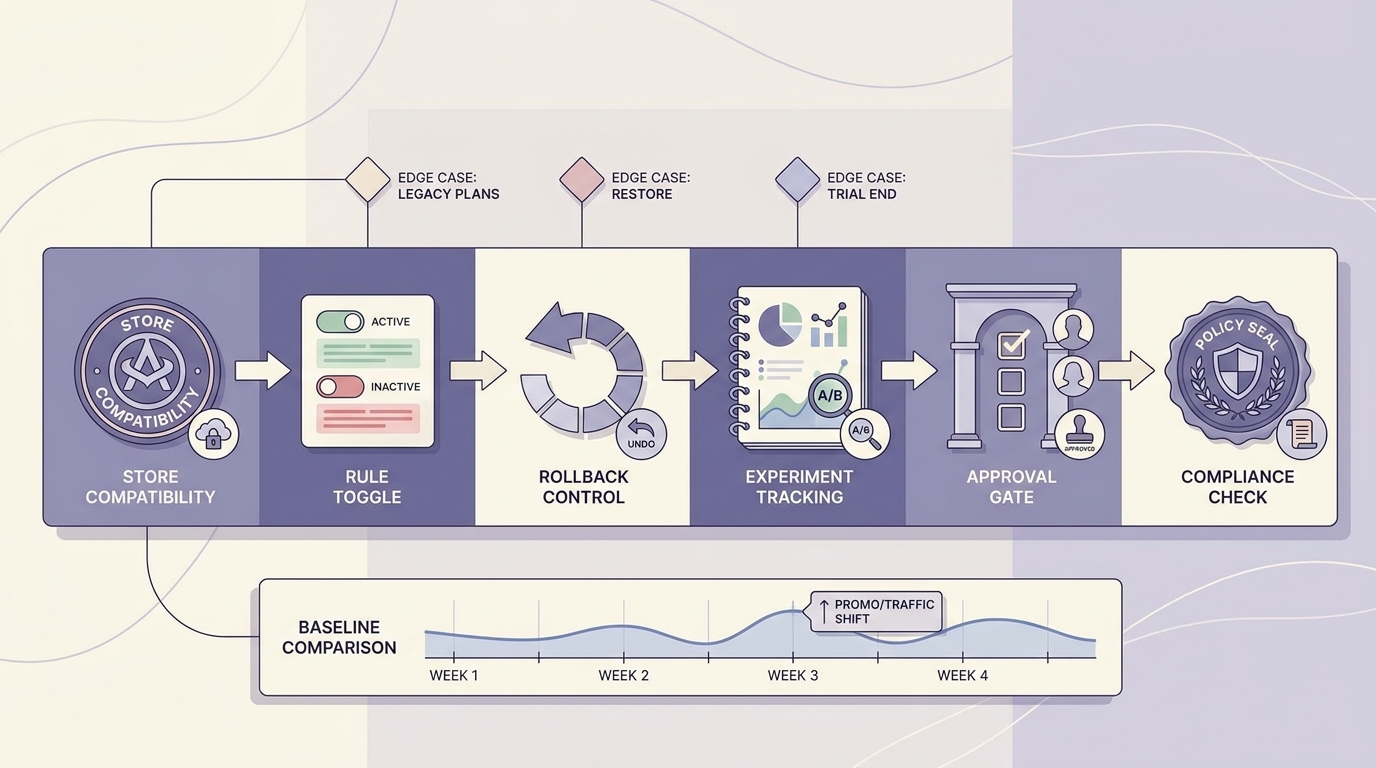
A pre-flight checklist for selecting no-code pricing and upgrade-flow tools, covering App Store and Google Play compatibility, rollback controls, experiment tracking, approval steps, and compliance checks.
A lightweight evaluation checklist
- Can you change paywalls and targeting rules remotely with an audit log, approvals, and easy rollback?
- Can you set triggers (session count, usage threshold) instead of only static screens?
- Does it support segmentation and experiments with stable experiment IDs that also reach your analytics stack?
- Who owns rollout, monitoring, and rollback (and who is on-call if revenue drops overnight)?
- Are store constraints handled explicitly, or will your team be debugging pricing and entitlement mismatches under pressure?
One concrete workflow example (tool + metric + decision rule)
Build two paywall variants in Superwall
Variant A = current baseline. Variant B = same price, different packaging copy and annual plan positioning. Expect 30-90 minutes to configure in a clean setup, then 1-2 hours to QA across devices and restore-purchase flows. Plan extra time if you support multiple locales or have custom entitlement logic.
Define metrics and guardrails before launch
Primary metric = revenue per visitor on the paywall funnel. Guardrails = refund rate and short-window retention (7-day when possible; otherwise a proxy like day-2 return rate). Dependency: ensure events are deduped between the tool and your analytics source of truth, or you will chase phantom lifts.
Roll out gradually and use a clear rollback rule
Start at 10-20% traffic for 4-24 hours, then ramp if guardrails are stable. Roll back if revenue per visitor drops more than 10% for long enough to have a meaningful sample, or if refund rate rises above baseline beyond normal noise. Tune thresholds to your volume and risk tolerance.
Common failure modes to plan for: mis-entitlements (user pays but does not unlock), pricing mismatch between displayed copy and store price, and experiment contamination (users seeing multiple variants due to reinstall behavior or weak assignment).
Common mistakes that distort results
- Bundling changes (price + timing + messaging) so you cannot isolate the lever.
- Calling a winner too early on small samples or during acquisition mix changes.
- Skipping QA on restore purchase, upgrades, cancellations, and regional price display.
- Treating no-code changes as "safe" and shipping without staged rollout, monitoring, and a kill switch.
- Underestimating operational load: when you ship more often, you also create more chances for support tickets and late-night rollbacks.
Pilot one delayed monetization change with one app, one segment, one primary metric, and a written rollback rule.
Keep it small enough to QA in a single afternoon.
Start a pilot
Want a checklist to evaluate tools and run your first two tests without breaking entitlements?
It includes QA cases, rollout steps, and realistic time estimates.
Get the checklist
What to Do in the First 48 Hours After Your App Goes Live reframes the same problem with a slightly different lens - useful before you finalize.


